

Watcher
/Year
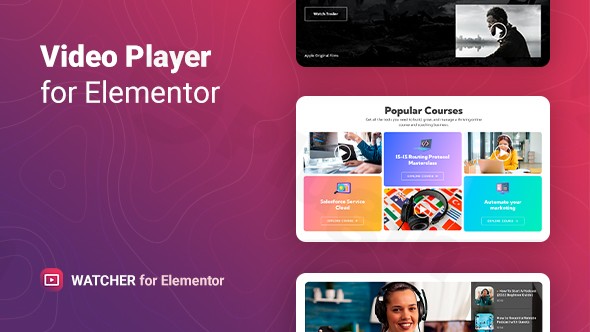
In today’s visually-driven digital landscape, video is king. Whether you’re showcasing products, sharing testimonials, or providing valuable tutorials, a professional and engaging video presentation can significantly boost user engagement on your WordPress website. This is precisely where Watcher Elementor video player steps in, offering a powerful yet incredibly user-friendly solution to integrate customizable video experiences directly within your Elementor-built pages.Watcher is not just another Elementor video plugin; it’s a comprehensive tool designed to give you complete control over how your video content looks and performs. From seamless self-hosted video embedding to dynamic playlists from YouTube and other platforms, this flexible video player for Elementor helps you captivate your audience and tell your story more effectively.
Key Features of the Watcher Flexible Video Player
The Watcher plugin empowers you with an extensive suite of features, transforming how you present video content on your Elementor website. Each feature is crafted to enhance user experience, simplify management, and offer unparalleled customization.
Broad Media Support for Any Video Source
Watcher breaks down barriers by supporting both self-hosted video files and external platforms like YouTube. This flexibility ensures that no matter where your videos reside, you can easily integrate them into your Elementor designs. It’s ideal for users who prioritize privacy with self-hosted content or leverage the reach of major video platforms.
Create Engaging Video Playlists in Elementor
Move beyond single video embeds with Watcher’s robust WordPress video playlist Elementor functionality. You can create unlimited players, each with single tracks or multiple videos organized into playlists. This is perfect for:
- Series of tutorials
- Collections of product demos
- Curated testimonial compilationsEach video within a playlist can have its own title, description, thumbnail, and source, offering fine-tuned control over your sequential content.
Customizable Player Controls and Layout Settings
Achieve a truly branded look with Watcher’s deep customization options for player controls. You can manage and order player elements with straightforward layout settings directly within Elementor, ensuring your video player matches your site’s aesthetic. This feature makes it a truly custom video player Elementor users can adapt to any design.
Enhance Visuals with Custom Video Poster Images
Before, during pauses, and after playback, a custom poster image can significantly enhance your video’s visual appeal. Watcher allows you to display a custom poster image, making your videos more engaging and professional even when they’re not actively playing.
Improved Accessibility with Keyboard Controls
Watcher enhances user experience and accessibility through dedicated keyboard control options for video playback. This ensures that your content is navigable and enjoyable for a wider audience, adhering to modern web standards.
Configurable Playback Options
Take command of your video’s behavior with configurable playback options, including:
- Initial volume settings
- Looping video toggle for continuous playback
- The option to display videos as “live content”
Smart Audio Management (Auto-Pause Other Players)
A common issue on pages with multiple videos is competing audio. Watcher intelligently addresses this with its smart audio management feature, which can automatically pause other players when a selected video begins playback. This ensures a clean, professional, and uninterrupted audio experience for your viewers.
Flexible Style Settings for Pixel-Perfect Design
Watcher offers extensive styling options right in the Elementor interface. Without writing a single line of code, you can customize:
- Color and typography
- Player width and height
- Background color
- Borders, margins, and paddingThis allows for complete visual integration and pixel-perfect design.
Responsive Design Across All Devices
In today’s multi-device world, responsiveness is paramount. Watcher includes robust responsiveness settings, guaranteeing that your videos look great and function flawlessly across all devices—desktops, tablets, and smartphones—and modern browsers (Chrome, Firefox, Opera, Safari, Edge). Your Elementor video player responsive on all devices commitment is fully met.
Jumpstart Your Designs with Pre-Designed Templates
To accelerate your workflow, Watcher comes with five ready-to-use templates. These templates provide a quick starting point and inspire creative design possibilities, allowing you to deploy professional video players rapidly.
Multi-Language Support and Chaptering
Watcher supports multiple languages, making it a globally friendly solution. Furthermore, the inclusion of a chaptering feature helps users better understand and navigate longer video content, significantly improving the learning or viewing experience.
Installation & Setup: Get Your Watcher Video Player Running in Minutes
Installing and setting up the Watcher – Flexible Video Player for Elementor is a straightforward process, designed for non-developers. Here’s a step-by-step guide to get you started:
- Download the Plugin: Obtain the Watcher plugin files. If you acquired it from ZeroPlugin.com, you benefit from regular updates, VirusTotal verified clean files, and full GPL license compliance.
- Upload to WordPress:
- Log in to your WordPress admin dashboard.
- Navigate to Plugins > Add New.
- Click on the “Upload Plugin” button at the top of the page.
- Click “Choose File”, select the Watcher plugin .zip file from your computer, and then click “Install Now”.
- Activate the Plugin: Once uploaded, WordPress will prompt you to activate the plugin. Click on “Activate Plugin”.
- Start Using in Elementor: After activation, Watcher is ready to go.
- Edit any page or post with Elementor.
- Search for the “Watcher” widget in the Elementor sidebar.
- Drag and drop the widget onto your canvas.
- Configure your video source, playlist (if applicable), controls, and styling options directly within Elementor’s intuitive interface.The quick installation process takes only a few seconds, and the plugin is designed to work immediately without requiring additional complex settings.
Practical Usage & Best Practices for Your Elementor Video Content
Leveraging the Watcher Elementor video player effectively can transform your website’s content strategy. Here are a few practical use cases and best practices for marketers, site owners, and content creators.
1. Product Demos and Showcases
Use Case: An eCommerce store wants to demonstrate product features and benefits in an engaging way.Best Practice: Create a playlist for each product, featuring a main overview video, followed by shorter clips highlighting specific features. Use custom poster images that align with your product branding. The flexible video player for Elementor allows for consistent branding across all product pages, and the chaptering feature can guide users through different aspects of the product.
2. Testimonials and Brand Storytelling
Use Case: A service-based business wants to showcase client success stories or share its brand narrative.Best Practice: Compile a playlist of client video testimonials on a dedicated “Success Stories” page. Utilize Watcher’s smart audio management to ensure only one testimonial plays at a time, creating a focused listening experience. For brand storytelling, a single, engaging video with custom controls can set the tone for your “About Us” page.
3. Educational Content and Tutorials
Use Case: A coach or online course creator needs to present instructional video series.Best Practice: Organize your course modules into distinct playlists using Watcher. The chaptering feature is incredibly useful here, allowing students to jump to specific topics within a longer lesson. For a professional learning environment, ensure the initial volume is set appropriately and looping is disabled unless a specific section needs to be reviewed continuously. This addresses the question of “how to create a video playlist in Elementor with custom controls” for educational purposes.
4. Marketing and Lead Generation
Use Case: A marketer wants to use video to capture attention and direct users to a call to action.Best Practice: Embed a concise, impactful marketing video on a landing page. Use a compelling custom poster image to draw initial clicks. While Watcher doesn’t have built-in CTA overlays, you can strategically place Elementor buttons or forms directly below the video player, encouraging conversions after viewing. This is an excellent way to use the best Elementor addon for YouTube and Vimeo videos with custom styling for marketing efforts.
FAQ & Troubleshooting for Watcher – Flexible Video Player for Elementor
Here are answers to some common questions about the Watcher Elementor video player:
Q1: Is Watcher – Flexible Video Player compatible with my WordPress theme and Elementor version?
A1: Yes, the Watcher plugin is designed for broad compatibility. It works seamlessly with Elementor 3.0 and higher and is compatible with all WordPress themes built on Elementor. This ensures that you can integrate it into virtually any modern Elementor-powered website without issues.
Q2: Can I create video playlists with both self-hosted and external videos using Watcher?
A2: Absolutely. Watcher offers robust playlist functionality that supports both self-hosted video files and external video links from platforms like YouTube. You can mix and match these sources within the same playlist, offering maximum flexibility for your content curation. This directly answers “Can I create video playlists in Elementor?” with a resounding yes.
Q3: How do I embed self-hosted videos in Elementor using Watcher?
A3: To embed self-hosted videos, first, upload your video file to your WordPress Media Library. Then, when configuring the Watcher widget in Elementor, select the self-hosted option and choose your video file from the media library. Watcher makes it straightforward to integrate your own media, providing a secure and controlled viewing experience.
Q4: Does the Watcher Elementor plugin support live streaming content?
A4: Yes, Watcher includes “live video display options” which allow you to display videos as live content. While it doesn’t provide a live streaming platform itself, it can be configured to represent a live stream source, offering a versatile solution for integrating various forms of video content, including what appears to be live.
Q5: Will using Watcher impact my website’s page load speed?
A5: While specific benchmark data for Watcher’s performance impact isn’t explicitly detailed, the plugin is designed for “easy to use” and “quick installation” implying streamlined functionality. Generally, well-optimized video plugins aim to minimize site load speed impact. For best performance, consider optimizing your video files (compression, proper formats) and Elementor’s overall settings, as Elementor itself can have performance considerations. Watcher strives to integrate efficiently within this ecosystem.
Conclusion: Empower Your WordPress Site with Watcher
The Watcher – Premium Video Player Plugin for Elementor is an indispensable tool for any WordPress user looking to leverage the power of video with unparalleled flexibility and control. Its comprehensive feature set, including extensive media support, dynamic playlist creation, advanced customization, and intelligent audio management, positions it as a leading flexible video player for Elementor.By choosing Watcher, you gain the ability to create highly engaging, professionally branded video experiences that resonate with your audience and enhance your website’s overall user experience. For businesses, content creators, and agencies, Watcher offers a significant return on investment by enabling visually rich content delivery without needing complex coding. If you’re seeking a powerful yet intuitive Elementor video plugin to transform your visual content, Watcher is an excellent choice.
I. Download Limits & Account Benefits
- Free Downloads: Each email address receives 3 downloads per day for free products
- Upgrade Benefits: Purchase any paid product to increase your daily download limit by 3 for each paid product
- No Account Required: You can download immediately by receiving the download link via email
- Account Recommended: Create an account for easier access to your order history and direct update downloads
II. Understanding GPL vs Official Versions
Important: The products available on WPPick are GPL-licensed versions, which differ from official developer versions. Before purchasing, please read our comprehensive guide: Understanding GPL & Official Differences at WPPick
Key Points:
- GPL versions may not include premium support from original developers
- Updates may be delayed compared to official releases
- Some premium features might have limitations
- Always consider your specific needs and support requirements
III. Support & Assistance
We’re here to help through multiple channels:
- Email Support: Direct email assistance for all inquiries
- Live Chat: Real-time support during business hours
- Comprehensive Documentation: Detailed guides and tutorials
IV. Order Tracking
Access your complete purchase history and download links anytime: Order History
V. Account Access
New to WPPick? Login or Create Account to manage your downloads and orders efficiently.
VI. Refund Protection
We stand behind our products with a clear refund policy. Review our terms: Refund Policy
VII. Privacy & Security
Your data security is our priority. Learn how we protect your information: Privacy Policy
VII. Terms of Service
Understanding our service terms ensures a smooth experience: Terms of Use
Quick Tips for Best Experience
- Verify Compatibility: Check plugin/theme compatibility with your WordPress version
- Backup First: Always backup your site before installing new plugins or themes
- Test Environment: Consider testing on a staging site first
- Stay Updated: Regularly check for updates in your account dashboard
- Read Documentation: Review any included documentation for optimal setup
Need Help?
If you have questions about downloads, licensing, or need technical assistance, don’t hesitate to contact our support team. We’re committed to ensuring you have the best possible experience with WPPick products.
Ready to get started? Your download adventure begins with just one click!