
Watermark Images Plugin For WordPress And Woocommerce
/Year
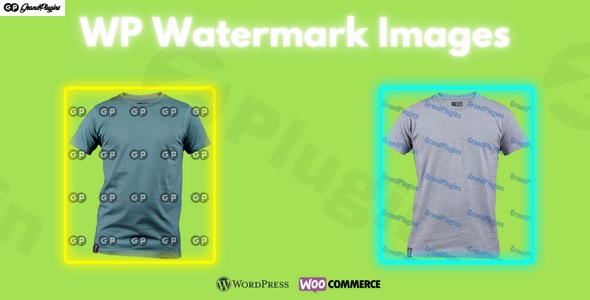
In today’s digital landscape, visual content is paramount, especially for WordPress websites and e-commerce platforms. Protecting your images from unauthorized use and maintaining brand integrity is crucial. The WP Watermark Images plugin offers a comprehensive, advanced solution designed to safeguard your visual assets with precision and ease, ensuring your intellectual property remains secure while preserving professional presentation.This premium plugin from ZeroPlugin.com provides robust watermarking capabilities tailored for photographers, digital artists, online stores, and educational platforms alike. It’s built for reliability, performance, and seamless integration, offering peace of mind for businesses of all sizes.
Advanced Watermarking Features
WP Watermark Images provides unparalleled control over your image protection, allowing you to implement a tailored strategy that perfectly aligns with your brand.
Dual Watermark Support: Text and Image
Take full control over your branding by implementing both text-based and image-based watermarks.
- Text Watermarks: Customize every aspect of your text watermarks, including font size, a wide selection of font families, color, and opacity. This ensures your text is legible and integrated seamlessly. The plugin also supports the addition of custom fonts for unique branding.
- Image Watermarks: Incorporate your company logos or copyright symbols with image watermarks. Control their width, height, and opacity to achieve the ideal balance between protection and visual appeal.
Precise Positioning Controls
Never compromise on placement. WP Watermark Images offers intuitive and precise controls to position your watermarks exactly where they need to be.
- Flexible Placement: Choose from 9 preset positions or define custom coordinates for pixel-perfect placement.
- Rotation: Rotate watermarks to any angle, adding a dynamic and professional touch to your protected images.
- Corner Offset: Fine-tune the position further by selecting specific corner offsets.
Pattern Watermarking
For maximum protection, implement repeating watermark patterns across your images. This advanced feature allows you to control the spacing and direction of horizontal and vertical offsets, making it significantly harder to remove your branding through simple cropping or editing.
Dynamic Information with Placeholders
Enhance your text watermarks with dynamic information using placeholders. This feature allows you to automatically include details like the uploader’s name or the upload date, adding another layer of authenticity and tracking to your images.
Automated Workflow Solutions
WP Watermark Images streamlines your image protection process with powerful automation, saving you valuable time and ensuring consistent application across your entire media library.
Smart Template System
Create unlimited watermark templates to suit different scenarios or image types. Apply specific watermarks automatically based on upload directories, image sizes, or custom criteria. This intelligent system ensures consistency while eliminating repetitive manual tasks.
Bulk Processing Capabilities
Efficiently apply watermarks to your entire existing image collection with a single click. The plugin is optimized to handle large media libraries without compromising performance, ensuring that all your historical content receives the same level of protection as new uploads.
Automatic Upload Protection
Configure the plugin to automatically watermark all new image uploads immediately. Set specific rules for various image types, sizes, or upload locations, guaranteeing that every image is protected from the moment it’s uploaded.
Conditional Watermarking
Gain granular control over when and where watermarks are applied. Implement conditional watermarking based on specific product categories or tags, and easily exclude certain products or categories from being watermarked. This is particularly useful for varied content strategies or special promotions.
E-commerce and Educational Integration
Understanding the unique needs of online businesses and educational platforms, WP Watermark Images offers specialized integrations.
WooCommerce Compatibility
Essential for online stores, the plugin provides robust WooCommerce integration. It seamlessly works with product galleries, variations, and thumbnails. A key feature includes the ability to exclude downloadable product images from watermarking, which is perfect for digital product sellers who need to provide clean files upon purchase. Dynamic watermarking for order-specific images further enhances security for digital downloads.
Masterstudy LMS Support
For educational platforms, integrated compatibility with the Masterstudy LMS plugin ensures your valuable course materials and visual content remain protected while providing appropriate access to enrolled students.
Safety and Recovery Features
Your original images are precious assets. WP Watermark Images prioritizes their safety with comprehensive backup and optimization features.
Comprehensive Backup System
Before any watermarking operation takes place, all original images are securely backed up. This robust backup system allows you to restore any image to its original, unwatermarked state with a single click, either individually or in bulk, giving you complete control and peace of mind over your media assets.
Smart Size Optimization
Achieve perfect watermark scaling on every image size. The plugin intelligently auto-resizes watermarks based on the target image’s dimensions, maintaining readability and visual appeal across all devices and image formats. This ensures your watermarks always look professional, whether on full-size images or small thumbnails. The plugin supports all image types compatible with GD or Imagick packages on your server.
Why Choose WP Watermark Images from ZeroPlugin.com?
When you choose WP Watermark Images from ZeroPlugin.com, you’re investing in a premium, reliable solution backed by expertise and trust.
- Genuine GPL-licensed Software: We provide authentic GPL-licensed software, ensuring you receive a legitimate and secure product.
- Regular Updates and Security Patches: Our commitment to excellence means consistent updates and security patches, guaranteeing compatibility with the latest WordPress versions and protecting against emerging threats.
- Thorough VirusTotal Scanning: All plugin files undergo rigorous VirusTotal scanning to ensure complete safety and freedom from malicious code.
- Reliable Support: We offer dependable support for your digital asset protection needs, ensuring you get the most out of the plugin.WP Watermark Images is ideal for professionals and businesses needing to protect their visual content, prevent unauthorized use, and reinforce their brand identity. From individual photographers to large enterprises managing extensive media libraries, this plugin provides the tools to safeguard your visual assets while maintaining brand consistency and visual quality across your entire WordPress ecosystem.
Setup and Usage Guide
Getting started with WP Watermark Images is straightforward, designed for both technical and non-technical users.
- Installation: Install and activate WP Watermark Images like any standard WordPress plugin. Upload the plugin files via your WordPress dashboard or FTP, then activate it.
- Configuration: Navigate to the plugin’s settings within your WordPress admin area. Here, you can:
- Create Watermark Templates: Design your text and image watermarks, setting fonts, colors, opacity, size, position, and rotation.
- Define Automation Rules: Set up rules for automatic watermarking on new uploads based on image types, sizes, or upload directories.
- Configure Conditional Watermarks: Specify conditions for applying watermarks, such as excluding certain WooCommerce product categories or tags.
- Application:
- Bulk Watermarking: Use the bulk processing tool to apply your chosen templates to your existing media library.
- Individual Image Watermarking: For specific images, you can preview and apply watermarks directly from the media library edit screen.
- Automated Protection: Once configured, the plugin will automatically apply watermarks to all new uploads according to your defined rules.
- Backup & Restore: Familiarize yourself with the backup system. In case you need to revert changes, you can restore original images individually or in bulk with ease.This structured approach ensures that whether you’re protecting a single portfolio image or an entire e-commerce catalog, WP Watermark Images provides an efficient, reliable, and user-friendly experience.
Conclusion
In an age where digital assets are constantly at risk, WP Watermark Images stands out as the ultimate solution for protecting your visual content on WordPress and WooCommerce. Its rich feature set, including dual watermark support, precise positioning, pattern watermarking, and robust automation, empowers users to maintain control over their brand and intellectual property. With its strong focus on safety through comprehensive backups and smart optimization, coupled with seamless e-commerce integration, WP Watermark Images is more than just a plugin—it’s an essential tool for securing your digital presence. Choose WP Watermark Images from ZeroPlugin.com to transform your image protection strategy and safeguard your valuable visual assets with confidence and expertise.
I. Download Limits & Account Benefits
- Free Downloads: Each email address receives 3 downloads per day for free products
- Upgrade Benefits: Purchase any paid product to increase your daily download limit by 3 for each paid product
- No Account Required: You can download immediately by receiving the download link via email
- Account Recommended: Create an account for easier access to your order history and direct update downloads
II. Understanding GPL vs Official Versions
Important: The products available on WPPick are GPL-licensed versions, which differ from official developer versions. Before purchasing, please read our comprehensive guide: Understanding GPL & Official Differences at WPPick
Key Points:
- GPL versions may not include premium support from original developers
- Updates may be delayed compared to official releases
- Some premium features might have limitations
- Always consider your specific needs and support requirements
III. Support & Assistance
We’re here to help through multiple channels:
- Email Support: Direct email assistance for all inquiries
- Live Chat: Real-time support during business hours
- Comprehensive Documentation: Detailed guides and tutorials
IV. Order Tracking
Access your complete purchase history and download links anytime: Order History
V. Account Access
New to WPPick? Login or Create Account to manage your downloads and orders efficiently.
VI. Refund Protection
We stand behind our products with a clear refund policy. Review our terms: Refund Policy
VII. Privacy & Security
Your data security is our priority. Learn how we protect your information: Privacy Policy
VII. Terms of Service
Understanding our service terms ensures a smooth experience: Terms of Use
Quick Tips for Best Experience
- Verify Compatibility: Check plugin/theme compatibility with your WordPress version
- Backup First: Always backup your site before installing new plugins or themes
- Test Environment: Consider testing on a staging site first
- Stay Updated: Regularly check for updates in your account dashboard
- Read Documentation: Review any included documentation for optimal setup
Need Help?
If you have questions about downloads, licensing, or need technical assistance, don’t hesitate to contact our support team. We’re committed to ensuring you have the best possible experience with WPPick products.
Ready to get started? Your download adventure begins with just one click!