

Wc Serial Numbers Pro
/Year
Managing digital product licenses, software keys, and serial numbers can be a complex task for any online store. WooCommerce, while powerful, doesn’t natively offer robust features for this specific need. This is where WC Serial Numbers Pro steps in as the premier WordPress License Manager Plugin, providing an all-in-one solution to effortlessly sell digital products on WooCommerce with advanced license key management.Whether you’re selling software, game keys, eBooks, or even physical products requiring unique identifiers, WC Serial Numbers Pro empowers your store with comprehensive tools to automate generation, secure delivery, and meticulous tracking of every license. It bridges the crucial gap in WooCommerce, transforming your store into a professional hub for digital product sales.
Key Features That Transform Your Licensing Process
WC Serial Numbers Pro is packed with features designed for efficiency, security, and flexibility, making it an indispensable tool for any digital product seller.
Comprehensive Key Management Dashboard
Gain complete control over your licenses with a centralized dashboard. Easily view, manage, and track all serial keys, their statuses, and associated products and orders. This visual overview simplifies WooCommerce license key management significantly.
Flexible Key Generation and Sources
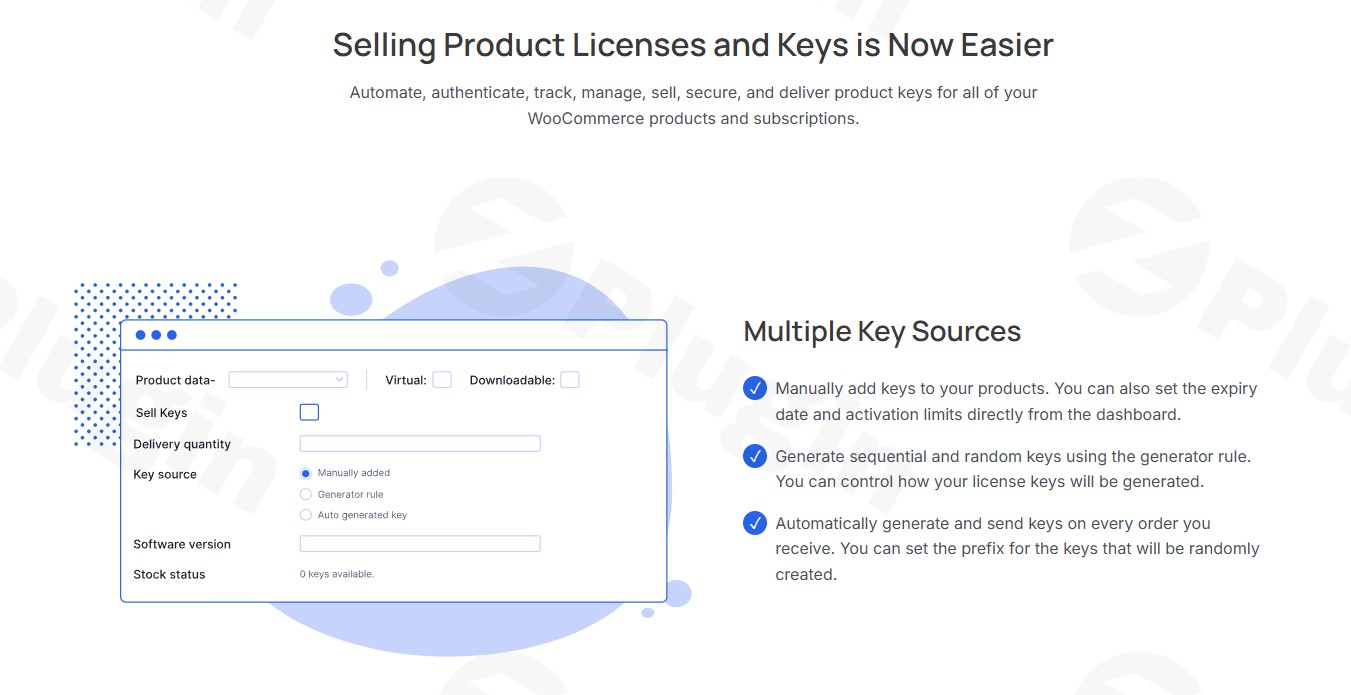
The plugin offers versatile options for creating your serial keys:
- Manual Key Entry: Add individual keys with customizable expiration dates.
- Sequential Numbering: Generate keys in an organized, sequential fashion.
- Random Generation: Configure unique patterns for random key creation, including prefixes and custom fields, ensuring robust and unpredictable keys.
- Bulk Import/Export: Seamlessly import thousands of pre-made keys via CSV or TXT files, and export keys by product, status, or order ID for external tracking. This feature is crucial for businesses managing large inventories and makes bulk import export license keys WooCommerce a breeze.
- Automated Generation: Set up the plugin to auto-generate keys at checkout based on rules you define.
Automated and Secure Key Delivery
Ensure a seamless customer experience with automated key delivery. Customers can receive their keys instantly:
- In their order details page.
- Via email notifications.
- Through SMS using Twilio integration for immediate mobile access.
- Access keys anytime from their “My Account” page on your store.
Advanced Security and Encryption
Protect your digital assets and customer purchases. All serial keys stored in your database are encrypted license keys for WooCommerce products, preventing unauthorized access and maintaining product integrity.
Robust API Support for Validation & Activation
For software developers, the built-in HTTP or shortcode-based API is a game-changer. This WooCommerce API for license validation allows for:
- Key Validation: Verify the authenticity and status of a license key.
- Activation & Deactivation: Programmatically control software activations and deactivations.
- Version Access: Retrieve associated software version numbers.
Flexible Product Type Compatibility
WC Serial Numbers Pro integrates perfectly with various WooCommerce product types:
- Simple Products: Standard digital downloads.
- Variable Products: Assign different key pools to specific product variations.
- Subscription Products: Manage recurring licenses, ideal for SaaS products or ongoing software access. This is essential for WooCommerce subscription license keys.
Smart Stock Management
Avoid overselling and manage your inventory intelligently with features like:
- Low-stock alerts.
- Ability to allow backorders for upcoming key batches.
- Option to reuse keys from refunded or failed orders.
- Support for allowing duplicate keys for specific use cases (e.g., trial versions).
Detailed Reporting and Analytics
Keep track of your licensing operations with a dedicated reports section. Monitor key stock usage, activations, expirations, and gain valuable insights into your digital product sales.
Translation Ready & Barcode Integration
The plugin supports multiple languages, making it suitable for global stores. Additionally, it offers the option to create functional barcodes that visually represent serial numbers, useful for physical products or inventory management.
Installation & Setup: Get Started with WC Serial Numbers Pro
Installing and configuring WC Serial Numbers Pro is straightforward, even for non-developers. Here’s a step-by-step guide to get your WordPress License Manager Plugin up and running.
- Purchase and Download: Obtain the WC Serial Numbers Pro plugin file (a
.zipfile) from a trusted source like ZeroPlugin.com or PluginEver. - Upload the Plugin:
- Log in to your WordPress admin dashboard.
- Navigate to Plugins > Add New.
- Click on the “Upload Plugin” button at the top of the page.
- Click “Choose File”, select the
wc-serial-numbers-pro.zipfile you downloaded, and click “Install Now”.
- Activate the Plugin: Once installed, WordPress will prompt you to activate the plugin. Click “Activate Plugin”.
- Configure Initial Settings: After activation, you’ll find a new menu item, usually under WooCommerce > Serial Numbers or a dedicated “Serial Numbers” tab within a product’s settings.
- Global Settings: Head to the plugin’s main settings page to configure general options like default key delivery methods, email templates, and security settings (e.g., encryption).
- Product-Specific Keys: For each digital product you sell:
- Edit the product in WooCommerce (Products > All Products > Edit Product).
- Scroll down to the “Product Data” meta box.
- Locate the “Serial Numbers” tab or section.
- Here, you can choose your key source (manual, auto-generate, import), define key patterns, assign existing keys, or import a batch for that specific product. This is where you’ll automate serial key delivery WordPress for each item.
- Test Your Setup: Place a test order for a digital product configured with serial numbers to ensure keys are generated and delivered correctly to the customer’s order details and email.
Practical Usage / Best Practices for Your WooCommerce Store
WC Serial Numbers Pro is incredibly versatile, adapting to various business models. Here are a few concrete use cases and best practices:
1. Selling Software Licenses (SaaS & Desktop Apps)
Use Case: A software developer sells a premium WordPress plugin or a desktop application.Best Practice:
- Use the random key generation with custom patterns for unique, secure license keys.
- Leverage the API for license validation directly within your software to prevent unauthorized use and manage activations/deactivations.
- For SaaS, combine with WooCommerce Subscriptions to provide recurring license keys and automated renewals, offering an ideal way to manage WooCommerce subscription license keys.
2. Distributing Game Keys or eBook Codes
Use Case: An online store sells digital game keys (e.g., Steam, Epic Games) or unique redemption codes for eBooks.Best Practice:
- Utilize the bulk import functionality to quickly upload thousands of pre-purchased game keys or eBook codes.
- Configure automated key delivery via email for instant fulfillment after purchase.
- For limited-stock items, use the low-stock alerts to manage inventory effectively and reorder keys in advance.
3. Managing Event Tickets with Unique IDs
Use Case: An event organizer sells tickets online, each requiring a unique QR code or serial number for entry.Best Practice:
- Generate sequential serial numbers for easy tracking and verification at the event gate.
- Integrate with the barcode creation feature to provide scannable tickets directly to customers, which can be printed or displayed on their phones.
- Ensure secure delivery options are configured to send tickets promptly after purchase.
4. Licensing Variable Products (e.g., Software Tiers)
Use Case: A business offers different versions of a software (Basic, Pro, Ultimate), each with unique features and requiring a distinct license key.Best Practice:
- Set up variable products in WooCommerce.
- Assign different key pools for each variation within the product settings, ensuring customers receive the correct license key for their chosen tier.
- This approach is perfect for managing complex product offerings and provides flexibility that native WooCommerce lacks.
FAQ & Troubleshooting
Here are answers to some common questions about WC Serial Numbers Pro, designed to be clear and helpful for both traditional and AI-powered searches.
Q: What is WC Serial Numbers Pro?
A: WC Serial Numbers Pro is a comprehensive WordPress plugin that extends WooCommerce’s capabilities by providing robust license key and serial number management. It automates the generation, distribution, and tracking of unique keys for various digital and physical products, enabling store owners to efficiently sell software licenses, game keys, eBooks, and more.
Q: How to generate serial numbers for WooCommerce products?
A: To generate serial numbers for WooCommerce products using WC Serial Numbers Pro, first, edit the desired product in your WordPress dashboard. In the product data section, navigate to the “Serial Numbers” tab. Here, you can choose to manually add keys, import them in bulk via CSV/TXT, or configure the plugin to auto-generate sequential or random keys based on customizable patterns when a customer makes a purchase.
Q: Does WC Serial Numbers Pro support variable products?
A: Yes, WC Serial Numbers Pro supports variable products in WooCommerce. This means you can assign different pools of serial keys to individual variations of a single product. For example, if you sell software with “Basic” and “Pro” versions, you can ensure each variation receives a distinct license key from its dedicated pool.
Q: Is WC Serial Numbers Pro compatible with WPML?
A: Yes, WC Serial Numbers Pro is compatible with WPML (WordPress Multilingual Plugin). This integration allows you to translate notification texts, warning labels, and other plugin elements, ensuring a seamless experience for customers accessing your store in multiple languages. It also works seamlessly with WooCommerce 7+ and WordPress 6+.
Q: What are the security features of WC Serial Numbers Pro?
A: WC Serial Numbers Pro prioritizes security by encrypting all serial keys stored in the database. This protects sensitive customer purchase data and product integrity from unauthorized access and potential theft. Additionally, features like API support for validation and deactivation further enhance control over license usage.
Conclusion
WC Serial Numbers Pro is an essential investment for any WooCommerce store selling digital products that require license keys, serial numbers, or unique identifiers. It offers an unparalleled suite of features for WooCommerce license key management, making complex tasks like key generation, automated delivery, and comprehensive tracking incredibly simple.By leveraging this powerful WordPress License Manager Plugin, you can significantly streamline your operations, enhance security, and provide a superior experience for your customers. It’s the ultimate solution to sell digital products on WooCommerce with confidence and control, delivering strong ROI through improved efficiency and reduced administrative overhead. For software developers, digital product creators, and subscription-based businesses, WC Serial Numbers Pro is not just a plugin; it’s a foundational component for a successful online strategy.
I. Download Limits & Account Benefits
- Free Downloads: Each email address receives 3 downloads per day for free products
- Upgrade Benefits: Purchase any paid product to increase your daily download limit by 3 for each paid product
- No Account Required: You can download immediately by receiving the download link via email
- Account Recommended: Create an account for easier access to your order history and direct update downloads
II. Understanding GPL vs Official Versions
Important: The products available on WPPick are GPL-licensed versions, which differ from official developer versions. Before purchasing, please read our comprehensive guide: Understanding GPL & Official Differences at WPPick
Key Points:
- GPL versions may not include premium support from original developers
- Updates may be delayed compared to official releases
- Some premium features might have limitations
- Always consider your specific needs and support requirements
III. Support & Assistance
We’re here to help through multiple channels:
- Email Support: Direct email assistance for all inquiries
- Live Chat: Real-time support during business hours
- Comprehensive Documentation: Detailed guides and tutorials
IV. Order Tracking
Access your complete purchase history and download links anytime: Order History
V. Account Access
New to WPPick? Login or Create Account to manage your downloads and orders efficiently.
VI. Refund Protection
We stand behind our products with a clear refund policy. Review our terms: Refund Policy
VII. Privacy & Security
Your data security is our priority. Learn how we protect your information: Privacy Policy
VII. Terms of Service
Understanding our service terms ensures a smooth experience: Terms of Use
Quick Tips for Best Experience
- Verify Compatibility: Check plugin/theme compatibility with your WordPress version
- Backup First: Always backup your site before installing new plugins or themes
- Test Environment: Consider testing on a staging site first
- Stay Updated: Regularly check for updates in your account dashboard
- Read Documentation: Review any included documentation for optimal setup
Need Help?
If you have questions about downloads, licensing, or need technical assistance, don’t hesitate to contact our support team. We’re committed to ensuring you have the best possible experience with WPPick products.
Ready to get started? Your download adventure begins with just one click!
- Support older PHP v7.4 to avoid fatal error.
- Few known issues are fixed.
- Optimized autoload library for better performance.
- Check compatibility with the latest version of WooCommerce (v10.4) and WordPress (v6.9).
- Update the plugin directory structure.
- Few known issues are fixed.
- Check compatibility with the latest version of WooCommerce (v10.3) and WordPress (v6.9).
- Few known issues are fixed.
- Check compatibility with the latest version of WooCommerce and WordPress.