

Weddingkit Pro
/Year
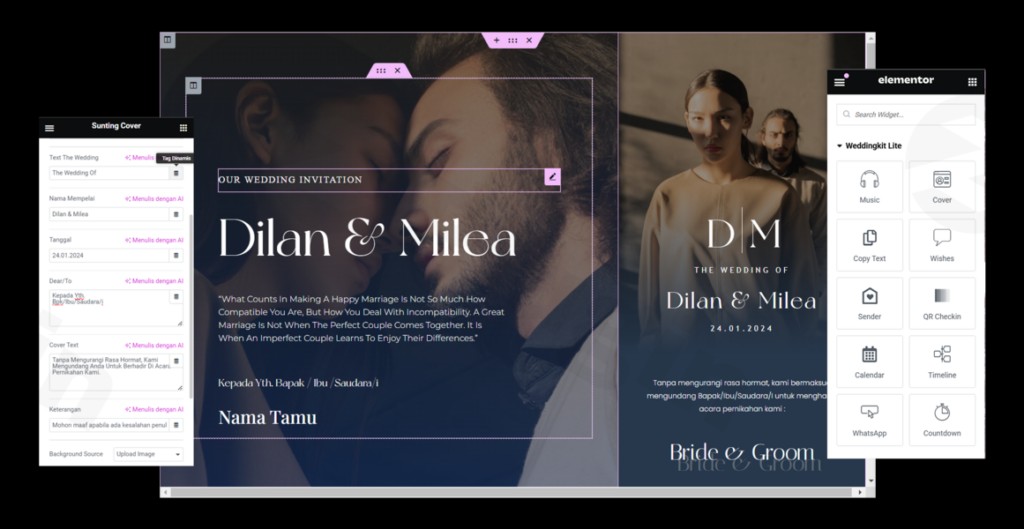
Planning a wedding is a monumental task, and in the digital age, a professional website is the centerpiece of your communication. The Weddingkit Elementor Template Kit is a powerful design solution for WordPress users looking to create a stunning, functional wedding invitation website template without writing a single line of code.
While often searched for as a “plugin,” Weddingkit is technically a sophisticated Elementor Template Kit. This means it provides a pre-designed framework of pages and sections that you can import directly into the Elementor page builder, offering a much faster and more cohesive design experience than building from scratch.
Key Features of Weddingkit
The Weddingkit kit is specifically engineered for wedding organizers, couples, and event planners. It focuses on the aesthetic elegance and functional requirements of a high-end wedding site.
1. 15+ Professionally Designed Templates
Weddingkit provides over 15 distinct page and section templates. This includes everything from the high-impact Homepage and Global Header/Footer to niche pages like Our Story, The Gallery, and the 404 Page.
2. Seamless RSVP Management
One of the most critical elements of a WordPress wedding organizer website is the RSVP system. Weddingkit includes dedicated RSVP form sections that allow guests to confirm their attendance easily, which can be integrated with your preferred form-handling tools.
3. Dedicated “Bridesmaid & Groomsmen” Sections
Personalize your site by introducing your wedding party. The kit includes specific layouts to showcase your closest friends and family, complete with photos and social links.
4. Fully Responsive & Mobile-Optimized
Since many guests will view your invitation on their phones, these Elementor wedding templates are built with a mobile-first mindset. Your gallery, maps, and RSVP forms will look perfect on any device screen.
5. Highly Customizable Global Styles
With the Global Kit Styles feature, you can change your site’s entire color palette and typography in one place. This ensures that your website perfectly matches your wedding’s physical theme and stationery.
Installation & Setup: How to Use Weddingkit
Setting up the Weddingkit Elementor Template Kit is straightforward. Follow these steps to get your site live:
- Prepare Your Environment:Ensure you have WordPress installed. For the best performance, we recommend using the free Hello Elementor theme.
- Install Required Plugins:Navigate to Plugins > Add New and install Elementor. Note that some advanced features (like the Global Header/Footer) may require Elementor Pro.
- Upload the Template Kit:Go to Elementor > Tools > Import/Export Kit (or use the Envato Elements plugin if you purchased it there). Upload the Weddingkit ZIP file.
- Import the Templates:Follow the on-screen prompts to import the global styles and individual page templates.
- Customize Your Content:Open any page (e.g., the Homepage) with Elementor. Simply click on the text or images to replace the “Weddingkit” demo data with your own wedding details and photos.
- Publish:Once you’ve updated your RSVP links and wedding date, hit Publish.
Practical Usage & Best Practices
To get the most out of this kit, consider these real-world workflows for your wedding site:
- The “Save the Date” Countdown: Use the “Coming Soon” page template immediately after securing your date. This allows you to collect email addresses or physical addresses before the full site is ready.
- Centralized Information Hub: Use the FAQ section to answer common guest questions regarding parking, dress codes, and gift registries. This reduces the number of direct inquiries the couple has to handle.
- Digital Storytelling: The “Our Story” template is ideal for building emotional engagement. Use high-quality photography and a timeline layout to share your journey with your guests.
- Post-Wedding Gallery: After the big day, repurpose the Gallery page to share professional wedding photos and videos with your guests, keeping the site useful even after the event.
FAQ & Troubleshooting
What is Weddingkit Elementor Template Kit?
Weddingkit is a collection of pre-designed website layouts specifically for weddings. It is not a standalone WordPress plugin but a design kit that works within the Elementor page builder to provide a ready-made structure for your site.
Does Weddingkit require Elementor Pro?
While many of the core page designs work with the free version of Elementor, certain “Pro” features like the Theme Builder (for Global Headers, Footers, and Archive pages) and advanced forms usually require Elementor Pro to function as intended.
Is this kit compatible with any WordPress theme?
Yes, it is compatible with most Elementor-supported themes. However, for maximum compatibility and site speed, it is highly recommended to use the Hello Elementor theme.
How can I customize the RSVP form?
The RSVP section in Weddingkit is a design layout. To make it functional, you should link the buttons to a form plugin (like Elementor Forms, WPForms, or Contact Form 7) to collect guest data in your WordPress dashboard or via email.
Can I use this for multiple wedding websites?
Yes. Because the kit falls under the GPL (General Public License), you can typically use the templates on multiple sites, making it a cost-effective choice for professional wedding planners.
Final Verdict
The Weddingkit Elementor Template Kit is an exceptional value for anyone needing a high-quality wedding invitation website template without the high cost of a custom developer. It balances aesthetic elegance with the practical needs of a wedding organizer.
If you are already using Elementor and need a fast, mobile-responsive, and beautiful way to manage your wedding’s digital presence, Weddingkit is a top-tier choice. You can find more WordPress tools and tutorials at wppick.com.
I. Download Limits & Account Benefits
- Free Downloads: Each email address receives 3 downloads per day for free products
- Upgrade Benefits: Purchase any paid product to increase your daily download limit by 3 for each paid product
- No Account Required: You can download immediately by receiving the download link via email
- Account Recommended: Create an account for easier access to your order history and direct update downloads
II. Understanding GPL vs Official Versions
Important: The products available on WPPick are GPL-licensed versions, which differ from official developer versions. Before purchasing, please read our comprehensive guide: Understanding GPL & Official Differences at WPPick
Key Points:
- GPL versions may not include premium support from original developers
- Updates may be delayed compared to official releases
- Some premium features might have limitations
- Always consider your specific needs and support requirements
III. Support & Assistance
We’re here to help through multiple channels:
- Email Support: Direct email assistance for all inquiries
- Live Chat: Real-time support during business hours
- Comprehensive Documentation: Detailed guides and tutorials
IV. Order Tracking
Access your complete purchase history and download links anytime: Order History
V. Account Access
New to WPPick? Login or Create Account to manage your downloads and orders efficiently.
VI. Refund Protection
We stand behind our products with a clear refund policy. Review our terms: Refund Policy
VII. Privacy & Security
Your data security is our priority. Learn how we protect your information: Privacy Policy
VII. Terms of Service
Understanding our service terms ensures a smooth experience: Terms of Use
Quick Tips for Best Experience
- Verify Compatibility: Check plugin/theme compatibility with your WordPress version
- Backup First: Always backup your site before installing new plugins or themes
- Test Environment: Consider testing on a staging site first
- Stay Updated: Regularly check for updates in your account dashboard
- Read Documentation: Review any included documentation for optimal setup
Need Help?
If you have questions about downloads, licensing, or need technical assistance, don’t hesitate to contact our support team. We’re committed to ensuring you have the best possible experience with WPPick products.
Ready to get started? Your download adventure begins with just one click!
No changelog available.