

Werk – Clothing Shopify Theme Os 2.0
/Year
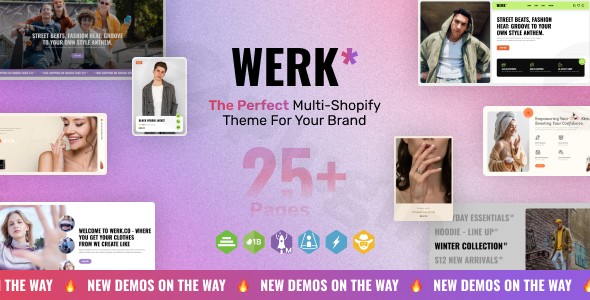
The Werk Clothing Shopify Theme OS 2.0 is a premium e-commerce solution designed specifically for fashion brands, apparel retailers, and high-end boutiques. Built on the robust Shopify Online Store 2.0 (OS 2.0) framework, it offers unprecedented flexibility for merchants who want to create a high-performance storefront.
While many users search for “Werk” in the context of WordPress, it is important to clarify that Werk is a native Shopify theme. However, for businesses that prefer the content management power of WordPress alongside the commerce engine of Shopify, this theme can be seamlessly bridged using Shopify WordPress integration plugins.
In this guide, we will explore the core features of the Werk theme, its OS 2.0 capabilities, and the best practices for integrating your Shopify-powered Werk store with a WordPress site.
Key Features of Werk Clothing Shopify Theme OS 2.0
The Werk theme leverages the latest Shopify technology to provide a “no-code” design experience that rivals custom-built websites. Here are the primary benefits for fashion retailers:
1. Sections Everywhere (OS 2.0 Architecture)
One of the most significant upgrades in Shopify OS 2.0 is the “Sections Everywhere” feature. Previously, dynamic sections were limited to the homepage. With Werk, you can add, reorder, and customize blocks on every page type, including product pages, collections, and blog posts. This allows for unique storytelling on every landing page.
2. Advanced Metafields Integration
Werk utilizes Shopify’s native metafields, allowing you to display specialized product data without editing code. For clothing stores, this is ideal for:
- Size Charts: Unique charts for different garment types.
- Material Specs: Detailed fabric and care instructions.
- Shipping Timelines: Specific delivery info for different collections.
3. High-Performance Speed
Fashion sites are often heavy with high-resolution imagery. Werk is optimized for speed, utilizing JSON templates and lean CSS to ensure your site passes Core Web Vitals, which is critical for both user experience and SEO.
4. App Blocks and Extensibility
The theme supports App Blocks, meaning you can install Shopify apps (like reviews, loyalty programs, or size finders) and drag-and-drop them into specific areas of your layout without breaking the theme’s code.
How to Integrate Werk (Shopify) with WordPress
Many agencies and marketers use a “Headless” or “Hybrid” approach, where the main store runs on Shopify (using the Werk theme) and the content/blogging happens on WordPress. To achieve a successful Shopify WordPress integration, follow these steps:
Step 1: Set Up Your Shopify Store
Before connecting to WordPress, you must purchase and install the Werk theme on your Shopify admin dashboard.
- Go to Online Store > Themes.
- Upload the Werk
.zipfile. - Customize your branding, colors, and typography using the Updated Theme Editor.
Step 2: Choose an Integration Plugin
To display products from your Werk-themed store on a WordPress site, you need a bridge. The two most reliable methods are:
- WP Shopify (Plugin): This is the gold standard for syncing products and collections as native WordPress posts.
- Official Shopify Plugin for WordPress: Uses the “Buy Button” technology to embed product cards and checkout functionality directly into WordPress pages.
Step 3: Sync Your Product Data
Once the plugin is installed on your WordPress site:
- Generate a Private App API Key in your Shopify admin.
- Paste the credentials into the WordPress plugin settings.
- Run the sync process to import your product data, descriptions, and images.
Practical Usage & Best Practices
To get the most out of the Werk Clothing Shopify Theme, consider these real-world workflows:
- For Fashion Influencers: Use the Werk theme for your main merchandise store, then use a WordPress blog to post “Get the Look” articles. Use a Shopify plugin for WordPress product sync to embed the exact items you are wearing directly into your blog posts.
- For Boutique Agencies: Leverage the Sections Everywhere feature to create unique “Lookbooks” on Shopify. Use WordPress for your client-facing SEO landing pages and link them to the Shopify checkout for a friction-less experience.
- When to use Werk: This theme is ideal for brands with high-quality photography that need a clean, minimalist aesthetic that doesn’t distract from the apparel.
FAQ & Troubleshooting
Is the Werk Shopify theme compatible with WordPress?
No, Shopify themes are built using the Liquid templating language and are not directly compatible with WordPress (which uses PHP). However, you can use a WordPress Shopify plugin to display and sell your Shopify products on a WordPress website.
Can I use Shopify OS 2.0 features like “Sections Everywhere” on WordPress?
No, “Sections Everywhere” is a feature specific to the Shopify Theme Editor. When you integrate with WordPress, you will use WordPress blocks (Gutenberg) or page builders (Elementor/Divi) to design the layouts on the WordPress side.
How do I update the Werk theme without losing my customizations?
Because Werk is an OS 2.0 theme, most customizations are stored in JSON files. When an update is released, you can usually use Shopify’s “Theme Update” tool which attempts to migrate your settings automatically. Always keep a backup of your current theme before updating.
Does Werk support WooCommerce?
No. Werk is exclusively a Shopify theme. If you wish to use WooCommerce, you would need to look for a dedicated WordPress Clothing Theme or use a migration tool like S2W (Shopify to WooCommerce) to move your data from Shopify to a WordPress-based store.
Final Verdict
The Werk Clothing Shopify Theme OS 2.0 is a powerhouse for modern fashion retailers who demand flexibility and speed. While it is not a WordPress plugin, its ability to be integrated via Shopify WordPress integration makes it a top choice for merchants who want the “best of both worlds”—Shopify’s world-class checkout and WordPress’s superior SEO and content tools.
If you are looking for a sleek, OS 2.0-ready framework for your apparel brand, Werk provides the professional foundation needed to scale. For more tips on e-commerce tools, visit wppick.com.
I. Download Limits & Account Benefits
- Free Downloads: Each email address receives 3 downloads per day for free products
- Upgrade Benefits: Purchase any paid product to increase your daily download limit by 3 for each paid product
- No Account Required: You can download immediately by receiving the download link via email
- Account Recommended: Create an account for easier access to your order history and direct update downloads
II. Understanding GPL vs Official Versions
Important: The products available on WPPick are GPL-licensed versions, which differ from official developer versions. Before purchasing, please read our comprehensive guide: Understanding GPL & Official Differences at WPPick
Key Points:
- GPL versions may not include premium support from original developers
- Updates may be delayed compared to official releases
- Some premium features might have limitations
- Always consider your specific needs and support requirements
III. Support & Assistance
We’re here to help through multiple channels:
- Email Support: Direct email assistance for all inquiries
- Live Chat: Real-time support during business hours
- Comprehensive Documentation: Detailed guides and tutorials
IV. Order Tracking
Access your complete purchase history and download links anytime: Order History
V. Account Access
New to WPPick? Login or Create Account to manage your downloads and orders efficiently.
VI. Refund Protection
We stand behind our products with a clear refund policy. Review our terms: Refund Policy
VII. Privacy & Security
Your data security is our priority. Learn how we protect your information: Privacy Policy
VII. Terms of Service
Understanding our service terms ensures a smooth experience: Terms of Use
Quick Tips for Best Experience
- Verify Compatibility: Check plugin/theme compatibility with your WordPress version
- Backup First: Always backup your site before installing new plugins or themes
- Test Environment: Consider testing on a staging site first
- Stay Updated: Regularly check for updates in your account dashboard
- Read Documentation: Review any included documentation for optimal setup
Need Help?
If you have questions about downloads, licensing, or need technical assistance, don’t hesitate to contact our support team. We’re committed to ensuring you have the best possible experience with WPPick products.
Ready to get started? Your download adventure begins with just one click!
No changelog available.