

Wiso Photography | WordPress Theme
/Year
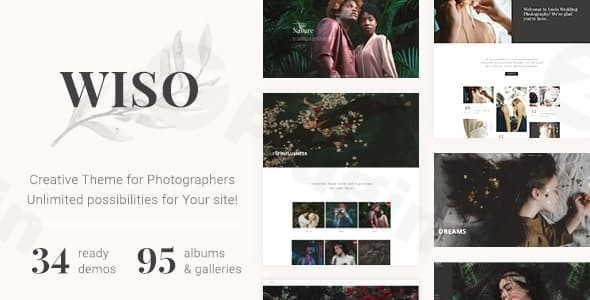
For photographers and visual artists, a website is more than just a digital business card—it is a gallery, a storefront, and a professional workspace. The Wiso Photography WordPress theme is a visually focused, feature-rich solution designed specifically to meet these demands. Developed by Fox-Themes, Wiso strikes a balance between high-end aesthetic appeal and the robust functionality required by modern creative professionals.Whether you are a wedding photographer needing private client galleries or a visual artist looking for a creative portfolio WordPress theme that stands out, Wiso provides a clean, minimal, and high-performance framework. This theme isn’t just about showing images; it’s about creating an immersive user experience through dynamic animations and professional-grade layout controls.
Key Features: Design, Layout & Performance
The Wiso Photography WordPress theme is built on a “content-first” philosophy, ensuring that your imagery remains the focal point across all devices.
Versatile Layout & Design Options
Wiso offers an impressive library of over 34 ready-to-use demos and more than 140 exclusive section templates. These aren’t just generic layouts; they are tailored for specific niches within the creative industry.
- Gallery Variations: Choose from Masonry, Grid, or Carousel layouts to showcase your work.
- Dynamic Visuals: The theme incorporates modern design elements, such as text and images that slide into place as users scroll, providing a premium feel.
- Full Customization: With over 800 Google Fonts and unlimited color skins, you can align your site perfectly with your brand identity.
Built-in Photography Tools
Unlike general multipurpose themes, Wiso includes specialized tools that solve real-world problems for photographers:
- Client Proofing: Create private, password-protected galleries where clients can review and select their photos.
- Booking & Events: Integrated support for appointment booking and the Modern Event Calendar plugin makes it easy to manage photography sessions.
- Watermarking & Downloads: Protect your intellectual property with built-in features for managing image rights and downloads.
Performance & SEO-Friendly Architecture
Speed is a critical ranking factor for any photography WordPress theme. Wiso is optimized for fast loading times and follows SEO best practices. Its clean markup ensures that search engines can easily crawl your content, while its responsive, Retina-ready design ensures your high-resolution photos look crisp on everything from an iPhone to a 5K monitor.
Installation & Demo Import: A Step-by-Step Guide
Setting up your professional portfolio doesn’t require advanced coding knowledge. Wiso simplifies the process through an intuitive setup wizard.
- Theme Installation: Upload the
wiso.zipfile via Appearance > Themes > Add New in your WordPress dashboard. - Plugin Activation: Upon activation, Wiso will prompt you to install required companion plugins, including WPBakery Page Builder and Contact Form 7.
- One-Click Demo Import: Navigate to the Wiso import settings. Choose from the 30+ available demos (e.g., Wedding, Agency, or Personal Portfolio) and click “Import.”
- Pro Tip: Ensure your server’s
memory_limitis set to at least 256M to prevent timeouts during the import of high-resolution demo images.
- Pro Tip: Ensure your server’s
- Final Polish: Once the import is complete, your menus, widgets, and homepages will be automatically configured to match the live demo.
Customization Guide: Branding & Layout
Personalizing the Wiso Photography WordPress theme is handled through a combination of the WordPress Customizer and the WPBakery Page Builder.
Global Styles & Branding
To change your logo, primary colors, and typography, head to the Theme Options or the Customizer. Here, you can set global rules for your headers and footers. Wiso provides multiple header styles, allowing you to choose between a classic top-bar menu, a transparent overlay, or a side-navigation layout.
Building Pages with WPBakery
Wiso is deeply integrated with the WPBakery Page Builder. Instead of building from scratch, you can use the 140+ pre-designed section templates. This “mix-and-match” approach allows you to drag a “Testimonials” block from one demo and a “Masonry Gallery” from another, creating a completely unique layout in minutes.
Setting Up the Shop
Wiso is a WooCommerce compatible photography theme. If you plan to sell prints or digital presets, simply install WooCommerce. The theme includes dedicated shop templates that maintain the sleek, minimalist aesthetic of your portfolio while providing a secure checkout experience.
FAQ & Troubleshooting
Is Wiso Photography compatible with Elementor?
Wiso is primarily optimized for the WPBakery Page Builder, which comes bundled with the theme. While you can use the Gutenberg Block Editor for blog posts, the core layout features and prebuilt sections are designed for WPBakery. If you prefer Elementor, you may need to manually recreate some of the theme’s specific gallery effects.
Does the theme support WooCommerce for online stores?
Yes, Wiso is fully WooCommerce compatible. It allows photographers to sell physical prints, digital downloads, or photography packages directly from their website with a cohesive design.
Does it support child themes?
Yes, a child theme is included in the download package. It is highly recommended to install and activate the child theme before making any CSS or PHP modifications to ensure your changes are not lost during future theme updates.
What should I do if the demo import fails?
Most demo import issues are related to server resources. Check that your max_execution_time is set to 300 and upload_max_filesize is at least 32M. If the import still fails, you can contact Fox-Themes support for manual XML import files.
Conclusion
The Wiso Photography WordPress theme is a powerful, professional-grade solution for anyone in the visual arts. Its standout features—like private client proofing and a massive library of section templates—make it one of the best WordPress themes for photographers who want a high-end look without the high-end development cost.While it relies on WPBakery rather than the native Block Editor for its advanced layouts, the sheer amount of creative control it offers is hard to beat. If you are looking for an SEO-friendly WordPress theme that prioritizes image quality and user experience, Wiso is an excellent investment for your creative brand.For more WordPress theme reviews and tutorials, visit wppick.com.
I. Download Limits & Account Benefits
- Free Downloads: Each email address receives 3 downloads per day for free products
- Upgrade Benefits: Purchase any paid product to increase your daily download limit by 3 for each paid product
- No Account Required: You can download immediately by receiving the download link via email
- Account Recommended: Create an account for easier access to your order history and direct update downloads
II. Understanding GPL vs Official Versions
Important: The products available on WPPick are GPL-licensed versions, which differ from official developer versions. Before purchasing, please read our comprehensive guide: Understanding GPL & Official Differences at WPPick
Key Points:
- GPL versions may not include premium support from original developers
- Updates may be delayed compared to official releases
- Some premium features might have limitations
- Always consider your specific needs and support requirements
III. Support & Assistance
We’re here to help through multiple channels:
- Email Support: Direct email assistance for all inquiries
- Live Chat: Real-time support during business hours
- Comprehensive Documentation: Detailed guides and tutorials
IV. Order Tracking
Access your complete purchase history and download links anytime: Order History
V. Account Access
New to WPPick? Login or Create Account to manage your downloads and orders efficiently.
VI. Refund Protection
We stand behind our products with a clear refund policy. Review our terms: Refund Policy
VII. Privacy & Security
Your data security is our priority. Learn how we protect your information: Privacy Policy
VII. Terms of Service
Understanding our service terms ensures a smooth experience: Terms of Use
Quick Tips for Best Experience
- Verify Compatibility: Check plugin/theme compatibility with your WordPress version
- Backup First: Always backup your site before installing new plugins or themes
- Test Environment: Consider testing on a staging site first
- Stay Updated: Regularly check for updates in your account dashboard
- Read Documentation: Review any included documentation for optimal setup
Need Help?
If you have questions about downloads, licensing, or need technical assistance, don’t hesitate to contact our support team. We’re committed to ensuring you have the best possible experience with WPPick products.
Ready to get started? Your download adventure begins with just one click!
No changelog available.