

Woo Essential – Divi Shop Builder
/Year
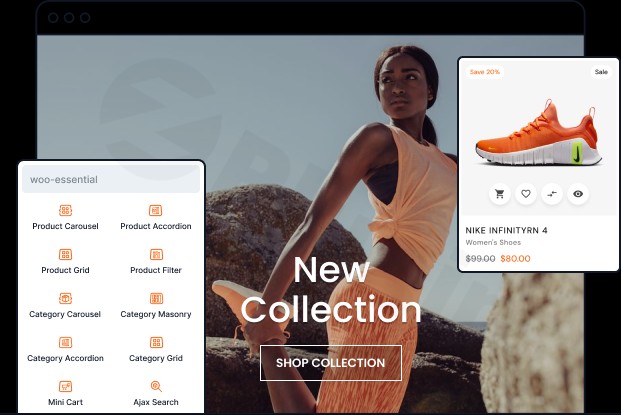
Building a high-converting online store requires more than just a basic product list; it requires a seamless, engaging user experience that guides customers from discovery to checkout. Woo Essential Divi is a comprehensive WordPress plugin designed to bridge the gap between the Divi builder’s design flexibility and WooCommerce’s robust e-commerce functionality. By providing specialized WooCommerce Divi modules, this plugin allows site owners to create professional-grade storefronts without writing a single line of code.
Whether you are looking to create a minimalist masonry shop or a feature-rich product carousel, Woo Essential provides the tools to transform a standard WordPress site into a high-performance e-commerce platform.
Key Features & Benefits of Woo Essential
Woo Essential offers a robust set of over 10 specialized modules and features aimed at enhancing every aspect of a WooCommerce store. Its core strength lies in its deep integration with the Divi Builder, allowing for extensive customization.
1. Dynamic Product Display Modules
Standard product grids can often feel static. Woo Essential introduces several ways to showcase your inventory:
- Woo Product Carousel: Display products in elegant, touch-responsive sliders to save screen real estate while showcasing more items.
- Woo Product Accordion: An interactive, space-saving format that reveals product details upon interaction.
- Woo Product Masonry & Grid: Create structured or artistic layouts that adapt perfectly to any screen size, ensuring your store looks great on mobile and desktop alike.
2. Advanced Category Management
Navigation is key to conversion. Woo Essential helps customers find what they need through specialized category modules:
- Woo Category Carousel & Grid: Organize your product lines into visually engaging sections.
- Woo Category Accordion: Uses animated expand-and-reveal layouts to keep the interface clean while providing deep navigation options.
3. High-Conversion UX Tools
To turn visitors into buyers, Woo Essential includes features that reduce friction:
- Woo Ajax Search: Adds an instant, “search-as-you-type” form, helping customers find products in seconds.
- Woo Quick View: Shoppers can preview product details in a lightbox without leaving their current page, keeping them in the “buying flow.”
- Product Comparison & Wishlist: Allows customers to save items for later or compare specifications side-by-side, which is essential for tech or high-consideration purchases.
4. Professional Variation Swatches
Instead of boring dropdown menus, the WooCommerce Variation Swatches feature allows you to use color swatches, image previews, or button labels. This visual approach significantly improves the user experience for stores selling apparel, furniture, or any product with multiple attributes.
Optimized for the Future: Divi 5 Compatibility
One of the most significant advantages of Woo Essential is its Divi 5 WooCommerce compatibility. As Elegant Themes transitions to the next-generation Divi 5 architecture, Woo Essential is already officially verified and ready.
- Future-Proofing: You won’t have to worry about your shop breaking when Divi 5 becomes the standard.
- Performance: Built with modern architecture to ensure that your site remains fast and stable, even with multiple modules active.
How to Install and Set Up Woo Essential
Setting up Woo Essential Divi is straightforward and follows the standard WordPress workflow. Follow these steps to get started:
- Purchase and Download: Obtain the plugin ZIP file from DiviNext or the Divi Marketplace.
- Upload the Plugin: Log in to your WordPress dashboard, go to Plugins > Add New > Upload Plugin, and select the ZIP file.
- Activate: Once uploaded, click Activate.
- Enable Modules: Navigate to the Woo Essential settings page within your dashboard. Here, you can toggle specific modules on or off to ensure you are only loading the code you actually need.
- Start Designing: Open any page with the Divi Builder. You will now see the new “Woo” modules (e.g., Woo Product Carousel, Woo Ajax Search) available in the module library.
Practical Usage & Best Practices
To get the most out of this Divi Shop Builder, consider these real-world workflows:
- For Fashion Retailers: Use the Variation Swatches combined with the Woo Product Masonry layout. This creates a “lookbook” feel where customers can see different colors and styles immediately.
- For High-Inventory Stores: Implement the Woo Ajax Search in your header and use the Woo Category Accordion in your sidebar. This helps users navigate thousands of SKUs without feeling overwhelmed.
- For Promotional Campaigns: Use the Woo Product Carousel on your homepage to highlight “Deal of the Day” or seasonal items. The motion of the carousel naturally draws the eye to featured products.
Best Practice Tip: While Woo Essential is optimized for speed, it is a best practice to only activate the modules you are actively using on your site to maintain peak performance.
FAQ & Troubleshooting
Is Woo Essential compatible with Divi 5?
Yes, Woo Essential Divi is officially verified for Divi 4 and Divi 5. It is designed to work seamlessly with the next-generation architecture of Divi, ensuring your store remains functional and fast during the transition.
Does this plugin support WooCommerce Variation Swatches?
Absolutely. Woo Essential includes a built-in feature to transform standard WooCommerce dropdowns into visual swatches (colors, images, or labels), which enhances the visual appeal and usability of your product pages.
How do I customize WooCommerce shop pages with Divi using this plugin?
Once the plugin is active, you can use the Divi Theme Builder to create a “Global Shop” layout. Within that layout, you can insert any of the Woo Essential modules, such as the Product Grid or Ajax Search, and style them using Divi’s familiar drag-and-drop interface.
Will Woo Essential slow down my website?
Woo Essential is built for performance. However, like any plugin, its impact depends on your hosting and configuration. To ensure the fastest load times, only enable the specific modules you need in the plugin settings.
Final Verdict
The Woo Essential Divi Shop Builder is a must-have extension for any store owner using the Divi theme. It eliminates the need for multiple single-purpose plugins by combining carousels, swatches, quick views, and wishlists into one cohesive package. With its early adoption of Divi 5 standards and its library of over 90 layouts, it provides an exceptional ROI for agencies and DIY site owners alike.
If you want to build a professional, high-converting store that is ready for the future of WordPress, Woo Essential Divi is the ideal solution.
I. Download Limits & Account Benefits
- Free Downloads: Each email address receives 3 downloads per day for free products
- Upgrade Benefits: Purchase any paid product to increase your daily download limit by 3 for each paid product
- No Account Required: You can download immediately by receiving the download link via email
- Account Recommended: Create an account for easier access to your order history and direct update downloads
II. Understanding GPL vs Official Versions
Important: The products available on WPPick are GPL-licensed versions, which differ from official developer versions. Before purchasing, please read our comprehensive guide: Understanding GPL & Official Differences at WPPick
Key Points:
- GPL versions may not include premium support from original developers
- Updates may be delayed compared to official releases
- Some premium features might have limitations
- Always consider your specific needs and support requirements
III. Support & Assistance
We’re here to help through multiple channels:
- Email Support: Direct email assistance for all inquiries
- Live Chat: Real-time support during business hours
- Comprehensive Documentation: Detailed guides and tutorials
IV. Order Tracking
Access your complete purchase history and download links anytime: Order History
V. Account Access
New to WPPick? Login or Create Account to manage your downloads and orders efficiently.
VI. Refund Protection
We stand behind our products with a clear refund policy. Review our terms: Refund Policy
VII. Privacy & Security
Your data security is our priority. Learn how we protect your information: Privacy Policy
VII. Terms of Service
Understanding our service terms ensures a smooth experience: Terms of Use
Quick Tips for Best Experience
- Verify Compatibility: Check plugin/theme compatibility with your WordPress version
- Backup First: Always backup your site before installing new plugins or themes
- Test Environment: Consider testing on a staging site first
- Stay Updated: Regularly check for updates in your account dashboard
- Read Documentation: Review any included documentation for optimal setup
Need Help?
If you have questions about downloads, licensing, or need technical assistance, don’t hesitate to contact our support team. We’re committed to ensuring you have the best possible experience with WPPick products.
Ready to get started? Your download adventure begins with just one click!
No changelog available.