

Woocommerce Delivery Time Picker For Shipping
/Year
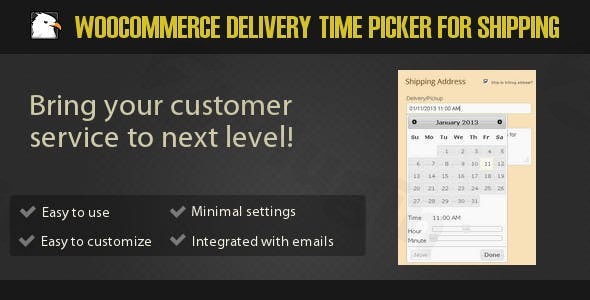
In today’s fast-paced e-commerce world, flexible and predictable delivery options are no longer a luxury—they’re an expectation. Customers want control over when their orders arrive. The WooCommerce Delivery Time Picker for Shipping plugin addresses this critical need by empowering your customers to select their preferred delivery date and time directly during the checkout process. This intuitive plugin transforms your WooCommerce store by offering a superior customer experience while simultaneously streamlining your internal order fulfillment and logistics, making it an essential woocommerce shipping time picker solution for any online business.
Key Features: Giving Your Customers (and You) More Control
The WooCommerce Delivery Time Picker for Shipping is packed with features designed for both customer convenience and administrative control. It goes beyond basic delivery options to provide a robust scheduling solution.
Customer-Driven Delivery Date and Time Selection
At its core, this plugin allows customers to choose a specific delivery date and time using an intuitive calendar and time slot widget displayed prominently on the checkout page. This level of granular control significantly enhances customer satisfaction, as they can align deliveries with their personal schedules. It’s a powerful way to enable woocommerce customers to choose delivery time, fostering trust and reducing missed deliveries.
Comprehensive Administrative Configuration
Store administrators gain full control over the delivery time picker’s appearance and functionality. You can easily customize text labels, select preferred date and time formats, and even support up to 74 languages, ensuring the plugin integrates seamlessly with your store’s branding and global audience. This makes it straightforward to set delivery time WooCommerce options that align with your business operations.
Flexible Date and Time Restrictions
Not all days or times are suitable for delivery. The plugin allows you to define precise restrictions:
- Restrict Specific Dates & Ranges: Block out holidays, specific event days, or custom date ranges when deliveries are not possible.
- Exclude Weekdays: Prevent deliveries on weekends or any specific weekday.
- Set Minimum & Maximum Delivery Hours: Define operational hours, ensuring customers can only select times when your team is available. This feature is particularly useful for implementing a woocommerce delivery time picker with minimum hours requirement.
Smart Shipping Method Integration
Tailor the delivery time picker’s visibility based on your existing WooCommerce shipping methods. You can enable or disable the picker for specific methods, offering flexibility. For instance, you might only offer time-based delivery for local pickups or premium shipping options, providing granular woocommerce checkout delivery options.
Efficient Order Capacity Management
Prevent your delivery team from becoming overwhelmed. The plugin includes a crucial feature to limit the number of shipments per day. This ensures you never overbook your capacity, leading to smoother operations and preventing service bottlenecks in your woocommerce order delivery scheduling.
Customization and Branding
Personalize the delivery experience further with various customization options:
- Custom Text Labels: Modify any text displayed on the picker without touching a single line of code.
- Calendar Themes: Choose from different visual themes to match your website’s design.
Shortcode Support for Flexible Placement
For advanced users or specific page layouts, the plugin provides shortcodes ([wdt_shipping_time] and [wdt_field]) to display the delivery time picker anywhere on your site, offering ultimate flexibility in where customers can interact with the woocommerce delivery date and time selection.
Enhanced Order Visibility
Once a customer selects their preferred delivery time, this information is clearly visible to store administrators within the WooCommerce order details. It’s also automatically included in email notifications, ensuring everyone involved in the fulfillment process is aware of the chosen delivery window.
WPML Compatibility for Multilingual Stores
For businesses serving a global audience, the plugin boasts 100% compatibility with WPML (WordPress Multilingual Plugin), allowing you to offer the delivery time selection in multiple languages seamlessly.
Installation & Setup: Get Your Delivery Picker Running
Adding the WooCommerce Delivery Time Picker for Shipping to your store is a straightforward process, even for those without extensive technical expertise. Here’s how to add delivery time picker to woocommerce checkout:
- Purchase and Download: Acquire the plugin from CodeCanyon. You’ll receive a
.zipfile containing the plugin. - Upload the Plugin:
- Log in to your WordPress admin dashboard.
- Navigate to Plugins > Add New.
- Click on the “Upload Plugin” button at the top.
- Choose the
.zipfile you downloaded and click “Install Now”.
- Activate the Plugin: Once installed, click “Activate Plugin”.
- Configure Settings:
- Go to WooCommerce > Settings in your WordPress dashboard.
- You should find a new tab or section related to “Delivery Time Picker” or “Shipping Time Picker.”
- Here, you can configure all the options mentioned in the features section: customize labels, set date/time formats, define restrictions (holidays, weekdays, minimum hours), and enable/disable the picker for specific shipping methods. This is where you’ll restrict delivery dates WooCommerce plugin options.
Practical Usage & Best Practices: Optimizing Your Delivery Workflow
The WooCommerce Delivery Time Picker for Shipping isn’t just a feature; it’s a tool to refine your operational efficiency and boost customer satisfaction. Here are a few practical use cases and best practices:
Use Case 1: Local Deliveries and Niche Businesses
For local businesses offering direct delivery, or niche stores selling time-sensitive products (like baked goods or floral arrangements), allowing customers to pick a specific slot is invaluable. This is the best way to manage WooCommerce order delivery scheduling for precise logistics. You can set specific delivery windows (e.g., 9 AM-12 PM, 2 PM-5 PM) and manage the number of orders within each slot.
Use Case 2: Perishable Goods and Food Delivery
If your e-commerce store handles perishable items, prompt and coordinated delivery is crucial. Customers can choose a time they know they’ll be home, ensuring the freshness and quality of their order. This drastically reduces spoilage and customer complaints related to delayed or mishandled deliveries.
Use Case 3: High-Volume E-commerce with Daily Capacity Limits
For larger stores, managing the sheer volume of orders can be challenging. By utilizing the plugin’s order capacity management feature, you can automatically limit the number of deliveries accepted per day. This prevents your team from becoming overloaded, maintains service quality, and ensures that promised delivery times are consistently met, providing robust WooCommerce shipping slots management.
Best Practice: Clear Communication
Always communicate clearly with your customers about their selected delivery times. The plugin automatically includes this in order emails, but consider adding a brief notice on your product pages or a dedicated FAQ section about your delivery scheduling process.
FAQ & Troubleshooting
Here are answers to common questions about implementing a delivery time picker in WooCommerce.
How to let customers choose delivery time in WooCommerce?
To allow customers to choose their delivery time in WooCommerce, you can install the WooCommerce Delivery Time Picker for Shipping plugin. Once activated and configured, a calendar and time selection widget will appear on your checkout page, enabling customers to easily select their preferred delivery date and time before completing their purchase.
Can WooCommerce customers select delivery date?
Yes, with the WooCommerce Delivery Time Picker for Shipping plugin, your customers can explicitly select their preferred delivery date. The plugin provides an intuitive calendar interface on the checkout page where they can pick any available date, alongside a time slot, making the delivery process highly convenient and customer-centric.
What is the best delivery time picker for WooCommerce?
While “best” can be subjective and depend on specific needs, the WooCommerce Delivery Time Picker for Shipping is an excellent contender due to its comprehensive features. It offers extensive administrative control over date and time restrictions, capacity management, shipping method integration, and multilingual support, making it a robust solution for businesses seeking flexible and efficient delivery scheduling. Its ease of use and rich customization options position it as a strong choice among best woocommerce delivery time and date plugin options.
How to set delivery time slots in WooCommerce?
With the WooCommerce Delivery Time Picker for Shipping, you can define delivery time slots by setting minimum and maximum delivery hours for each day. Additionally, you can restrict specific dates or weekdays. While customers choose a precise time within your defined windows, the combined effect of these restrictions creates effective “slots” that align with your operational capabilities, preventing selections outside your allowed hours.
Is the WooCommerce Delivery Time Picker for Shipping compatible with other plugins?
The plugin is explicitly stated to be 100% compatible with WPML, making it suitable for multilingual WooCommerce stores. It’s also designed to work seamlessly with the latest versions of WooCommerce. Generally, premium plugins like this are built to adhere to WordPress and WooCommerce best practices, ensuring broad compatibility with well-coded themes and other popular plugins.
Conclusion: Deliver a Better Customer Experience
The WooCommerce Delivery Time Picker for Shipping plugin is more than just an add-on; it’s a strategic investment in customer satisfaction and operational efficiency. By providing customers with the ability to choose their exact delivery date and time, you eliminate uncertainty, reduce missed deliveries, and significantly enhance the overall purchasing experience. For any WooCommerce store aiming to offer flexible delivery time picker for woocommerce options and streamline their logistics, this plugin from ProWCPlugins offers a lightweight, easy-to-configure, and highly effective solution. It’s ideal for businesses of all sizes looking to elevate their service and stand out in a competitive e-commerce landscape.
I. Download Limits & Account Benefits
- Free Downloads: Each email address receives 3 downloads per day for free products
- Upgrade Benefits: Purchase any paid product to increase your daily download limit by 3 for each paid product
- No Account Required: You can download immediately by receiving the download link via email
- Account Recommended: Create an account for easier access to your order history and direct update downloads
II. Understanding GPL vs Official Versions
Important: The products available on WPPick are GPL-licensed versions, which differ from official developer versions. Before purchasing, please read our comprehensive guide: Understanding GPL & Official Differences at WPPick
Key Points:
- GPL versions may not include premium support from original developers
- Updates may be delayed compared to official releases
- Some premium features might have limitations
- Always consider your specific needs and support requirements
III. Support & Assistance
We’re here to help through multiple channels:
- Email Support: Direct email assistance for all inquiries
- Live Chat: Real-time support during business hours
- Comprehensive Documentation: Detailed guides and tutorials
IV. Order Tracking
Access your complete purchase history and download links anytime: Order History
V. Account Access
New to WPPick? Login or Create Account to manage your downloads and orders efficiently.
VI. Refund Protection
We stand behind our products with a clear refund policy. Review our terms: Refund Policy
VII. Privacy & Security
Your data security is our priority. Learn how we protect your information: Privacy Policy
VII. Terms of Service
Understanding our service terms ensures a smooth experience: Terms of Use
Quick Tips for Best Experience
- Verify Compatibility: Check plugin/theme compatibility with your WordPress version
- Backup First: Always backup your site before installing new plugins or themes
- Test Environment: Consider testing on a staging site first
- Stay Updated: Regularly check for updates in your account dashboard
- Read Documentation: Review any included documentation for optimal setup
Need Help?
If you have questions about downloads, licensing, or need technical assistance, don’t hesitate to contact our support team. We’re committed to ensuring you have the best possible experience with WPPick products.
Ready to get started? Your download adventure begins with just one click!
- Version 3.2.8 released on 15 April 2025.