

Woocommerce Order Details
/Year
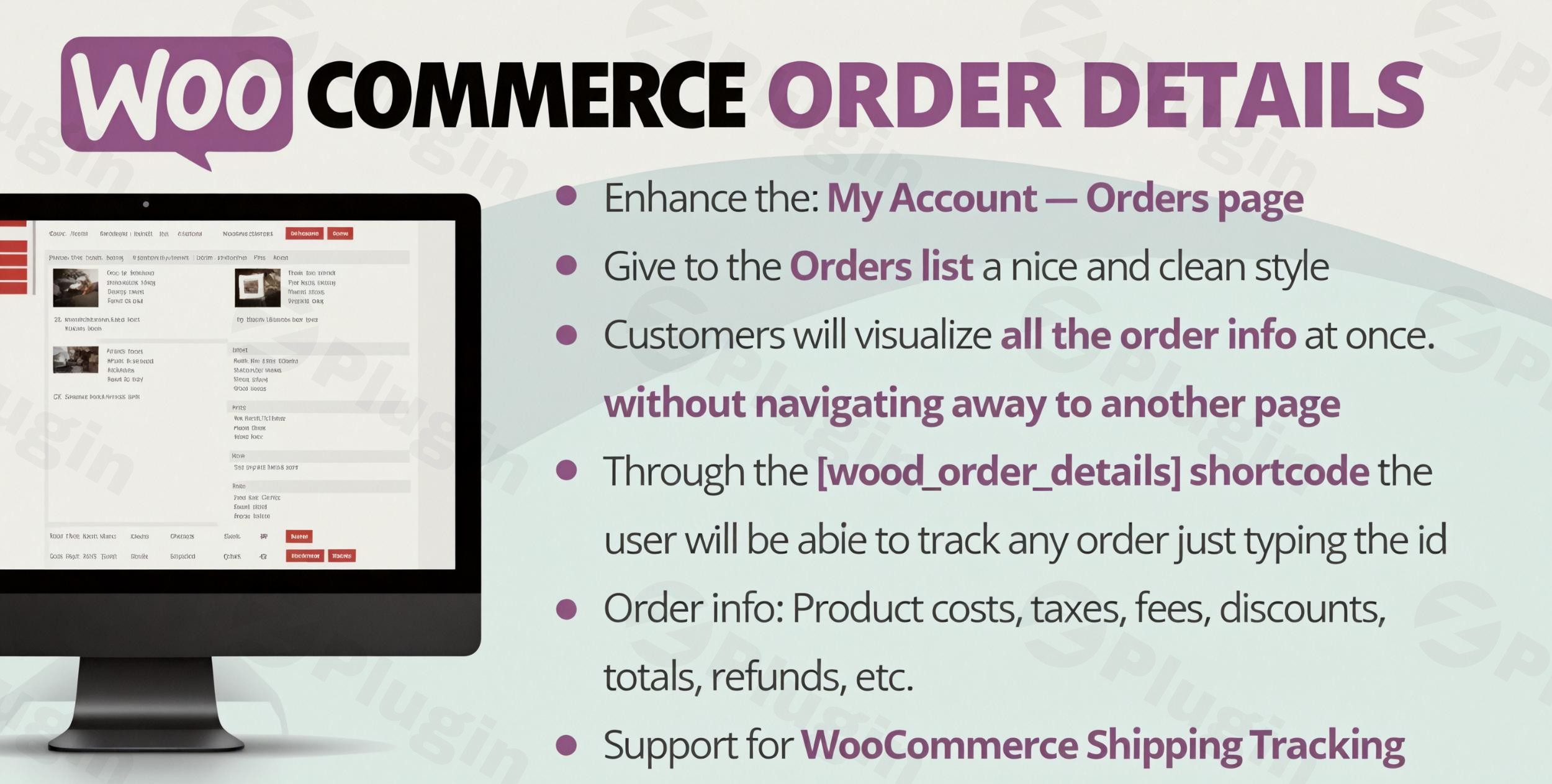
For any bustling online store running on WooCommerce, efficient order management and clear communication with customers are paramount. The default WooCommerce order display, while functional, often lacks the depth, flexibility, and user-friendliness that modern e-commerce demands. This is where specialized WooCommerce Order Details plugins step in, transforming how store owners and customers interact with crucial WooCommerce Order Information. These plugins are designed to simplify order tracking, customize display options, and provide robust management tools, ultimately enhancing the overall shopping experience and operational efficiency.
Key Features That Transform Your WooCommerce Order Management
WooCommerce order detail plugins offer a suite of functionalities aimed at improving both the backend administration and the customer-facing “My Account” area. Here’s a breakdown of the most impactful features:
Enhanced Order Display for Customers
Plugins like “WooCommerce Order Details” (by vanquish) and “Extended Order Details for WooCommerce” drastically improve the customer experience on the “My Account -> Orders” page. Instead of navigating through multiple pages, customers can view WooCommerce orders with all relevant information—product data (images, prices, taxes), shipping costs, fees, refunds, subtotals, totals, and billing/shipping addresses—conveniently presented on a single, clean page, often with expandable sections for clarity. This significantly reduces customer queries and frustration.
Seamless Order Tracking Capabilities
Many robust WooCommerce Order Management Plugins integrate order tracking directly into the customer’s account or via dedicated shortcodes. For instance, a shortcode like [wcod_order_details] allows customers to easily track any order by simply entering their order ID, providing real-time updates and peace of mind.
Custom Order Statuses for Flexible Workflows
Beyond the default “Pending,” “Processing,” and “Completed” statuses, plugins such as “WooCommerce Order Status Manager” and “YITH WooCommerce Custom Order Status” enable you to create and manage custom WooCommerce Order Status options. This is invaluable for unique workflows like “Awaiting Shipment,” “Partially Shipped,” or “Ready for Pickup,” offering clearer communication and better internal organization.
Robust Order Exporting for Reporting and Analysis
For data-driven decision-making and integration with external systems, plugins like “Advanced Orders Export For WooCommerce” and “Order Sync With Google Sheets for WooCommerce” are indispensable. They facilitate the export of comprehensive order details into various formats such as CSV, Excel, or directly to Google Sheets, making reporting, analysis, and accounting much simpler. This is particularly useful for extracting data for the “Best plugin to export WooCommerce order details to CSV” searches.
Admin Column Enhancements for Store Owners
The “Display Order Details” plugin, for example, addresses a common pain point by reintroducing the “Items” column to the WooCommerce -> Orders admin page. This column, which was removed in WooCommerce v3.0.0, displays order content and quantities at a glance, allowing store owners to quickly grasp the contents of an order without needing to click into each one.
Broad Compatibility and Integrations
Many order detail plugins are built with broad compatibility in mind, working seamlessly with major WordPress versions (typically 4.4+ or 5.8+ recommended) and WooCommerce versions (3.0.0+). Some even offer specific integrations, such as “Extended Order Details for WooCommerce” with Affiliate WP for commission display, or general support for WooCommerce Shipping Tracking to show tracking information within the order details.
Installing and Setting Up Your WooCommerce Order Details Plugin
Installing a WooCommerce order details plugin follows the standard WordPress plugin installation process. Here’s a general guide:
- Download the Plugin: Obtain the plugin file (usually a
.zipfile) from the WordPress plugin repository, CodeCanyon, or the developer’s website. - Upload to WordPress:
- Log in to your WordPress dashboard.
- Navigate to Plugins > Add New.
- Click on the “Upload Plugin” button at the top of the page.
- Click “Choose File”, select the
.zipfile you downloaded, and then click “Install Now”.
- Activate the Plugin: Once installed, click the “Activate Plugin” button.
- Configure Settings: After activation, most plugins will add a new menu item under “WooCommerce” or “Settings,” or integrate directly into existing WooCommerce menus. Navigate to these settings to configure the plugin according to your needs. This is where you might specify how to display custom order details in WooCommerce or adjust visibility settings for customers.
- Test Thoroughly: Place a test order on your site to ensure all features are working as expected, both for the customer in their “My Account” area and for you in the WordPress admin.
Practical Usage & Best Practices for Enhanced Order Management
Integrating a WooCommerce order details plugin into your workflow offers significant advantages:
- Improve Customer Satisfaction: By providing comprehensive and easily accessible order information, you empower customers to self-serve, reducing the need for support tickets related to order status or details. This is ideal for any e-commerce business focused on customer experience.
- Streamline Administrative Tasks: Features like enhanced admin columns and custom order statuses allow your team to process orders more efficiently, quickly identify order contents, and manage complex workflows without manual workarounds. This is especially beneficial for agencies managing multiple client stores or store owners with high order volumes.
- Boost Data Analysis and Reporting: With robust export capabilities, you can easily pull detailed order data for accounting, inventory management, marketing analysis, and sales forecasting. This is perfect for data-driven marketers and store managers looking to optimize their operations.
- Tailor the Customer Account Experience: Use customization options to align the “WooCommerce order details in customer account page” with your brand’s aesthetics and information hierarchy, providing a more consistent and professional user experience.
FAQ & Troubleshooting
What are the key features of WooCommerce order detail plugins?
Key features typically include enhanced display of order information on customer “My Account” pages, order tracking capabilities, the ability to create and manage custom order statuses, comprehensive order exporting tools (e.g., to CSV or Excel), and improvements to the order display in the WordPress admin area.
How can I improve the display of order details for my customers?
To improve the display of order details for your customers, you should use a dedicated WooCommerce order details plugin. These plugins often provide a single, organized page in the customer’s “My Account” section where all order information, including products, prices, shipping, and addresses, is clearly presented, often with expandable sections.
Are there free plugins for WooCommerce order details?
Yes, there are often free plugins available in the WordPress.org plugin repository that offer basic enhancements for WooCommerce order details, such as improving admin columns or minor customer display changes. For more advanced features like custom order statuses, robust exporting, or deep integrations, premium plugins are generally required.
What is the technical requirement for WooCommerce order plugins?
Most WooCommerce order detail plugins require WordPress 4.4 or higher (with 5.8+ recommended for optimal performance), WooCommerce 3.0.0 or higher, and PHP 7.0 or higher (with PHP 7.4+ or 8.0+ recommended). For the database, MySQL 5.7 or MariaDB 10.4 are typically minimums, but newer versions are recommended for better performance.
Troubleshoot WooCommerce orders not completing: What should I do?
If you’re facing issues with WooCommerce orders not completing, first check your payment gateway settings and logs for errors. Then, systematically deactivate other plugins one by one (starting with recently installed ones) to identify potential conflicts. Ensure your server meets the minimum PHP and database requirements, and temporarily switch to a default WordPress theme like Storefront to rule out theme conflicts.
Conclusion
WooCommerce order detail plugins are essential tools for any serious e-commerce store owner seeking to optimize their operations and elevate the customer experience. By providing clearer WooCommerce Order Details and robust management capabilities, these plugins help you reduce support overhead, streamline your internal workflows, and gain valuable insights from your order data. Whether you’re a small business looking to simplify order tracking or a large enterprise needing advanced export and customization options, investing in a quality WooCommerce Order Information plugin is a smart move that delivers tangible ROI for your WPPick.com store.
I. Download Limits & Account Benefits
- Free Downloads: Each email address receives 3 downloads per day for free products
- Upgrade Benefits: Purchase any paid product to increase your daily download limit by 3 for each paid product
- No Account Required: You can download immediately by receiving the download link via email
- Account Recommended: Create an account for easier access to your order history and direct update downloads
II. Understanding GPL vs Official Versions
Important: The products available on WPPick are GPL-licensed versions, which differ from official developer versions. Before purchasing, please read our comprehensive guide: Understanding GPL & Official Differences at WPPick
Key Points:
- GPL versions may not include premium support from original developers
- Updates may be delayed compared to official releases
- Some premium features might have limitations
- Always consider your specific needs and support requirements
III. Support & Assistance
We’re here to help through multiple channels:
- Email Support: Direct email assistance for all inquiries
- Live Chat: Real-time support during business hours
- Comprehensive Documentation: Detailed guides and tutorials
IV. Order Tracking
Access your complete purchase history and download links anytime: Order History
V. Account Access
New to WPPick? Login or Create Account to manage your downloads and orders efficiently.
VI. Refund Protection
We stand behind our products with a clear refund policy. Review our terms: Refund Policy
VII. Privacy & Security
Your data security is our priority. Learn how we protect your information: Privacy Policy
VII. Terms of Service
Understanding our service terms ensures a smooth experience: Terms of Use
Quick Tips for Best Experience
- Verify Compatibility: Check plugin/theme compatibility with your WordPress version
- Backup First: Always backup your site before installing new plugins or themes
- Test Environment: Consider testing on a staging site first
- Stay Updated: Regularly check for updates in your account dashboard
- Read Documentation: Review any included documentation for optimal setup
Need Help?
If you have questions about downloads, licensing, or need technical assistance, don’t hesitate to contact our support team. We’re committed to ensuring you have the best possible experience with WPPick products.
Ready to get started? Your download adventure begins with just one click!
- Improved security