
WooCommerce Order Status Manager By SkyVerge
/Year
Optimized Order Tracking for WordPress eCommerce
Managing the post-purchase lifecycle effectively is critical for running an efficient eCommerce operation. WooCommerce Order Status Manager provides online store owners with the necessary tools to break away from rigid default order pipelines. By introducing tailored tracking phases, this extension bridges the gap between payment confirmation, backend warehouse operations, and final delivery, helping businesses reduce transactional friction and customer support inquiries.
What It Does
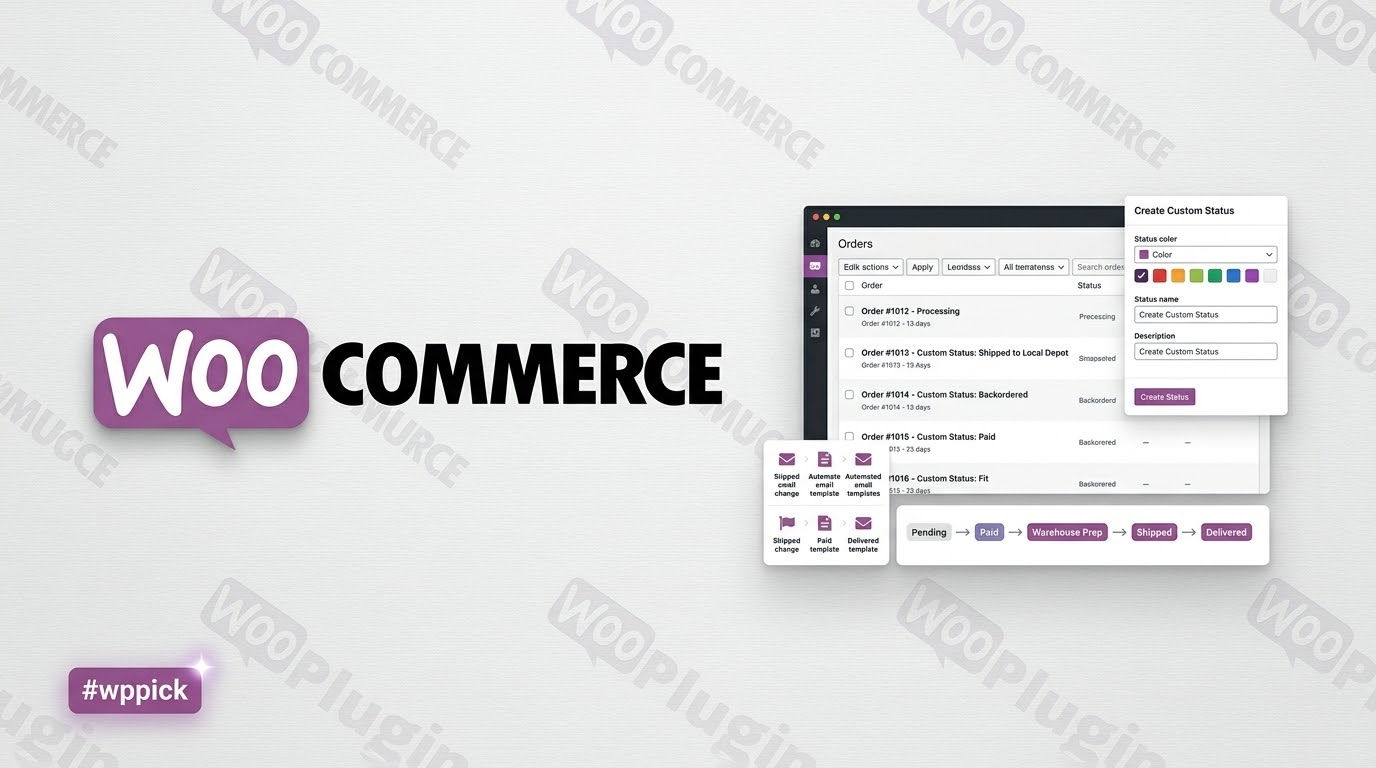
This WordPress plugin integrates into your existing store infrastructure to add, modify, and delete order statuses. Instead of relying solely on standard defaults like pending, processing, completed, or refunded, store administrators can establish a granular sequence reflecting exact business operations. Each status can be customized with distinct visual markers, integrated into core bulk actions, and linked with automatic notification routines to keep internal staff and external purchasers aligned.
Who Is It For
This solution serves digital merchants, logistics managers, and agency developers handling complex fulfillment workflows. It is highly beneficial for shops managing tailored goods, print-on-demand services, procurement-heavy pipelines, or multi-step booking operations. If your store requires steps such as assembly, quality control checking, custom printing, or local pickup preparation before an item ships, this extension provides the administrative framework needed to track those steps accurately.
Key Capabilities
- Create and edit custom order statuses with personalized titles, slugs, and distinct operational icons.
- Integrate newly created states cleanly into core order management views, bulk action dropdowns, and filtering columns.
- Configure custom email triggers linked to specific transactional shifts, allowing notifications to send automatically when an order advances.
- Edit core default statuses to rewrite titles or control whether items can be cancelled or downloaded while holding a specific status.
- Mark tailored tracking steps as paid to ensure download permissions unlock and stock levels adjust appropriately upon reaching that phase.
- Establish custom operational flows by using action buttons on the main administration screen to move orders quickly through defined sequences.
Practical WordPress Use Cases
Consider a custom furniture store utilizing a multi-week manufacturing process. Instead of leaving an order marked as processing for a month, the administrator can introduce sequential steps such as material sourcing, in production, and quality review. Another practical scenario involves wholesale businesses requiring separate awaiting payment verification and ready for pickup statuses. Digital software portals can use the extension to build a custom processing tier that keeps downloadable item links restricted until secondary validation occurs.
Setup and Compatibility Notes
Installation follows standard plugin deployment procedures via the WordPress dashboard or secure file transfer protocols. Once activated, management panels appear directly within the main settings menu. The extension is engineered to respect core hooks, ensuring high compatibility with reporting dashboards, invoicing extensions, and third-party shipping platforms. Administrators should verify that custom payment steps match expected download or inventory rules to prevent automatic digital fulfillment from triggering prematurely.
Why Choose It on WPPick
Acquiring this tool via WPPick allows store managers to scale operational capabilities without excessive initial investment. Users receive fully functional, cleanly packaged extensions optimized for rapid deployment and testing environments. This makes it straightforward to build out complex workflow proofs-of-concept, evaluate automation triggers, and refine customer transactional communication strategies prior to rolling features out to a live customer base.
Latest Version Context
Detailed release notes are not available from the provided sources for version 1.15.7. The extension continues to maintain modern codebase hygiene through routine updates aimed at ensuring stability, updating security practices like data escaping, and reinforcing operational compatibility across contemporary database architectures and technical systems.
Frequently Asked Questions
Can I create separate emails for specific custom statuses?
Yes. The extension features built-in email triggers that let you create completely new transactional notifications. These emails can be assigned to activate whenever an order switches from any status to your newly defined custom status, or during specific status transitions, allowing you to notify customers or warehouse teams automatically.
Will custom statuses interfere with my digital product downloads?
No. You can configure each custom status to be recognized as a paid state. When an order transitions to a status marked as paid, WooCommerce recognizes that the transaction is validated, ensuring that downloadable product permissions unlock seamlessly for the buyer and inventory counts update properly.
Can I delete or edit core WooCommerce statuses with this plugin?
You can edit core statuses to change their display names or icons to fit your branding. While you cannot completely delete core system statuses because WooCommerce relies on them for vital framework functions, you can add as many personalized steps as necessary to build a completely custom fulfillment sequence.
Does this extension support bulk administrative actions?
Yes. Any custom status you create integrates directly into the bulk actions dropdown menu on the main orders administration panel. This allows store managers to select multiple orders simultaneously and advance them to the next production or shipping phase with a single click.
Are custom statuses visible to customers in their account dashboards?
Yes. You can choose whether a custom status is displayed publicly or kept internal. If made public, customers will see the personalized status name directly within their account dashboard order history, keeping them fully informed about where their purchase stands in the fulfillment pipeline.
I. Download Limits & Account Benefits
- Free Downloads: Each email address receives 3 downloads per day for free products
- Upgrade Benefits: Purchase any paid product to increase your daily download limit by 3 for each paid product
- No Account Required: You can download immediately by receiving the download link via email
- Account Recommended: Create an account for easier access to your order history and direct update downloads
II. Understanding GPL vs Official Versions
Important: The products available on WPPick are GPL-licensed versions, which differ from official developer versions. Before purchasing, please read our comprehensive guide: Understanding GPL & Official Differences at WPPick
Key Points:
- GPL versions may not include premium support from original developers
- Updates may be delayed compared to official releases
- Some premium features might have limitations
- Always consider your specific needs and support requirements
III. Support & Assistance
We’re here to help through multiple channels:
- Email Support: Direct email assistance for all inquiries
- Live Chat: Real-time support during business hours
- Comprehensive Documentation: Detailed guides and tutorials
IV. Order Tracking
Access your complete purchase history and download links anytime: Order History
V. Account Access
New to WPPick? Login or Create Account to manage your downloads and orders efficiently.
VI. Refund Protection
We stand behind our products with a clear refund policy. Review our terms: Refund Policy
VII. Privacy & Security
Your data security is our priority. Learn how we protect your information: Privacy Policy
VII. Terms of Service
Understanding our service terms ensures a smooth experience: Terms of Use
Quick Tips for Best Experience
- Verify Compatibility: Check plugin/theme compatibility with your WordPress version
- Backup First: Always backup your site before installing new plugins or themes
- Test Environment: Consider testing on a staging site first
- Stay Updated: Regularly check for updates in your account dashboard
- Read Documentation: Review any included documentation for optimal setup
Need Help?
If you have questions about downloads, licensing, or need technical assistance, don’t hesitate to contact our support team. We’re committed to ensuring you have the best possible experience with WPPick products.
Ready to get started? Your download adventure begins with just one click!
- Improve escaping and sanitizing throughout codebase
- Tested up to WooCommerce 10.2
- "Translation triggered too early" errors
- Update the SkyVerge framework to v5.15.9
- Removed deprecated usage of WC_Email `$find` and `$replace` properties in favor of `$placeholder`. The associated filters `wc_order_status_manager_order_status_email_find_variables` and `wc_order_status_manager_order_status_email_replace_variables` have also been deprecated, with a new replacement: `wc_order_status_manager_order_status_email_placeholders`
- When an order moves to a custom paid status, we no longer delete the existing `woocommerce_downloadable_product_permissions` record for that order. Our new behavior better aligns with WooCommerce core paid statuses.