
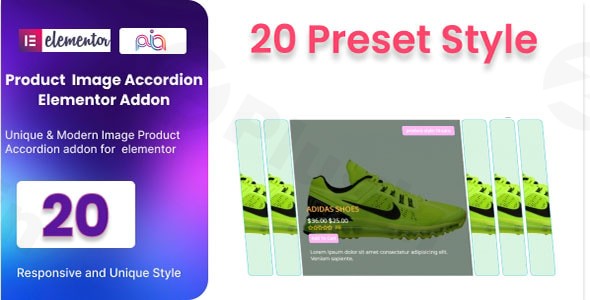
Woocommerce Product Image Accordion Addon For Elementor
/Year
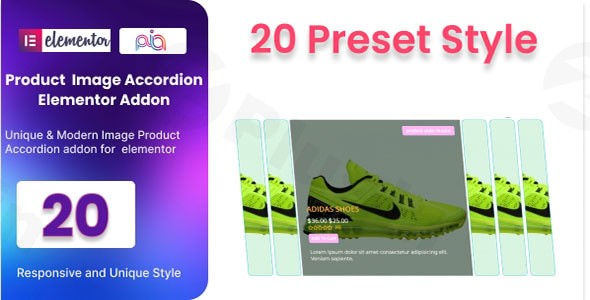
Enhance Store UX with Interactive Image Displays
Capturing buyer attention quickly is critical for online stores. The WooCommerce Product Image Accordion Addon For Elementor addresses this by transforming traditional, flat product galleries into dynamic, spatial-saving interactive accordions. Built specifically for the Elementor page builder, this extension gives store managers a fluid way to show off multiple angles, product variations, or featured items without cluttering the interface.
What It Does and Who It Is For
This plugin functions as a specialized display widget within the Elementor panel. When active, it allows users to display WooCommerce product media in alternating horizontal or vertical expanding panels. It is engineered for e-commerce store managers, web designers, and agile developers who build storefronts with Elementor and need an elegant presentation alternative to traditional grid-based galleries or basic sliders. It works seamlessly across various retail niches, particularly fashion, consumer electronics, and handcrafted goods where visual detail dictates user buying choices.
Key Structural Capabilities
- Offers flexible orientation settings, allowing you to choose between smooth vertical columns or stacked horizontal rows.
- Provides built-in design presets to rapidly deploy pre-configured visual arrangements without styling from scratch.
- Integrates directly with Elementor typography, background control, and padding options for precise custom branding.
- Utilizes light scripts to minimize assets, keeping loading behavior fast and maintaining search index friendliness.
- Responsive breakpoint handling ensures panels stack correctly and respond precisely to touch actions on tablets and mobile devices.
Practical WooCommerce Use Cases
Digital stores leverage this tool to handle complex layout dilemmas. For instance, an online apparel retailer can showcase four distinct color variations or angles of a garment within a single block, saving the user from scrolling down long descriptive pages. Another clear use case is showcasing bundled package items where each panel in the accordion highlights a separate component of the product group. Additionally, it serves well on shop index pages to reveal hidden promotional elements or details when a user interacts with a highlighted item card.
Setup and Integration Context
Deployment follows standard WordPress plugin procedures. Once activated alongside WooCommerce and Elementor, a dedicated accordion block appears inside your layout builder element container. It relies entirely on standard database relations and standard WooCommerce hooks, meaning it does not alter underlying catalog architectures or core metadata fields. It maintains compatibility across common, performance-optimized store themes that respect standard theme hooks.
Why Choose This Extension on WPPick
Acquiring this extension via WPPick provides an efficient path to modernizing layout options under clean GPL distribution rules. Users get access to a fully functional package devoid of standard billing gates or software activation blocks. This setup enables developers to trial new presentation systems safely across staging servers, local setups, or test environments prior to executing major design modifications on a live digital enterprise.
Latest Version Context
The product is updated to version 2.6. Detailed release notes are not available from the provided sources. Because public engineering changelogs are restricted by the original vendor behind closed documentation panels, users can rely on the automated safety scans provided here on WPPick, confirming clean code compilation and asset reliability across current development versions.
Frequently Asked Questions
Does this block replace the main WooCommerce gallery?
It can function as a secondary visualization block or as a primary item image presentation depending on how you build your product singular template inside Elementor Pro or similar template tools. It does not overwrite the core gallery mechanism unless explicitly styled to do so within your layout architecture.
Are the accordion panels touch-friendly on mobile browsers?
Yes, the expansion behaviors scale according to responsive media parameters. The elements respond accurately to tap gestures on touch devices, maintaining layout structure across varied viewport layouts.
Can I feed image sources dynamically from custom variables?
The module supports default WooCommerce media loops and standard static image mappings. Dynamic fields depend on your underlying Elementor core configuration and field setup definitions.
Does the extension support auto-activation on hover?
Yes, configuration parameters allow managers to set whether accordion panels trigger open via mouse click actions or fluid mouse hover tracking behaviors.
Will this plugin slow down page loading performance?
No, the core script bundle relies on lightweight assets to control the layout states, preventing blockages that typically degrade performance scores or user metrics.
I. Download Limits & Account Benefits
- Free Downloads: Each email address receives 3 downloads per day for free products
- Upgrade Benefits: Purchase any paid product to increase your daily download limit by 3 for each paid product
- No Account Required: You can download immediately by receiving the download link via email
- Account Recommended: Create an account for easier access to your order history and direct update downloads
II. Understanding GPL vs Official Versions
Important: The products available on WPPick are GPL-licensed versions, which differ from official developer versions. Before purchasing, please read our comprehensive guide: Understanding GPL & Official Differences at WPPick
Key Points:
- GPL versions may not include premium support from original developers
- Updates may be delayed compared to official releases
- Some premium features might have limitations
- Always consider your specific needs and support requirements
III. Support & Assistance
We’re here to help through multiple channels:
- Email Support: Direct email assistance for all inquiries
- Live Chat: Real-time support during business hours
- Comprehensive Documentation: Detailed guides and tutorials
IV. Order Tracking
Access your complete purchase history and download links anytime: Order History
V. Account Access
New to WPPick? Login or Create Account to manage your downloads and orders efficiently.
VI. Refund Protection
We stand behind our products with a clear refund policy. Review our terms: Refund Policy
VII. Privacy & Security
Your data security is our priority. Learn how we protect your information: Privacy Policy
VII. Terms of Service
Understanding our service terms ensures a smooth experience: Terms of Use
Quick Tips for Best Experience
- Verify Compatibility: Check plugin/theme compatibility with your WordPress version
- Backup First: Always backup your site before installing new plugins or themes
- Test Environment: Consider testing on a staging site first
- Stay Updated: Regularly check for updates in your account dashboard
- Read Documentation: Review any included documentation for optimal setup
Need Help?
If you have questions about downloads, licensing, or need technical assistance, don’t hesitate to contact our support team. We’re committed to ensuring you have the best possible experience with WPPick products.
Ready to get started? Your download adventure begins with just one click!