
Wooecom
/Year
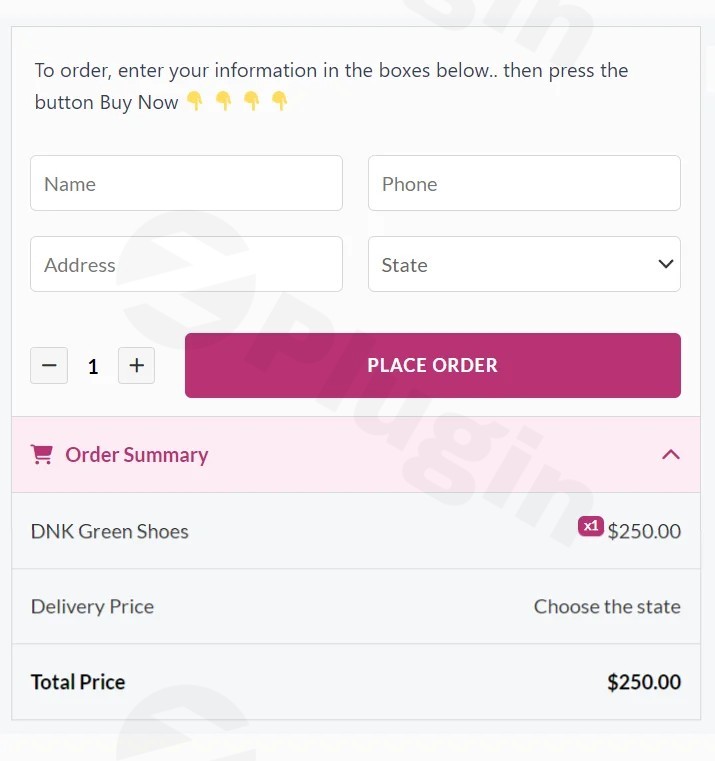
In the competitive landscape of e-commerce, every click and every moment matters. To truly thrive, online stores need to offer an unparalleled user experience that minimizes friction and accelerates the path to purchase. Enter WooEcom, a powerful premium WordPress plugin meticulously engineered to transform your WooCommerce store’s purchasing experience, drive down cart abandonment, and significantly boost your conversion rates.WooEcom empowers customers to complete their orders directly from the product page, eliminating unnecessary steps and creating a seamless, intuitive checkout journey. As a premium solution, WooEcom provides advanced, reliable capabilities designed for serious store owners committed to maximizing their online potential.
Key Features & Benefits That Drive Sales
WooEcom is built on a foundation of performance and user-centric design, offering a suite of features engineered to optimize your sales funnel.
Accelerate the Path to Purchase
The most common barrier to conversion is a convoluted checkout process. WooEcom addresses this directly by integrating a streamlined ordering form right on individual product pages. This means customers can make instant purchases without navigating away to a separate cart page. This direct approach is proven to reduce friction, minimize cart abandonment, and significantly increase your conversion rates, leading to higher revenue and enhanced customer satisfaction.
Full Compatibility with Product Variations
For stores selling products with multiple options—be it different colors, sizes, materials, or other attributes—WooEcom offers flawless compatibility. It effortlessly handles all WooCommerce variable products, allowing customers to select their preferred options and place their order immediately, all from a single, intuitive interface on the product page. This ensures a smooth experience even for complex product catalogs.
Highly Customizable & User-Friendly
Tailoring your e-commerce experience to match your brand and operational needs is crucial. WooEcom provides extensive customization options, giving you full control over its appearance and functionality. You can easily customize colors to align with your store’s branding, choose to show or hide the order summary, and configure pricing and shipping rules seamlessly. Furthermore, WooEcom is optimized for the modern mobile shopper, offering specific features such as clickable phone and WhatsApp call icons directly within the order form, catering to the growing mobile shopping audience and facilitating immediate customer interaction.
Optimized for Performance & Unwavering Trust
Performance is paramount for any e-commerce site. WooEcom is developed with clean, efficient code, ensuring lightning-fast order processing that enhances the user experience without slowing down your site. When you acquire WooEcom from ZeroPlugin.com, you are investing in a genuine, GPL-licensed product. Our commitment to security and reliability means our plugin files are regularly updated and rigorously scanned for potential threats via reputable third-party services like VirusTotal, guaranteeing a safe, stable, and reliable addition to your WordPress website.
Ideal Use Cases for WooEcom
WooEcom is a versatile tool perfect for various e-commerce strategies:
- High-Converting Landing Pages: Create dedicated landing pages for specific products with an immediate purchase option, maximizing conversion from marketing campaigns.
- Simplifying Buying for Simple Products: For single-option products or those requiring minimal choices, WooEcom offers the quickest possible purchase flow.
- Quick-Order System: Provide an alternative to the traditional cart, allowing customers who know exactly what they want to bypass extra steps and complete their order instantly.Whether you’re looking to create an efficient direct-to-checkout experience or simply optimize existing product pages for speed and convenience, WooEcom is an essential tool for maximizing your WooCommerce store’s potential.
Setting Up WooEcom: A Step-by-Step Guide
Installing and configuring WooEcom is a straightforward process, designed to integrate seamlessly with your existing WooCommerce setup.
- Purchase and Download: Acquire the WooEcom plugin from ZeroPlugin.com. You will receive a ZIP file containing the plugin.
- Log into WordPress: Access your WordPress admin dashboard.
- Navigate to Plugins: Go to Plugins > Add New.
- Upload Plugin: Click the “Upload Plugin” button at the top of the page.
- Choose File: Click “Choose File” and select the WooEcom ZIP file you downloaded.
- Install Now: Click “Install Now” to upload and install the plugin.
- Activate Plugin: Once installed, click “Activate Plugin.”WooEcom is now installed and active on your site. You will find its settings usually under WooCommerce > Settings or a dedicated menu item in your WordPress dashboard, ready for configuration.
Mastering WooEcom: Configuration & Usage
After activation, a few simple configuration steps will allow you to leverage WooEcom’s full potential:
- Access WooEcom Settings: Locate the WooEcom settings panel within your WordPress dashboard (typically under the WooCommerce menu or a dedicated WooEcom section).
- General Settings: Configure global options such as enabling/disabling the direct order form, choosing which product types it applies to, and setting default behaviors.
- Customization: Dive into the styling options to match the order form with your website’s aesthetic. Adjust colors, fonts, and layout. Decide whether to display the order summary to provide transparency to your customers.
- Pricing & Shipping Rules: Define how pricing and shipping are handled within the direct order form, ensuring accuracy and consistency with your store’s policies.
- Mobile Optimization: Activate and configure mobile-specific features, such as the clickable phone and WhatsApp call icons, to cater to your mobile audience effectively.
- Test Thoroughly: After configuring, visit your product pages on both desktop and mobile devices to ensure the WooEcom order form functions correctly and provides a smooth user experience.By following these steps, you can tailor WooEcom to perfectly suit your store’s specific needs and start seeing an immediate impact on your conversion rates.
Why WooEcom Stands Apart
WooEcom isn’t just another plugin; it’s a strategic investment in your e-commerce success. Its unique approach to streamlining the checkout process, coupled with robust customization and a focus on performance, sets it apart. The emphasis on trust and security through ZeroPlugin.com’s vetting process ensures that you are deploying a reliable and secure solution that aligns with best practices for online business. For both technical developers seeking efficient code and non-technical marketers aiming for higher conversions, WooEcom simplifies complex tasks, improves workflow, and delivers a clear return on investment.
Conclusion
In an age where customer patience is dwindling, WooEcom offers a critical advantage by simplifying and accelerating the purchasing journey. By enabling direct-from-product-page ordering, comprehensive product variation support, extensive customization, and a commitment to performance and trust, WooEcom empowers your WooCommerce store to achieve higher conversion rates and deliver a superior customer experience.Ready to simplify checkout and boost your sales? Choose ZeroPlugin.com for your WooEcom plugin. We provide verified, safe, and regularly updated GPL software to help your business thrive without compromise. Unlock the full potential of your WooCommerce store today with WooEcom.
I. Download Limits & Account Benefits
- Free Downloads: Each email address receives 3 downloads per day for free products
- Upgrade Benefits: Purchase any paid product to increase your daily download limit by 3 for each paid product
- No Account Required: You can download immediately by receiving the download link via email
- Account Recommended: Create an account for easier access to your order history and direct update downloads
II. Understanding GPL vs Official Versions
Important: The products available on WPPick are GPL-licensed versions, which differ from official developer versions. Before purchasing, please read our comprehensive guide: Understanding GPL & Official Differences at WPPick
Key Points:
- GPL versions may not include premium support from original developers
- Updates may be delayed compared to official releases
- Some premium features might have limitations
- Always consider your specific needs and support requirements
III. Support & Assistance
We’re here to help through multiple channels:
- Email Support: Direct email assistance for all inquiries
- Live Chat: Real-time support during business hours
- Comprehensive Documentation: Detailed guides and tutorials
IV. Order Tracking
Access your complete purchase history and download links anytime: Order History
V. Account Access
New to WPPick? Login or Create Account to manage your downloads and orders efficiently.
VI. Refund Protection
We stand behind our products with a clear refund policy. Review our terms: Refund Policy
VII. Privacy & Security
Your data security is our priority. Learn how we protect your information: Privacy Policy
VII. Terms of Service
Understanding our service terms ensures a smooth experience: Terms of Use
Quick Tips for Best Experience
- Verify Compatibility: Check plugin/theme compatibility with your WordPress version
- Backup First: Always backup your site before installing new plugins or themes
- Test Environment: Consider testing on a staging site first
- Stay Updated: Regularly check for updates in your account dashboard
- Read Documentation: Review any included documentation for optimal setup
Need Help?
If you have questions about downloads, licensing, or need technical assistance, don’t hesitate to contact our support team. We’re committed to ensuring you have the best possible experience with WPPick products.
Ready to get started? Your download adventure begins with just one click!