
WordPress Real Media Library – Media Categories / Folder File Managers
/Year
Product Intent
Real Media Library is a WordPress plugin designed to transform the native media library into a structured, folder-based file management system. It directly addresses the limitations of the default WordPress media grid by allowing administrators, editors, and content creators to categorize, organize, and locate images, videos, and documents with efficiency. This tool is built for websites handling large volumes of media, such as portfolios, e-commerce stores, news portals, and digital agencies, providing a desktop-like file navigation experience directly within the WordPress dashboard.
Latest Version 4.23.0 Changes
While version 4.23.0 of the Real Media Library plugin is officially listed as the current version on the WordPress.org plugin repository and devowl.io, the official developer changelog page at changelog.devowl.io does not yet contain the release notes for version 4.23.0. The changelog currently lists version 4.22.86 as the most recent entry.
Key Capabilities
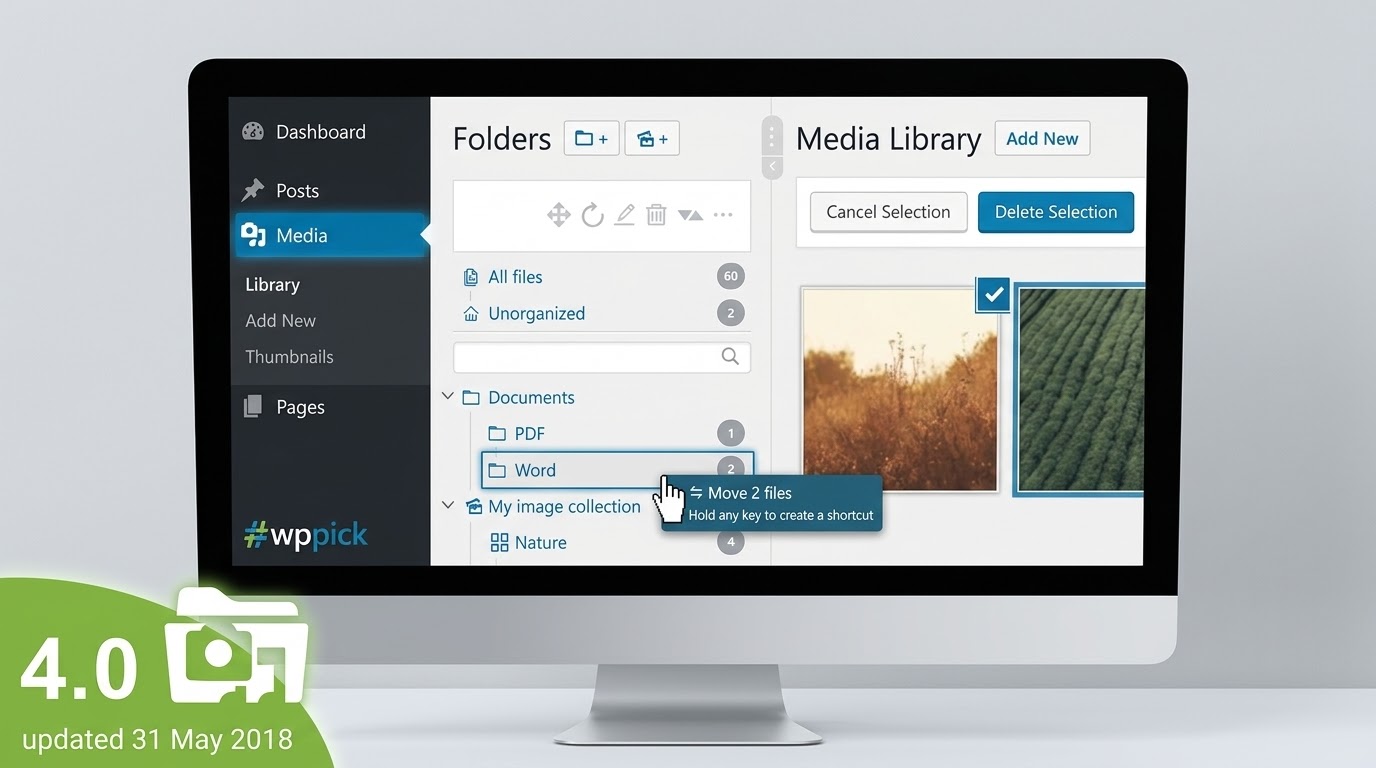
The core functionality revolves around a dynamic, drag-and-drop folder tree integrated directly into the standard media library view. Users can create, rename, delete, and rearrange folders seamlessly using an intuitive interface. It supports unlimited folders and subfolders, enabling complex hierarchical structures. The plugin allows users to drag files individually or in bulk into designated folders. It also includes an advanced custom sorting system, allowing users to quickly rearrange the physical order of files within a folder via drag-and-drop. A shortcut feature enables users to place a single media file in multiple folders without duplicating the actual file on the server, saving storage space while improving accessibility. Furthermore, the plugin offers dynamic gallery generation directly from a specific folder, which automatically updates on the frontend when new files are added to that folder in the backend interface.
Practical WordPress Use Cases
E-commerce administrators use this plugin to organize product images by brand, category, or seasonal collection, drastically reducing the time spent searching for specific product shots during catalog updates. Photographers and creatives utilize the folder structure to separate client galleries, portfolio pieces, and blog assets, keeping their digital workspace organized. Corporate websites benefit from separating downloadable documents, such as PDFs and whitepapers, from general site graphics and team photos. Multilingual websites can maintain separate folders for language-specific assets, ensuring editors select the correct localized imagery. Agencies managing client sites use the system to hand over a clean, structured media library, preventing client confusion and maintaining aesthetic consistency across the site layout. Educational platforms rely on it to sort course materials, assignment downloads, and instructional videos by semester or subject matter.
Setup and Compatibility Notes
Installation is straightforward, integrating seamlessly with the standard WordPress media library interface without requiring a separate dashboard or complex configuration steps. It is designed to be highly compatible with major WordPress page builders, including Elementor, WPBakery Page Builder, Divi, and the native Gutenberg block editor. Within these builders, the folder structure is accessible directly from the default media modal, ensuring a continuous and uninterrupted workflow. The plugin is optimized for performance, utilizing fast database queries to load the folder tree quickly even with thousands of files and deeply nested directories. It fully supports WordPress multisite networks, allowing network administrators to manage folder structures across various sub-sites effectively. Compatibility with translation plugins ensures that media taxonomy is handled correctly within the folder architecture.
Reasons to Choose It
Real Media Library stands out due to its native feel and highly intuitive interface. Unlike other solutions that hijack the media library or introduce complex, disjointed external interfaces, this plugin feels like a natural, built-in extension of WordPress. The ability to create shortcuts rather than duplicating files demonstrates a clear focus on server efficiency and storage management. Its robust compatibility with leading page builders ensures that the organizational benefits extend directly into the actual page creation process, not just backend file management. The active development and continuous responsiveness to modern WordPress environment requirements make it a reliable choice for long-term media organization.
Latest Version Context
Frequently Asked Questions
- What happens to my physical files on the server?
The plugin creates virtual folders within the WordPress database. The actual physical file paths on your server remain completely unchanged, ensuring that existing image links, embedded media, and SEO structures are never broken.
- Can I place the same image in multiple folders?
Yes, the plugin includes a dedicated shortcut feature. You can create a shortcut of an image and place it in a different folder. This references the original file without creating a duplicate file on your server.
- Is this compatible with visual page builders?
Yes, the folder structure integrates directly into the standard WordPress media modal. Because most major page builders use this native modal, the plugin works seamlessly with tools like Elementor, Divi, Gutenberg, and WPBakery.
- What happens if I deactivate or uninstall the plugin?
Your images and media files are completely safe. Because the folders are virtual taxonomies, uninstalling the plugin simply removes the folder structure interface from the dashboard. All your files will remain accessible in the standard WordPress media library exactly as they were before installation.
- Does the plugin support WordPress Multisite installations?
Yes, it is fully compatible with WordPress Multisite environments. You can activate it across the entire network, and each individual sub-site will maintain its own independent and private folder structure.
I. Download Limits & Account Benefits
- Free Downloads: Each email address receives 3 downloads per day for free products
- Upgrade Benefits: Purchase any paid product to increase your daily download limit by 3 for each paid product
- No Account Required: You can download immediately by receiving the download link via email
- Account Recommended: Create an account for easier access to your order history and direct update downloads
II. Understanding GPL vs Official Versions
Important: The products available on WPPick are GPL-licensed versions, which differ from official developer versions. Before purchasing, please read our comprehensive guide: Understanding GPL & Official Differences at WPPick
Key Points:
- GPL versions may not include premium support from original developers
- Updates may be delayed compared to official releases
- Some premium features might have limitations
- Always consider your specific needs and support requirements
III. Support & Assistance
We’re here to help through multiple channels:
- Email Support: Direct email assistance for all inquiries
- Live Chat: Real-time support during business hours
- Comprehensive Documentation: Detailed guides and tutorials
IV. Order Tracking
Access your complete purchase history and download links anytime: Order History
V. Account Access
New to WPPick? Login or Create Account to manage your downloads and orders efficiently.
VI. Refund Protection
We stand behind our products with a clear refund policy. Review our terms: Refund Policy
VII. Privacy & Security
Your data security is our priority. Learn how we protect your information: Privacy Policy
VII. Terms of Service
Understanding our service terms ensures a smooth experience: Terms of Use
Quick Tips for Best Experience
- Verify Compatibility: Check plugin/theme compatibility with your WordPress version
- Backup First: Always backup your site before installing new plugins or themes
- Test Environment: Consider testing on a staging site first
- Stay Updated: Regularly check for updates in your account dashboard
- Read Documentation: Review any included documentation for optimal setup
Need Help?
If you have questions about downloads, licensing, or need technical assistance, don’t hesitate to contact our support team. We’re committed to ensuring you have the best possible experience with WPPick products.
Ready to get started? Your download adventure begins with just one click!
- prepare WordPress plugins for React 19 compatibility (CU-86956vcbx)
- minimum required WordPress version is now 6.1 (CU-86956vcbx)
- declare WordPress 7.1 compatibility in wporg readmes (CU-869ejj0vg)
- implement safe clone server and activation reclaim process (CU-869edzz7b)
- do not invalidate license for hostingersite.com (CU-869ea3vfe)
- sever cloned license identity before remote calls (CU-869edzz7b)
- Make import of exported folder structure work again (CU-869cbm3x5)
- Remove default values for some database fields to avoid "Cant have a default value" errors (CU-869cd7jc0)
- Compatibility with WordPress 7.0 (CU-869ck49rt)
- Prevent wrong multisite license target selection with WP_SITEURL (CU-869chrw97)
- Compatibility with WP Travel Engine (CU-869ccgymq)
- Prevent Google PageSpeed Insights warnings by excluding deprecated APIs (CU-869cbmc6b)
- Preload chunks and not wait for resources before rendering the cookie banner to improve Google PageSpeed Insights score (CU-869ccahh5)
- Flaky tests (CU-8699ywv2h)
- Enhance translatable properties schema with refinable structure (CU-869c8thkx)
- Add versionless contracts, interpolated params and fix GET request ContentType (CU-8699ywv2h)
- Implement cursor-based pagination for orders retrieval and add reusable pagination metadata schema (CU-869c8thkx)
- Correctly use peer dependencies (CU-8699tgzbd)
- Introduce complyforce-proxy with OVHcloud storage (CU-8699tgzbd)
- Improve CPU/memory usage in development environment (CU-869cjmbyz)
- Changelog dependencies were not processed correctly and broke (CU-869ckaf4m)
- Make backend package more side-effect-free, concurrent-aware and allow to register shutdown callbacks (CU-869cb1mbz)
- Preload chunks and not wait for resources before rendering the cookie banner to improve Google PageSpeed Insights score (CU-869ccahh5)
- Improved SQL queries when using together with WPML (CU-869c14un4).
- Dependency updates @devowl-wp/utils 1.20.13: Fixed compatibility with Hostinger and services could not be created (CU-869c14a9d).
- show media library folders in MailPoet newsletter editor https://app.clickup.com/t/869bcanq9
- Access to source files of plugin (CU-869ad3694)
- Development dependency update @devowl-wp/continuous-integration 0.7.10 (Purpose of dependency: DevOps macros, job templates and jobs for Gitlab CI and @devowl-wp/node-gitlab-ci)
- OSS-extract only in master pipeline (CU-869ad3694)
- Development dependency update @devowl-wp/eslint-config 0.2.19 (Purpose of dependency: Provide eslint configuration for our complete monorepo)
- Introduce .oss.ts and oss-extract CLI (CU-869ad3694)
- Development dependency update @devowl-wp/monorepo-utils 0.2.19 (Purpose of dependency: Predefined monorepo utilities and tasks)
- Introduce .oss.ts and oss-extract CLI (CU-869ad3694)
- Development dependency update @devowl-wp/webpack-config 0.2.49 (Purpose of dependency: Webpack config builder for multiple ecosystems like standalone React frontends, Antd, Preact and WordPress)
- Introduce .oss.ts and oss-extract CLI (CU-869ad3694)
- folder selector not visible in Gutenberg when Divi is active (CU-869a8e6j8)
- PHP 8.3 deprecation notice: Implicitly marking parameter as nullable is deprecated (CU-869a837c4)
- improved font in Real Media Library logo (CU-8699pygy5)
- Development dependency update @devowl-wp/api 1.3.0
- Development dependency update @devowl-wp/continuous-integration 0.7.9
- Development dependency update @devowl-wp/eslint-config 0.2.18