
WordPress Toolbar Editor Pro Addon
/Year
What is the WordPress Toolbar Editor Pro Addon?
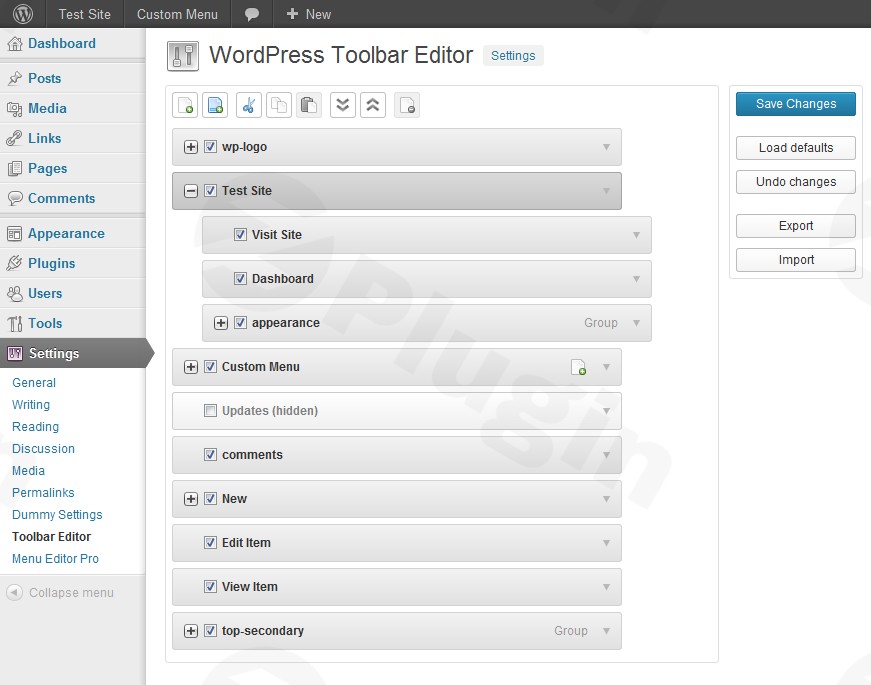
The WordPress Toolbar Editor Pro Addon is a specialized extension designed to work seamlessly alongside Admin Menu Editor Pro. It gives site administrators complete authority over the WordPress admin toolbar, often referred to as the admin bar. Instead of accepting the default layout provided by WordPress and various plugins, site owners can completely reorganize the top navigation to suit their exact workflow requirements.
What Does the Toolbar Editor Pro Addon Do?
This plugin allows users to modify every aspect of the top admin bar. You can easily hide unwanted shortcut menus injected by third-party plugins, reorder existing items using a simple visual interface, and create entirely new custom toolbar links. Whether you want to add quick shortcuts to frequently used dashboard pages, internal tools, or external resources, the plugin makes layout adjustments fast and efficient without requiring manual code modifications.
Who Is This Plugin For?
The addon is built primarily for website administrators, developers, and digital agencies managing complex WordPress installations or client sites. Multi-author blogs, membership platforms, and ecommerce stores cluttered with plugin shortcuts will benefit significantly from a clean, customized toolbar. It is also an ideal solution for administrators looking to enforce a standardized navigation experience across multisite networks.
Key Capabilities and Features
The extension includes a robust set of features tailored for efficient backend management. Drag-and-drop functionality ensures that repositioning menu items takes only seconds. Advanced visibility rules allow you to control which user roles or specific users can view particular toolbar elements. Additionally, you can add custom dropdown menus, integrate external links, and clean up visual clutter to improve day-to-day productivity.
Practical WordPress Use Cases
Real-world applications include removing distracting update notices and extraneous links from client dashboards to prevent accidental changes. Agencies often use the tool to add custom support links or direct access tickets right into the toolbar for their clients. Content teams benefit from adding direct creation shortcuts, reducing the number of clicks required to publish new posts or manage media files.
Setup and Compatibility Notes
Because this utility functions as an extension, it requires Admin Menu Editor Pro to be installed and activated on your WordPress site. It is fully compatible with standard single-site installations as well as WordPress Multisite environments. The plugin is designed to work smoothly with major modern web browsers and conforms to core WordPress coding standards to ensure optimal performance.
Latest Version Context
Version 1.5.2 includes updates to the internal plugin update checker to ensure reliable background notifications and maintenance workflows. It has also been thoroughly tested and verified for full compatibility with WordPress up to version 7.0.3, ensuring stable operation on modern server environments.
Why Choose This Addon on WPPick?
Sourcing your plugins through WPPick provides access to verified, clean files ready for deployment. This addon delivers an efficient way to take charge of your administrative interface, saving time and reducing interface fatigue for everyone who logs into your dashboard.
Frequently Asked Questions
Q: Does this plugin work without Admin Menu Editor Pro? A: No, this is a dedicated pro addon and requires the main Admin Menu Editor Pro plugin to function properly.
Q: Can I restrict specific toolbar items to certain user roles? A: Yes, the plugin includes capability and role-based visibility settings so you can show or hide items per user group.
Q: Is it possible to add completely custom links to the admin bar? A: Yes, you can create custom menu nodes and assign any internal or external URL alongside custom icons.
Q: Does customizing the toolbar affect frontend visitors? A: The toolbar modifications apply primarily to logged-in users who have permission to view the admin bar on the frontend or backend.
I. Download Limits & Account Benefits
- Free Downloads: Each email address receives 3 downloads per day for free products
- Upgrade Benefits: Purchase any paid product to increase your daily download limit by 3 for each paid product
- No Account Required: You can download immediately by receiving the download link via email
- Account Recommended: Create an account for easier access to your order history and direct update downloads
II. Understanding GPL vs Official Versions
Important: The products available on WPPick are GPL-licensed versions, which differ from official developer versions. Before purchasing, please read our comprehensive guide: Understanding GPL & Official Differences at WPPick
Key Points:
- GPL versions may not include premium support from original developers
- Updates may be delayed compared to official releases
- Some premium features might have limitations
- Always consider your specific needs and support requirements
III. Support & Assistance
We’re here to help through multiple channels:
- Email Support: Direct email assistance for all inquiries
- Live Chat: Real-time support during business hours
- Comprehensive Documentation: Detailed guides and tutorials
IV. Order Tracking
Access your complete purchase history and download links anytime: Order History
V. Account Access
New to WPPick? Login or Create Account to manage your downloads and orders efficiently.
VI. Refund Protection
We stand behind our products with a clear refund policy. Review our terms: Refund Policy
VII. Privacy & Security
Your data security is our priority. Learn how we protect your information: Privacy Policy
VII. Terms of Service
Understanding our service terms ensures a smooth experience: Terms of Use
Quick Tips for Best Experience
- Verify Compatibility: Check plugin/theme compatibility with your WordPress version
- Backup First: Always backup your site before installing new plugins or themes
- Test Environment: Consider testing on a staging site first
- Stay Updated: Regularly check for updates in your account dashboard
- Read Documentation: Review any included documentation for optimal setup
Need Help?
If you have questions about downloads, licensing, or need technical assistance, don’t hesitate to contact our support team. We’re committed to ensuring you have the best possible experience with WPPick products.
Ready to get started? Your download adventure begins with just one click!
- Updated the internal plugin update checker.
- Tested up to WP 7.0.3.