
Wp Booking System
/Year
Flexible Booking Management for Your Business
In today’s fast-paced digital world, efficient booking and reservation management are crucial for rental businesses, service providers, and any enterprise relying on scheduled appointments. The WP Booking System is a premium WordPress plugin engineered to streamline this entire process, offering an robust, flexible, and reliable solution directly from your WordPress website. Designed for businesses of all sizes, it provides unparalleled control over your booking process, ensuring seamless operations and enhanced customer satisfaction.The WP Booking System stands out as a sophisticated, lightweight plugin, meticulously crafted to be secure, extendable, and regularly updated. Its core strength lies in its ability to manage per-day bookings, making it an ideal choice for accommodations, car and boat rentals, equipment hire, and event spaces.
Key Features That Set Our Plugin Apart
The WP Booking System is packed with advanced functionalities that empower businesses to manage reservations with precision and ease, demonstrating its expertise in delivering a comprehensive booking solution.
Multi-Calendar System
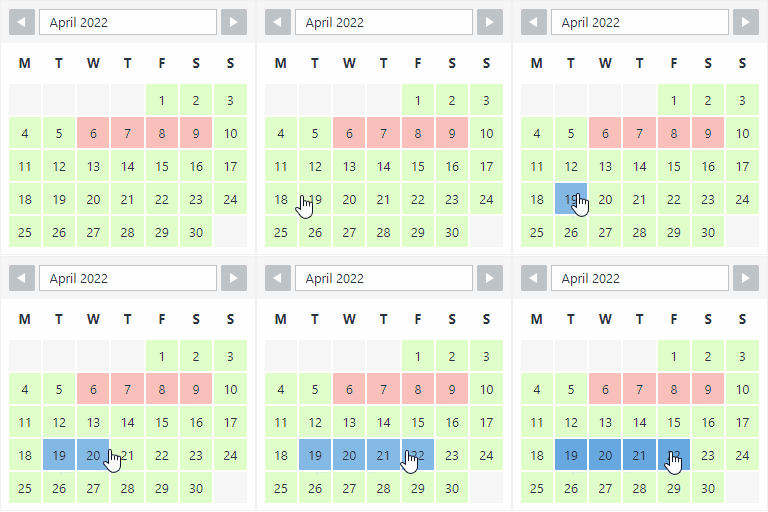
Gain complete oversight by creating and managing an unlimited number of booking calendars simultaneously. These can be combined into a unified overview, making it perfect for businesses with multiple services, locations, or rental products. Each calendar can be easily embedded into any WordPress post or page using shortcodes or the Gutenberg block.
Smart Availability Search
Enhance user experience and conversion rates with an advanced search widget. This feature allows your website visitors to quickly check availability across multiple products or services for specific dates, simplifying their decision-making process.
Advanced Booking Rules & Availability Management
Take precise control over your booking inventory. The plugin enables you to set comprehensive restrictions, including:
- Minimum/Maximum Booking Durations: Define the shortest and longest permissible booking periods.
- Specific Start/End Days: Enforce particular days of the week for bookings to begin or end.
- Advance Booking Limits: Set how far in advance bookings can be made.
- Seasonal or Year-Round Application: Apply these rules flexibly across different periods.Availability is manually managed, with booked days automatically blocked to prevent overbooking, ensuring accurate inventory control.
Online and Offline Payments
The premium version of WP Booking System facilitates both online and offline payment processing. It integrates seamlessly with major payment platforms, allowing you to display taxes, offer discounts via coupon codes, and charge deposits, providing a flexible and secure transaction experience for your customers.
iCalendar Sync
A critical feature for rental businesses, iCalendar synchronization allows you to import and export bookings effortlessly. This ensures your availability is consistently updated across popular external platforms such as Airbnb, Booking.com, and HomeAway, preventing scheduling conflicts and maximizing your booking potential.
Inventory Management
Prevent overbooking and streamline operations with automatic inventory tracking. The system will automatically close dates or products when maximum booking capacities are reached, ensuring your availability is always accurate and up-to-date.
Notifications and Reminders
Maintain excellent communication with automated email and SMS notifications and reminders. These can be configured for both clients and administrators for various actions, including booked, canceled, or rescheduled appointments, fostering trustworthiness and professionalism.
Booking Management
An intuitive backend interface provides administrators with a centralized hub to review, manage, and edit all bookings. Features like sorting, searching, and filtering bookings, along with the ability to add manual bookings, offer unparalleled administrative control and efficiency.
Complete Customization
Align your booking calendars perfectly with your brand identity. The plugin offers extensive customization options, allowing you to personalize calendar colors, text, and display options. Each calendar can have unique styling with split color options for legends and tooltips, supporting multi-month displays and configurable start days/months.
Bulk Editing Tools
Save valuable time with the bulk date editor. This powerful tool enables you to make sweeping changes across date ranges with just a few clicks, drastically improving efficiency for large-scale availability updates.
Secure User Access
Maintain stringent control over your booking calendars with granular user permissions. Assign specific calendars to individual users or user roles, ensuring secure and appropriate access for your team members.
Global Business Ready
Reach a wider audience with the plugin’s comprehensive multi-language support. It boasts a fully translatable interface compatible with 29 languages out of the box, eliminating the need for additional translation plugins and allowing you to manage all translations directly from your WordPress dashboard.
Multi-Currency Support
Cater to an international clientele by accepting payments in various currencies, making it an ideal solution for global businesses and diverse customer bases.
Setup & Usage Guide
Getting started with WP Booking System is straightforward, designed for ease of use whether you’re a technical user or a marketer.
- Installation: As a premium plugin, once you’ve purchased the WP Booking System, you’ll download the plugin file. Navigate to your WordPress Dashboard, go to
Plugins > Add New > Upload Plugin, select the downloaded file, and clickInstall Now. After installation, remember toActivate Plugin. - Creating Calendars: From your WordPress dashboard, navigate to the WP Booking System menu. Here, you can create new booking calendars, giving each a unique name.
- Configuring Availability: Within each calendar, you’ll find options to manage availability. You can manually block dates, set minimum/maximum booking durations, and define specific start/end days using the intuitive calendar interface. Leverage the Bulk Editing Tools for efficient date range modifications.
- Customizing Appearance: Personalize your calendar’s look under the customization settings. Choose colors, update legend text, and define tooltip information to match your website’s aesthetic.
- Creating Booking Forms: Link your calendars to customizable booking forms. Design forms to collect all necessary client information.
- Implementing iCalendar Sync: For integration with external platforms like Airbnb or Booking.com, access the iCalendar Sync settings. Here, you can generate export feeds and import external calendars to keep all your availability synchronized.
- Setting Up Payments: Configure your preferred online payment gateways (e.g., Stripe, PayPal), set up offline payment options, define taxes, and create coupon codes within the payment settings.
- Notifications: Customize automated email and SMS notifications for various booking statuses for both administrators and clients.
- Embedding on Your Site: Utilize the provided shortcodes or Gutenberg blocks to insert your booking calendars and forms into any WordPress post or page where you want users to make reservations.
- Managing Bookings: All incoming bookings can be managed from the central “Bookings” interface within the plugin. Here you can review, edit, approve, or cancel reservations, and even add manual bookings.
Technical Specifications & Compatibility
The WP Booking System is engineered for robust performance and broad compatibility within the WordPress ecosystem, ensuring a stable and reliable booking experience.
- WordPress Version: Requires WordPress version 4.7 or higher, extensively tested up to version 6.8.3.
- PHP Version: A minimum PHP version of 5.6 or higher is required for optimal functionality.
- Active Installations: Boasts over 10,000 active installations, a testament to its popularity and reliability.
- Page Builder Compatibility: Seamlessly integrates with leading page builders, including Elementor, Gutenberg, Beaver Builder, Divi Theme, FacetWP, WP Bakery, Visual Composer, and Search & Filter Pro, offering maximum flexibility in design.
- Performance: Described as “lightweight,” the plugin prioritizes efficient performance. Version 5.0.0 was a complete rewrite, enhancing security and extendibility, ensuring it remains a performant solution even during peak booking times.
- Updates: The plugin receives regular updates, introducing new features, performance optimizations, and security enhancements to keep your booking system cutting-edge.
Why Choose WP Booking System?
Choosing the WP Booking System means investing in a premium, high-performance solution backed by expertise, experience, and a strong commitment to user satisfaction.
- Exceptional User Satisfaction and Support: With an outstanding average rating of 4.9 out of 5 stars on WordPress.org, user reviews consistently praise its reliability, customization options, and the exceptional, prompt, and thorough customer support. This high level of satisfaction underscores its trustworthiness and the team’s dedication to quality.
- Purpose-Built for Rentals: Experts frequently recommend the WP Booking System for its specific suitability for rental businesses—be it holiday homes, boats, cars, equipment, or event spaces—that require precise tracking and management of reservations. Its focus on per-day bookings distinguishes it from more general appointment plugins.
- Ease of Use: Reviewers consistently highlight its user-friendly interface and straightforward installation, enabling businesses to quickly deploy a powerful booking system without extensive technical expertise. This blend of ease and power establishes its authority in providing accessible yet robust solutions.
- Unbeatable Functions-to-Price Ratio: The plugin is celebrated for offering an extensive feature set at a competitive price point, providing significant value in the premium WordPress plugin market.
- Transparency and Security: Distributed under the GPL license, the plugin ensures complete transparency and freedom. Regular updates and security scans through VirusTotal provide peace of mind regarding your website’s integrity and the booking system’s security.
Conclusion
The WP Booking System is a highly capable and trustworthy premium WordPress plugin designed to elevate your business’s booking process. Its comprehensive suite of features, including multi-calendar management, smart availability search, flexible payment options, and crucial iCalendar synchronization, makes it an indispensable tool for rental businesses and service providers. With its focus on user experience, robust technical specifications, and a strong reputation for excellent support, the WP Booking System offers an unparalleled combination of power, flexibility, and reliability. Empower your business with a booking solution that simplifies operations, delights customers, and drives growth.
I. Download Limits & Account Benefits
- Free Downloads: Each email address receives 3 downloads per day for free products
- Upgrade Benefits: Purchase any paid product to increase your daily download limit by 3 for each paid product
- No Account Required: You can download immediately by receiving the download link via email
- Account Recommended: Create an account for easier access to your order history and direct update downloads
II. Understanding GPL vs Official Versions
Important: The products available on WPPick are GPL-licensed versions, which differ from official developer versions. Before purchasing, please read our comprehensive guide: Understanding GPL & Official Differences at WPPick
Key Points:
- GPL versions may not include premium support from original developers
- Updates may be delayed compared to official releases
- Some premium features might have limitations
- Always consider your specific needs and support requirements
III. Support & Assistance
We’re here to help through multiple channels:
- Email Support: Direct email assistance for all inquiries
- Live Chat: Real-time support during business hours
- Comprehensive Documentation: Detailed guides and tutorials
IV. Order Tracking
Access your complete purchase history and download links anytime: Order History
V. Account Access
New to WPPick? Login or Create Account to manage your downloads and orders efficiently.
VI. Refund Protection
We stand behind our products with a clear refund policy. Review our terms: Refund Policy
VII. Privacy & Security
Your data security is our priority. Learn how we protect your information: Privacy Policy
VII. Terms of Service
Understanding our service terms ensures a smooth experience: Terms of Use
Quick Tips for Best Experience
- Verify Compatibility: Check plugin/theme compatibility with your WordPress version
- Backup First: Always backup your site before installing new plugins or themes
- Test Environment: Consider testing on a staging site first
- Stay Updated: Regularly check for updates in your account dashboard
- Read Documentation: Review any included documentation for optimal setup
Need Help?
If you have questions about downloads, licensing, or need technical assistance, don’t hesitate to contact our support team. We’re committed to ensuring you have the best possible experience with WPPick products.
Ready to get started? Your download adventure begins with just one click!
- Added filter for setting file upload file types
- Added new currencies
- Updated iCalendar feed to match new AirBnB requirements
- Fixed issue with emails being scheduled for manual bookings with send emails option turned off
- Fixed final payment scheduled email not to be sent if booking value is 0.
- Improved payment error handling
- Backend styling improvements
- Added new hooks and filters
- Accessibility improvements for selecting a date using the keyboard only
- Added ‘data-price’ attribute to pricing table line items
- Security updates
- Fixed dynamic date selection issue when multiple calendars were embedded on the same page
- Fixed conditional logic issue with “contains” rule not working for exact match
- Fixed issue with final payment email not being sent for bank transfers when marking final payment as “paid”
- Fixed potential PHP warnings when saving an email notification
- Fixed part payment methods returning incorrect value for non part payment bookings
- Fixed validation for number fields for minimum/maximum values ignored in some cases