

Wp Captcha Pro
/Year
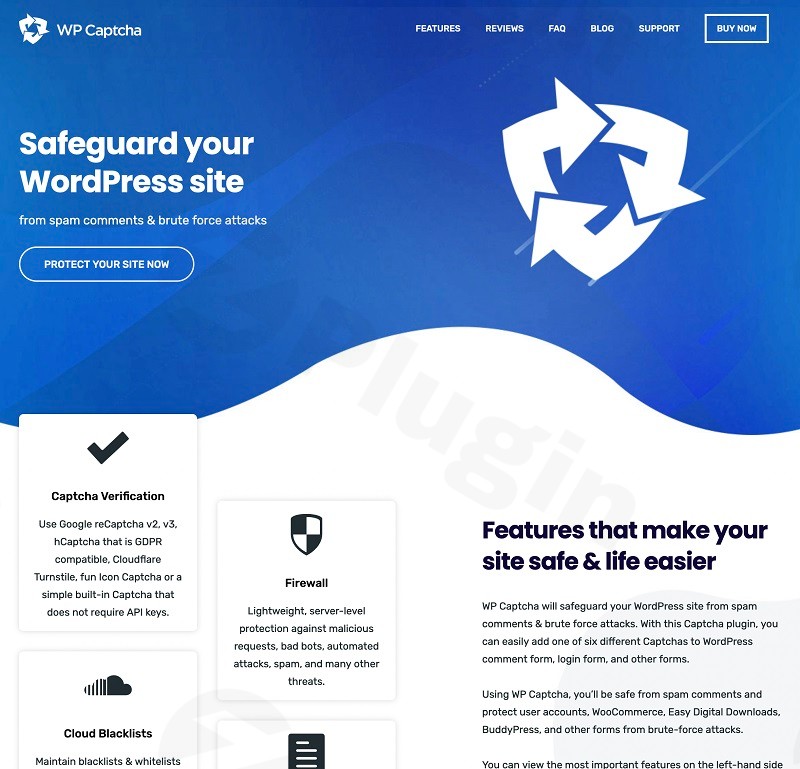
In an era where automated bots account for nearly half of all internet traffic, securing your website is no longer optional—it is a necessity. WP Captcha Pro is a comprehensive WordPress security plugin designed to shield your site from spam, malicious bot activity, and sophisticated brute-force attacks. By integrating multiple verification methods into a single interface, this plugin ensures that your login pages, registration forms, and comment sections remain accessible to humans while staying invisible to bad actors.
Whether you are running a high-traffic blog or a complex WooCommerce store, WP Captcha Pro offers the multi-layered defense needed to maintain site integrity without compromising user experience.
Key Features of WP Captcha Pro
The strength of this WordPress captcha plugin lies in its versatility. Unlike basic tools that offer only one form of verification, WP Captcha Pro provides a suite of advanced security tools.
1. Multiple CAPTCHA Integration Options
WP Captcha Pro supports the world’s leading verification services, allowing you to choose the balance between security and user friction:
- Google reCAPTCHA (v2 and v3): Use the classic “I’m not a robot” checkbox or the seamless v3 invisible score-based system.
- hCaptcha: A privacy-first alternative to Google that offers robust bot detection.
- Cloudflare Turnstile: A user-friendly, non-interactive replacement for CAPTCHAs that preserves visitor privacy.
- Built-in Options: Includes Math CAPTCHA, Image CAPTCHA, and specialized invisible honeypots that require no external API keys.
2. Advanced Brute-Force Protection
One of the most critical WP Captcha Pro features is its ability to stop password-guessing bots. The plugin safeguards user accounts by:
- Limiting login retries.
- Locking out users who attempt to use invalid usernames.
- Masking login errors to prevent “username harvesting.”
- Allowing you to change the default WordPress login URL to a custom path.
3. Integrated Firewall and IP Management
Beyond simple forms, the plugin includes a lightweight firewall that blocks malicious requests at the server level. You can manage access with:
- IP Whitelisting: Ensure your team or trusted users never get challenged by CAPTCHAs.
- Country Blocking: Prevent traffic from specific geographic regions known for high bot activity.
- Anonymous Activity Logs: Monitor site actions to identify patterns of attempted breaches.
4. Seamless Plugin Compatibility
WP Captcha Pro is built to work with the most popular tools in the WordPress ecosystem, ensuring your entire workflow is protected. It integrates out-of-the-box with:
- eCommerce: WooCommerce, Easy Digital Downloads (EDD).
- Forms: Contact Form 7, Gravity Forms, WPForms, Ninja Forms.
- Community: BuddyPress, bbPress.
- Marketing: Mailchimp, Jetpack.
How to Install WP Captcha Pro Plugin
Setting up WP Captcha Pro is straightforward, even for non-developers. Follow these steps to secure your site:
- Download and Upload: Purchase the plugin and download the ZIP file. In your WordPress dashboard, navigate to Plugins > Add New > Upload Plugin and select the file.
- Activate: Click Activate once the upload is complete.
- Choose Your CAPTCHA Type: Go to the WP Captcha Pro settings page. Select your preferred method (e.g., Google reCAPTCHA or Cloudflare Turnstile).
- Configure API Keys: If using an external service, enter your Site Key and Secret Key provided by the service provider.
- Select Forms to Protect: Toggle the switches for the areas you want to secure, such as the Login Form, Registration Form, or Comment Form.
- Save & Test: Save your settings and open your site in an Incognito/Private window to verify the CAPTCHA appears and functions correctly.
Practical Usage & Best Practices
To get the most out of this WordPress security plugin, consider these real-world workflows:
For eCommerce Store Managers
Ideal for: Protecting WooCommerce checkout and account pages.
- Best Practice: Enable Cloudflare Turnstile on the checkout page. It provides high security without interrupting the customer’s purchase flow, which helps maintain high conversion rates while preventing “carding” attacks (where bots test stolen credit card numbers).
For High-Traffic Blogs
Ideal for: Stopping comment spam and reducing server load.
- Best Practice: Use the Invisible CAPTCHA and the Honeypot for Bots. These features trap automated spammers without requiring real readers to solve puzzles, keeping your comment section clean and professional.
For Agency and Client Sites
Ideal for: Maintaining a professional brand and restricted access.
- Best Practice: Utilize White Label Mode to rebrand the plugin settings for your clients. Additionally, use the Login URL Customization to move
wp-adminto a unique path like/secure-portal/, drastically reducing the number of random bot hits.
FAQ & Troubleshooting
What are the features of WP Captcha Pro?
WP Captcha Pro offers a comprehensive security suite including multiple CAPTCHA types (Google reCAPTCHA, hCaptcha, Turnstile), brute-force protection, login page customization, a lightweight firewall, IP whitelisting, country blocking, 2FA support, and an anonymous activity log.
Is WP Captcha Pro compatible with WooCommerce?
Yes, WP Captcha Pro is fully compatible with WooCommerce. You can easily add CAPTCHA protection to the WooCommerce login, registration, lost password, and checkout forms to prevent fraudulent transactions and bot registrations.
Does this plugin support Two-Factor Authentication (2FA)?
Yes, WP Captcha Pro includes built-in support for Two-Factor Authentication (2FA). This adds an extra layer of security beyond just a CAPTCHA, requiring users to provide a second form of identification before accessing the dashboard.
How can I prevent brute force attacks on my WordPress site?
The most effective way to prevent brute force attacks is to use WP Captcha Pro to limit login attempts and mask login errors. Additionally, changing your default login URL and enabling a CAPTCHA on the login form will stop the majority of automated password-guessing scripts.
What should I do if I get locked out of my own site?
If you accidentally lock yourself out due to IP restrictions or login limits, you can manually disable the plugin by renaming its folder in the /wp-content/plugins/ directory via FTP or your hosting File Manager. Once you log back in, you can rename the folder back to its original name and adjust your settings.
Final Verdict: Is WP Captcha Pro Worth It?
WP Captcha Pro is a high-value investment for any site owner looking for more than just a basic spam filter. By combining firewall capabilities, IP management, and multiple CAPTCHA integrations, it serves as a robust WordPress security plugin that addresses multiple attack vectors simultaneously.
While the inclusion of multiple external APIs might seem daunting, the user-friendly interface makes configuration a breeze. If you need to protect your site’s reputation and performance from the growing threat of bot traffic, WP Captcha Pro is a reliable, professional-grade solution.
Ready to secure your site? Visit wppick.com for more WordPress guides and premium plugin reviews.
I. Download Limits & Account Benefits
- Free Downloads: Each email address receives 3 downloads per day for free products
- Upgrade Benefits: Purchase any paid product to increase your daily download limit by 3 for each paid product
- No Account Required: You can download immediately by receiving the download link via email
- Account Recommended: Create an account for easier access to your order history and direct update downloads
II. Understanding GPL vs Official Versions
Important: The products available on WPPick are GPL-licensed versions, which differ from official developer versions. Before purchasing, please read our comprehensive guide: Understanding GPL & Official Differences at WPPick
Key Points:
- GPL versions may not include premium support from original developers
- Updates may be delayed compared to official releases
- Some premium features might have limitations
- Always consider your specific needs and support requirements
III. Support & Assistance
We’re here to help through multiple channels:
- Email Support: Direct email assistance for all inquiries
- Live Chat: Real-time support during business hours
- Comprehensive Documentation: Detailed guides and tutorials
IV. Order Tracking
Access your complete purchase history and download links anytime: Order History
V. Account Access
New to WPPick? Login or Create Account to manage your downloads and orders efficiently.
VI. Refund Protection
We stand behind our products with a clear refund policy. Review our terms: Refund Policy
VII. Privacy & Security
Your data security is our priority. Learn how we protect your information: Privacy Policy
VII. Terms of Service
Understanding our service terms ensures a smooth experience: Terms of Use
Quick Tips for Best Experience
- Verify Compatibility: Check plugin/theme compatibility with your WordPress version
- Backup First: Always backup your site before installing new plugins or themes
- Test Environment: Consider testing on a staging site first
- Stay Updated: Regularly check for updates in your account dashboard
- Read Documentation: Review any included documentation for optimal setup
Need Help?
If you have questions about downloads, licensing, or need technical assistance, don’t hesitate to contact our support team. We’re committed to ensuring you have the best possible experience with WPPick products.
Ready to get started? Your download adventure begins with just one click!
- Changelog Not Found!