
Wp Debug Toolkit Pro
/Year
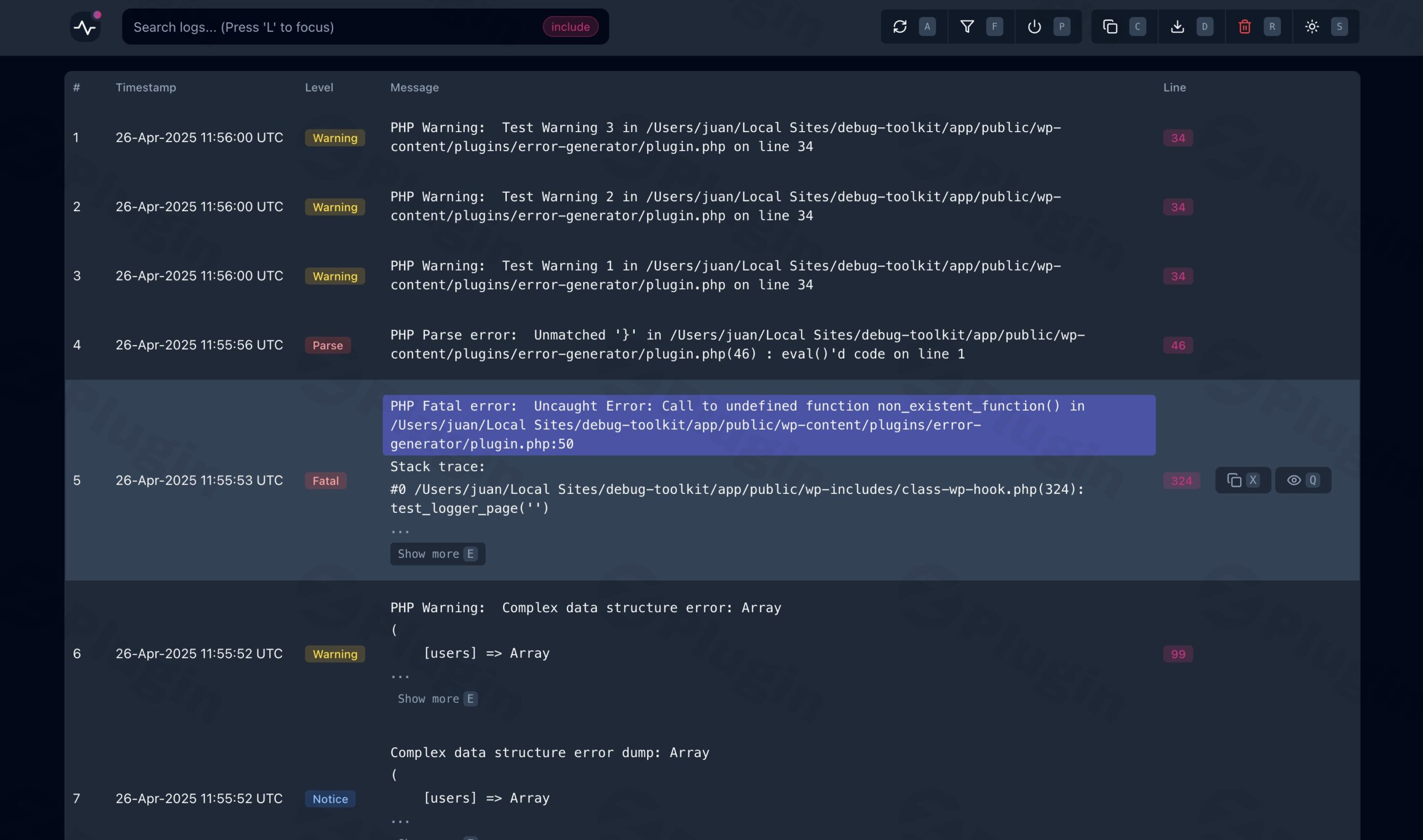
Debugging a website is often the most frustrating part of a developer’s workflow. Between the “White Screen of Death” and the tedious task of manually editing wp-config.php via FTP, standard WordPress error logging can be slow and inefficient. WP Debug Toolkit Pro is a premium WordPress debugging plugin designed to eliminate these friction points, providing a high-performance environment for real-time troubleshooting and crash recovery.
In this guide, we will explore how WP Debug Toolkit Pro streamlines the development process, why its independent viewer app is a game-changer, and how you can use it to maintain a healthy WordPress site.
Key Features: Why WP Debug Toolkit Pro Stands Out
While there are many free tools available, WP Debug Toolkit Pro focuses on “Zero-Friction” debugging. Here is a breakdown of the core features that provide immediate ROI for developers and site administrators.
1. One-Click Debug Mode Activation
The most common way to debug WordPress is by modifying the wp-config.php file to set WP_DEBUG to true. This plugin replaces that manual process. With a single toggle in the dashboard, you can enable or disable debugging instantly without touching a single line of code.
2. Independent Viewer App (Crash-Proof Logging)
Perhaps the most unique selling point is the standalone viewer app. Most debugging plugins live inside the WordPress admin dashboard. If your site crashes, you lose access to the very tools meant to fix it. WP Debug Toolkit Pro operates independently, allowing you to view PHP error logs in WordPress even if the front-end and back-end are completely inaccessible.
3. Advanced Crash Recovery System
When a plugin or theme update goes wrong, it can lock you out of your site. This plugin includes a recovery system that identifies the problematic component and allows you to disable it remotely through the toolkit, regaining access to your dashboard in seconds.
4. Context-Aware File Viewer & Advanced Filters
When an error occurs, the plugin doesn’t just tell you what happened; it shows you where.
- Deep Linking: Click an error to open the specific file and line number.
- Smart Filtering: Filter logs by severity (Notice, Warning, Fatal Error), source (Plugin/Theme name), or specific keywords.
- Error Highlighting: Visual color-coding helps you quickly distinguish between minor CSS notices and critical PHP failures.
5. Performance-Minded Database Monitoring
Unlike some tools that bloat your database with log entries, this plugin uses file-based logging. It identifies inefficient query loops and database bottlenecks with minimal impact on site speed, making it safe for use on production environments.
Installation and Setup Guide
Setting up WP Debug Toolkit Pro is straightforward. Follow these steps to get your advanced WordPress error logging environment running.
- Upload and Activate: Purchase the plugin and upload the
.zipfile via Plugins > Add New > Upload in your WordPress dashboard. - License Activation: Enter your license key in the plugin settings to enable automatic updates and premium features.
- Enable Debug Mode: Navigate to the “WP Debug Toolkit” menu and toggle the Debug Mode switch to “On.” This automatically handles the
WP_DEBUGconstants for you. - Configure the Viewer: Set up the Independent Viewer App by following the on-screen prompts. This will ensure you have a “backdoor” to your logs if the site fails.
5. Set Alerts: (Optional) Configure the notification system to receive alerts for critical errors. We recommend setting “Rate Limiting” to avoid getting flooded with emails during a major issue.
Practical Usage & Best Practices
To get the most out of this WordPress debugging plugin, integrate it into your daily workflow using these best practices:
Use Case 1: Safe Plugin Updates
Before updating a major plugin (like WooCommerce or an Elementor add-on), keep the WP Debug Toolkit open in a separate tab. If the update triggers a conflict, the real-time log will immediately flag the file responsible, allowing you to roll back or fix the code before users notice.
Use Case 2: Identifying “Silent” Performance Killers
Not all errors break a site. Use the Database Query Monitoring feature to find queries that take longer than 100ms. This is ideal for optimizing agency-built sites or complex eCommerce stores where page speed is tied directly to conversion rates.
Use Case 3: Emergency Site Recovery
If you encounter the “White Screen of Death”:
- Access the Independent Viewer App.
- Identify the “Fatal Error” at the top of the log.
- Use the toolkit’s recovery feature to deactivate the offending plugin.
* Refresh your dashboard and fix the code.
WP Debug Toolkit Pro vs. Query Monitor
Many developers ask: “How does this compare to Query Monitor?”
| Feature | Query Monitor | WP Debug Toolkit Pro |
|---|---|---|
| Price | Free | Premium |
| UI Location | Admin Bar / Overlay | Standalone Dashboard + Independent App |
| Crash Access | No (Dashboard must work) | Yes (Works if site is down) |
| One-Click Debug | Limited | Full wp-config Management |
| File Viewer | Text-based | Context-Aware Highlighting |
Verdict: Query Monitor is excellent for performance profiling on a working site. WP Debug Toolkit Pro is the superior choice for professional developers who need a robust safety net and a more streamlined, “hands-off” configuration.
FAQ: Frequently Asked Questions
What is WP Debug Toolkit Pro?
WP Debug Toolkit Pro is a professional-grade WordPress plugin designed to simplify error tracking, PHP logging, and site recovery. It allows developers to monitor site health in real-time and provides a standalone viewer to diagnose issues even when the WordPress site has crashed.
How do I enable WP_DEBUG without editing wp-config.php?
With WP Debug Toolkit Pro, you can enable WP_DEBUG without editing wp-config.php manually. Simply go to the plugin settings and toggle the “Debug Mode” switch. The plugin handles the background configuration for you, making it safer and faster than using FTP.
Is WP Debug Toolkit Pro compatible with my PHP version?
Yes, the plugin supports PHP 7.4 and higher. It is built to be lightweight and compatible with the last three years of WordPress core updates, ensuring it works seamlessly with modern themes and builders like Elementor or Gutenberg.
Can I use this plugin on a live production site?
Yes. Because it uses optimized file-based logging rather than heavy database writes, it has a negligible impact on performance. However, it is a best practice to keep the “Debug Mode” toggle OFF when you aren’t actively troubleshooting to prevent log files from growing unnecessarily large.
Final Verdict: Is It Worth It?
If you are a casual blogger, the built-in WordPress error logs might suffice. However, for agencies, developers, and power users, WP Debug Toolkit Pro is a “no-brainer.” The time saved by avoiding FTP edits and the peace of mind provided by the WordPress crash recovery system far outweighs the cost of the plugin. It turns a stressful “site down” situation into a simple, 30-second fix. For high-stakes environments, this is the most reliable WordPress debugging plugin currently available on the market.For more WordPress reviews and technical guides, visit wppick.com.
I. Download Limits & Account Benefits
- Free Downloads: Each email address receives 3 downloads per day for free products
- Upgrade Benefits: Purchase any paid product to increase your daily download limit by 3 for each paid product
- No Account Required: You can download immediately by receiving the download link via email
- Account Recommended: Create an account for easier access to your order history and direct update downloads
II. Understanding GPL vs Official Versions
Important: The products available on WPPick are GPL-licensed versions, which differ from official developer versions. Before purchasing, please read our comprehensive guide: Understanding GPL & Official Differences at WPPick
Key Points:
- GPL versions may not include premium support from original developers
- Updates may be delayed compared to official releases
- Some premium features might have limitations
- Always consider your specific needs and support requirements
III. Support & Assistance
We’re here to help through multiple channels:
- Email Support: Direct email assistance for all inquiries
- Live Chat: Real-time support during business hours
- Comprehensive Documentation: Detailed guides and tutorials
IV. Order Tracking
Access your complete purchase history and download links anytime: Order History
V. Account Access
New to WPPick? Login or Create Account to manage your downloads and orders efficiently.
VI. Refund Protection
We stand behind our products with a clear refund policy. Review our terms: Refund Policy
VII. Privacy & Security
Your data security is our priority. Learn how we protect your information: Privacy Policy
VII. Terms of Service
Understanding our service terms ensures a smooth experience: Terms of Use
Quick Tips for Best Experience
- Verify Compatibility: Check plugin/theme compatibility with your WordPress version
- Backup First: Always backup your site before installing new plugins or themes
- Test Environment: Consider testing on a staging site first
- Stay Updated: Regularly check for updates in your account dashboard
- Read Documentation: Review any included documentation for optimal setup
Need Help?
If you have questions about downloads, licensing, or need technical assistance, don’t hesitate to contact our support team. We’re committed to ensuring you have the best possible experience with WPPick products.
Ready to get started? Your download adventure begins with just one click!
- Query Logger - Real-time database query monitoring with slow query detection and performance metrics
- Query Statistics Dashboard - Visual insights into query performance and component-level breakdowns
- N+1 Query Detection - Automatically identifies and highlights repeated queries with aggregate statistics
- Database query error logging with detailed error messages and filtering
- Query export to CSV, JSON, and TSV formats with accurate component attribution
- Dynamic query statistics that recalculate based on active filters
- WP-CLI commands for license activation, debug toggling, viewer setup, and log management (wp dbtk)
- Email notification system for error alerts with customizable templates
- Automatic log cleanup with delete/archive/truncate methods, size limits, and age-based rotation
- Viewer permissions health check with repair button in Site Health
- Viewer settings for query dashboard limit, tail scan MB, max entry MB
- PHP memory limit management (writes to wp-config.php)
- Upload limit controls via WordPress filters
- Settings UI redesign with modern tabbed interface
- Modular licensing system with grandfathered benefits for early adopters
- Query logs encrypted at rest
- Password protection now mandatory for viewer (8-character minimum)
- SQLite-based rate limiting with progressive brute-force protection
- Enhanced session security with 30-minute timeout and IP binding
- Strengthened path traversal prevention with expanded blocklist
- Replaced exec() with token_get_all() for PHP syntax validation
- Fixed wp-config.php case-sensitivity bypass vulnerability in viewer
- Added protection for secure-debug.php (GridPane compatibility)
- Scoped CORS headers to plugin endpoints only
- Restricted wp-config backup file permissions
- Hardened viewer config and auth files against direct access
- Expanded viewer blocked files list with additional sensitive file patterns
- Added directory listing protection for query log storage
- Production and performance warnings in setup wizard for debug mode and query logging
- “Install without tools” option to set up the viewer without enabling debugging tools
- Setup wizard defaults tools to disabled — users opt in consciously
- Viewer installer wizard with step-by-step guidance
- Redesigned crash recovery system with cleaner UI and granular plugin/theme controls
- License management moved to Settings page
- Targeted cache clearing (plugin-specific transients only)
- Enhanced output buffer management
- Better type safety and code quality across PHP and React code
- Custom file paths configuration (DBTK_CONFIG_PATH, DBTK_LOG_PATH constants)
- Error level selection in Settings (Debug, Info, Warning, Error)
- Cache busting in Admin and Viewer apps
- WordPress internationalization (wp-i18n) support
- Psalm static analysis with type hints
- Partner discounts page
- Query Viewer tail reader no longer returns 0 entries on huge final log line
- Viewer auth rate limiter fallback when PDO SQLite is unavailable
- Directory permission issues on restrictive servers (umask handling)
- Viewer installation on hosts where WordPress files are in subfolders
- Path validation now supports relative paths securely
- Health check now properly loads WordPress admin functions
- Admin CSS isolation prevents conflicts with other plugins
- Compatibility with UiPress Lite and WP Dark Mode
- wp-config.php duplicate constants when reinstalling viewer