
Wp Meta Seo Addon – The WordPress Seo Friendly Plugin
/Year
Take Command of Your On-Page and Technical SEO
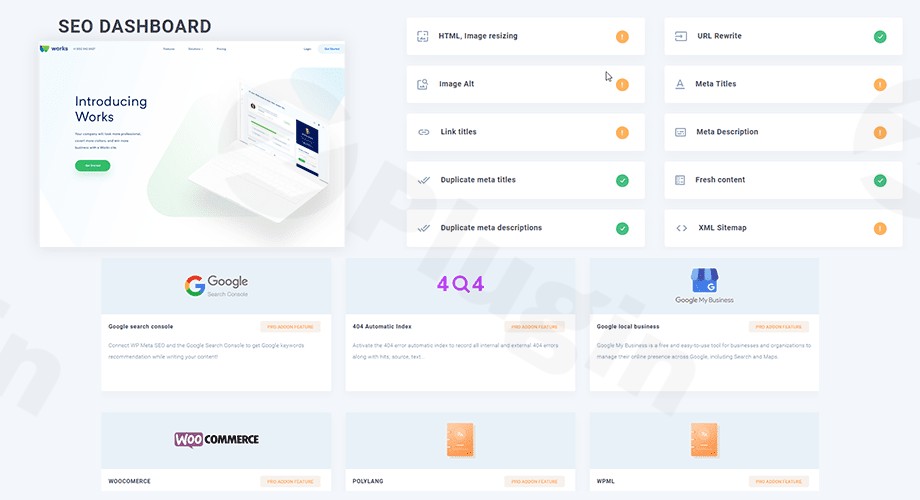
Optimizing an entire WordPress website can be an incredibly tedious task if you have to open, edit, and save every single post or page individually. WP Meta SEO Addon bridges this gap, giving webmasters, marketers, and digital agencies absolute control over their site’s search presence. This powerful WordPress SEO plugin equips you with bulk metadata editors, live content analysis, and advanced technical control panels so you can optimize hundreds of pages in minutes instead of days.
What is WP Meta SEO Addon and Who Is It For?
WP Meta SEO Addon is an enterprise-grade extension designed for site owners who want to scale their search engine optimization without bloated configurations. Whether you run a high-traffic WooCommerce store, manage a network of custom post types, or operate a fast-paced blogging site, this addon automates the repetitive parts of SEO. It is perfect for SEO professionals, digital marketing agencies, and developer teams looking to systematically resolve on-page issues, broken links, and metadata gaps from a single consolidated dashboard.
Key Features and Capabilities
- Rapid Bulk Meta Editor: Edit meta titles, descriptions, and keywords across all custom post types and pages via an intuitive, AJAX-driven spreadsheet view that saves your work instantly.
- Automated Sitemap Generation: Build XML and HTML sitemaps dynamically. Select which menus, posts, pages, categories, or custom taxonomies to include, and set custom update frequencies and priorities.
- Deep Image SEO: Edit image file names in bulk directly within your content, adjust image titles, and insert dynamic alt tags. The built-in dynamic image resizing tool automatically optimizes oversized media for faster load times.
- Live Content Analysis: Run a comprehensive diagnostic checklist inside the Gutenberg or Elementor editor to instantly identify and resolve structural keyword, title, and heading mistakes.
- Advanced 404 Redirect Manager: Capture internal and external 404 errors automatically. Configure custom redirect rules, set up home page redirects, or point dead links to alternative pages with one click.
- Google Search Console Integration: Retrieve active keyword suggestions directly from Google based on real-time Search Console data to optimize your current content targets.
Practical WordPress Use Cases
- WooCommerce Category Optimization: Rapidly add meta titles and descriptions to thousands of WooCommerce product tags and categories without having to click into individual product screens.
- Global Site Audits: Scan an entire legacy website to replace raw image filenames with keyword-rich alt tags and SEO-optimized titles.
- Safe Theme and Builder Migrations: Keep your layout intact while evaluating your content structures across popular builders like Gutenberg, Elementor, and Divi with integrated compatibility checks.
- Broken Link Recovery: Track broken URLs during site migration and map them instantly to the correct target pages to preserve valuable link equity.
Setup and Integration Context
WP Meta SEO Addon is designed to work seamlessly alongside modern web environments. The plugin is fully translation-ready and integrates naturally with WPML and Polylang, allowing you to filter and optimize your metadata structure localized by language. It also supports major page builders including Divi, Elementor, and Gutenberg. To deploy the addon, ensure you activate the base plugin; the system is designed to handle clean configuration transitions so you do not experience conflicts during setup.
Why Choose This Plugin on WPPick?
Purchasing WP Meta SEO Addon on WPPick gives you instant access to premium search optimization features at a fraction of the cost. You receive clean, verified files free of malicious code, ready to deploy across your client sites. Enjoy hassle-free downloads, standard performance, and regular asset updates to keep your technical SEO running flawlessly year-round.
Latest Version Context
The latest version of the plugin, version 1.5.6, includes crucial technical corrections to stabilize key marketing workflows. Specifically, this update resolves an issue within the Google Analytics integration where the GA4 profiles list was failing to load correctly on the admin dashboard. Upgrading to the latest release ensures continuous data tracking and accurate metrics reporting directly from your WordPress environment.
Frequently Asked Questions
Can I import existing metadata from other SEO plugins?
Yes. WP Meta SEO Addon features a built-in migration tool that allows you to import all existing meta titles, descriptions, and keywords directly from Yoast SEO and All in One SEO, allowing you to switch plugins without losing your rankings.
Does the image optimizer change file names inside post content?
Yes, the bulk image editor is built to be smart. When you rename an image file name inside the WP Meta SEO interface, the plugin automatically updates all instances of that image within your posts, pages, and custom post types to prevent broken media paths.
Is this plugin compatible with custom post types and custom fields?
Absolutely. You can select, filter, and edit custom post types (such as portfolio items or WooCommerce products) and custom taxonomies directly from the bulk editing interface, making it highly versatile for complex sites.
How does the sitemap generator handle changes to my site?
The XML sitemap updates automatically whenever you publish new posts, edit categories, or alter menus. You can configure specific schedules and priorities for search engines to crawl your changes in real time.
I. Download Limits & Account Benefits
- Free Downloads: Each email address receives 3 downloads per day for free products
- Upgrade Benefits: Purchase any paid product to increase your daily download limit by 3 for each paid product
- No Account Required: You can download immediately by receiving the download link via email
- Account Recommended: Create an account for easier access to your order history and direct update downloads
II. Understanding GPL vs Official Versions
Important: The products available on WPPick are GPL-licensed versions, which differ from official developer versions. Before purchasing, please read our comprehensive guide: Understanding GPL & Official Differences at WPPick
Key Points:
- GPL versions may not include premium support from original developers
- Updates may be delayed compared to official releases
- Some premium features might have limitations
- Always consider your specific needs and support requirements
III. Support & Assistance
We’re here to help through multiple channels:
- Email Support: Direct email assistance for all inquiries
- Live Chat: Real-time support during business hours
- Comprehensive Documentation: Detailed guides and tutorials
IV. Order Tracking
Access your complete purchase history and download links anytime: Order History
V. Account Access
New to WPPick? Login or Create Account to manage your downloads and orders efficiently.
VI. Refund Protection
We stand behind our products with a clear refund policy. Review our terms: Refund Policy
VII. Privacy & Security
Your data security is our priority. Learn how we protect your information: Privacy Policy
VII. Terms of Service
Understanding our service terms ensures a smooth experience: Terms of Use
Quick Tips for Best Experience
- Verify Compatibility: Check plugin/theme compatibility with your WordPress version
- Backup First: Always backup your site before installing new plugins or themes
- Test Environment: Consider testing on a staging site first
- Stay Updated: Regularly check for updates in your account dashboard
- Read Documentation: Review any included documentation for optimal setup
Need Help?
If you have questions about downloads, licensing, or need technical assistance, don’t hesitate to contact our support team. We’re committed to ensuring you have the best possible experience with WPPick products.
Ready to get started? Your download adventure begins with just one click!
- Fix : Google Analytics integration: GA4 profiles list not loading
- Failed to load the sitemap wpms-sitemap.xml
- Automatically disable the free WP Meta SEO plugin to avoid conflict
- Merged the free versions of WP Meta SEO into the WP Meta SEO Pro
- Redesigned the plugin interface