

WP Sheet Editor Pro (Premium)
/Year
Introduction to WP Sheet Editor Pro
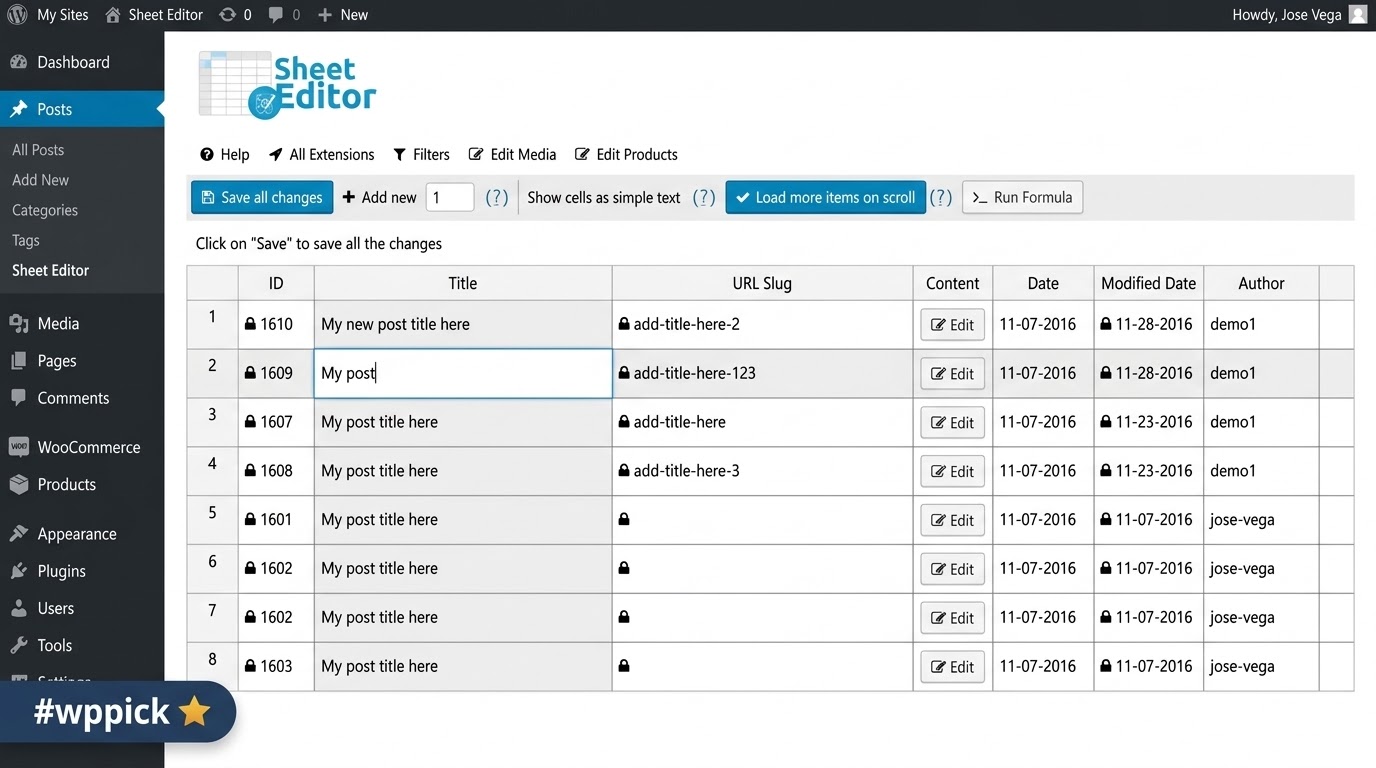
Managing extensive amounts of data within a standard WordPress installation can become a time-consuming process. Navigating through multiple pages, opening individual records, making minor adjustments, and saving each change separately creates a bottleneck for store owners and content managers. WP Sheet Editor Pro addresses this operational inefficiency by transforming the traditional WordPress backend into a responsive, highly functional spreadsheet interface. By bringing the familiarity of spreadsheet applications directly into the WordPress dashboard, this plugin allows users to view, manage, and edit their website data in a centralized environment, drastically reducing the time spent on routine data entry and catalog management tasks.
Latest Version 2.26.0 Changes
WP Sheet Editor Pro version 2.26.0 was released on January 6, 2026. This core update introduced the capability to directly import and export Excel files, brought general UI and performance improvements, improved search functionality, and enhanced the handling of default attributes for WooCommerce Products.
- NEW – IMPORTS – Allow to import Excel files
- NEW – EXPORTS – Allow to export Excel files
- CHANGE – CORE – UI improvements
- CHANGE – FILTERS – Improve the search
- CHANGE – WC Products – Improve the handling of default attributes
- CHANGE – CORE – Improve performance
Understanding What It Does
At its core, WP Sheet Editor Pro interacts directly with the WordPress database to pull information from posts, pages, custom post types, user profiles, and taxonomies, rendering them into a familiar tabular format. Instead of clicking through pagination and editing screens, users can view all their data rows simultaneously. The plugin enables cell-by-cell editing, just like traditional spreadsheet software, meaning you can click into a cell, type your new value, and navigate to the next cell using your keyboard. When you are finished, a single save operation commits all the changes to the database at once. It bypasses the need for repetitive page reloads and standard WordPress post-update cycles, providing a smooth and uninterrupted data management experience.
Who Is This Tool Built For
This solution is specifically designed for professionals who manage large volumes of WordPress data on a regular basis. WooCommerce store owners managing hundreds or thousands of products will find it invaluable for updating pricing, stock levels, and attributes rapidly. SEO professionals rely on it to audit and optimize meta titles, descriptions, and focus keywords across entire content libraries without opening every single post. Digital agencies and site administrators use the plugin to quickly set up new sites, import bulk content, and maintain clean databases. Additionally, data entry specialists benefit from the familiar spreadsheet layout, which lowers the learning curve and allows for rapid data manipulation without requiring deep technical knowledge of WordPress architecture.
Key Capabilities and Features
- Live spreadsheet interface embedded directly within the WordPress admin dashboard for immediate data access.
- Comprehensive bulk editing capabilities allowing you to apply formulas or mass updates to hundreds of rows simultaneously.
- Advanced search and filtering mechanisms to isolate specific data sets based on exact custom criteria, terms, or attributes.
- Full support for custom fields, custom post types, and custom taxonomies, automatically recognizing data structures from other plugins.
- Direct import and export functionality for migrating data seamlessly between environments or modifying records in external spreadsheet applications.
- Column management features allowing users to hide, display, resize, and reorder data points to create a personalized workspace.
Practical WordPress Use Cases
One of the most common applications of WP Sheet Editor Pro involves WooCommerce catalog management. When a supplier updates their pricing, a store owner can filter their product list by category, apply a percentage increase to the regular price column using a simple formula, and save the entire catalog in minutes. Another critical use case is taxonomic organization. Content managers can quickly review all tags and categories assigned to blog posts, identifying inconsistencies, merging duplicates, and assigning new hierarchical structures directly from the grid. For SEO audits, marketers can load all pages, display the Yoast or Rank Math custom fields in columns, and systematically write missing meta descriptions while visualizing the entire site structure, ensuring no page is left unoptimized.
Setup and Compatibility Notes
Deploying the plugin requires standard WordPress installation procedures via the plugin dashboard. Once activated, it generates its own menu area where users can generate specific spreadsheets for different post types or taxonomies. WP Sheet Editor Pro is built to be lightweight and operates exclusively in the backend, meaning it has zero impact on frontend website performance or Core Web Vitals. It maintains strict compatibility with major third-party plugins, including Advanced Custom Fields, WooCommerce, WPML, and various SEO frameworks. The plugin respects standard WordPress user roles and capabilities, ensuring that users only have spreadsheet access to the data they are authorized to edit.
Reasons to Choose It on WPPick
Acquiring WP Sheet Editor Pro through WPPick ensures that you are downloading a verified, secure, and uncompromised software package. WPPick evaluates plugins for stability and safety, providing a reliable source for your site infrastructure. Users benefit from clear transparency regarding product updates, rigorous malware scanning, and an organized catalog that helps you identify the exact tools required for your specific WordPress workflow without navigating through misleading claims or unverified third-party repositories.
Latest Version Context
Detailed release notes indicate that WP Sheet Editor Pro version 2.26.1 brings significant workflow enhancements to data management. This core update introduces the capability to directly import and export Excel files, expanding beyond standard CSV formats. The release also includes general user interface improvements and performance optimizations to make spreadsheet rendering faster. Additionally, users will find improved search functionality and enhanced handling of default attributes specifically tailored for WooCommerce products, making store management more reliable.
Frequently Asked Questions
- What happens to my website data if I deactivate the WP Sheet Editor Pro plugin? Your data remains completely safe. The plugin simply acts as a viewing and editing interface for your existing WordPress database; deactivating it removes the spreadsheet view, but all changes you saved will remain intact in your standard WordPress screens.
- Can I undo changes made in the spreadsheet? The plugin includes a revisions feature and change tracking for certain actions, but it is highly recommended to perform a database backup before executing massive bulk updates or formula applications across thousands of rows.
- Does this tool work with custom fields added by my theme or other plugins? Yes, WP Sheet Editor Pro automatically detects custom fields and post meta, allowing you to display them as editable columns within your spreadsheet workspace.
- Will using this plugin slow down my live website? No, the plugin operates entirely on the server side within the WordPress admin dashboard and loads no scripts or styles on the frontend of your website.
- Can multiple users work on the spreadsheet at the same time? While multiple users can access the backend, concurrent editing of the exact same records can lead to conflicts. It is advisable to have users work on different filtered datasets or post types to ensure data integrity.
I. Download Limits & Account Benefits
- Free Downloads: Each email address receives 3 downloads per day for free products
- Upgrade Benefits: Purchase any paid product to increase your daily download limit by 3 for each paid product
- No Account Required: You can download immediately by receiving the download link via email
- Account Recommended: Create an account for easier access to your order history and direct update downloads
II. Understanding GPL vs Official Versions
Important: The products available on WPPick are GPL-licensed versions, which differ from official developer versions. Before purchasing, please read our comprehensive guide: Understanding GPL & Official Differences at WPPick
Key Points:
- GPL versions may not include premium support from original developers
- Updates may be delayed compared to official releases
- Some premium features might have limitations
- Always consider your specific needs and support requirements
III. Support & Assistance
We’re here to help through multiple channels:
- Email Support: Direct email assistance for all inquiries
- Live Chat: Real-time support during business hours
- Comprehensive Documentation: Detailed guides and tutorials
IV. Order Tracking
Access your complete purchase history and download links anytime: Order History
V. Account Access
New to WPPick? Login or Create Account to manage your downloads and orders efficiently.
VI. Refund Protection
We stand behind our products with a clear refund policy. Review our terms: Refund Policy
VII. Privacy & Security
Your data security is our priority. Learn how we protect your information: Privacy Policy
VII. Terms of Service
Understanding our service terms ensures a smooth experience: Terms of Use
Quick Tips for Best Experience
- Verify Compatibility: Check plugin/theme compatibility with your WordPress version
- Backup First: Always backup your site before installing new plugins or themes
- Test Environment: Consider testing on a staging site first
- Stay Updated: Regularly check for updates in your account dashboard
- Read Documentation: Review any included documentation for optimal setup
Need Help?
If you have questions about downloads, licensing, or need technical assistance, don’t hesitate to contact our support team. We’re committed to ensuring you have the best possible experience with WPPick products.
Ready to get started? Your download adventure begins with just one click!
- NEW - COLUMNS MANAGER - Add data validation options
- NEW - CORE - Added "no conflict mode"
- CHANGE - IMPORT - Allow to import XML files
- CHANGE - CORE - Improve UI
- CHANGE - CORE - Improve resiliency of the saving process
- CHANGE - CORE - Performance improvements
- FIX - CORE - Global sort by meta data doesn't work well when having multiple meta filters
- FIX - CORE - Small bug fixes
- FIX - CORE - Security patch
- Allow to import Excel files
- Allow to export Excel files
- UI improvements
- Improve the search
- Improve the handling of default attributes
- Improve performance
- Allow to edit selected cells
- Improve attributes search
- Allow to sort columns in the spreadsheet itself
- Improve the extensions installer
- General bug fixes
- CORE - UI improvements
- WC Coupons - Allow to use custom separator for product columns
- CORE - Compatibility issue with WP-Stateless for Google Cloud
- WPML - Compat issue with WC Multilingual 5.5.0
- ACF - Minor improvements
- CORE - UI improvements
- WPML - The filter "translation missing in language" is not working for languages with dialects
- WC Products - Small bug fixes
- CORE - General bug fixes