

Wp Stories For Buddypress And Buddyboss
/Year
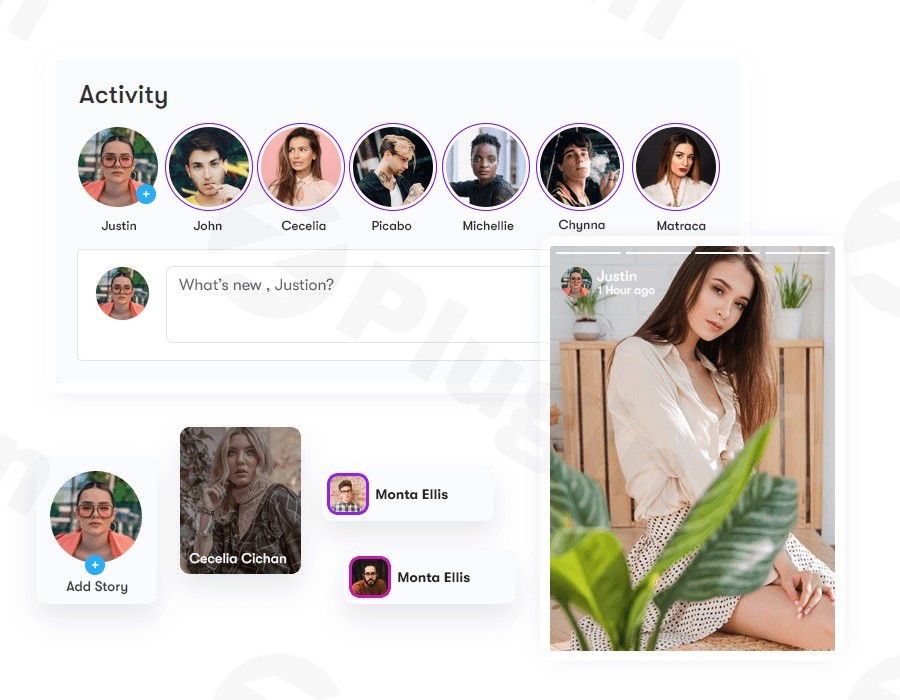
In today’s fast-paced digital world, captivating your audience means delivering content that’s fresh, engaging, and easy to consume. The WP Stories plugin is your go-to solution for bringing the dynamic, Instagram and Facebook-like “Stories” experience directly to your WordPress website. Whether you’re running a thriving community with BuddyPress or BuddyBoss, managing an active blog, or building an eCommerce platform, WP Stories empowers you to create visually appealing, time-sensitive content that boosts engagement and keeps your visitors coming back for more. This powerful WordPress stories plugin integrates seamlessly, transforming how your users interact with your site and its content.
Why Choose WP Stories for Your Community-Driven Website?
WP Stories is specifically designed to meet the demands of modern web engagement. It solves the challenge of static content by allowing site owners and users to publish short, engaging updates that feel familiar to anyone who uses social media. For wp stories BuddyPress and wp stories BuddyBoss users, this means a significant upgrade to community interaction, fostering a more lively and dynamic environment. It’s an indispensable tool for anyone looking to add authentic, user-generated content features to their WordPress site.
Key Features That Make WP Stories Stand Out
WP Stories offers a comprehensive suite of features engineered for ease of use, deep customization, and robust community integration. Here’s a detailed look at what you can expect:
Effortless Story Creation
Create stunning stories with the same intuitive experience you’d find on popular social media platforms. The process is straightforward, whether you’re uploading images or videos, and requires absolutely no technical skills. This makes it incredibly accessible for all your site’s users, from casual visitors to seasoned content creators.
Robust Admin Approval System
Maintain complete control over the content published on your site. The admin moderation WP Stories plugin feature allows you to require admin approval before any story goes live. This ensures quality control and brand consistency, giving you peace of mind.
Customizable Story Timer & Expiration
Generate urgency and keep your content fresh by setting custom expiration times for stories. You can configure individual stories or public story boxes to disappear after a defined number of days, encouraging users to check back frequently for new content.
Multiple Display Styles
Customize WP Stories BuddyPress display to perfectly match your site’s aesthetic. Choose from three distinct rendering styles, including options that mimic popular social media story layouts like “Square,” “Play,” or an “Instagram-style.” This flexibility ensures that stories blend harmoniously with your site’s design.
Seamless Mobile Optimization & RTL Support
WP Stories is built with responsiveness in mind. It provides excellent compatibility with mobile and tablet devices, guaranteeing that your stories look great and are fully interactive across all screen sizes. Furthermore, it offers full compatibility with Right-to-Left (RTL) language websites, ensuring proper display and functionality for diverse audiences.
Advanced Multimedia Capabilities
Go beyond static images. WP Stories supports video uploads in multiple formats, allowing for more dynamic and engaging storytelling. Users can also upload cover images for their stories, adding another layer of visual appeal. This addresses the common query, “Can users upload videos to WP Stories?” with a resounding yes.
Flexible Story Boxes & Shortcode Integration
Create different collections of stories and display them anywhere on your site using simple shortcodes. This flexibility allows you to showcase stories on specific pages, posts, or even in widget areas, providing granular control over content placement.
User Limits & Activity Wall Integration
Control how many stories individual users can create and publish, as well as the number of items within a single story. For community sites, users’ latest stories can be prominently displayed on the activity wall, significantly increasing their visibility and engagement.
Deep Community Platform Integration
One of WP Stories’ strongest unique selling points is its seamless integration with leading WordPress community plugins. It works perfectly with BuddyPress, BuddyBoss Platform, and PeepSo, making it the best WordPress story plugin for BuddyBoss and BuddyPress. This integration fosters a truly interactive and dynamic community experience, providing a BuddyBoss story feature that feels native.
Viewer Insights & Direct Messaging
Users can view who has seen their stories directly from their profile page, providing valuable insights into engagement. Additionally, the plugin facilitates direct messaging through stories, fostering more immediate interaction within your community.
Installation & Setup: How to Add Stories to Your WordPress Website
Installing and configuring WP Stories is a straightforward process, designed for users of all technical levels. Here’s a step-by-step guide to get you up and running:
- Purchase and Download: Obtain the WP Stories plugin from a trusted source like ZeroPlugin.com. You’ll receive a downloadable ZIP file.
- Upload the Plugin:
- Log in to your WordPress admin dashboard.
- Navigate to Plugins > Add New.
- Click on the “Upload Plugin” button at the top of the page.
- Click “Choose File,” select the
wp-stories.zipfile you downloaded, and then click “Install Now.”
- Activate the Plugin: Once installed, click the “Activate Plugin” button.
- Initial Configuration:
- After activation, a new “Stories” menu item will appear in your WordPress admin sidebar.
- Navigate to Stories > Settings to configure global options. Here, you can set defaults for story expiration, enable/disable admin approval, choose default display styles, and manage user limits.
- Ensure your BuddyPress, BuddyBoss, or PeepSo integrations are enabled if you’re using those platforms.
- Display Stories on Your Site:
- WP Stories provides various shortcodes to display stories. For public stories, you might use a shortcode like
[wp_stories]on a page or in a widget. - To display a specific user’s stories, you might use a shortcode that accepts a user ID.
- For community sites, stories will often integrate automatically into user profiles and activity feeds.
- WP Stories provides various shortcodes to display stories. For public stories, you might use a shortcode like
Practical Usage & Best Practices for WP Stories
Leveraging WP Stories effectively can significantly enhance your site’s engagement. Here are some practical use cases and best practices:
- Community Announcements & Updates: For BuddyPress or BuddyBoss communities, how to add stories to BuddyPress website is a key question. Use stories for quick, digestible community announcements, event reminders, or daily “Q&A” prompts. Encourage members to share their own updates, fostering a more interactive social environment. This is ideal for boosting the social media stories WordPress experience on your site.
- Behind-the-Scenes Content: Share glimpses of your team, product development, or event preparations. This builds a more personal connection with your audience and offers exclusive content that encourages regular visits.
- Limited-Time Promotions & Flash Sales: Utilize the customizable timer feature to create urgency around special offers, discounts, or new product launches. This strategy is highly effective for eCommerce sites or membership platforms.
- User-Generated Content Campaigns: Encourage your audience to submit their own stories, perhaps showcasing how they use your products or services. With the admin approval system, you can curate high-quality content that acts as powerful social proof.
- Interactive Tutorials & Tips: Break down complex topics into short, tappable story segments. For instance, a cooking blog could share a quick recipe walkthrough, or a tech review site could offer “first impressions” of a new gadget.
FAQ & Troubleshooting
Here are answers to common questions about WP Stories for BuddyPress and BuddyBoss:
Does WP Stories integrate with BuddyBoss Platform?
Yes, WP Stories is designed for seamless integration with the BuddyBoss Platform, as well as BuddyPress and PeepSo. It extends the social functionality of these platforms by adding dynamic story capabilities, providing a native-feeling experience for your community members.
How to create Instagram-style stories in WordPress?
To create Instagram-style stories in WordPress, install and activate the WP Stories plugin. Once active, you can access story creation features either through the WordPress admin panel or directly from the front-end, mimicking the familiar experience of popular social media apps. Simply upload your images or videos, add any desired text, and publish.
Can users upload videos to WP Stories?
Yes, users can upload videos in multiple formats to create dynamic video stories with WP Stories. This feature significantly enhances the potential for rich, engaging content, moving beyond static images to offer a more immersive storytelling experience.
What are the styling options for WP Stories for BuddyPress?
WP Stories for BuddyPress offers multiple customizable display styles, including “Square,” “Play,” and “Instagram-style” rendering. You can also customize various styling options to control the visual presentation of stories, ensuring they align perfectly with your website’s design and branding.
Is WP Stories mobile friendly?
Absolutely. WP Stories features a perfectly responsive design, ensuring excellent compatibility and optimal viewing on all mobile and tablet devices. Stories are interactive and look great, regardless of screen size, providing a consistent user experience across different platforms.
Conclusion: Transform Your WordPress Site with Engaging Stories
WP Stories is more than just a plugin; it’s a powerful tool for fostering a more interactive and dynamic online presence. By bringing the familiar and engaging “Stories” format to your WordPress, BuddyPress, or BuddyBoss site, you can significantly boost user engagement, encourage content creation, and keep your audience coming back for more.The plugin’s ease of use, robust feature set—including multimedia support, admin moderation, and customizable display options—and its deep integration with leading community platforms make it an unparalleled choice. If you’re looking to revitalize your WordPress stories plugin strategy and create a more vibrant, social media-like experience for your users, WP Stories for BuddyPress and BuddyBoss is an essential addition to your toolkit. Invest in WP Stories and watch your community thrive with fresh, captivating content.
I. Download Limits & Account Benefits
- Free Downloads: Each email address receives 3 downloads per day for free products
- Upgrade Benefits: Purchase any paid product to increase your daily download limit by 3 for each paid product
- No Account Required: You can download immediately by receiving the download link via email
- Account Recommended: Create an account for easier access to your order history and direct update downloads
II. Understanding GPL vs Official Versions
Important: The products available on WPPick are GPL-licensed versions, which differ from official developer versions. Before purchasing, please read our comprehensive guide: Understanding GPL & Official Differences at WPPick
Key Points:
- GPL versions may not include premium support from original developers
- Updates may be delayed compared to official releases
- Some premium features might have limitations
- Always consider your specific needs and support requirements
III. Support & Assistance
We’re here to help through multiple channels:
- Email Support: Direct email assistance for all inquiries
- Live Chat: Real-time support during business hours
- Comprehensive Documentation: Detailed guides and tutorials
IV. Order Tracking
Access your complete purchase history and download links anytime: Order History
V. Account Access
New to WPPick? Login or Create Account to manage your downloads and orders efficiently.
VI. Refund Protection
We stand behind our products with a clear refund policy. Review our terms: Refund Policy
VII. Privacy & Security
Your data security is our priority. Learn how we protect your information: Privacy Policy
VII. Terms of Service
Understanding our service terms ensures a smooth experience: Terms of Use
Quick Tips for Best Experience
- Verify Compatibility: Check plugin/theme compatibility with your WordPress version
- Backup First: Always backup your site before installing new plugins or themes
- Test Environment: Consider testing on a staging site first
- Stay Updated: Regularly check for updates in your account dashboard
- Read Documentation: Review any included documentation for optimal setup
Need Help?
If you have questions about downloads, licensing, or need technical assistance, don’t hesitate to contact our support team. We’re committed to ensuring you have the best possible experience with WPPick products.
Ready to get started? Your download adventure begins with just one click!
- Story upload not working with PeepSo integration
- Undefined function issue when using BuddyBoss
- Cloudflare 404 detection issue
- Issue with cover story visibility
- JavaScript strings now properly translatable
- Upload size and file type restrictions now enforced reliably
- Avatar function `get_wp_stories_user_avatar()` updated for compatibility
- Removed unused debugging and commented-out code
- Improved script and style enqueue handling
- Documented all PHP functions across the plugin
- Prevented direct access to plugin files
- Removed unnecessary `var_dump()` and debug logic