

Wp Ultimate Post Grid Premium
/Year
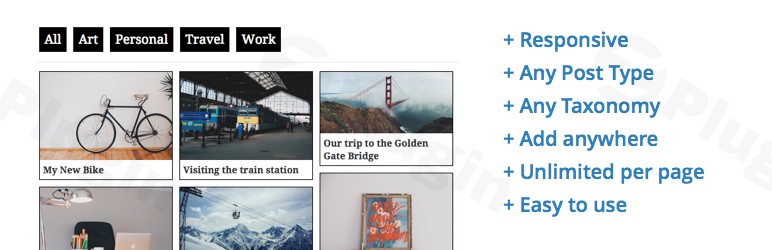
Standard WordPress archives are often rigid and uninspiring, making it difficult for visitors to find the content they need. WP Ultimate Post Grid Premium is a robust WordPress post grid plugin designed to solve this by allowing you to create beautiful, responsive, and highly interactive layouts for your posts, pages, and custom post types.Whether you are running a recipe blog, a portfolio site, or a complex WooCommerce store, this plugin provides the tools to build a filterable post grid in WordPress that enhances user experience and boosts engagement. By utilizing advanced Isotope filtering and a live template editor, you can ensure your content is both discoverable and visually stunning.
Key Features of WP Ultimate Post Grid Premium
The premium version of this plugin goes beyond basic layouts, offering advanced functionality for power users and developers.
1. Advanced Isotope Filtering
One of the standout features is the WordPress Isotope filter integration. This allows for smooth, animated filtering without refreshing the page.
- Multiple Filter Types: Use dropdowns, checkboxes, or multi-select filters for any taxonomy (categories, tags, or custom terms).
- Plain Text Search: A dedicated search field allows visitors to find specific items within the grid instantly.
- Dynamic Post Counts: Optionally display the number of posts available under each filter term to guide user navigation.
2. Versatile Pagination Options
Managing large amounts of content is easy with several premium pagination styles:
- Load More Button: A classic way to keep users on the page while loading more content.
- Infinite Scroll: Perfect for modern blogs and portfolios where content loads automatically as the user scrolls.
- Load on Filter: The grid updates dynamically as soon as a filter is applied, providing a seamless browsing experience.
3. Deep Customization with the Template Editor
Unlike plugins that lock you into fixed designs, WP Ultimate Post Grid Premium features an extensive template editor.
- Live Preview: See exactly how your grid looks in real-time as you tweak the layout.
- Custom Links & Images: Override featured images or default post links to point users exactly where you want them.
- Responsive Design: Every WordPress grid layout created with this plugin is mobile-friendly by default, ensuring a perfect look on smartphones and tablets.
4. Broad Compatibility and Integrations
- Custom Post Type (CPT) Support: Easily create a custom post type grid for portfolios, testimonials, or products.
- Gutenberg & Shortcodes: Use dedicated blocks in the WordPress editor or place shortcodes anywhere on your site.
- WP Recipe Maker: Fully integrated for food bloggers looking to create beautiful recipe indexes.
* Multilingual Ready: Compatible with WPML and supports RTL (Right-to-Left) languages.
How to Install and Set Up WP Ultimate Post Grid Premium
Setting up your first grid is straightforward. Follow these steps to get started:
- Download and Install: After purchasing the premium version from the developer (Bootstrapped Ventures), download the .zip file. Go to your WordPress Dashboard > Plugins > Add New > Upload Plugin.
- Activate License: Once activated, navigate to the plugin settings page to enter your license key to unlock premium features and updates.
- Create Your First Grid:
- Go to Post Grids > Add New.
- Select your “Data Source” (e.g., Posts, Pages, or a Custom Post Type).
- Define your query (filter by specific categories or tags).
- Choose a Template: Under the “Layout” tab, select a pre-designed template or click on the Template Editor to build your own.
- Configure Filters: If you want a filterable post grid in WordPress, go to the “Filters” tab and add the taxonomies you want your visitors to use (e.g., Category, Year, or Topic).
6. Publish: Save your grid and copy the generated shortcode, or use the WP Ultimate Post Grid block in the Gutenberg editor to place it on any page.
Practical Usage & Best Practices
To get the most out of your grids, consider these real-world workflows:
For Bloggers and Content Creators
If you have years of content, use the Infinite Scroll or Load More features. This reduces initial page load time (improving SEO) while encouraging users to explore older posts.
For Agency Portfolios
Use the custom post type grid functionality to display client projects. Apply Isotope filtering by “Industry” or “Service Type” so potential clients can quickly find relevant examples of your work.
For Recipe and Niche Sites
Utilize the WP Recipe Maker integration to display nutrition facts or cook times directly on the grid. Enable the “Plain Text Filter” to allow users to search for specific ingredients within your recipe index.
Performance Tip
While the plugin is optimized for speed, always use appropriately sized featured images. WP Ultimate Post Grid Premium has a “Minimal impact on pagespeed,” but high-resolution images can still slow down your site.
FAQ & Troubleshooting
What is WP Ultimate Post Grid Premium?
WP Ultimate Post Grid Premium is a specialized WordPress plugin that allows site owners to create responsive, filterable, and highly customizable grids to display posts, pages, or custom post types. It is widely used for portfolios, recipe indexes, and blog archives.
Does WP Ultimate Post Grid support custom post types?
Yes. The plugin can pull data from any registered WordPress post type, making it an ideal solution for displaying WooCommerce products, events, testimonials, or any other custom post type grid.
Is it compatible with the Gutenberg Block Editor?
Absolutely. The plugin is fully compatible with the modern WordPress block editor (Gutenberg) and provides dedicated blocks for both grids and filter bars. It also supports the Classic Editor via shortcodes.
Can I filter grids by custom fields?
Yes, the premium version allows you to order and filter grid items based on custom field values, providing a high level of control for data-heavy websites.
What should I do if my grid isn’t displaying correctly?
Ensure that your WordPress version is 3.5 or higher and that you are using a supported PHP version. If the grid looks broken, check for CSS conflicts with your theme. The plugin is designed to be compatible with most themes, but a quick check in the “Live Preview” can help identify layout issues.
Conclusion: Is WP Ultimate Post Grid Premium Worth It?
If you need more than a basic list of posts, WP Ultimate Post Grid Premium offers exceptional ROI. It transforms a standard site into a dynamic, searchable platform that keeps users engaged longer. With its advanced WordPress isotope filter capabilities and flexible pagination, it is one of the most powerful tools available for content organization.For developers and site owners looking to build a professional-grade WordPress grid layout, this plugin provides the perfect balance of ease of use and deep technical customization. You can find more information and support at wppick.com.
I. Download Limits & Account Benefits
- Free Downloads: Each email address receives 3 downloads per day for free products
- Upgrade Benefits: Purchase any paid product to increase your daily download limit by 3 for each paid product
- No Account Required: You can download immediately by receiving the download link via email
- Account Recommended: Create an account for easier access to your order history and direct update downloads
II. Understanding GPL vs Official Versions
Important: The products available on WPPick are GPL-licensed versions, which differ from official developer versions. Before purchasing, please read our comprehensive guide: Understanding GPL & Official Differences at WPPick
Key Points:
- GPL versions may not include premium support from original developers
- Updates may be delayed compared to official releases
- Some premium features might have limitations
- Always consider your specific needs and support requirements
III. Support & Assistance
We’re here to help through multiple channels:
- Email Support: Direct email assistance for all inquiries
- Live Chat: Real-time support during business hours
- Comprehensive Documentation: Detailed guides and tutorials
IV. Order Tracking
Access your complete purchase history and download links anytime: Order History
V. Account Access
New to WPPick? Login or Create Account to manage your downloads and orders efficiently.
VI. Refund Protection
We stand behind our products with a clear refund policy. Review our terms: Refund Policy
VII. Privacy & Security
Your data security is our priority. Learn how we protect your information: Privacy Policy
VII. Terms of Service
Understanding our service terms ensures a smooth experience: Terms of Use
Quick Tips for Best Experience
- Verify Compatibility: Check plugin/theme compatibility with your WordPress version
- Backup First: Always backup your site before installing new plugins or themes
- Test Environment: Consider testing on a staging site first
- Stay Updated: Regularly check for updates in your account dashboard
- Read Documentation: Review any included documentation for optimal setup
Need Help?
If you have questions about downloads, licensing, or need technical assistance, don’t hesitate to contact our support team. We’re committed to ensuring you have the best possible experience with WPPick products.
Ready to get started? Your download adventure begins with just one click!
No changelog available.