

Wpcarrently Car Rental Manager Pro
/Year
Managing a vehicle fleet requires precision, from tracking real-time availability to processing secure payments and handling seasonal price fluctuations. Wpcarrently Car Rental Manager Pro is a comprehensive WordPress car rental plugin designed to transform any WordPress site into a fully functional rental powerhouse. Whether you are running a local car hire service or a large-scale agency, this plugin simplifies the complex logistics of vehicle management without requiring a single line of code.
By integrating directly with your existing WordPress environment, Wpcarrently Pro eliminates the need for expensive third-party booking platforms, allowing you to keep 100% of your revenue and maintain full control over your customer data.
Key Features of Wpcarrently Car Rental Manager Pro
Wpcarrently Pro is built to handle the nuances of the rental industry. Here are the core features that provide the most significant ROI for business owners:
1. Robust WooCommerce Integration
As a dedicated WooCommerce car rental plugin, Wpcarrently leverages the world’s most popular e-commerce engine. This allows you to use any payment gateway supported by WooCommerce (Stripe, PayPal, Square, etc.) to process bookings securely. It also ensures compatibility with tax calculation and reporting tools.
2. Intelligent Pricing & Tiered Discounts
The plugin offers a flexible pricing engine that goes beyond flat daily rates:
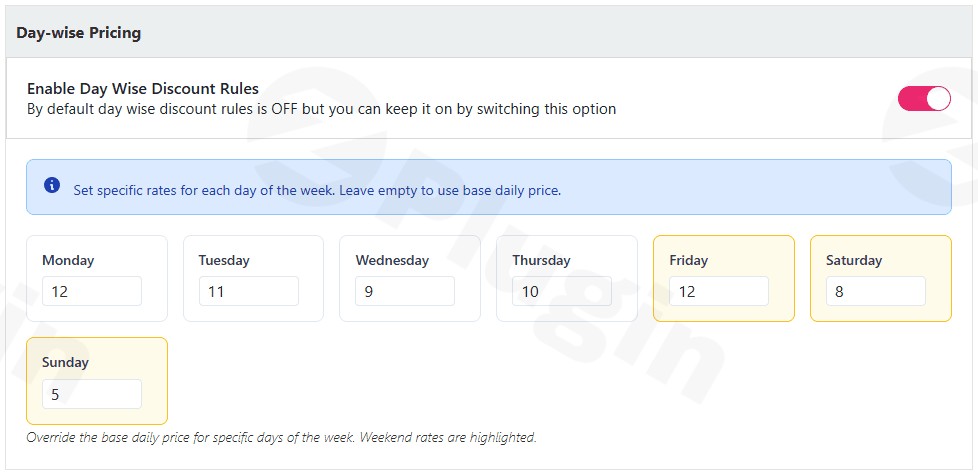
- Seasonal Pricing: Increase rates during peak holidays or offer discounts during the off-season.
- Tiered Discounts: Incentivize longer rentals by automatically reducing the daily rate as the rental duration increases (e.g., a 7-day rental costs less per day than a 2-day rental).
3. Real-Time Inventory & Google Calendar Sync
To prevent the nightmare of double bookings, the car rental booking system WordPress users rely on must be accurate. Wpcarrently features a real-time availability calendar. The Pro version further enhances this by syncing with Google Calendar, allowing your staff to view reservations, cancellations, and reschedules on their mobile devices instantly.
4. Professional PDF Invoicing & Dual Emails
Professionalism is key to customer trust. Wpcarrently Pro automatically generates PDF tickets and invoices upon booking completion. It also features a dual-email system that sends automated confirmations to the customer and internal notifications to the site admin, ensuring no order goes unnoticed.
5. Social Proof with Google Ratings
The Pro version allows you to display authentic customer ratings and reviews directly on your vehicle pages via the Google Places API. This transparency builds immediate trust with potential renters.
How to Set Up Wpcarrently Car Rental Manager Pro
Setting up your online car rental software WordPress solution is straightforward. Follow these steps to get your fleet online:
- Install the Plugin: Upload the Wpcarrently Pro
.zipfile viaPlugins > Add New > Upload Pluginin your WordPress dashboard. - Activate License: Enter your Pro license key to unlock premium features and updates.
- Configure WooCommerce: Ensure WooCommerce is installed and your preferred payment gateways are active.
- Create Your Fleet: Navigate to the Wpcarrently menu and select “Add New Car.” Fill in the vehicle details, upload high-quality images, and set the base price.
- Set Rental Rules: Define your “Advanced Booking Control” (e.g., how many hours/days in advance a car must be booked) and set your pickup/drop-off locations.
- Add Extras: Create “Add-ons” like insurance, GPS units, or child seats that customers can add to their cart during the booking process.
Practical Usage & Best Practices
To get the most out of your WordPress car rental plugin, consider these professional workflows:
Ideal for Luxury Fleet Management
If you rent high-end vehicles, use the “Add-ons” feature to include premium insurance packages or “Meet and Greet” airport services. High-resolution galleries and the Google Review integration are essential here to showcase the quality of your service.
Managing Seasonal Tourist Destinations
For businesses in tourist hotspots, use the Seasonal Pricing feature to set your rates for the entire year in advance. This ensures you maximize revenue during summer or winter peaks without manual daily adjustments.
Best Way to Reduce “No-Shows”
Utilize the dual-email notification system to send a reminder to your customers 24 hours before their pickup time. Since Wpcarrently integrates with WooCommerce, you can also set up deposit-based bookings to ensure commitment from the renter.
FAQ & Troubleshooting
What is Wpcarrently Car Rental Manager Pro?
Wpcarrently Car Rental Manager Pro is a premium WordPress plugin designed to manage car rental operations. It handles vehicle listings, booking calendars, automated pricing, and payment processing through WooCommerce.
Does Wpcarrently Pro integrate with WooCommerce?
Yes. Wpcarrently Pro is designed to work seamlessly with WooCommerce. This allows site owners to use various payment gateways, manage orders through the WooCommerce interface, and benefit from the extensive WooCommerce ecosystem.
Can I sync my bookings with my phone?
Yes. By using the Google Calendar Sync feature in the Pro version, all reservations, cancellations, and updates are automatically pushed to your Google Calendar, making it accessible on any mobile device.
Is the plugin compatible with page builders like Elementor?
Wpcarrently is generally compatible with any well-coded WordPress theme and major page builders. It uses shortcodes and standard WordPress hooks to display booking forms and car lists.
How do I handle different prices for different seasons?
Within the vehicle settings, you can define “Seasonal Pricing” rules. You can select specific date ranges and apply a percentage increase or a fixed price adjustment to the base rental rate for those periods.
Final Verdict: Is Wpcarrently Pro Worth It?
If you are looking for a professional, scalable, and user-friendly WordPress car rental plugin, Wpcarrently Car Rental Manager Pro offers an excellent balance of features and ease of use. Its deep integration with WooCommerce provides a level of payment security and flexibility that many standalone rental scripts lack.
For agencies that need real-time inventory management, automated PDF invoicing, and flexible pricing models, Wpcarrently Pro is a top-tier choice that can significantly reduce administrative overhead and improve the customer booking experience. Visit wppick.com for more insights and updates on the best WordPress tools for your business.
I. Download Limits & Account Benefits
- Free Downloads: Each email address receives 3 downloads per day for free products
- Upgrade Benefits: Purchase any paid product to increase your daily download limit by 3 for each paid product
- No Account Required: You can download immediately by receiving the download link via email
- Account Recommended: Create an account for easier access to your order history and direct update downloads
II. Understanding GPL vs Official Versions
Important: The products available on WPPick are GPL-licensed versions, which differ from official developer versions. Before purchasing, please read our comprehensive guide: Understanding GPL & Official Differences at WPPick
Key Points:
- GPL versions may not include premium support from original developers
- Updates may be delayed compared to official releases
- Some premium features might have limitations
- Always consider your specific needs and support requirements
III. Support & Assistance
We’re here to help through multiple channels:
- Email Support: Direct email assistance for all inquiries
- Live Chat: Real-time support during business hours
- Comprehensive Documentation: Detailed guides and tutorials
IV. Order Tracking
Access your complete purchase history and download links anytime: Order History
V. Account Access
New to WPPick? Login or Create Account to manage your downloads and orders efficiently.
VI. Refund Protection
We stand behind our products with a clear refund policy. Review our terms: Refund Policy
VII. Privacy & Security
Your data security is our priority. Learn how we protect your information: Privacy Policy
VII. Terms of Service
Understanding our service terms ensures a smooth experience: Terms of Use
Quick Tips for Best Experience
- Verify Compatibility: Check plugin/theme compatibility with your WordPress version
- Backup First: Always backup your site before installing new plugins or themes
- Test Environment: Consider testing on a staging site first
- Stay Updated: Regularly check for updates in your account dashboard
- Read Documentation: Review any included documentation for optimal setup
Need Help?
If you have questions about downloads, licensing, or need technical assistance, don’t hesitate to contact our support team. We’re committed to ensuring you have the best possible experience with WPPick products.
Ready to get started? Your download adventure begins with just one click!