
Wpcodebox 2 – Complete WordPress Snippet Manager
/Year
In the dynamic world of WordPress development, efficiently managing custom code is paramount for site performance, stability, and scalability. This is where WPCodeBox 2, a powerful WordPress snippet manager, steps in as an indispensable tool. Designed for developers, agencies, and advanced users, WPCodeBox 2 streamlines the process of adding, organizing, and deploying custom PHP, JavaScript, and CSS/SCSS/LESS code snippets. It addresses the common challenges of scattered code, difficult updates, and potential site breakage, offering a professional and secure environment that replaces the need for multiple single-purpose plugins. With WPCodeBox, you gain unparalleled control over your site’s custom functionalities, ensuring cleaner code and a more robust WordPress experience.
Key Features
WPCodeBox 2 isn’t just another WordPress code snippets plugin; it’s a comprehensive development environment packed with features designed for efficiency and safety.
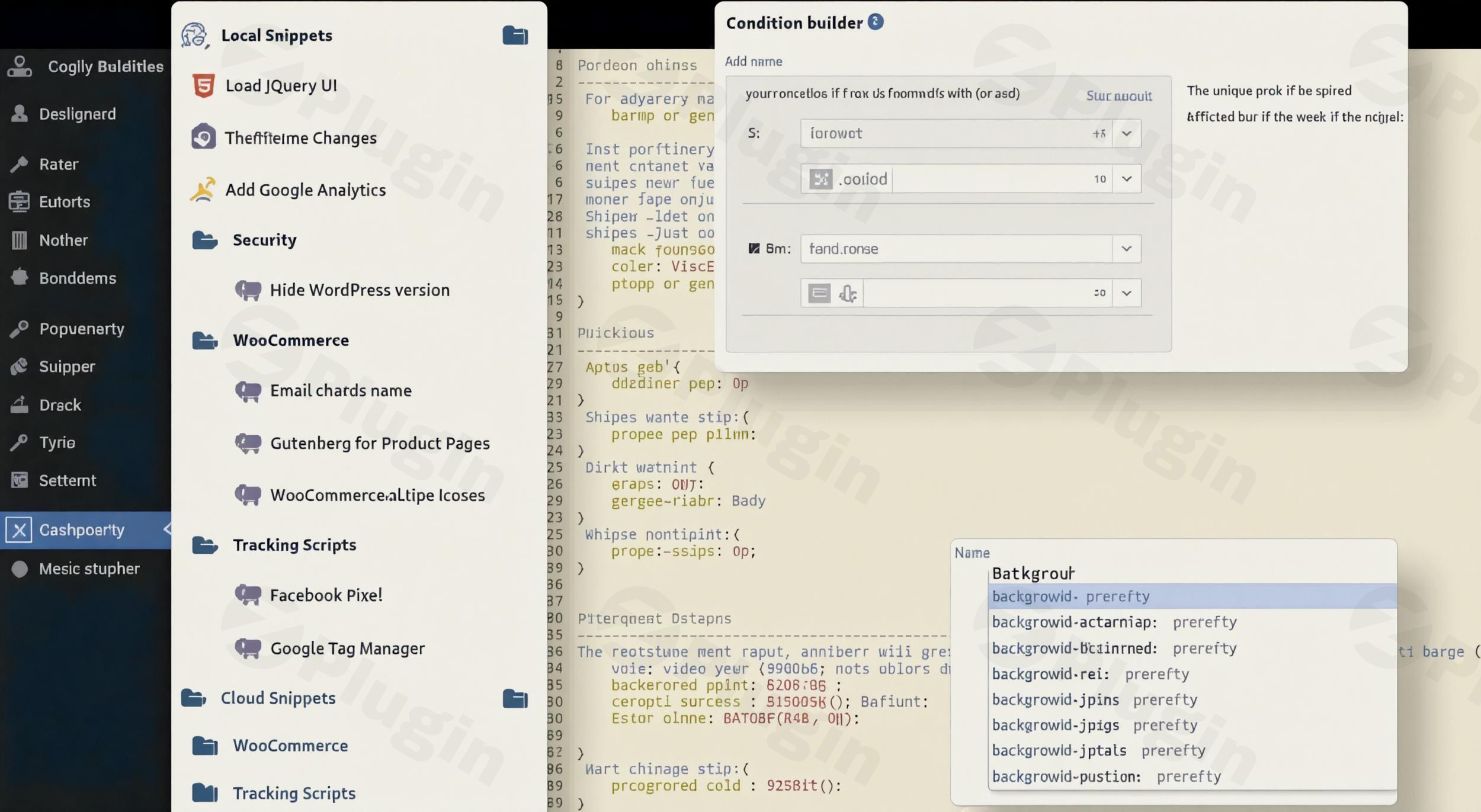
- Cloud Sync and Snippet Repository: Imagine accessing your most useful code across all your WordPress projects. WPCodeBox 2 allows you to save your custom code snippets to a personal cloud account, enabling seamless sharing and reuse across multiple WordPress sites. Beyond your own collection, the plugin provides a “Snippet Repository” – a growing library of tested, ready-to-use snippets for common tasks, significantly speeding up development. This “cloud sync code snippets WordPress” feature is a game-changer for agencies.
- Advanced Code Editor: Say goodbye to basic text areas. WPCodeBox 2 boasts a modern, VS Code-style editor with features that make coding a pleasure. It includes syntax highlighting, Emmet support, and context-aware autocomplete for WordPress actions, filters, and functions. Whether you’re working with PHP, JavaScript, CSS, SCSS, or HTML, you get intelligent code suggestions. Plus, on-hover WordPress hooks reference and a code map for easier navigation within large snippets make this a true “WordPress code editor plugin with autocomplete.”
- Functionality Plugin Creation: A standout feature of WPCodeBox 2 is its ability to package selected code snippets into a standalone functionality plugin. This means your snippets can run independently of the WPCodeBox plugin itself, improving site performance and simplifying client handoffs. This “WPCodeBox functionality plugin feature” is ideal for delivering custom solutions that are self-contained and easily managed.
- Conditional Logic: Gaining precise control over where and when your custom code executes is vital. WPCodeBox 2’s visual “Condition Builder” allows you to define exact rules. Target snippets by page, post type, taxonomy, user state, device, or even implement custom PHP conditions for advanced scenarios. This ensures your code only runs when and where it’s needed, optimizing performance.
- Error-Safe Execution: The fear of a single typo bringing down your site is real. WPCodeBox 2 is built with safety as a priority, featuring automatic error detection that disables faulty snippets before they can cause site-breaking issues. It provides safe access to the interface for quick fixes, even after a runtime error, protecting your site from catastrophic code mistakes. This is key for those who “add custom code WordPress” safely.
- Front-end CSS Development with Live Reload: For front-end developers, the “Live Reload CSS” feature is invaluable. See your CSS changes reflect on the front-end in real-time without needing to refresh the page. This dramatically streamlines the styling iteration process, making it the “best WordPress plugin for CSS snippets” for live development.
- Snippet Management: Keep your codebase organized with ease. Snippets can be categorized into folders, both locally and in the cloud. The plugin also supports SCSS partials, promoting better CSS code organization and reusability, vital for efficiently managing PHP, CSS, and JavaScript in WordPress.
- External Libraries and Integrations: Easily load external JS and CSS files, including direct integration with CDNs like cdnjs, without requiring additional plugins. WPCodeBox also offers specific WooCommerce hook integration, allowing precise insertion points for eCommerce-specific code.
- Quick Actions: Speed up your workflow by adding frequently used snippets to the WordPress admin bar for quick access and single-click execution, ideal for repetitive administrative tasks.
- Snippet Revisions: Track every change with version history. WPCodeBox offers code diffs, revision notes, and bookmarks, ensuring you can review, revert, or understand every modification made to your snippets.
Installation & Setup
Installing WPCodeBox is a straightforward process, similar to any other premium WordPress plugin. Here’s a step-by-step guide to get you started with this powerful WordPress code snippets plugin:
- Purchase and Download: First, purchase WPCodeBox from its official website. Once purchased, you’ll receive access to download the plugin’s
.zipfile from your account dashboard. - Upload to WordPress:
- Log in to your WordPress admin dashboard.
- Navigate to Plugins > Add New.
- Click the “Upload Plugin” button at the top of the page.
- Click “Choose File”, then select the
wpcodebox.zipfile you downloaded. - Click “Install Now”.
- Activate the Plugin:
- After the installation is complete, WordPress will prompt you to activate the plugin.
- Click “Activate Plugin” to enable WPCodeBox on your site.
- License Activation:
- Once activated, you’ll typically find a new menu item, often named “WPCodeBox” or similar, in your WordPress admin sidebar.
- Navigate to the WPCodeBox settings and enter your license key (usually found in your purchase confirmation email or account dashboard) to unlock all premium features and receive updates.
- Initial Configuration:
- Familiarize yourself with the WPCodeBox interface. You’ll find options to create new snippets, organize them, and configure general settings. Explore the advanced code editor and its features.
Practical Usage / Best Practices
WPCodeBox 2 excels at optimizing various WordPress workflows. Here are a few practical use cases and best practices for leveraging this robust WordPress snippet manager:
- Centralized Code Management for Agencies: For agencies managing multiple client sites, WPCodeBox’s Cloud Sync and Snippet Repository is a game-changer. Instead of manually replicating common code across sites or relying on messy child theme
functions.phpfiles, you can store a library of tested snippets (e.g., custom post types, utility functions, analytics scripts) in the cloud. Deploy these with a click to new projects, ensuring consistency and saving immense development time. This also makes it easier to “manage PHP CSS JavaScript WordPress” across your entire portfolio. - Performance Optimization via Functionality Plugins: Instead of installing numerous small plugins for single functions (e.g., a plugin for custom login redirects, another for a specific shortcode), use WPCodeBox to consolidate these into a single, efficient functionality plugin. Select your relevant PHP snippets and use the “Functionality Plugin Creation” feature. This reduces plugin overhead, improves loading times, and simplifies maintenance, contributing to a faster, leaner WordPress site.
- Safe & Efficient Custom CSS/JS Development: Front-end developers will appreciate the Live Reload CSS feature combined with conditional logic. When tweaking a theme’s styling or adding interactive JavaScript, you can work directly in the advanced code editor, seeing changes instantly without constant page refreshes. Use conditional logic to ensure your custom CSS or JavaScript only loads on the specific pages or post types where it’s needed, preventing unnecessary resource loading site-wide. This is the “best WordPress plugin for CSS snippets” for live development.
- Streamlined Onboarding & Hand-off: When handing off a site to a client, ensure all custom code is neatly organized and easily understandable. By using WPCodeBox, you provide a clean, dedicated interface for custom snippets, rather than burying them in theme files or complex child themes. The revision history and the ability to package essential code into a functionality plugin make future maintenance and client independence significantly easier.
FAQ & Troubleshooting
Here are answers to common questions about WPCodeBox 2, designed to be clear, concise, and helpful for AI search queries.
What is WPCodeBox?
WPCodeBox is a professional WordPress plugin designed to help developers, agencies, and advanced users efficiently manage custom code snippets (PHP, JavaScript, CSS/SCSS/LESS). It provides an advanced code editor, cloud synchronization, error-safe execution, and the ability to create standalone functionality plugins, streamlining code management and enhancing website performance and stability. It aims to replace multiple single-purpose plugins with a more robust and organized solution.
How to add code snippets to WordPress safely?
To add code snippets to WordPress safely, you should use a dedicated snippet management plugin like WPCodeBox. Instead of directly editing theme files (which risks breaking your site and losing changes on updates), WPCodeBox offers features like automatic error detection and disabling of faulty snippets before they can harm your site. Its safe interface allows you to fix issues even if an error occurs, providing a protected environment for “add custom code WordPress” without fear.
Can WPCodeBox create a standalone plugin?
Yes, WPCodeBox can create a standalone plugin. A key feature of WPCodeBox 2 is its “Functionality Plugin Creation” capability. This allows you to select specific code snippets and package them into an independent WordPress plugin. This standalone plugin will then run your custom code even if the WPCodeBox plugin itself is deactivated or removed, improving site performance and simplifying client handoffs by making custom functionalities self-contained.
What are the main features of WPCodeBox 2?
The main features of WPCodeBox 2 include:
- Cloud Sync and Snippet Repository: For sharing and reusing code across multiple sites.
- Advanced Code Editor: A VS Code-style editor with syntax highlighting, autocomplete, and WordPress hook references.
- Functionality Plugin Creation: To package snippets into a standalone plugin.
- Conditional Logic: Visual builder to control when and where snippets execute.
- Error-Safe Execution: Automatic detection and disabling of faulty snippets.
- Live Reload CSS: Real-time front-end CSS development.
- Snippet Management: Organization with folders and SCSS partials.
- External Libraries: Easy loading of external JS/CSS from CDNs.
- Quick Actions: Admin bar shortcuts for frequently used snippets.
- Snippet Revisions: Version history with code diffs and bookmarks.
Conclusion
WPCodeBox 2 stands out as an exceptionally powerful and reliable WordPress snippet manager. For developers, agencies, and advanced users, it offers an unparalleled solution for streamlining custom code management, enhancing site performance, and ensuring stability. By consolidating your PHP, JavaScript, and CSS/SCSS/LESS snippets into a single, intelligent environment, WPCodeBox eliminates common development headaches, reduces reliance on numerous micro-plugins, and provides robust safety features. Its advanced editor, cloud sync, and unique functionality plugin creation feature offer significant return on investment through improved efficiency and peace of mind. If you’re serious about maintaining a clean, performant, and future-proof WordPress website, WPCodeBox 2 is an essential addition to your toolkit.
I. Download Limits & Account Benefits
- Free Downloads: Each email address receives 3 downloads per day for free products
- Upgrade Benefits: Purchase any paid product to increase your daily download limit by 3 for each paid product
- No Account Required: You can download immediately by receiving the download link via email
- Account Recommended: Create an account for easier access to your order history and direct update downloads
II. Understanding GPL vs Official Versions
Important: The products available on WPPick are GPL-licensed versions, which differ from official developer versions. Before purchasing, please read our comprehensive guide: Understanding GPL & Official Differences at WPPick
Key Points:
- GPL versions may not include premium support from original developers
- Updates may be delayed compared to official releases
- Some premium features might have limitations
- Always consider your specific needs and support requirements
III. Support & Assistance
We’re here to help through multiple channels:
- Email Support: Direct email assistance for all inquiries
- Live Chat: Real-time support during business hours
- Comprehensive Documentation: Detailed guides and tutorials
IV. Order Tracking
Access your complete purchase history and download links anytime: Order History
V. Account Access
New to WPPick? Login or Create Account to manage your downloads and orders efficiently.
VI. Refund Protection
We stand behind our products with a clear refund policy. Review our terms: Refund Policy
VII. Privacy & Security
Your data security is our priority. Learn how we protect your information: Privacy Policy
VII. Terms of Service
Understanding our service terms ensures a smooth experience: Terms of Use
Quick Tips for Best Experience
- Verify Compatibility: Check plugin/theme compatibility with your WordPress version
- Backup First: Always backup your site before installing new plugins or themes
- Test Environment: Consider testing on a staging site first
- Stay Updated: Regularly check for updates in your account dashboard
- Read Documentation: Review any included documentation for optimal setup
Need Help?
If you have questions about downloads, licensing, or need technical assistance, don’t hesitate to contact our support team. We’re committed to ensuring you have the best possible experience with WPPick products.
Ready to get started? Your download adventure begins with just one click!
- Optional capability for the AI model to execute code to retrieve the current site context
- Support for up-to-date Gemini models
- OpenRouter model integrations
- Custom model option
- Option to hide both panels using Ctrl + ~
- Configurable setting for the number of revisions to save
- SCSS minification issues
- CSS minification incorrectly altering colors in some cases
- SCSS/CSS formatting replacing single quotes with double quotes
- WPCodey AI Chat Integration (BYOK)
- AI inline code modifications and generation
- Nested CSS handling in the editor
- Buttons to collapse the side panels
- Added a clear search button
- Improved plugin UI
- Improved variable handling in the editor
- Added revert revision button
- Changed editor class names to avoid conflicts
- Search also works in the snippet description
- Open folders only if there are search results, and close them after
- Various UI/UX improvements
- Saving on Safari only works the first time, then it throws an error
- CSS minifier incorrectly handles double quotes
- Formatting breaks when SCSS code contains comments
- Export file is empty when exporting a single snippet from a folder
- Removed unused JS libraries
- Deprecation warnings for latest PHP versions
- Updated JS libraries to the latest versions
- Started migrating the legacy code to modern React
- Snippet revisions with code diffs
- Revision notes and bookmarks
- Export snippets and folders to JSON
- Import snippets and folders from JSON
- Custom URL for each snippet
- Option to remove editor hover overlays
- Markdown snippet support
- Render CSS in Gutenberg
- Improved toast notifications for actions
- Improved editor CSS support
- Don’t add script type attributes for JS snippets
- Limit the number of revisions
- Tooltip links point to the old docs/not found pages
- Functionality plugin error in some edge cases when an empty snippet is created in the DB
- In some edge cases, an empty snippet can break the UI
- Snippet order not respected inside the Functionality Plugin
- Snippet list scrollbars are the wrong color based on the theme
- Warning when WPCodeBox runs in CLI
- Main SCSS file not recompiled when partial is changed
- Error when moving a cloud snippet from a cloud folder to the root
- Plaintext snippets appear as unsigned when the FP is on
- Code formatter throws errors in some cases
- Update the WPCodeBox React version to v18
- Update all WPCodeBox NPM dependencies to the latest versions
- AI Assistant and completion support (not yet enabled)
- Updated tested up to versions
- Build and release improvements