

Wpconsent Pro – WordPress Privacy Compliance Made Easy
/Year
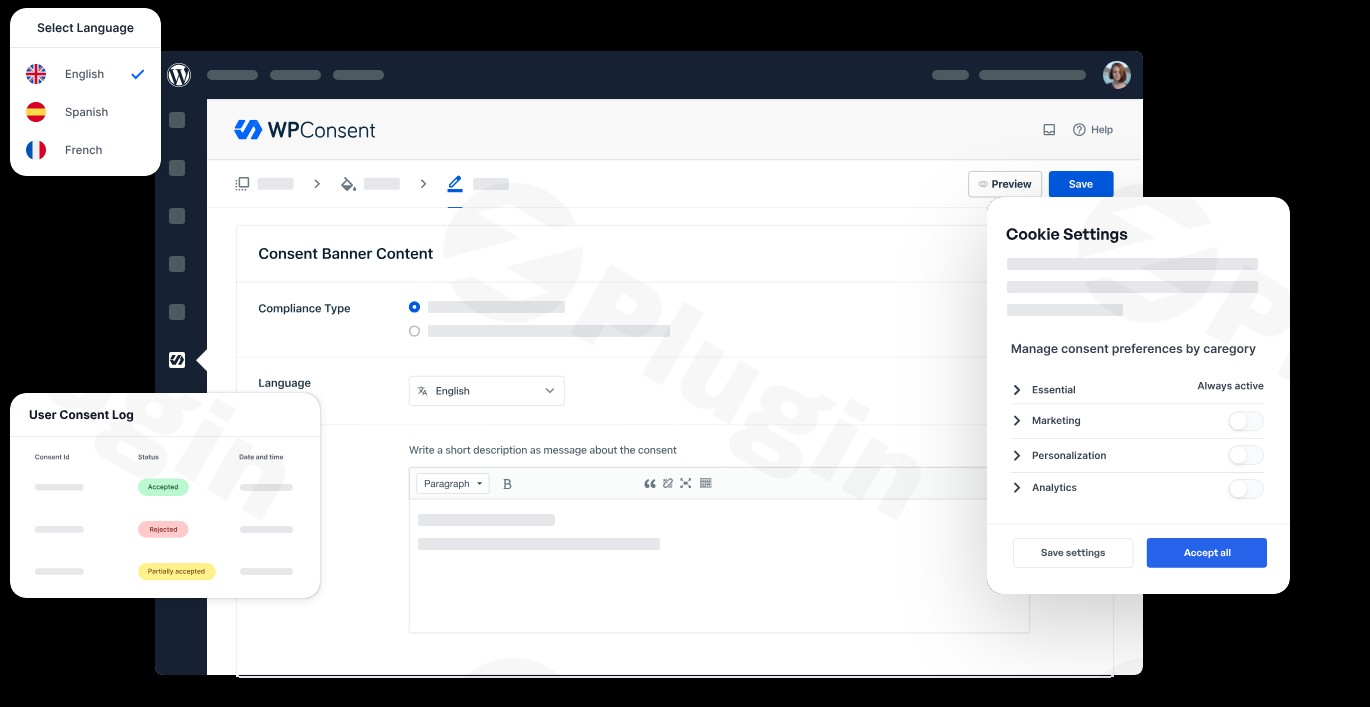
Maintaining WordPress privacy compliance is no longer just a “nice-to-have” feature—it is a legal necessity. With regulations like GDPR in Europe and CCPA in California, website owners face significant risks if they fail to handle user data transparently. Wpconsent Pro is a premium WordPress plugin designed to automate this complex process, ensuring your site remains compliant while maintaining a professional user experience.
In this guide, we will explore how Wpconsent Pro works, its standout features, and why it is increasingly preferred over SaaS-based alternatives for managing cookie consent.
What is Wpconsent Pro?
Wpconsent Pro is a comprehensive WordPress cookie consent plugin developed by the expert team behind WPBeginner. Unlike many privacy tools that rely on external servers, Wpconsent Pro is a self-hosted solution. This means your visitors’ consent data stays on your own server, providing an extra layer of privacy and security that aligns perfectly with the spirit of data protection laws.
Key Features & Benefits of Wpconsent Pro
Wpconsent Pro goes beyond simple “Accept” buttons. It provides a technical infrastructure that handles the heavy lifting of script management and legal documentation.
1. Automatic Cookie Scanning and Script Blocking
One of the biggest challenges in WordPress privacy compliance is identifying every cookie your site sets. Wpconsent Pro includes an automatic website compliance scanning tool that detects cookies and third-party scripts (like Facebook Pixel or Google Analytics).
- The Benefit: It automatically prevents these scripts from loading until the user gives explicit consent, keeping you on the right side of the law without manual coding.
2. Google Consent Mode v2 & Clarity Support
For marketers, losing data is a major concern. Wpconsent Pro supports Google Consent Mode v2, allowing Google services to run in a restricted, “cookieless” state if consent is denied. It also features Clarity Consent Mode for Microsoft’s heatmapping tools, ensuring you still get essential insights without violating privacy.
3. Self-Hosted Data Storage
Unlike SaaS competitors that store your data on their clouds (often with pageview limits), Wpconsent Pro stores all consent record logs directly in your WordPress database.
- The Benefit: You have full ownership of your data, no monthly “overage” fees, and a simplified audit trail that shows anonymized IPs and timestamps.
4. Smart Geolocation Detection
Not every visitor needs a GDPR banner. Wpconsent Pro can detect a user’s location and only display the cookie banner to visitors from regions with strict privacy laws (like the EU or California). This improves the user experience for everyone else by keeping your site interface clean.
5. AI-Powered Auto Translations
If you run a multilingual site, Wpconsent Pro simplifies localizing your legal notices. It supports over 70 languages and uses AI to handle the translation of banner content and cookie descriptions automatically.
How to Set Up GDPR Compliance on a WordPress Site with Wpconsent Pro
Setting up Wpconsent Pro is designed to be straightforward, even for those without a technical background.
- Install and Activate: Upload the plugin via
Plugins > Add Newin your WordPress dashboard. - Run the Compliance Scanner: Navigate to the Wpconsent Pro settings and initiate a scan. The plugin will find all active cookies and categorize them (e.g., Necessary, Marketing, Statistics).
- Configure the Cookie Banner: Use the customization settings to add your logo, choose a layout (bottom bar, modal, or corner box), and match the colors to your brand.
- Enable Script Blocking: Ensure the “Automatic Script Blocking” toggle is on. This ensures no tracking happens before the “Accept” button is clicked.
- Set Up Google Tag Manager (Optional): If you use GTM, Wpconsent Pro offers a custom event integration, making it the ideal for agencies managing complex tracking setups.
Practical Usage & Best Practices
To get the most out of Wpconsent Pro on wppick.com or your own project, consider these real-world workflows:
- For eCommerce (WooCommerce): Use the content blocking feature to hide external elements like embedded reviews or maps until the user consents. This ensures your store remains fully compliant during the checkout process.
- For Content Marketers: Leverage the Google Consent Mode v2 integration. This allows you to recover “lost” conversion data in Google Ads by sending anonymous pings even when cookies are rejected.
- For Web Agencies: Since Wpconsent Pro is self-hosted with no pageview limits, it is more cost-effective for high-traffic client sites compared to SaaS tools like CookieYes.
Wpconsent Pro vs. The Competition
| Feature | Wpconsent Pro | Complianz | CookieYes (SaaS) |
|---|---|---|---|
| Data Storage | Self-Hosted | Self-Hosted | Third-Party Cloud |
| Script Blocking | Automatic | Automatic | Manual/Auto |
| Pricing Model | Fixed Annual | Fixed Annual | Tiered by Pageviews |
| Google Consent Mode | Yes (v2) | Yes | Yes |
| AI Translations | Yes (70+ Languages) | Limited | Limited |
While Complianz is a strong competitor with a great setup wizard, Wpconsent Pro is often preferred for its cleaner UI and the weight of the WPBeginner team’s expertise behind it.
FAQ & Troubleshooting
What is Wpconsent Pro?
Wpconsent Pro is a premium WordPress plugin that automates privacy compliance by managing cookie banners, blocking tracking scripts, and logging user consent to satisfy legal requirements like GDPR and CCPA.
Does Wpconsent Pro work with Elementor?
Yes, Wpconsent Pro is fully compatible with Elementor, as well as other major builders like Divi, Gutenberg, and WPBakery. It can block scripts within these builders without breaking your site layout.
How do I block Google Analytics cookies with Wpconsent Pro?
Once installed, Wpconsent Pro’s scanner will detect the Google Analytics script. You simply need to ensure the script is categorized under “Statistics” or “Marketing” in the plugin settings. Wpconsent Pro will then automatically hold that script from loading until the visitor clicks “Accept.”
Is the data storage secure?
Absolutely. Because Wpconsent Pro is a self-hosted cookie consent plugin, all consent logs are stored on your own server’s database. This reduces the risk of data leaks from third-party platforms.
Final Verdict: Is Wpconsent Pro Worth It?
If you are looking for a “set it and forget it” solution for WordPress privacy compliance, Wpconsent Pro is one of the most robust tools on the market. It offers a perfect balance of advanced technical features—like automatic script blocking and Google Consent Mode v2—with an interface that is accessible to non-developers.
For site owners who value data ownership and want to avoid the recurring “per-pageview” costs of SaaS compliance tools, Wpconsent Pro is a top-tier investment for your WordPress site.
I. Download Limits & Account Benefits
- Free Downloads: Each email address receives 3 downloads per day for free products
- Upgrade Benefits: Purchase any paid product to increase your daily download limit by 3 for each paid product
- No Account Required: You can download immediately by receiving the download link via email
- Account Recommended: Create an account for easier access to your order history and direct update downloads
II. Understanding GPL vs Official Versions
Important: The products available on WPPick are GPL-licensed versions, which differ from official developer versions. Before purchasing, please read our comprehensive guide: Understanding GPL & Official Differences at WPPick
Key Points:
- GPL versions may not include premium support from original developers
- Updates may be delayed compared to official releases
- Some premium features might have limitations
- Always consider your specific needs and support requirements
III. Support & Assistance
We’re here to help through multiple channels:
- Email Support: Direct email assistance for all inquiries
- Live Chat: Real-time support during business hours
- Comprehensive Documentation: Detailed guides and tutorials
IV. Order Tracking
Access your complete purchase history and download links anytime: Order History
V. Account Access
New to WPPick? Login or Create Account to manage your downloads and orders efficiently.
VI. Refund Protection
We stand behind our products with a clear refund policy. Review our terms: Refund Policy
VII. Privacy & Security
Your data security is our priority. Learn how we protect your information: Privacy Policy
VII. Terms of Service
Understanding our service terms ensures a smooth experience: Terms of Use
Quick Tips for Best Experience
- Verify Compatibility: Check plugin/theme compatibility with your WordPress version
- Backup First: Always backup your site before installing new plugins or themes
- Test Environment: Consider testing on a staging site first
- Stay Updated: Regularly check for updates in your account dashboard
- Read Documentation: Review any included documentation for optimal setup
Need Help?
If you have questions about downloads, licensing, or need technical assistance, don’t hesitate to contact our support team. We’re committed to ensuring you have the best possible experience with WPPick products.
Ready to get started? Your download adventure begins with just one click!