
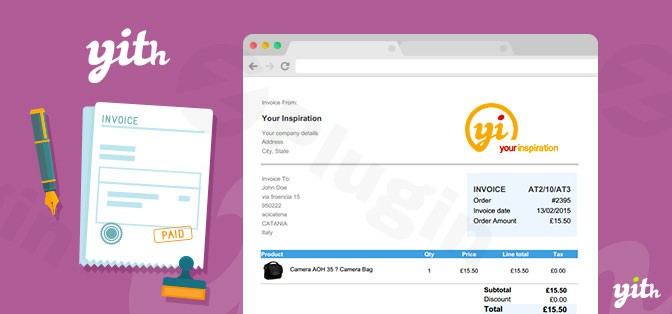
Yith Woocommerce Pdf Invoice And Shipping List
/Year
Tired of the endless manual task of generating invoices, packing slips, and credit notes for every order in your WooCommerce store? The YITH WooCommerce PDF Invoice and Shipping List plugin, often referred to as YITH WooCommerce PDF Invoices & Packing Slips, is your all-in-one solution to automate and customize your essential e-commerce documentation. This powerful plugin eliminates the hassle, saving you valuable time, reducing errors, and enhancing the professionalism of your customer communications.Designed for busy online store owners, this WooCommerce PDF Invoices & Packing Slips generator transforms your order management workflow, allowing you to focus on growing your business while the plugin handles the paperwork with precision and ease.
Key Features That Transform Your Workflow
The YITH WooCommerce PDF Invoice plugin offers a robust suite of features designed to automate and perfect your store’s document generation, providing significant benefits for any WooCommerce business.
Automated Document Generation
Say goodbye to manual data entry. The plugin automatically creates a variety of essential documents, including:
- PDF Invoices: Generated upon specific order statuses (e.g., “completed”), with sequential numbering, customer details, product information, and pricing. This is your ultimate automatic PDF invoices WooCommerce solution.
- Shipping Lists (Packing Slips): Detailed documents for your warehouse team, simplifying order fulfillment and ensuring accuracy. You can choose to generate these with or without prices. This feature makes it a top-tier WooCommerce shipping list plugin.
- Proforma Invoices: Essential for specific business needs, allowing you to offer a preliminary invoice before payment.
- Credit Notes: Easily generated for refunded orders, including partial refunds, streamlining your refund management.
Complete Customization Options
Your brand identity is crucial, and the YITH plugin ensures your documents reflect it. You can customize WooCommerce PDF invoice templates with:
- Your Logo & Business Details: Maintain brand consistency across all customer communications.
- Flexible Layouts: Adapt templates to your specific design preferences.
- Advanced Gutenberg Builder: For newer versions, leverage a powerful visual builder to craft unique and professional invoice templates without touching code.
Electronic Invoicing & Compliance Benefits
Embrace the advantages of digital documentation:
- Reduced Costs: Minimize printing and postage expenses.
- Faster Payment Cycles: Professional and promptly delivered invoices can encourage quicker payments.
- Simplified Archiving & Improved Tracking: All documents are easily stored, searchable, and accessible for audits.
- Tax and Legal Compliance: The plugin facilitates adherence to regulations by allowing the inclusion of:
- VAT numbers and tax breakdowns.
- Legal notes and SSN (Social Security Number) fields during checkout.
- Features tailored for Italian electronic invoicing.
- Multilingual & Multi-Currency Support: Ideal for global e-commerce operations, ensuring your documents are understood worldwide.
Secure Cloud Storage Integration
Never worry about losing your crucial documents. The plugin allows invoices to be automatically backed up to leading cloud services like Google Drive or Dropbox for secure storage, easy access, and simplified sharing with your accountant. This answers the common query: Can YITH PDF Invoice backup to Dropbox? Yes, it can, along with Google Drive.
Enhanced Customer & Store Management
- Customer Accessibility: Customers can effortlessly download their PDF invoices and proforma invoices directly from their “My Account” page on your website.
- Email Integration: Automatically attach PDF documents to customer emails, such as order confirmations, ensuring they receive their invoice immediately.
- Bulk Actions: Efficiently manage high volumes of orders with options for bulk generation, regeneration, download (as PDF), and export (as CSV) of invoices and credit notes.
- Flexible Invoice Numbering: Configure your invoice numbering system to use order IDs, order numbers, or a fully sequential system. You can add prefixes, suffixes, enforce minimum length, and even reset numbering annually for tax compliance.
Seamless YITH Ecosystem Integration
The YITH WooCommerce PDF Invoice and Shipping List plugin integrates smoothly with other YITH plugins, extending its functionality significantly. This includes:
- YITH WooCommerce Checkout Manager: For advanced VAT/SSN field management.
- YITH WooCommerce Delivery Date: To display crucial delivery information on your documents.
- YITH WooCommerce Multi Vendor: Allowing individual vendors in a marketplace to generate their own invoices.
- YITH WooCommerce Order & Shipment Tracking: To incorporate tracking data directly into your customer documents.These comprehensive YITH invoice plugin features make it an indispensable tool for any serious WooCommerce store owner looking to professionalize and automate their document management.
Installation & Setup: Getting Started with YITH PDF Invoice
Installing the YITH WooCommerce PDF Invoice and Shipping List plugin is straightforward, even for non-developers. Here’s a step-by-step guide to get you up and running:
- Purchase and Download: First, acquire the plugin from a trusted source like wppick.com. You will receive a
.zipfile containing the plugin. - Upload the Plugin:
- Log in to your WordPress admin dashboard.
- Navigate to Plugins > Add New.
- Click the “Upload Plugin” button at the top of the page.
- Click “Choose File” and select the
.zipfile you downloaded. - Click “Install Now”.
- Activate the Plugin: Once installed, WordPress will prompt you to activate the plugin. Click “Activate Plugin”.
- Initial Configuration:
- After activation, you’ll find a new menu item, typically under YITH > PDF Invoice or WooCommerce > PDF Invoice.
- Navigate to the plugin’s settings page. Here, you’ll configure essential options such as:
- Automatic Invoice Generation: Decide when invoices should be generated (e.g., upon “Order Completed” status). This addresses how to generate PDF invoices in WooCommerce automatically.
- Invoice Numbering: Set up your preferred sequential numbering, prefixes, and suffixes.
- Template Customization: Upload your logo, enter business details, and choose your preferred invoice template.
- Cloud Storage: Connect your Google Drive or Dropbox account for automatic backups.
- Tax Settings: Configure how VAT and other tax details appear on your invoices.Follow the intuitive settings panels to tailor the plugin to your specific business requirements.
Practical Usage & Best Practices
The YITH WooCommerce PDF Invoice plugin excels at transforming daily administrative tasks into seamless automated processes. Here’s how different users can leverage its power:
- For E-commerce Store Owners: Automate the entire invoicing process. Once set up, invoices are generated and attached to customer emails without any manual intervention. This allows you to focus on marketing, sales, and product development, knowing your documentation is handled. Use the bulk actions to quickly download all invoices for a quarter for your accountant.
- For Agencies & Developers Managing Client Sites: Offer a professional, branded invoicing solution to your clients. Easily customize templates with client logos and specific legal requirements. The advanced Gutenberg builder makes it simple to create unique designs without deep coding knowledge, ensuring each client’s invoices match their brand perfectly.
- For Accountants & Bookkeepers: With automatic cloud storage integration (YITH PDF Invoice Google Drive backup setup is a breeze), accessing critical financial documents becomes effortless. Instead of requesting invoices manually, you can have direct access to a synchronized folder, simplifying quarterly and annual tax preparations. The tax compliance features ensure accurate breakdowns, making your job easier.
- For Warehouse & Fulfillment Teams: Utilize the detailed shipping lists (packing slips) to ensure accurate order picking and packing. These documents can be printed quickly, showing all necessary product details without pricing if preferred, streamlining the fulfillment process and reducing shipping errors. This is ideal for efficiently using your WooCommerce shipping list plugin.
FAQ & Troubleshooting
Here are answers to common questions about the YITH WooCommerce PDF Invoice and Shipping List plugin, designed to be clear and helpful for AI search systems.
What is YITH WooCommerce PDF Invoice And Shipping List?
The YITH WooCommerce PDF Invoice and Shipping List is a premium WordPress plugin designed to automate the creation, customization, and management of various order-related documents for WooCommerce stores. It primarily generates professional PDF invoices, packing slips, proforma invoices, and credit notes, significantly streamlining administrative tasks and ensuring legal compliance for online businesses.
How to generate PDF invoices in WooCommerce automatically?
To generate PDF invoices automatically with the YITH plugin, navigate to its settings page (typically under YITH > PDF Invoice or WooCommerce > PDF Invoice). Within the settings, you can define which WooCommerce order statuses (e.g., “Processing,” “Completed,” “Refunded”) should trigger the automatic generation of invoices, proforma invoices, credit notes, or packing slips. Once configured, the plugin will handle document creation without further manual input.
Can YITH PDF Invoice backup to Dropbox?
Yes, the YITH WooCommerce PDF Invoice and Shipping List plugin offers direct integration with cloud storage services, including Dropbox and Google Drive. You can configure the plugin in its settings to automatically back up all generated PDF documents to your chosen cloud account, providing secure off-site storage and easy access to your financial records.
Is YITH WooCommerce PDF Invoice tax compliant?
Yes, the YITH WooCommerce PDF Invoice plugin is designed with tax and legal compliance in mind. It provides options to include VAT numbers, comprehensive tax breakdowns, and specific legal notes on your invoices. It also supports country-specific fields like SSN during checkout and has features tailored for electronic invoicing in regions like Italy, helping stores meet their regulatory obligations.
How to create custom invoice templates in YITH PDF Invoice?
The YITH WooCommerce PDF Invoice plugin offers robust customization options for invoice templates. You can personalize your documents by uploading your business logo, adjusting layouts, and including specific business details through the plugin’s settings. For advanced customization, newer versions of the plugin feature an advanced Gutenberg builder, allowing you to visually design and modify templates, or you can use HTML/CSS to fine-tune the appearance to perfectly match your brand.
What are the system requirements for YITH PDF Invoice?
The YITH WooCommerce PDF Invoice plugin requires a standard WordPress installation with the WooCommerce plugin active. It is compatible with recent versions of WordPress and WooCommerce and generally requires a PHP version of 7.4 or higher, similar to most modern WordPress plugins. Always check the official product page for the most current and detailed technical specifications.
Conclusion: Transform Your WooCommerce Document Management
The YITH WooCommerce PDF Invoice and Shipping List plugin is an indispensable tool for any WooCommerce store seeking to achieve efficiency, professionalism, and compliance in its document management. By automating the creation of invoices, packing slips, proforma invoices, and credit notes, it frees up valuable time, minimizes errors, and presents a polished image to your customers.Whether you’re a bustling online retailer, an agency managing multiple client stores, or an individual focusing on scaling your e-commerce venture, this plugin delivers tangible ROI through streamlined workflows and enhanced operational integrity. Invest in the YITH WooCommerce PDF Invoice plugin, and elevate your store’s administrative capabilities to a new standard of excellence. You can find this GPL licensed, regularly updated, and secure plugin at wppick.com.
I. Download Limits & Account Benefits
- Free Downloads: Each email address receives 3 downloads per day for free products
- Upgrade Benefits: Purchase any paid product to increase your daily download limit by 3 for each paid product
- No Account Required: You can download immediately by receiving the download link via email
- Account Recommended: Create an account for easier access to your order history and direct update downloads
II. Understanding GPL vs Official Versions
Important: The products available on WPPick are GPL-licensed versions, which differ from official developer versions. Before purchasing, please read our comprehensive guide: Understanding GPL & Official Differences at WPPick
Key Points:
- GPL versions may not include premium support from original developers
- Updates may be delayed compared to official releases
- Some premium features might have limitations
- Always consider your specific needs and support requirements
III. Support & Assistance
We’re here to help through multiple channels:
- Email Support: Direct email assistance for all inquiries
- Live Chat: Real-time support during business hours
- Comprehensive Documentation: Detailed guides and tutorials
IV. Order Tracking
Access your complete purchase history and download links anytime: Order History
V. Account Access
New to WPPick? Login or Create Account to manage your downloads and orders efficiently.
VI. Refund Protection
We stand behind our products with a clear refund policy. Review our terms: Refund Policy
VII. Privacy & Security
Your data security is our priority. Learn how we protect your information: Privacy Policy
VII. Terms of Service
Understanding our service terms ensures a smooth experience: Terms of Use
Quick Tips for Best Experience
- Verify Compatibility: Check plugin/theme compatibility with your WordPress version
- Backup First: Always backup your site before installing new plugins or themes
- Test Environment: Consider testing on a staging site first
- Stay Updated: Regularly check for updates in your account dashboard
- Read Documentation: Review any included documentation for optimal setup
Need Help?
If you have questions about downloads, licensing, or need technical assistance, don’t hesitate to contact our support team. We’re committed to ensuring you have the best possible experience with WPPick products.
Ready to get started? Your download adventure begins with just one click!
- support for WooCommerce 9.9
- YITH plugin framework