

Zonar – Personal Portfolio WordPress Theme
/Year
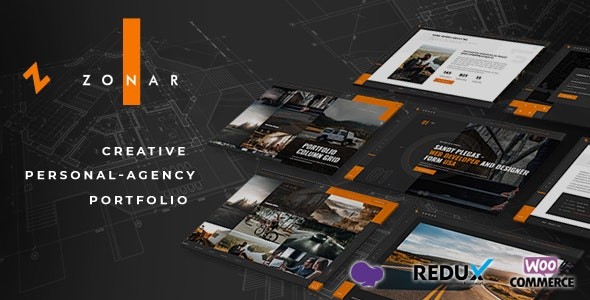
Building a digital presence that stands out requires more than just a standard layout; it demands a blend of high-end aesthetics and seamless functionality. The Zonar WordPress theme is a premium solution specifically engineered for creative professionals, freelancers, and designers who need a personal portfolio WordPress theme that leaves a lasting impression. With its emphasis on smooth transitions, interactive parallax effects, and modern UI/UX principles, Zonar transforms a traditional website into a dynamic digital showcase.
In this review and guide, we will explore how Zonar leverages the power of the Elementor page builder and advanced AJAX transitions to help you build a professional brand effortlessly.
Key Features: Design, Layout & Performance
The Zonar WordPress theme distinguishes itself through a “visual-first” philosophy. It is designed to minimize clutter and maximize the impact of your work through sophisticated layouts and technical optimization.
1. High-End Design & Layout Options
Zonar offers a variety of “eye-catching” portfolio styles that cater to different creative niches:
- Diverse Homepage Styles: Choose from Revolution Slider, static images, video backgrounds, carousels, or slideshows to set the tone of your site.
- Interactive Portfolio Showcase: Utilize grids, sliders, and lightboxes powered by the premium Isotope plugin (included) to organize your projects.
- AJAX Page Transitions: One of Zonar’s standout features is its support for smooth AJAX transitions (specifically within the WPBakery version), which allow users to navigate between pages without a full browser refresh, creating a “web app” feel.
- Unique Scrolling Effects: The theme supports sections where backgrounds and text change dynamically as the user scrolls, paired with incredible parallax effects.
2. Deep Customization Capabilities
While the design is bold, the control remains in your hands. Zonar utilizes the Redux Option Framework, providing a powerful admin panel to manage global styles.
- Page Builder Integration: Full compatibility with Elementor Page Builder allows for intuitive drag-and-drop editing.
- Typography & Icons: Access to unlimited Google Fonts and Font Awesome 5 Pro, giving you over 4,000 icons to choose from.
- Color Systems: Flexible backend color selectors allow you to match the theme to your personal branding in seconds.
3. Performance & SEO Readiness
A beautiful portfolio is useless if it doesn’t rank or load quickly. Zonar is built with a lightweight and clean-coded architecture.
- SEO Optimized: Built with clean markup and structured headings to ensure search engines can easily index your content.
- Responsive & Retina Ready: The theme is fully optimized for mobile devices and high-resolution screens, ensuring your images look sharp on iPhones and 5K monitors alike.
* Asset Optimization: Supports CSS and JS compression to minimize load times.
Installation & Demo Import: A Step-by-Step Guide
Setting up the Zonar WordPress theme is straightforward, even for those without coding experience. Follow these steps to get your site looking like the demo:
- Install the Theme: Log into your WordPress Dashboard, navigate to Appearance > Themes > Add New, and upload the
zonar.zipfile. - Activate Required Plugins: Upon activation, you will see a prompt to install required plugins, including Elementor, Redux Framework, and Contact Form 7.
- One-Click Demo Import: Navigate to the theme’s admin panel (often labeled “Zonar Options” or under “Tools”). Look for the Demo Importer. Click “Import” to pull in the sample pages, sliders, and settings.
- Wait for Completion: Ensure you do not refresh the page during the import. This process sets up your menus, widgets, and homepage layouts automatically.
5. Verify Content: Once finished, check your homepage. You may need to assign your primary menu under Appearance > Menus if it doesn’t appear immediately.
Customization Guide: Personalizing Your Brand
To truly make this creative portfolio WordPress theme your own, you need to dive into the customization settings.
- Global Branding: Use the Redux Admin Panel to upload your logo and set your primary brand colors. This ensures consistency across all sub-pages.
- Building with Elementor: Open any page and click “Edit with Elementor.” You can drag custom Zonar widgets onto the canvas to create unique project case studies.
- Setting up the Blog: Zonar includes integrated blog and case study layouts. Use these to share the “behind-the-scenes” of your projects, which helps with SEO and building trust with potential clients.
* Child Theme Usage: Always activate the included Child Theme before making any code-level changes. This ensures your customizations are not lost during future theme updates.
FAQ & Troubleshooting
Is Zonar WordPress theme good for photographers?
Yes. Zonar is an excellent choice for photographers due to its full-screen background support, high-resolution retina optimization, and various gallery/slider layouts that prioritize visual storytelling.
Does Zonar support WooCommerce for online stores?
Yes, the Zonar WordPress theme mentions WooCommerce compatibility. This allows you to sell digital assets, prints, or design services directly from your portfolio site.
Is it compatible with Elementor?
Absolutely. Zonar is highly compatible with the Elementor Page Builder, enabling a drag-and-drop design experience that requires zero coding knowledge.
How to build a personal portfolio website with WordPress using Zonar?
To build your portfolio, install Zonar, use the one-click demo import to create a framework, and then replace the placeholder content with your own projects via Elementor. Ensure you utilize the “Portfolio” post type to take advantage of the theme’s specialized layout transitions.
Conclusion
The Zonar WordPress theme is a top-tier choice for those who want a professional, high-performance freelancer WordPress theme. Its combination of AJAX-powered animations, Elementor flexibility, and SEO-friendly code makes it a powerhouse for creative professionals. While it is a specialized theme with a niche focus on portfolios, its inclusion of WooCommerce and a robust admin panel makes it flexible enough for small agencies and boutique stores. If you are looking for an affordable, visually-striking way to showcase your work, Zonar is a definitive contender.For more WordPress theme reviews and SEO strategies, visit wppick.com.
I. Download Limits & Account Benefits
- Free Downloads: Each email address receives 3 downloads per day for free products
- Upgrade Benefits: Purchase any paid product to increase your daily download limit by 3 for each paid product
- No Account Required: You can download immediately by receiving the download link via email
- Account Recommended: Create an account for easier access to your order history and direct update downloads
II. Understanding GPL vs Official Versions
Important: The products available on WPPick are GPL-licensed versions, which differ from official developer versions. Before purchasing, please read our comprehensive guide: Understanding GPL & Official Differences at WPPick
Key Points:
- GPL versions may not include premium support from original developers
- Updates may be delayed compared to official releases
- Some premium features might have limitations
- Always consider your specific needs and support requirements
III. Support & Assistance
We’re here to help through multiple channels:
- Email Support: Direct email assistance for all inquiries
- Live Chat: Real-time support during business hours
- Comprehensive Documentation: Detailed guides and tutorials
IV. Order Tracking
Access your complete purchase history and download links anytime: Order History
V. Account Access
New to WPPick? Login or Create Account to manage your downloads and orders efficiently.
VI. Refund Protection
We stand behind our products with a clear refund policy. Review our terms: Refund Policy
VII. Privacy & Security
Your data security is our priority. Learn how we protect your information: Privacy Policy
VII. Terms of Service
Understanding our service terms ensures a smooth experience: Terms of Use
Quick Tips for Best Experience
- Verify Compatibility: Check plugin/theme compatibility with your WordPress version
- Backup First: Always backup your site before installing new plugins or themes
- Test Environment: Consider testing on a staging site first
- Stay Updated: Regularly check for updates in your account dashboard
- Read Documentation: Review any included documentation for optimal setup
Need Help?
If you have questions about downloads, licensing, or need technical assistance, don’t hesitate to contact our support team. We’re committed to ensuring you have the best possible experience with WPPick products.
Ready to get started? Your download adventure begins with just one click!
- Some JS issue has been fixed.
- WooCommerce version has been updated.