

Aaraa – Fashion Shop WordPress Theme
/Year
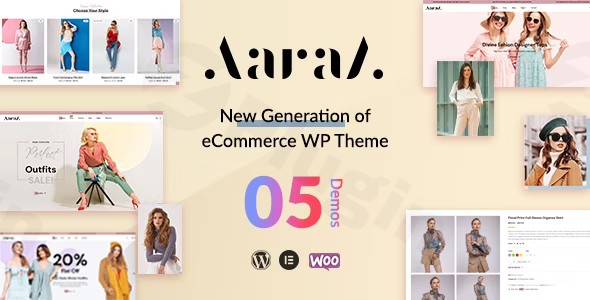
Looking to launch or refresh your online fashion boutique? The Aaraa Fashion Shop WordPress Theme is a modern, responsive, and feature-rich solution designed specifically for eCommerce businesses in the apparel and accessories industry. This theme provides an elegant platform to showcase your products, making it an ideal choice for fashion boutiques, jewelry stores, luxury brands, and lifestyle shops aiming for a sleek and professional online presence. With its deep WooCommerce integration and design flexibility, Aaraa helps transform visitors into loyal customers.
Key Features: Design, Layout & Performance
Aaraa is crafted to deliver a visually striking and high-performing online store. Its design philosophy centers on presenting products beautifully while ensuring a smooth user experience across all devices.
Design & Layout Options
The theme boasts a clean and modern design, meticulously optimized for displaying fashion collections, new arrivals, and seasonal trends effectively. It is fully responsive and mobile-optimized, guaranteeing a consistent and appealing look whether viewed on a smartphone, tablet, or desktop. Aaraa provides:
- Multiple pre-built demos: These offer quick setup options, allowing you to establish a professional-looking site with minimal effort.
- Advanced product pages: Designed to highlight your merchandise with high-quality images, detailed descriptions, size guides, and product variations (like colors and sizes).
- Unique visual elements: Including a quick view feature for products and a wishlist option (often supported by plugins like YITH WooCommerce Wishlist), enhancing the shopping experience.
Customization Capabilities
Aaraa puts the power of personalization in your hands, allowing you to tailor your store to match your brand identity precisely.
- Customizable layouts and color schemes: Easily adjust visual elements to create a unique look.
- Typography options: The theme supports Google Fonts, giving you extensive control over your site’s textual aesthetic.
- Intuitive customization: Leverage the native WordPress Customizer and full Elementor compatibility to modify layouts, colors, fonts, and more with drag-and-drop ease, no coding knowledge required.
Performance & SEO Features
In today’s competitive online landscape, speed and search engine visibility are paramount. Aaraa is built with performance and SEO in mind:
- Fast loading performance: Described as “lightweight, superfast, and attractive,” Aaraa is optimized to provide a quick and smooth browsing experience, which is crucial for user retention and search engine rankings.
- SEO optimized: Engineered with best practices to ensure your site is easily discoverable by search engines, helping you rank higher and attract more organic traffic. This includes clean markup and a structured approach to content.
- Mobile responsiveness: The theme is designed to look great and function flawlessly on all screen sizes, which is a critical factor for both user experience and SEO.
Installation & Demo Import
Getting started with Aaraa is a straightforward process, even for those new to WordPress.
- Install & Activate the Theme:
- From your WordPress dashboard, navigate to
Appearance > Themes > Add New. - Click
Upload Theme, choose the Aaraa theme.zipfile, and clickInstall Now. - Once installed, click
Activate.
- From your WordPress dashboard, navigate to
- Install Required Companion Plugins:
- Upon activation, Aaraa may prompt you to install recommended plugins, such as the “WEDESIGNTECH SHOP PLUGIN” (which provides core features and custom post types) and WooCommerce. Install and activate all suggested plugins to unlock the theme’s full functionality.
- Use One-Click Demo Import:
- Aaraa typically includes a one-click demo content import feature, often powered by the Unyson Importer. Look for this option in your WordPress dashboard, usually under
Appearanceor a dedicated theme options panel. - Selecting a demo and importing it will populate your site with pre-designed layouts, pages, images, and content, making your site look exactly like the demo in minutes.
- Aaraa typically includes a one-click demo content import feature, often powered by the Unyson Importer. Look for this option in your WordPress dashboard, usually under
- Post-Import Setup:
- After the demo import, you may need to manually set your homepage (
Settings > Reading) and assign your main navigation menus (Appearance > Menus). Review all imported pages and content, replacing placeholders with your actual product details, images, and brand copy.Note: Large demo imports can sometimes require increased server memory or timeout limits. If you encounter issues, consult your hosting provider or the theme’s documentation.
- After the demo import, you may need to manually set your homepage (
Customization Guide: Branding & Layout
Personalizing your Aaraa-powered fashion shop to reflect your unique brand identity is intuitive and flexible.
- WordPress Customizer: This is your central hub for global style adjustments. Navigate to
Appearance > Customizeto modify:- Colors: Easily change primary, secondary, and accent colors to match your brand palette.
- Typography: Select from Google Fonts for headings, body text, and other elements.
- Header & Footer Layouts: Adjust the structure and content of these critical areas.
- Logo: Upload your brand logo for consistent recognition.
- Elementor Page Builder: Aaraa’s full compatibility with Elementor empowers you with drag-and-drop functionality for extensive page and layout customization.
- Design pages visually: Modify any page or post using Elementor’s intuitive interface, adding sections, columns, and widgets to create unique designs without writing a single line of code.
- Custom Post Types & Shortcodes: The integrated “WEDESIGNTECH SHOP PLUGIN” provides a repertoire of shortcodes and custom post types, which can be seamlessly integrated and styled with Elementor for enhanced flexibility in product showcases and other content.
- Setting up Pages and Menus: Easily assign your desired static homepage and blog page from
Settings > Reading. Create and manage your navigation menus viaAppearance > Menus, linking to product categories, pages, and other important sections of your site.The customization experience is designed to be user-friendly, offering robust tools that cater to both beginners and experienced users, ensuring your fashion store looks precisely how you envision it.
FAQ & Troubleshooting
Here are answers to some common questions about the Aaraa Fashion Shop WordPress Theme:
Is Aaraa Fashion Shop Theme compatible with Elementor and Gutenberg?
Yes, Aaraa is fully compatible with Elementor, allowing for drag-and-drop design and layout customization without coding knowledge. It also works completely fine with the WordPress Block Editor (Gutenberg), giving you flexibility in content creation.
Does Aaraa support WooCommerce for online stores?
Absolutely! Aaraa is fully compatible with WooCommerce for seamless online shopping, inventory management, and payment processing. It supports various payment gateways like PayPal and Stripe and includes advanced features like quick view and a wishlist option.
Can I use a child theme with Aaraa to preserve customizations during updates?
While not explicitly detailed in the provided content, it is standard practice and highly recommended to use a child theme for any custom CSS, functions, or template overrides. Given Aaraa’s GPL license and commercial nature, it’s expected to support child themes, allowing you to update the parent theme without losing your modifications.
What are the minimum system requirements for Aaraa?
Aaraa is compatible with the “latest WordPress Version.” While specific minimum PHP and server requirements are not explicitly documented, it’s generally recommended to use PHP 7.4 or higher and ensure your hosting meets standard WordPress requirements (e.g., sufficient memory limit) for optimal performance.
What should I do if the demo import fails or looks different from the demo site?
If the demo import fails, first ensure your server’s PHP memory limit and execution time are sufficiently high (consult your host). If it looks different, check that all recommended plugins were installed and activated before importing. Sometimes, regenerate thumbnails or clear caches can also resolve display issues.
Conclusion
The Aaraa Fashion Shop WordPress Theme stands out as a compelling choice for anyone looking to build a professional and visually appealing online store for fashion, apparel, or accessories. Its modern, elegant design provides an excellent canvas for showcasing products, while its deep integration with WooCommerce offers robust eCommerce functionalities right out of the box.With its full compatibility with Elementor and intuitive options via the WordPress Customizer, Aaraa ensures significant design flexibility and ease of customization, making it accessible even for beginners without coding experience. Furthermore, its commitment to fast loading performance and SEO optimization helps your store attract and retain customers.Whether you’re a boutique owner, a fashion retailer, or an online entrepreneur, Aaraa provides a lightweight, superfast, and attractive foundation for your digital storefront, poised to convert visitors into loyal customers. It’s a solid choice for creating a high-converting online clothing store with a focus on aesthetics and user experience.
I. Download Limits & Account Benefits
- Free Downloads: Each email address receives 3 downloads per day for free products
- Upgrade Benefits: Purchase any paid product to increase your daily download limit by 3 for each paid product
- No Account Required: You can download immediately by receiving the download link via email
- Account Recommended: Create an account for easier access to your order history and direct update downloads
II. Understanding GPL vs Official Versions
Important: The products available on WPPick are GPL-licensed versions, which differ from official developer versions. Before purchasing, please read our comprehensive guide: Understanding GPL & Official Differences at WPPick
Key Points:
- GPL versions may not include premium support from original developers
- Updates may be delayed compared to official releases
- Some premium features might have limitations
- Always consider your specific needs and support requirements
III. Support & Assistance
We’re here to help through multiple channels:
- Email Support: Direct email assistance for all inquiries
- Live Chat: Real-time support during business hours
- Comprehensive Documentation: Detailed guides and tutorials
IV. Order Tracking
Access your complete purchase history and download links anytime: Order History
V. Account Access
New to WPPick? Login or Create Account to manage your downloads and orders efficiently.
VI. Refund Protection
We stand behind our products with a clear refund policy. Review our terms: Refund Policy
VII. Privacy & Security
Your data security is our priority. Learn how we protect your information: Privacy Policy
VII. Terms of Service
Understanding our service terms ensures a smooth experience: Terms of Use
Quick Tips for Best Experience
- Verify Compatibility: Check plugin/theme compatibility with your WordPress version
- Backup First: Always backup your site before installing new plugins or themes
- Test Environment: Consider testing on a staging site first
- Stay Updated: Regularly check for updates in your account dashboard
- Read Documentation: Review any included documentation for optimal setup
Need Help?
If you have questions about downloads, licensing, or need technical assistance, don’t hesitate to contact our support team. We’re committed to ensuring you have the best possible experience with WPPick products.
Ready to get started? Your download adventure begins with just one click!
- Fixed notice errors
- Added Global Product Template For Single Product Page
- Compatible with latest WordPress Version
- Compatible with latest WordPress Version