
Absolute Fitness – Fitness Multipurpose WordPress Theme
/Year
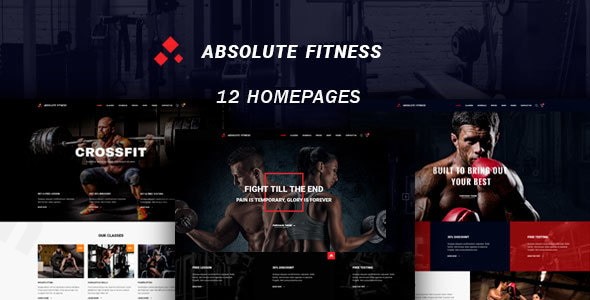
Are you looking to build a professional online presence for your fitness business? The Absolute Fitness WordPress theme is a modern, feature-rich solution designed specifically for fitness centers, gyms, personal trainers, and sports clubs. This versatile template combines stunning design with powerful functionality to help you showcase your services, attract more clients, and transform your fitness business online.
Key Features: Design, Layout & Performance
Absolute Fitness is engineered to meet the unique demands of the health and wellness industry, offering a visually appealing and highly functional platform.
Dynamic Design & Layout Options
The theme’s strength lies in its specialized design elements and flexible layouts, making it ideal for a diverse range of fitness niches.
- Responsive Design: Absolute Fitness boasts a responsive design that ensures your website looks impeccable and functions flawlessly across all devices, from desktops to tablets and smartphones. This mobile-first approach is crucial for reaching clients on the go.
- Pre-built Demos for Every Niche: Get a head start with multiple awesome demos tailored for various sports and fitness activities. Whether you run a yoga studio, CrossFit box, martial arts school, bodybuilding gym, or need a personal trainer portfolio, there’s a ready-to-use layout. These include specific demos for K1, boxing, MMA, Muay Thai, dance studios, and general fitness centers, providing a quick and effective launchpad.
- Unique Visual Elements: Engage your audience with industry-specific features such as:
- Customizable workout schedules and class timetables: Essential for keeping members informed.
- Trainer profiles with booking functionality: Highlight your team’s expertise.
- Integrated membership management system: Streamline client onboarding and retention.
- Nutrition plan and progress tracking features: Offer added value to your clients.
- BMI Calculator: A notable interactive tool to engage potential clients and demonstrate value.
- Events Calendar: For advanced timetable and event management.
- Pricing Tables: Clearly present your membership options.
- Team Grids: Showcase your trainers and staff.
- “Before/After” Galleries: Powerful for demonstrating client transformations.
Robust Customization Capabilities
Personalizing your Absolute Fitness site to reflect your brand’s unique identity is straightforward, even without extensive coding knowledge.
- WPBakery Page Builder Integration: The theme is deeply integrated with WPBakery Page Builder (formerly Visual Composer), providing a robust drag-and-drop interface for creating and customizing pages with ease. This allows for significant control over spacing, containers, sections, and backgrounds.
- Extensive Color Schemes: While not explicitly detailed, the theme’s roots suggest a wide array of color customization options to perfectly match your brand palette.
- Flexible Typography: Leverage a selection of Google Fonts like Roboto, Oswald, Archivo Black, and Playfair Display, giving you ample choice to define your website’s textual style and ensure readability.
Performance & SEO Readiness
Beyond aesthetics, Absolute Fitness is built with foundational elements important for performance and visibility.
- Mobile Responsiveness and Cross-Browser Compatibility: The theme is designed to be fully responsive and compatible with major browsers, including IE11, Firefox, Safari, Opera, and Chrome, ensuring a consistent experience for all visitors.
- WooCommerce Compatibility: For fitness businesses looking to sell merchandise, supplements, or training programs online, Absolute Fitness is WooCommerce compatible, allowing you to set up a fully functional online store.
- SEO Structure: While specific speed scores are not detailed, premium themes like Absolute Fitness typically adhere to clean coding practices and structured heading usage that contribute positively to search engine optimization. However, it’s important to note that the theme was not “Gutenberg Optimized” as of its last update in August 2019, meaning it relies more on traditional page builders than the native WordPress Block Editor.
Installation & Demo Import Guide
Getting your Absolute Fitness website up and running is a streamlined process.
- Install & Activate the Theme:
- First, purchase and download the Absolute Fitness theme files from ZeroPlugin.com or ThemeForest.
- Log in to your WordPress dashboard.
- Navigate to Appearance > Themes > Add New > Upload Theme.
- Choose the theme’s ZIP file (e.g.,
absolute-fitness.zip) and click “Install Now.” - Once installed, click “Activate.”
- Install Required Plugins:
- Upon activation, the theme will likely prompt you to install a set of recommended or required plugins. These typically include WPBakery Page Builder, WooCommerce (if you plan to sell products), and an Events Calendar plugin. Install and activate all suggested plugins to ensure full theme functionality.
- Import a Demo Site:
- Absolute Fitness comes with multiple pre-built demos. While the exact “one-click” process may vary slightly based on theme updates, premium themes usually provide a dedicated demo importer tool within your WordPress dashboard (often under Appearance or a dedicated theme options panel).
- Navigate to the demo import section (look for “Demo Import,” “Import Demo Data,” or similar).
- Browse the available demos (e.g., Gym, Yoga, Personal Trainer) and select the one that best fits your business needs.
- Initiate the import process.
- What to expect: The demo import will typically bring in sample content, pages, posts, widgets, menu structures, and theme settings. This provides a solid foundation that you can then customize with your own content. Be aware that larger demo imports may require adequate server memory and execution time to complete successfully; if you encounter issues, contacting your hosting provider to temporarily increase PHP limits (e.g.,
memory_limit,max_execution_time) might be necessary.
Customization Guide: Branding & Layout
After importing your demo, the real fun begins: making the Absolute Fitness theme uniquely yours.
- Using the WordPress Customizer & Theme Options: While WPBakery handles page-specific layouts, global styling often occurs through the native WordPress Customizer (Appearance > Customize) or a dedicated theme options panel (often found as a top-level menu item or under “Appearance”). Here, you can usually adjust:
- Colors: Set primary, secondary, accent colors, and background colors to align with your brand.
- Typography: Choose your desired Google Fonts for headings and body text, controlling font sizes, weights, and line heights.
- Logo & Favicon: Upload your brand’s logo for the header and a favicon for browser tabs.
- Header & Footer Layouts: While WPBakery can influence these areas, theme options often provide predefined header styles, widget areas for footers, and menu locations.
- Building Pages with WPBakery Page Builder:
- For individual page layouts (e.g., homepage, services, about us), navigate to the page you want to edit and select “Edit with WPBakery Page Builder.”
- Use the intuitive drag-and-drop interface to add, remove, and rearrange elements like text blocks, images, sliders, pricing tables, team members, class schedules, and more.
- Each element offers its own customization settings, allowing you to fine-tune its appearance and content.
- Setting Up Navigation Menus:
- Go to Appearance > Menus to create and assign your main navigation menus. Link to your imported demo pages or custom links.
- Configuring Blog & Static Homepage:
- Under Settings > Reading, you can choose to display a static page as your homepage (e.g., an imported demo homepage) and designate another page as your blog posts page.The visual nature of WPBakery Page Builder makes the customization experience highly accessible, allowing gym owners, personal trainers, and other fitness professionals to craft a stunning and functional website without deep coding knowledge.
FAQ & Troubleshooting
Here are answers to common questions about the Absolute Fitness WordPress theme:
Is Absolute Fitness compatible with Elementor / WPBakery / Gutenberg?
Absolute Fitness is built to integrate seamlessly with WPBakery Page Builder (formerly Visual Composer) for drag-and-drop page creation. As of its last major update, the theme is not “Gutenberg Optimized,” meaning it does not fully leverage the native WordPress Block Editor. There is no explicit mention of compatibility with Elementor.
Does Absolute Fitness support WooCommerce for online stores?
Yes, Absolute Fitness offers full WooCommerce compatibility. This means you can easily set up an online store to sell fitness products, merchandise, supplements, or even class passes and memberships directly from your website.
Does Absolute Fitness support child themes?
Yes, like most professionally developed WordPress themes, Absolute Fitness is designed to work with child themes. It includes standard WordPress files (PHP, CSS, JS), making child theme creation a standard practice for applying customizations without modifying the core theme files.
How can I update the Absolute Fitness theme without losing my customizations?
To update the Absolute Fitness theme safely without losing your customizations, it is highly recommended to create and use a child theme. Any custom CSS, functions, or template overrides should be placed within your child theme. This ensures that when you update the parent Absolute Fitness theme, your modifications remain intact.
What types of websites is Absolute Fitness ideal for?
Absolute Fitness is an ideal WordPress fitness theme for a wide array of businesses within the health and wellness sector. It shines particularly for fitness centers, gyms, personal trainers, yoga studios, dance studios, boxing clubs, martial arts centers, and any sports-related business looking for a robust and visually engaging online presence.
Conclusion
The Absolute Fitness WordPress theme stands out as a powerful and specialized solution for the fitness industry. Its compelling design, coupled with niche-specific features like customizable class schedules, trainer profiles, and a BMI calculator, provides a significant advantage for businesses aiming to attract and manage clients effectively.With its responsive layout, extensive customization options via WPBakery Page Builder, and WooCommerce compatibility, Absolute Fitness offers a high degree of flexibility for branding and functionality. While its lack of native Gutenberg optimization and an older last update date might be considerations for some, its robust feature set and clear focus on the fitness niche make it an excellent choice for gym owners, personal trainers, and health and wellness entrepreneurs who prioritize a dedicated, feature-rich platform and are comfortable with a classic page builder workflow. If you need a website that truly reflects the dynamism of your fitness brand, Absolute Fitness provides all the essential tools to build an engaging and conversion-focused online presence.
I. Download Limits & Account Benefits
- Free Downloads: Each email address receives 3 downloads per day for free products
- Upgrade Benefits: Purchase any paid product to increase your daily download limit by 3 for each paid product
- No Account Required: You can download immediately by receiving the download link via email
- Account Recommended: Create an account for easier access to your order history and direct update downloads
II. Understanding GPL vs Official Versions
Important: The products available on WPPick are GPL-licensed versions, which differ from official developer versions. Before purchasing, please read our comprehensive guide: Understanding GPL & Official Differences at WPPick
Key Points:
- GPL versions may not include premium support from original developers
- Updates may be delayed compared to official releases
- Some premium features might have limitations
- Always consider your specific needs and support requirements
III. Support & Assistance
We’re here to help through multiple channels:
- Email Support: Direct email assistance for all inquiries
- Live Chat: Real-time support during business hours
- Comprehensive Documentation: Detailed guides and tutorials
IV. Order Tracking
Access your complete purchase history and download links anytime: Order History
V. Account Access
New to WPPick? Login or Create Account to manage your downloads and orders efficiently.
VI. Refund Protection
We stand behind our products with a clear refund policy. Review our terms: Refund Policy
VII. Privacy & Security
Your data security is our priority. Learn how we protect your information: Privacy Policy
VII. Terms of Service
Understanding our service terms ensures a smooth experience: Terms of Use
Quick Tips for Best Experience
- Verify Compatibility: Check plugin/theme compatibility with your WordPress version
- Backup First: Always backup your site before installing new plugins or themes
- Test Environment: Consider testing on a staging site first
- Stay Updated: Regularly check for updates in your account dashboard
- Read Documentation: Review any included documentation for optimal setup
Need Help?
If you have questions about downloads, licensing, or need technical assistance, don’t hesitate to contact our support team. We’re committed to ensuring you have the best possible experience with WPPick products.
Ready to get started? Your download adventure begins with just one click!