

Acadia – Education WordPress Theme For University & Online Course
/Year
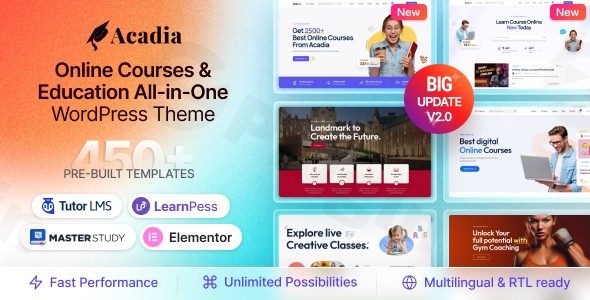
Empowering Modern Online Education and Academic Websites
Building a professional digital campus requires a specialized digital foundation that balances administrative needs with an engaging student experience. Acadia is a robust, feature-rich education WordPress theme meticulously engineered for universities, colleges, online course creators, and independent academies. By combining modern aesthetics with deep learning management system compatibility, this theme offers everything educational webmasters need to launch and scale a thriving digital learning hub.
What Acadia Does for Your Educational Platform
Acadia streamlines the process of establishing a fully functioning e-learning portal or university website without requiring complex custom coding. It provides pre-designed layouts, intuitive course catalog structures, student dashboard interfaces, and secure checkout workflows. Whether you are managing multi-instructor university departments or selling individual video-based masterclasses, the theme handles course discovery, user registration, and content delivery seamlessly.
Who Is This Theme For?
This solution is tailored for a diverse range of educational entities and creators looking for a polished online presence:
- Universities and colleges seeking a centralized digital portal for students and faculty.
- Online course creators and instructors launching standalone e-learning academies.
- Language schools, art institutes, and vocational training centers.
- Marketing and business coaching professionals offering structured digital curricula.
Key Capabilities and Advanced Features
Acadia stands out through its comprehensive feature set designed specifically for modern digital learning environments:
- Seamless integration with leading learning management plugins such as LearnPress and Tutor LMS.
- Full compatibility with the Elementor page builder for flexible, code-free layout customization.
- Dedicated instructor profile docks and advanced student dashboard interfaces.
- Responsive course grids, category filters, and mobile-optimized navigation.
- Built-in e-commerce support for handling paid enrollments, bundles, and digital subscriptions.
Practical WordPress Use Cases
Webmasters can deploy Acadia across various real-world academic scenarios. It powers university homepages featuring upcoming semester admissions, course search filters, and campus news feeds. It also supports specialized portals like language academies or design schools where instructors can showcase their credentials, display verified ratings, and organize syllabi into clear, digestible modules.
Setup, Integration, and Compatibility Notes
Deploying Acadia is straightforward for anyone familiar with the WordPress ecosystem. The theme integrates smoothly with standard caching solutions, SEO plugins, and multilingual translation tools. Its modular architecture ensures that core learning tools load efficiently, maintaining fast page speeds even when managing extensive course catalogs and large student databases.
Reasons to Choose Acadia on WPPick
Choosing Acadia through WPPick ensures you receive a clean, ready-to-deploy theme file backed by regular update tracking. It eliminates the friction of manual version monitoring, allowing site administrators to focus on content creation, student engagement, and curriculum development rather than technical maintenance overhead.
Latest Version Context and Updates
The latest version, 3.2.2, brings significant enhancements to user experience and backend styling. Key updates include a redesigned LearnPress checkout page with a sticky order summary and step-by-step forms, a refreshed Order Received confirmation page, and a completely overhauled profile dashboard featuring custom side navigation and statistic cards. Additionally, Tutor LMS users benefit from a new floating profile dock with stats, ratings, and social links on scroll, alongside refined course card spacing and crucial bug fixes for archive filters.
Frequently Asked Questions
Does Acadia support popular LMS plugins? Yes, Acadia offers deep integration with major learning management systems including LearnPress and Tutor LMS for streamlined course management.
Can I customize the layout without coding knowledge? Absolutely. The theme is fully compatible with the Elementor page builder, enabling intuitive drag-and-drop design modifications.
Is the theme optimized for mobile devices? Yes, Acadia features a fully responsive design framework that ensures course cards, navigation menus, and student dashboards render perfectly on smartphones and tablets.
Does version 3.2.2 include checkout improvements? Yes, version 3.2.2 introduces a redesigned LearnPress checkout page complete with a sticky order summary and streamlined form fields.
How do instructors manage their profiles? Instructors can utilize dedicated profile dashboards and floating profile docks that display real-time statistics, ratings, and social media links.
I. Download Limits & Account Benefits
- Free Downloads: Each email address receives 3 downloads per day for free products
- Upgrade Benefits: Purchase any paid product to increase your daily download limit by 3 for each paid product
- No Account Required: You can download immediately by receiving the download link via email
- Account Recommended: Create an account for easier access to your order history and direct update downloads
II. Understanding GPL vs Official Versions
Important: The products available on WPPick are GPL-licensed versions, which differ from official developer versions. Before purchasing, please read our comprehensive guide: Understanding GPL & Official Differences at WPPick
Key Points:
- GPL versions may not include premium support from original developers
- Updates may be delayed compared to official releases
- Some premium features might have limitations
- Always consider your specific needs and support requirements
III. Support & Assistance
We’re here to help through multiple channels:
- Email Support: Direct email assistance for all inquiries
- Live Chat: Real-time support during business hours
- Comprehensive Documentation: Detailed guides and tutorials
IV. Order Tracking
Access your complete purchase history and download links anytime: Order History
V. Account Access
New to WPPick? Login or Create Account to manage your downloads and orders efficiently.
VI. Refund Protection
We stand behind our products with a clear refund policy. Review our terms: Refund Policy
VII. Privacy & Security
Your data security is our priority. Learn how we protect your information: Privacy Policy
VII. Terms of Service
Understanding our service terms ensures a smooth experience: Terms of Use
Quick Tips for Best Experience
- Verify Compatibility: Check plugin/theme compatibility with your WordPress version
- Backup First: Always backup your site before installing new plugins or themes
- Test Environment: Consider testing on a staging site first
- Stay Updated: Regularly check for updates in your account dashboard
- Read Documentation: Review any included documentation for optimal setup
Need Help?
If you have questions about downloads, licensing, or need technical assistance, don’t hesitate to contact our support team. We’re committed to ensuring you have the best possible experience with WPPick products.
Ready to get started? Your download adventure begins with just one click!
- LearnPress Checkout page redesigned with a sticky order summary and step-by-step form.
- LearnPress Order Received (Thank You) page redesigned.
- LearnPress Profile Dashboard redesigned - profile header, side navigation and statistic cards.
- Profile Cover Image now displays as the profile header background.
- Tutor LMS Instructor Profile page - floating profile dock with stats, rating and socials on scroll.
- LearnPress Profile Orders and My Courses tables restyled to match the theme.
- LearnPress Profile Settings forms and sub-tabs restyled.
- Course card content spacing refined on Tutor LMS, LearnPress and MasterStudy archives.
- Course card styles missing on the LearnPress Profile page.
- LearnPress Review issue fixed.
- Tutor LMS course card icons showing stray characters instead of the rating, bookmark and cart icons.
- Tutor LMS course archive instructor filter listing instructors with no published course.
- Tutor LMS course card category and meta row not wrapping on narrow cards.
- Latest WordPress Compatible.
- Latest WooCommerce Compatible.
- All Plugin Updated.
- Latest WordPress Version Compatible.
- Latest WooCommerce Version Compatible.
- Latest All Plugin Compatible.
- Custom post type setting style change.
- Theme CSS issue fixed.
- Latest WordPress Version Compatible.
- Latest WooCommerce Version Compatible.
- Default Theme Header issue fixed.
- Course Tab issue fixed.
- Course With Filter issue fixed.
- Style issue fixed.
- Latest WordPress Version Compatible.
- Latest WooCommerce Version Compatible.
- Latest All Plugin Compatible.
- Theme CSS issue fixed.
- University Tab Widget issue fixed.
- Latest WordPress Version Compatible
- Latest WooCommerce Version Compatible
- Latest All Plugin Compatible
- Theme CSS issue fixed
- New 3 Home page
- Language Academy New Home Page
- Art & Design School New Home Page
- Marketing New Home Page
- Latest All Plugin Compatible
- Latest WooCommerce Version Compatible
- WooCommerce Wishlist Issue Fixed
- Core Plugin Issue Fixed
- Minor Bug Fixed