

Adhi – Yoga WordPress Theme
/Year
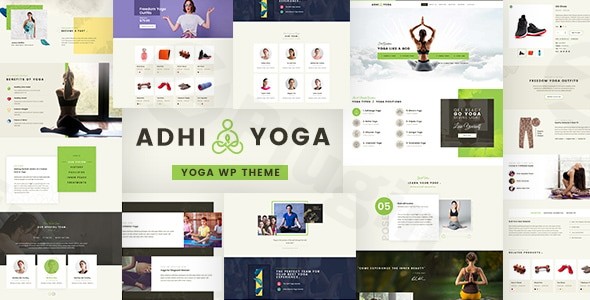
The digital space for yoga studios, meditation centers, and wellness coaches demands a website that’s both visually calming and functionally robust. The Adhi Yoga WordPress Theme steps in as a premium solution, meticulously crafted to help yoga professionals and wellness practitioners establish a tranquil yet powerful online presence. It’s designed for anyone from freelance instructors to large studios looking to attract students, manage classes, and grow their health-focused business.Adhi Yoga is more than just a beautiful template; it’s a comprehensive wellness WordPress theme built with a serene design philosophy. It focuses on clean lines, soothing aesthetics, and intuitive user experience, ensuring your visitors feel a sense of peace from the moment they land on your site. This theme is ideal for creating a digital hub that reflects the mindful and holistic nature of your services.
Key Features: Design, Layout & Performance
Adhi Yoga is packed with features that cater specifically to the yoga and wellness niche, balancing visual appeal with essential business functionalities.
Design & Layout Options
The theme’s design philosophy prioritizes tranquility and professionalism. Every element is built to be fully responsive, ensuring your website provides a seamless experience across all devices, from desktops to smartphones. This mobile-first approach is crucial for today’s diverse user base.Adhi Yoga comes equipped with multiple demo variations tailored for different aspects of the wellness industry. Whether you run a yoga studio, a meditation center, offer fitness training, or provide Ayurveda practices, there’s a professionally designed starter site to kickstart your journey. These demos offer pre-built pages and layouts for essential sections like instructor profiles, class schedules, and workshop promotions, saving you significant development time.
Customization Capabilities
Personalizing your website to reflect your unique brand identity is straightforward with Adhi Yoga. While specific details on the Customizer vs. Site Editor are not extensively documented, the theme provides essential customization options:
- Color Schemes: Easily adjust your site’s color palette with intuitive color pickers to align with your brand’s aesthetics and create a calming visual atmosphere.
- Typography: Tailor fonts to enhance readability and reinforce your brand’s voice, although detailed font system specifics are not provided, general adjustment is expected.
- Global Styles: The theme is built to allow for consistent styling across your site, ensuring a cohesive and professional look.The focus is on providing flexibility without overwhelming the user, ensuring that even those without coding knowledge can achieve a branded look.
Performance & SEO Features
In the competitive online wellness space, speed and search engine visibility are paramount. Adhi Yoga is built with clean code following WordPress best practices, contributing to faster loading times and smooth performance.Key performance and SEO attributes include:
- SEO Optimized: The theme’s structure and code are designed to be search engine-friendly, helping your website rank higher in search results for relevant keywords like “yoga classes near me” or “online meditation courses.”
- Mobile Responsiveness: Its responsive design is not just about aesthetics; it’s a critical SEO factor, ensuring your site performs well on Google’s mobile-first indexing.
- Translation Ready: Expand your reach globally with a theme that supports multiple languages, making it accessible to a wider audience.While specific metrics like Lighthouse scores aren’t detailed, the commitment to clean code and SEO best practices indicates a solid foundation for your digital wellness journey.
Installation & Demo Import
Setting up your Adhi Yoga website is designed to be a smooth process, even for those new to WordPress.
- Install & Activate the Theme:
- Log in to your WordPress dashboard.
- Navigate to
Appearance > Themes > Add New > Upload Theme. - Choose the
adhi-yoga.zipfile you downloaded and clickInstall Now. - Once installed, click
Activate.
- Install Required Companion Plugins:
- After activation, you’ll typically see a notification banner prompting you to install required plugins. Adhi Yoga relies on companion plugins like “DESIGN THEMES CORE FEATURES PLUGIN” for its custom post types (yoga poses, trainers, courses) and other functionalities. It’s also compatible with Elementor for page building and WooCommerce for e-commerce.
- Install and activate all recommended plugins for full theme functionality.
- Use the One-Click Demo Import:
- Adhi Yoga features a one-click demo import system, often found under an
Adhi OptionsorAppearance > Import Demo Datamenu. This tool allows you to replicate one of the professionally designed demo sites with all its content, layouts, and settings. - Select your preferred demo and initiate the import.
- Adhi Yoga features a one-click demo import system, often found under an
- What to Expect During/After Demo Import:
- The demo import process will populate your site with pages, posts, images (often placeholders), menus, and widgets, making your site look just like the demo.
- Common Pitfalls: For large demo imports, ensure your server has sufficient memory (PHP
memory_limittypically 256M or higher) and increased execution time (PHPmax_execution_time180 or 300 seconds). If the import fails or times out, these server settings are usually the cause. After import, you’ll need to update placeholder images and text with your own content.
Customization Guide (Branding & Layout)
Adhi Yoga provides the tools to personalize your website and align it perfectly with your brand’s identity and visual guidelines.
- WordPress Customizer: Most core theme customizations, such as setting your logo, choosing global colors, adjusting typography, and configuring header/footer layouts, will be accessible via the WordPress Customizer (
Appearance > Customize). This real-time preview environment allows you to see your changes instantly. - Page Builders (Elementor): Since Adhi Yoga is Elementor compatible, you can use its intuitive drag-and-drop interface to design and customize individual pages. This empowers you to create unique layouts for your class pages, instructor profiles, or service offerings without writing any code.
- Setting Up Homepage, Blog Page & Menus:
- You can set a static page imported from the demo as your homepage via
Settings > Reading. - Similarly, assign a page for your blog posts.
- Menus can be configured under
Appearance > Menus, allowing you to organize your site’s navigation.
- You can set a static page imported from the demo as your homepage via
- Intuitive Experience: The theme’s integration with the Customizer and popular page builders makes the customization experience intuitive. You’ll find options logically grouped, and the pre-designed elements from the demo act as excellent starting points for your branding efforts.
FAQ & Troubleshooting
Here are answers to some common questions about the Adhi Yoga WordPress Theme:
Is Adhi Yoga compatible with Elementor / WPBakery / Gutenberg?
Adhi Yoga is compatible with Elementor and Elementor Pro, allowing for flexible drag-and-drop page building. It is also designed to be Gutenberg-ready, integrating smoothly with WordPress’s native block editor for content creation. While WPBakery compatibility isn’t explicitly detailed, Elementor provides robust design capabilities.
Does Adhi Yoga support WooCommerce for online stores?
Yes, Adhi Yoga supports WooCommerce integration, making it an excellent choice for selling yoga products, memberships, online courses, and event tickets directly from your website. This allows you to monetize your wellness business effectively.
How can I update Adhi Yoga without losing my customizations?
To update the Adhi Yoga theme without losing your customizations, it is highly recommended to use a child theme. A child theme inherits all the functionality and styling of the parent theme (Adhi Yoga) but allows you to make modifications in separate files, preserving them during theme updates. For minor CSS changes, you can often use the “Additional CSS” section in the WordPress Customizer.
What should I do if the demo import fails or looks different from the demo site?
If the demo import fails or doesn’t look exactly like the live demo, first check your server’s PHP configuration. Ensure your memory_limit is at least 256M and max_execution_time is set to 180 or 300 seconds. If issues persist, refer to the theme’s official documentation or contact support for guidance, as server configuration is a common cause.
Is Adhi Yoga good for creating a comprehensive yoga class schedule and booking system?
Yes, Adhi Yoga includes specialized modules for professional booking and scheduling. It offers built-in calendar functionality to manage class schedules, private sessions, workshops, and retreats, making it easy for students to reserve spots and for you to manage capacity efficiently.
Conclusion
The Adhi Yoga WordPress Theme offers a compelling package for anyone in the wellness industry seeking to build a professional, beautiful, and highly functional online presence. Its specialized features for yoga and meditation businesses, combined with modern design and robust integration capabilities, position it as a top contender for yoga WordPress theme solutions.With its responsive layouts, intuitive customization options through Elementor and the WordPress Customizer, and strong WooCommerce compatibility, Adhi Yoga empowers you to attract students, promote your services, and manage your business effectively. Its commitment to clean code and SEO readiness ensures your site performs well in search engines, while features like dedicated yoga pose libraries and instructor profiles provide genuine value.Adhi Yoga is an excellent choice for yoga instructors, studio owners, meditation teachers, wellness coaches, and spiritual retreat centers. It provides a solid foundation for both new and established businesses, allowing you to focus on your core mission of promoting health and well-being while your website handles the digital heavy lifting. If you’re looking for a theme that truly understands the unique needs of the wellness sector, Adhi Yoga is a confident recommendation.
I. Download Limits & Account Benefits
- Free Downloads: Each email address receives 3 downloads per day for free products
- Upgrade Benefits: Purchase any paid product to increase your daily download limit by 3 for each paid product
- No Account Required: You can download immediately by receiving the download link via email
- Account Recommended: Create an account for easier access to your order history and direct update downloads
II. Understanding GPL vs Official Versions
Important: The products available on WPPick are GPL-licensed versions, which differ from official developer versions. Before purchasing, please read our comprehensive guide: Understanding GPL & Official Differences at WPPick
Key Points:
- GPL versions may not include premium support from original developers
- Updates may be delayed compared to official releases
- Some premium features might have limitations
- Always consider your specific needs and support requirements
III. Support & Assistance
We’re here to help through multiple channels:
- Email Support: Direct email assistance for all inquiries
- Live Chat: Real-time support during business hours
- Comprehensive Documentation: Detailed guides and tutorials
IV. Order Tracking
Access your complete purchase history and download links anytime: Order History
V. Account Access
New to WPPick? Login or Create Account to manage your downloads and orders efficiently.
VI. Refund Protection
We stand behind our products with a clear refund policy. Review our terms: Refund Policy
VII. Privacy & Security
Your data security is our priority. Learn how we protect your information: Privacy Policy
VII. Terms of Service
Understanding our service terms ensures a smooth experience: Terms of Use
Quick Tips for Best Experience
- Verify Compatibility: Check plugin/theme compatibility with your WordPress version
- Backup First: Always backup your site before installing new plugins or themes
- Test Environment: Consider testing on a staging site first
- Stay Updated: Regularly check for updates in your account dashboard
- Read Documentation: Review any included documentation for optimal setup
Need Help?
If you have questions about downloads, licensing, or need technical assistance, don’t hesitate to contact our support team. We’re committed to ensuring you have the best possible experience with WPPick products.
Ready to get started? Your download adventure begins with just one click!