

Adifier – Classified Ads WordPress Theme
/Year
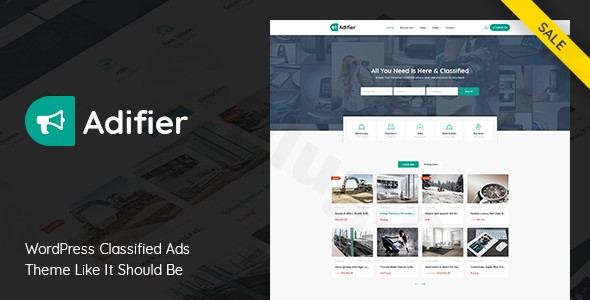
Building a successful online marketplace requires more than just a pretty layout; it demands a robust engine capable of handling user submissions, complex searches, and diverse monetization strategies. The Adifier WordPress theme is a premium, all-in-one solution specifically engineered for those looking to launch a high-performing classified ads WordPress theme without the bloat of dozens of third-party plugins. Whether you are aiming to build a niche real estate portal, an automotive marketplace, or a general community site like Craigslist or Gumtree, Adifier provides the professional framework needed to succeed.
Key Features: Design, Layout & Performance
Adifier stands out in the crowded marketplace niche by offering a design philosophy that balances visual hierarchy with extreme functional utility. It doesn’t just show ads; it manages them.
Versatile Layout & Visual Options
Adifier offers multiple homepage layouts and listing displays, including grid, list, and card styles. This flexibility allows site owners to choose the visual density that best fits their niche—for example, a clean grid for high-end electronics or a detailed list for real estate listings. The theme is fully responsive, ensuring that the “mobile-first” audience can browse, search, and post ads seamlessly on any device.
Advanced Customization & Custom Fields
One of Adifier’s most powerful features is its Custom Fields Builder. Unlike generic themes, Adifier allows you to create category-specific fields. If you are listing a car, you can include fields for “Mileage” and “Fuel Type”; if you are listing a house, you can switch to “Bedrooms” and “Square Footage.” This level of detail significantly improves the user experience and search accuracy.
Performance and SEO Readiness
Speed is a critical ranking factor for search engines and a major driver for user retention. Adifier is built from the ground up with clean markup and is Gutenberg optimized.
- Speed: Includes built-in performance features like lazy loading for images.
- SEO: The theme uses a structured heading hierarchy and is compatible with top optimization plugins like Autoptimize and Smush.
* Compatibility: It integrates seamlessly with Elementor and WPBakery, giving you drag-and-drop control over your page designs.
Installation & Adifier Theme Setup Guide
Setting up a complex classifieds site can be daunting, but Adifier simplifies the process through an intuitive onboarding workflow. Follow these steps to get started:
- Theme Installation: Upload the
adifier.zipfile via Appearance > Themes > Add New in your WordPress dashboard. Activate it once the upload is complete. - Plugin Activation: Upon activation, the theme will prompt you to install required companion plugins, including those for core functionality and monetization.
- One-Click Demo Import: Navigate to the Adifier options panel to find the Demo Import section. Choose your preferred starter site and click import. This will populate your site with sample listings, menus, and widgets, giving you a functional foundation in minutes.
4. Server Requirements: Ensure your hosting environment is running PHP 7.2+ and has a MySQL version of 5.6+ to ensure smooth performance during the import process.
Customization Guide: Branding & Layout
Once the demo is imported, personalizing the Adifier WordPress theme to match your brand is straightforward.
- Global Styling: Use the powerful Theme Options Panel to control your typography (via Google Fonts integration), primary brand colors, and container widths.
- Header & Footer: While Adifier comes with pre-designed headers, its compatibility with Elementor allows you to build custom headers and footers if you require a unique navigation structure.
- Monetization Setup: Adifier is fully WooCommerce compatible. You can set up “Pay per Ad” models, subscription packages, or “Bump Up” features to charge users for premium visibility.
* User Dashboard: The theme includes a professional front-end user dashboard where sellers can manage their ads, view messages, and track their invoices without ever seeing the WordPress back-end.
FAQ & Troubleshooting
Is Adifier compatible with Elementor or WPBakery?
Yes, the Adifier WordPress theme is fully compatible with popular page builders like Elementor and WPBakery. This allows you to create custom landing pages and modify layout structures using a visual, drag-and-drop interface.
Does Adifier support WooCommerce for online stores?
Yes, Adifier integrates deeply with WooCommerce. This integration is the backbone of its monetization system, enabling you to process payments for ad packages, subscriptions, and promotional features through various payment gateways.
How do I update Adifier without losing my customizations?
Adifier includes a child theme in its package. You should always activate the child theme and perform your CSS or functional modifications there. When the parent theme is updated, your child theme settings will remain intact.
What should I do if the demo import fails?
Demo import failures are usually caused by server timeouts or low memory limits. Ensure your PHP memory_limit is set to at least 256M and max_execution_time is set to 300. If the problem persists, check your server error logs or reach out to the developer, SpoonThemes.
Conclusion: Is Adifier Right for You?
The Adifier WordPress theme is a powerhouse for anyone serious about launching a professional marketplace. Its standout strength lies in its niche-specific features—like the auction system, built-in messaging, and the advanced custom fields builder—which are often expensive add-ons in other themes.Who is this for?
- Entrepreneurs: Looking for a turnkey solution to compete with major classified sites.
- Developers: Who need a flexible, clean-coded framework for client marketplace projects.
- Small Businesses: Looking to create a localized directory or niche-specific listing site.While it has a slight learning curve due to the sheer depth of its features, the result is a professional, SEO-optimized, and highly monetizable platform. If you want to build a “best-in-class” classified ads website, Adifier is a top-tier choice that delivers excellent value and performance.For more WordPress theme reviews and SEO strategies, visit wppick.com.
I. Download Limits & Account Benefits
- Free Downloads: Each email address receives 3 downloads per day for free products
- Upgrade Benefits: Purchase any paid product to increase your daily download limit by 3 for each paid product
- No Account Required: You can download immediately by receiving the download link via email
- Account Recommended: Create an account for easier access to your order history and direct update downloads
II. Understanding GPL vs Official Versions
Important: The products available on WPPick are GPL-licensed versions, which differ from official developer versions. Before purchasing, please read our comprehensive guide: Understanding GPL & Official Differences at WPPick
Key Points:
- GPL versions may not include premium support from original developers
- Updates may be delayed compared to official releases
- Some premium features might have limitations
- Always consider your specific needs and support requirements
III. Support & Assistance
We’re here to help through multiple channels:
- Email Support: Direct email assistance for all inquiries
- Live Chat: Real-time support during business hours
- Comprehensive Documentation: Detailed guides and tutorials
IV. Order Tracking
Access your complete purchase history and download links anytime: Order History
V. Account Access
New to WPPick? Login or Create Account to manage your downloads and orders efficiently.
VI. Refund Protection
We stand behind our products with a clear refund policy. Review our terms: Refund Policy
VII. Privacy & Security
Your data security is our priority. Learn how we protect your information: Privacy Policy
VII. Terms of Service
Understanding our service terms ensures a smooth experience: Terms of Use
Quick Tips for Best Experience
- Verify Compatibility: Check plugin/theme compatibility with your WordPress version
- Backup First: Always backup your site before installing new plugins or themes
- Test Environment: Consider testing on a staging site first
- Stay Updated: Regularly check for updates in your account dashboard
- Read Documentation: Review any included documentation for optimal setup
Need Help?
If you have questions about downloads, licensing, or need technical assistance, don’t hesitate to contact our support team. We’re committed to ensuring you have the best possible experience with WPPick products.
Ready to get started? Your download adventure begins with just one click!
- Added total amount on payment modal
- Updated language file
- Demo content file changed