
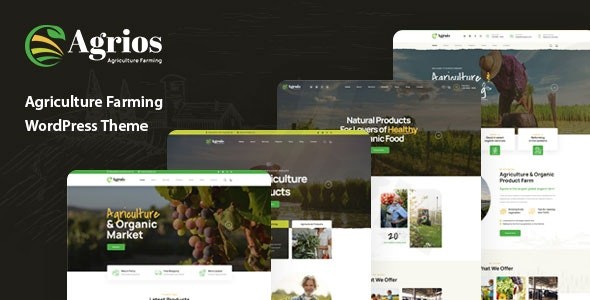
Agrios – Agriculture Farming WordPress Theme
/Year
Build a Stunning Farming or Agriculture Website with Ease
The Agrios WordPress theme is a robust and visually appealing solution specifically crafted for the agriculture and farming industry. If you’re running an organic farm, dairy operation, agricultural equipment supply business, or offering consulting services, Agrios provides the ideal platform to establish a professional online presence. Its modern design philosophy emphasizes cleanliness, user-friendliness, and conversion-ready layouts, ensuring your website effectively showcases your products, services, and commitment to quality without requiring any coding expertise.
Key Features: Design, Layout & Performance for the Modern Farm
Agrios is engineered to help agricultural businesses thrive online, blending intuitive design with powerful functionality and solid performance.
Flexible Design & Layout Options
Agrios offers a rich array of design and layout choices to give your agricultural website a unique and professional look.
- Homepage Diversity: Kickstart your site with 4+ unique homepage layouts, each thoughtfully designed with distinct sliders and elements tailored to various agricultural niches. Whether you need to highlight organic produce, showcase livestock, or feature farm services, there’s a starting point that fits.
- Inner Page Versatility: Beyond homepages, the theme provides customizable content layouts for essential sections like products, services, and portfolios, ensuring every part of your site is cohesive.
- Responsive & Retina-Ready: Your Agrios-powered website will look spectacular and perform flawlessly on any device, from desktops to smartphones and tablets, thanks to its fully responsive and retina-ready design.
Intuitive Customization Capabilities
Personalizing Agrios to reflect your brand’s identity is straightforward and powerful.
- Elementor Page Builder Integration: At its core, Agrios leverages the Elementor Page Builder, offering a drag-and-drop interface for creating and customizing layouts effortlessly. This bundled integration, compatible even with Elementor Pro, gives you complete design flexibility without touching a line of code.
- Live Theme Options Panel: Built upon the native WordPress Customizer, the powerful Live Theme Option Panel allows for real-time visual adjustments. Tweak colors, fonts, spacing, containers, sections, and backgrounds with instant previews.
- Unlimited Styling: With unlimited color and font options, including custom Google Fonts and icon fonts, your brand’s visual identity can be perfectly translated online.
- Advanced Header, Footer & Mega Menu Builder: Agrios includes a sophisticated builder for your site’s header, footer, and mega menus, seamlessly integrated with Elementor. Choose from multiple header styles and customize every detail, including sticky header options and mobile-specific layouts.
Performance & SEO Excellence
Agrios is built with speed and search engine visibility in mind, critical for reaching your audience.
- High-Speed Performance: The theme’s optimized code ensures fast loading times, providing a smooth user experience and positively impacting your search engine rankings.
- SEO Optimized: Designed with clean markup and a structured heading hierarchy, Agrios is inherently SEO-friendly, helping your farm or agriculture business appear prominently in search results.
- WooCommerce Ready & ShopEngine Integration: For selling farm produce, seeds, or equipment online, Agrios is fully WooCommerce Ready. It enhances your e-commerce capabilities with deep integration of the ShopEngine WooCommerce builder, adding advanced features like Product Comparison, Wishlist, and Variation Swatches.
Installation & One-Click Demo Import Guide
Getting your Agrios-powered agriculture website up and running is a streamlined process.
- Install & Activate the Agrios Theme:
- From your WordPress dashboard, navigate to Appearance > Themes > Add New.
- Click Upload Theme, choose the Agrios theme ZIP file, and click Install Now.
- Once installed, click Activate.
- Install Required Plugins:
- Upon activation, Agrios will prompt you to install recommended plugins. Crucially, it comes bundled with the Elementor Page Builder. Ensure you install and activate all suggested plugins, especially Elementor and ShopEngine (for WooCommerce functionality), to unlock the theme’s full potential.
- Perform One-Click Demo Import:
- Agrios features a one-click demo importer to quickly set up your website with sample content. Look for this option, usually under Appearance or a dedicated theme options panel (e.g., “Demo Importer,” “Install Demos”).
- Select your preferred homepage layout from the 4+ available designs and initiate the import. This process populates your site with the theme’s demo homepages, inner pages, blog posts, and even WooCommerce products, mirroring the live demo.
- What to Expect Post-Import:
- After a successful import, your website will resemble the chosen demo. You’ll find pre-built pages, menus, widgets, and sample content. You’ll need to go to Appearance > Menus and assign the imported menus to your theme’s locations (e.g., Primary Menu, Footer Menu). Similarly, check Appearance > Widgets to arrange sidebar and footer content.
- Common Pitfalls:
- Large demo imports can be resource-intensive. If you encounter issues (e.g., stalled import, incomplete content), ensure your hosting environment meets WordPress’s minimum requirements for PHP memory limit, execution time, and max input vars. Increasing these values temporarily often resolves import problems.
Customization Guide: Branding Your Agrios Website
Agrios makes personalizing your site intuitive, allowing you to create a unique brand presence.
- Utilizing the WordPress Customizer:
- Navigate to Appearance > Customize in your WordPress dashboard. This launches the Agrios Live Theme Options Panel, where you can make real-time visual changes.
- Here, you can adjust Global Styles for consistent branding across your site.
- Changing Colors & Typography:
- Within the Customizer, explore the Colors and Typography settings. Agrios provides unlimited color options and extensive control over fonts, including Google Fonts and custom icon fonts. Set your brand’s primary and secondary colors, choose readable font pairings, and define sizes for headings and body text.
- Uploading Your Logo:
- Find the Site Identity section in the Customizer to upload your farm or business logo. You can also set a site title and tagline, which are crucial for SEO.
- Configuring Header & Footer Layouts:
- The built-in Header, Footer & MegaMenu Builder (accessible often via Elementor templates or a dedicated theme option) gives you immense control. Customize elements like navigation links, contact information, social media icons, and call-to-action buttons. You can also define global header and footer templates to apply across your site.
- Setting Up Your Homepage, Blog, and Menus:
- Homepage: Go to Settings > Reading to set your imported demo homepage as your static front page.
- Blog Page: Create a new page (e.g., “Blog”) and assign it as your “Posts page” under Settings > Reading. Agrios offers various blog layouts to display your articles.
- Navigation Menus: From Appearance > Menus, select the imported menus or create new ones. Assign them to the appropriate menu locations (e.g., primary navigation, footer navigation) provided by the Agrios theme.
FAQ & Troubleshooting
Here are answers to some common questions about the Agrios WordPress theme:
Is Agrios compatible with Elementor, Gutenberg, and other page builders?
Yes, Agrios is highly compatible with Elementor Page Builder and it comes bundled for free. It also integrates seamlessly with Elementor Pro. The theme is also compatible with the native WordPress Block Editor (Gutenberg) for content creation. While its primary page builder is Elementor, its structure is generally compatible with standard WordPress content.
Does Agrios support WooCommerce for online stores?
Absolutely! Agrios is fully WooCommerce Ready, allowing you to set up a powerful online store to sell your farm products, organic produce, or agricultural equipment. Furthermore, it integrates with the ShopEngine WooCommerce builder, which enhances your store with advanced features like product comparisons, wishlists, and variation swatches, offering a superior e-commerce experience.
Can I use a child theme with Agrios to protect my customizations?
While explicit details regarding dedicated child theme support options are not extensively documented within the core snippets, it is a standard and highly recommended practice in WordPress development. For any significant customizations (CSS, functions, templates), creating and using a child theme is strongly advised to ensure your modifications are not lost during theme updates. You can find general WordPress guides on how to create a child theme.
How do I import demo content in the Agrios WordPress theme?
To import demo content in Agrios, first ensure the theme and all recommended plugins (especially Elementor) are installed and activated. Then, navigate to the theme’s options panel (often under Appearance or a dedicated menu item like “Agrios Options” or “Demo Importer”) in your WordPress dashboard. From there, you should find a “One-Click Demo Import” feature. Select your desired demo layout and initiate the import process.
What should I do if the Agrios theme demo import fails or looks different from the demo site?
If the demo import fails or doesn’t look exactly like the live demo, it’s often due to server resource limitations (e.g., low PHP memory, max execution time). Check your server’s PHP configuration and increase memory_limit, post_max_size, upload_max_filesize, and max_execution_time. Also, ensure all required plugins were installed and activated prior to import. If the issue persists after addressing server resources, consult the theme’s documentation or contact the support provider (if you purchased a licensed version).
Conclusion
The Agrios – Premium Agriculture & Farming WordPress Theme stands out as a top-tier choice for anyone in the agricultural sector seeking a professional and effective online presence. Its specialized design and robust feature set, including deep integration with Elementor for flexible page building and ShopEngine for advanced e-commerce, make it a comprehensive solution.With its 4+ ready-to-use homepage designs, one-click demo installation, and an intuitive customization experience via the WordPress Customizer, Agrios empowers both beginners and experienced users to create a stunning website with ease. Its commitment to performance, SEO readiness, and full mobile responsiveness ensures your site will be fast, visible, and accessible on all devices.Agrios is an ideal choice for organic farms, dairy producers, agricultural service providers, and farm-to-table businesses that need a reliable, visually engaging, and highly functional platform. If you’re looking for a theme that genuinely understands the agricultural niche and provides the tools to succeed online, Agrios offers a confident and compelling verdict.
I. Download Limits & Account Benefits
- Free Downloads: Each email address receives 3 downloads per day for free products
- Upgrade Benefits: Purchase any paid product to increase your daily download limit by 3 for each paid product
- No Account Required: You can download immediately by receiving the download link via email
- Account Recommended: Create an account for easier access to your order history and direct update downloads
II. Understanding GPL vs Official Versions
Important: The products available on WPPick are GPL-licensed versions, which differ from official developer versions. Before purchasing, please read our comprehensive guide: Understanding GPL & Official Differences at WPPick
Key Points:
- GPL versions may not include premium support from original developers
- Updates may be delayed compared to official releases
- Some premium features might have limitations
- Always consider your specific needs and support requirements
III. Support & Assistance
We’re here to help through multiple channels:
- Email Support: Direct email assistance for all inquiries
- Live Chat: Real-time support during business hours
- Comprehensive Documentation: Detailed guides and tutorials
IV. Order Tracking
Access your complete purchase history and download links anytime: Order History
V. Account Access
New to WPPick? Login or Create Account to manage your downloads and orders efficiently.
VI. Refund Protection
We stand behind our products with a clear refund policy. Review our terms: Refund Policy
VII. Privacy & Security
Your data security is our priority. Learn how we protect your information: Privacy Policy
VII. Terms of Service
Understanding our service terms ensures a smooth experience: Terms of Use
Quick Tips for Best Experience
- Verify Compatibility: Check plugin/theme compatibility with your WordPress version
- Backup First: Always backup your site before installing new plugins or themes
- Test Environment: Consider testing on a staging site first
- Stay Updated: Regularly check for updates in your account dashboard
- Read Documentation: Review any included documentation for optimal setup
Need Help?
If you have questions about downloads, licensing, or need technical assistance, don’t hesitate to contact our support team. We’re committed to ensuring you have the best possible experience with WPPick products.
Ready to get started? Your download adventure begins with just one click!
- WordPress 6.8.x Fully Compatible
- WooCommerce 9.8.x Fully Compatible
- Elementor 3.29.x Fully Compatible
- PHP 8 support