

Agron – Agriculture & Organic Farm WordPress Theme
/Year
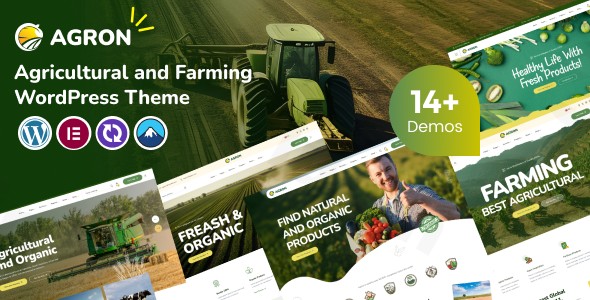
In the digital age, a farm’s online presence needs to feel as fresh and authentic as the produce it grows. The Agron WordPress theme is a premium solution specifically designed to bridge the gap between traditional agriculture and modern e-commerce. As a specialized organic farm WordPress theme, Agron focuses on nature-inspired aesthetics, sustainability, and high-conversion layouts that help local producers reach a global audience.Whether you are managing a dairy farm, an organic food store, or a professional landscaping service, Agron provides a professional, trustworthy framework that prioritizes user experience and visual storytelling.
Key Features: Design, Layout & Performance
Agron isn’t just a generic business template; it is a dedicated agriculture WordPress theme built with the specific needs of the green industry in mind.
Beautifully Crafted Niche Layouts
The theme comes packed with 14+ charming prebuilt demos tailored for gardening, landscaping, and organic retail. These layouts utilize a nature-inspired design philosophy, featuring earthy color palettes, hand-drawn icons, and textured visuals that evoke a sense of clean living and environmental responsibility. You can choose between full-width or boxed layouts to suit your brand’s specific aesthetic.
Advanced Customization Capabilities
Personalizing your site is intuitive thanks to the deep integration with Elementor.
- Typography & Color: Access over 1,000 Google Fonts and unlimited color options to match your farm’s branding perfectly.
- Header & Footer Builder: Unlike themes that lock you into a single look, Agron features a dedicated Header and Footer builder, allowing you to create unique navigation experiences.
- Dynamic Visuals: Enhance your storytelling with parallax effects and video backgrounds that showcase your farm’s daily operations in high definition.
Performance & SEO Optimization
In today’s market, speed is a ranking factor. Agron is SEO optimized with clean, semantic markup that helps your site rank higher on Google and Bing. The theme is built for “High Speed Performance,” ensuring that mobile users—who make up a significant portion of local search traffic—experience fast loading times and smooth navigation.
Installation & Demo Import
Setting up Agron is designed to be a frictionless experience, even for those without a technical background.
- Theme Activation: Upload the Agron zip file via your WordPress Dashboard (Appearance > Themes > Add New).
- Plugin Installation: Upon activation, the theme will prompt you to install required companion plugins, including Elementor, Slider Revolution, and the exclusive Case Addons.
- One-Click Demo Import: Navigate to the theme options and select the “Demo Import” feature. Choose from the 14+ available niche designs (e.g., Organic Store, Dairy Farm, or Landscaping).
- Final Polish: The importer will automatically bring in pages, menus, and widgets. Note that for large demo imports, ensure your server has adequate memory limits to prevent timeouts.
Customization Guide: Branding Your Farm
Once the demo is imported, personalizing your organic farm WordPress theme is where the real branding begins.
- Global Styles via Customizer: Use the WordPress Live Customizer to set your primary brand colors and typography. These settings apply globally, ensuring a consistent look across your blog, shop, and contact pages.
- Elementor Drag-and-Drop: To edit specific pages, simply click “Edit with Elementor.” You can move sections, swap out hand-drawn icons for your own imagery, and add custom “Case Addons” widgets specifically designed for agricultural data.
- WooCommerce Integration: For those selling produce directly, Agron is fully WooCommerce ready. You can easily set up product grids, variation swatches for different produce sizes, and a “WPC Quick View” to improve the shopping experience.
FAQ & Troubleshooting
Is the Agron theme compatible with Elementor?
Yes, Agron is built specifically for Elementor. It includes custom widgets and blocks designed to work seamlessly within the Elementor drag-and-drop interface, making it easy for beginners to build complex layouts.
Does Agron support WooCommerce for online stores?
Absolutely. Agron is fully optimized for WooCommerce. It includes specialized shop layouts, product pages, and supports essential e-commerce plugins like Variation Swatches and Wishlists, making it an ideal choice for organic food stores.
Does it support child themes?
Yes, Agron is Child Theme ready. This allows developers and site owners to make advanced CSS or PHP customizations that will not be overwritten when the main theme is updated.
Is the theme translation-ready?
Yes, Agron is compatible with WPML and includes .pot files, allowing you to create a multilingual agriculture website to reach diverse local or international markets.
Conclusion
The Agron WordPress theme stands out as a top-tier choice for anyone in the agribusiness sector. By combining a specialized “farm-to-table” aesthetic with powerful technical features like Elementor integration and SEO optimization, it removes the technical barriers to entry for farmers and eco-entrepreneurs.Final Verdict: If you need a site that feels as organic and sustainable as the products you sell, Agron offers the flexibility and performance required to build a high-converting, beautiful online home for your business. For more theme insights and WordPress strategies, visit us at wppick.com.
I. Download Limits & Account Benefits
- Free Downloads: Each email address receives 3 downloads per day for free products
- Upgrade Benefits: Purchase any paid product to increase your daily download limit by 3 for each paid product
- No Account Required: You can download immediately by receiving the download link via email
- Account Recommended: Create an account for easier access to your order history and direct update downloads
II. Understanding GPL vs Official Versions
Important: The products available on WPPick are GPL-licensed versions, which differ from official developer versions. Before purchasing, please read our comprehensive guide: Understanding GPL & Official Differences at WPPick
Key Points:
- GPL versions may not include premium support from original developers
- Updates may be delayed compared to official releases
- Some premium features might have limitations
- Always consider your specific needs and support requirements
III. Support & Assistance
We’re here to help through multiple channels:
- Email Support: Direct email assistance for all inquiries
- Live Chat: Real-time support during business hours
- Comprehensive Documentation: Detailed guides and tutorials
IV. Order Tracking
Access your complete purchase history and download links anytime: Order History
V. Account Access
New to WPPick? Login or Create Account to manage your downloads and orders efficiently.
VI. Refund Protection
We stand behind our products with a clear refund policy. Review our terms: Refund Policy
VII. Privacy & Security
Your data security is our priority. Learn how we protect your information: Privacy Policy
VII. Terms of Service
Understanding our service terms ensures a smooth experience: Terms of Use
Quick Tips for Best Experience
- Verify Compatibility: Check plugin/theme compatibility with your WordPress version
- Backup First: Always backup your site before installing new plugins or themes
- Test Environment: Consider testing on a staging site first
- Stay Updated: Regularly check for updates in your account dashboard
- Read Documentation: Review any included documentation for optimal setup
Need Help?
If you have questions about downloads, licensing, or need technical assistance, don’t hesitate to contact our support team. We’re committed to ensuring you have the best possible experience with WPPick products.
Ready to get started? Your download adventure begins with just one click!