

Aimax – Ai Agency WordPress Theme
/Year
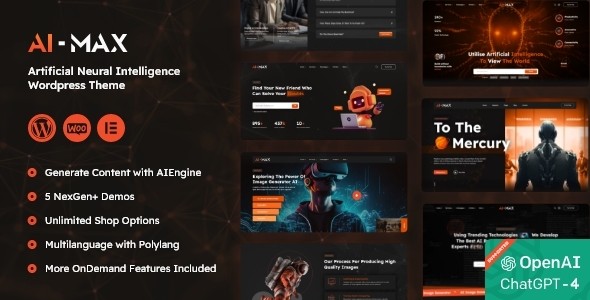
In the rapidly evolving world of artificial intelligence, a cutting-edge online presence is mandatory for any firm looking to establish authority. The Aimax WordPress theme is a premium, high-performance solution specifically engineered to serve as an AI Agency WordPress Theme. It offers a sleek, futuristic aesthetic that perfectly matches the innovation of AI agencies, technology startups, and data science firms. Developed by BuddhaThemes, Aimax focuses on a “no-code” philosophy, allowing tech-savvy entrepreneurs to launch professional websites that look like they were built by a high-end design agency.
Key Features: Design, Layout & Performance
The Aimax theme is built with a deep understanding of the technology sector’s UI/UX requirements. It moves away from generic corporate layouts in favor of modern, data-driven aesthetics often seen in SaaS and AI platforms.
Sleek Layouts and Visual Elements
Aimax provides extensive flexibility with full-width and standard layouts. Its design philosophy centers on high-impact visual elements, including:
- Parallax and Video Backgrounds: Perfect for creating immersive landing pages for AI art generators or robotics companies.
- Dark & White UI Options: The theme supports the popular “Dark Mode” aesthetic favored by developers and tech firms, enhancing visual hierarchy and focus.
- 50+ Custom Widgets: Through its integration with Elementor, Aimax includes a proprietary library of widgets (Aimo/Aimmo widgets) specifically designed for showcasing AI services, testimonials, and team expertise.
Customization Capabilities
As a dedicated AI Tech Startup Theme, Aimax offers a powerful Theme Options panel integrated with the real-time WordPress Customizer. This allows for:
- Advanced Typography: Access to over 650+ Google Fonts to ensure your brand’s voice is unique.
- Unlimited Color Schemes: Modify every aspect of the site’s palette to align with your corporate identity.
- Header & Footer Builder: A visual builder that removes the constraints of traditional theme headers, allowing for complex navigation and CTA placement.
Performance & SEO-Ready Infrastructure
Speed is a ranking factor and a critical component of user experience. Aimax is marketed as a fast WordPress theme for tech, optimized with clean markup and mobile-first responsiveness. It is SEO-ready, featuring a structure that search engines can easily crawl, and it includes support for breadcrumbs and schema-friendly layouts.
Installation & Demo Import
Setting up your AI Agency website template is streamlined through a guided process. Even for beginners, the transition from a fresh WordPress install to a fully functional demo takes only a few minutes.
- Theme Installation: Upload the
aimax.zipfile via Appearance > Themes > Add New. - Plugin Activation: Upon activation, you will be prompted to install required plugins, including Elementor, Slider Revolution, and Contact Form 7.
- One-Click Demo Import: Navigate to the Aimax Options panel. Choose from the available AI-specific demos (SaaS, Chatbot, Data Science, etc.) and click “Import.”
- Final Polish: The importer will pull in pages, menus, and widgets. Note that for large demo imports, ensure your server’s
memory_limitis set to at least 256M to avoid timeouts.
Customization Guide (Branding & Layout)
Once the demo is imported, personalization is handled through a combination of global settings and page-specific overrides.
- Global Styling: Use the WP Customizer to set your primary brand colors and typography. These will propagate across all Elementor widgets automatically.
- Page Building with Elementor: Aimax is an Elementor compatible AI theme. Every page is a canvas where you can drag and drop blocks. You can use the pre-built AI service blocks to quickly explain complex machine learning or big data concepts to your visitors.
- Advanced Post Options: One of the theme’s strengths is the ability to override global settings on a per-page basis. This is ideal if you want a landing page for an AI product to have a different header style than your main agency blog.
FAQ & Troubleshooting
Is Aimax theme good for SEO?
Yes, the Aimax theme is built with SEO best practices in mind. It features clean, valid HTML5 code, a responsive mobile-first design, and fast loading speeds—all of which are essential signals for Google and AI-based search engines. It also integrates seamlessly with popular SEO plugins like Yoast and Rank Math.
Is the Aimax theme compatible with Elementor?
Absolutely. Aimax is primarily built for Elementor, one of the world’s most popular drag-and-drop page builders. It also includes 50+ custom Elementor widgets specifically designed for the tech and AI sectors, making it a highly flexible Elementor compatible AI theme.
Does Aimax support WooCommerce for online stores?
Yes, Aimax is fully compatible with WooCommerce. This allows AI firms to sell digital products, API subscriptions, or tech hardware directly from their website with a cohesive design.
How do I customize the Aimax theme header?
You can customize the header using the built-in Header Builder. This tool allows you to visually design your navigation, logo placement, and “Get a Quote” buttons without writing code. Access it via the Theme Options panel or the WordPress Customizer.
What should I do if the demo import fails?
If the demo import doesn’t complete, it is usually due to server resource limits. Check your PHP max_execution_time and memory_limit. Increasing these values often resolves import issues. If the site looks different from the demo, ensure all required plugins (especially Slider Revolution) are active.
Conclusion
The Aimax WordPress theme stands out as a robust, visually striking solution for the modern tech landscape. It successfully balances aesthetic “wow-factor” with practical functionality, making it an ideal choice for AI firms, tech startups, and digital agencies who need to launch a high-end site quickly.With its heavy emphasis on Elementor integration, one-click demo imports, and SEO-ready code, Aimax removes the technical hurdles of web development. Whether you are building a site for an AI art generator or a complex big data firm, Aimax provides the professional foundation needed to convert visitors into clients. For more insights and WordPress resources, visit wppick.com.
I. Download Limits & Account Benefits
- Free Downloads: Each email address receives 3 downloads per day for free products
- Upgrade Benefits: Purchase any paid product to increase your daily download limit by 3 for each paid product
- No Account Required: You can download immediately by receiving the download link via email
- Account Recommended: Create an account for easier access to your order history and direct update downloads
II. Understanding GPL vs Official Versions
Important: The products available on WPPick are GPL-licensed versions, which differ from official developer versions. Before purchasing, please read our comprehensive guide: Understanding GPL & Official Differences at WPPick
Key Points:
- GPL versions may not include premium support from original developers
- Updates may be delayed compared to official releases
- Some premium features might have limitations
- Always consider your specific needs and support requirements
III. Support & Assistance
We’re here to help through multiple channels:
- Email Support: Direct email assistance for all inquiries
- Live Chat: Real-time support during business hours
- Comprehensive Documentation: Detailed guides and tutorials
IV. Order Tracking
Access your complete purchase history and download links anytime: Order History
V. Account Access
New to WPPick? Login or Create Account to manage your downloads and orders efficiently.
VI. Refund Protection
We stand behind our products with a clear refund policy. Review our terms: Refund Policy
VII. Privacy & Security
Your data security is our priority. Learn how we protect your information: Privacy Policy
VII. Terms of Service
Understanding our service terms ensures a smooth experience: Terms of Use
Quick Tips for Best Experience
- Verify Compatibility: Check plugin/theme compatibility with your WordPress version
- Backup First: Always backup your site before installing new plugins or themes
- Test Environment: Consider testing on a staging site first
- Stay Updated: Regularly check for updates in your account dashboard
- Read Documentation: Review any included documentation for optimal setup
Need Help?
If you have questions about downloads, licensing, or need technical assistance, don’t hesitate to contact our support team. We’re committed to ensuring you have the best possible experience with WPPick products.
Ready to get started? Your download adventure begins with just one click!