
Aleb – Event Conference Onepage WordPress Theme
/Year
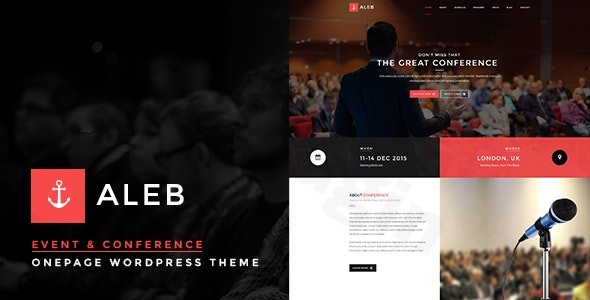
The Aleb WordPress theme is a specialized solution meticulously crafted for event organizers and conference planners. It empowers users to create a professional, engaging online presence for their events with remarkable ease. Designed with a clear focus on a one-page layout, Aleb streamlines the presentation of all crucial event information – from speaker profiles and detailed schedules to registration options – on a single, compelling page. Its intuitive integration with the Visual Composer (now WPBakery Page Builder) makes it an ideal choice for anyone looking to build a stunning event website without writing a single line of code.
Key Features: Design, Layout & Performance
Aleb stands out by offering a comprehensive suite of features specifically tailored for event promotion and management.
Design & Layout Options
Aleb’s design philosophy centers on creating elegant and professional event landing pages. It provides a highly responsive design, ensuring your event website looks impeccable on all devices, from desktops to smartphones. The theme supports both wide and boxed layouts, offering flexibility in how your content is framed, along with options for left, right, or no sidebar configurations to suit your content hierarchy.What truly sets Aleb apart are its dedicated event-specific visual elements:
- A prominent event countdown timer to build anticipation and create urgency for attendees.
- Dedicated sections for speaker profiles, allowing you to showcase bios, photos, contact details, and social media links.
- Customizable event schedules, making it easy for visitors to see the agenda at a glance.
- Engaging gallery sections to display past event photos or venue visuals.
- Powerful testimonial sections to build social proof and credibility.The inclusion of demo content further accelerates your design process, providing pre-built templates to get your site up and running quickly.
Customization Capabilities
Aleb offers extensive customization options to ensure your event branding shines through:
- Unlimited color options allow you to effortlessly match your brand’s color palette, giving you complete control over your site’s aesthetics.
- Support for Google Fonts provides flexible typography choices across your entire website, ensuring readability and visual appeal.
- The core of Aleb’s customization lies in its drag-and-drop page builder integration. The theme is compatible with and bundles Visual Composer (now WPBakery Page Builder) for free, enabling you to design custom layouts, control spacing, sections, containers, and backgrounds through a highly visual interface. This means even those without coding knowledge can achieve sophisticated designs.
Performance & SEO Features
In today’s fast-paced digital world, performance and SEO are paramount. Aleb is built to be mobile responsive and cross-browser compatible, ensuring a consistent experience for all your visitors, regardless of their device or browser. While reseller sites highlight claims of “advanced SEO optimization” and “lightning-fast performance,” specific performance metrics (like Lighthouse or GTmetrix scores) are not explicitly detailed in the provided documentation. However, a well-structured theme like Aleb, with clean markup and logical heading hierarchies, inherently provides a good foundation for search engine visibility.
Installation & Demo Import
Setting up your Aleb event conference theme is a straightforward process, designed to get your professional event website online quickly.
- Install & Activate the Theme:
- From your WordPress dashboard, navigate to
Appearance > Themes. - Click
Add New, thenUpload Theme. - Choose the
aleb.zipfile you downloaded from ZeroPlugin.com (or ThemeForest/Envato Elements) and clickInstall Now. - Once installed, click
Activate.
- From your WordPress dashboard, navigate to
- Install Required Companion Plugins:
- Upon activation, Aleb will likely prompt you to install a set of recommended plugins. The most crucial among these is Visual Composer (WPBakery Page Builder), which is bundled free with the theme and forms the backbone of its drag-and-drop functionality.
- You will also be prompted to install Cube Portfolio for managing portfolio-style content, which is useful for showcasing past events or speaker portfolios.
- Follow the on-screen instructions to install and activate all recommended plugins.
- Use the Theme’s Demo Import:
- Aleb includes demo content to help you quickly set up your website with pre-designed layouts. Look for an option in your WordPress dashboard, often under
Appearance > Import Demo Dataor a dedicated theme options panel (e.g.,Aleb Options > Demo Import). - Click the button to import the demo content.
- Important Note: Demo imports can be resource-intensive. Ensure your hosting environment meets standard WordPress requirements for memory and execution time. If you encounter issues, increasing your PHP memory limit and max execution time (via
wp-config.phporphp.ini) can often resolve them.
- Aleb includes demo content to help you quickly set up your website with pre-designed layouts. Look for an option in your WordPress dashboard, often under
- What to Expect During/After Demo Import:
- The demo import process will populate your site with sample pages, posts, speaker profiles, event schedules, and other content, closely mirroring the live demo.
- After the import, you may need to manually set your main navigation menus (under
Appearance > Menus) and select your homepage (underSettings > Reading). Review the imported pages and replace the placeholder content with your actual event details.
Customization Guide: Branding & Layout
Personalizing your Aleb theme to reflect your event’s unique brand and content is primarily done through the powerful WPBakery Page Builder and standard WordPress customization options.
- Leveraging WPBakery Page Builder:
- Since Aleb is deeply integrated with WPBakery, most of your layout and content customization will happen directly on the pages.
- When editing a page, switch to the “WPBakery Page Builder” editor. You can use the frontend editor for a live preview or the backend editor for a structural view.
- Drag and drop elements (like text blocks, images, event countdowns, speaker carousels, schedule tables, registration forms) onto your page.
- Each element has its own settings, allowing you to configure colors, fonts, sizes, animations, and content. This is how you’ll populate your speaker profiles, create your event schedule, and design your hero sections.
- Changing Colors, Fonts, and Logos:
- For global color schemes and typography, navigate to
Appearance > Customize. Aleb offers unlimited color options, which you’ll typically find under a “Colors” or “Theme Options” panel within the Customizer. Here, you can define your primary, secondary, and accent colors to align with your brand. - Google Fonts integration allows you to select from a vast library of fonts for your headings and body text, all accessible through the Customizer.
- Your event logo can be uploaded via the Customizer under
Site Identity, where you can also set your site title and favicon.
- For global color schemes and typography, navigate to
- Setting Up Your Homepage and Menus:
- After demo import, navigate to
Settings > Readingand set your imported homepage (e.g., “Home” or “Welcome”) as your static front page. - For navigation, go to
Appearance > Menus. Create a new menu, add the pages you want (including your one-page sections), and assign it to the theme’s primary menu location. For a one-page site, you’ll often link to specific sections on your homepage using anchor links.
- After demo import, navigate to
- Advanced Customization with Child Themes:
- Aleb supports child themes, which are crucial for advanced customizations. If you plan to modify the theme’s code, CSS, or add custom functionalities, always do so within a child theme. This ensures your changes are preserved when the parent Aleb theme receives updates. A child theme is included in older versions, suggesting good practice for future-proofing your site.
FAQ & Troubleshooting
Here are answers to common questions about the Aleb – Event Conference Onepage WordPress Theme:
Is Aleb WordPress theme Gutenberg compatible?
No, the Aleb WordPress theme is not optimized for Gutenberg, the native WordPress block editor. Its primary drag-and-drop functionality relies on integration with WPBakery Page Builder.
Is Aleb compatible with WPBakery Page Builder and other key plugins?
Yes, Aleb is explicitly compatible with and includes WPBakery Page Builder (formerly Visual Composer) for free. It is also compatible with WooCommerce for event ticketing/sales, WPML for multilingual sites, Contact Form 7 for custom forms, and Mailchimp for email marketing integration. Additionally, it bundles the Cube Portfolio plugin.
How do I import demo content in the Aleb theme?
To import demo content in Aleb, first, ensure the theme and all its required plugins (especially WPBakery) are installed and activated. Then, navigate to the theme’s options panel in your WordPress dashboard, typically found under Appearance > Import Demo Data or a similar dedicated section, and follow the on-screen instructions for one-click demo import.
What kind of events is the Aleb theme best for?
The Aleb theme is ideally suited for a wide range of single-page event and conference websites. This includes business conferences, academic symposiums, music festivals, corporate gatherings, workshops, seminars, meetups, and any event requiring a professional landing page to showcase details and drive registrations.
Does the Aleb theme support child themes?
Yes, the Aleb theme supports child themes. Using a child theme is highly recommended for making any custom code modifications, as it ensures your changes are not overwritten when the main Aleb theme is updated.
Conclusion
The Aleb – Event Conference Onepage WordPress Theme is a powerful, niche-specific solution designed to simplify the creation of professional event websites. Its strong emphasis on a one-page design makes it incredibly effective for clearly presenting all event details and driving attendee conversions. With unlimited color options, Google Fonts support, and deep integration with the intuitive WPBakery Page Builder, Aleb offers significant design flexibility and customization options for non-coders.While its explicit lack of Gutenberg optimization might be a consideration for those heavily invested in the native WordPress block editor, Aleb’s robust feature set for event management—including event countdowns, speaker profiles, schedule management, and registration form integration—makes it a compelling choice. It boasts compatibility with essential plugins like WooCommerce, WPML, and Contact Form 7, enhancing its functional value.Ultimately, Aleb is an excellent choice for event organizers, businesses, and individuals who need a visually appealing, easy-to-manage, and professional WordPress theme with event registration capabilities to promote conferences, workshops, or any special gathering on a single, impactful webpage. Its focus on user experience and dedicated event features makes it a strong contender in the event theme market.
I. Download Limits & Account Benefits
- Free Downloads: Each email address receives 3 downloads per day for free products
- Upgrade Benefits: Purchase any paid product to increase your daily download limit by 3 for each paid product
- No Account Required: You can download immediately by receiving the download link via email
- Account Recommended: Create an account for easier access to your order history and direct update downloads
II. Understanding GPL vs Official Versions
Important: The products available on WPPick are GPL-licensed versions, which differ from official developer versions. Before purchasing, please read our comprehensive guide: Understanding GPL & Official Differences at WPPick
Key Points:
- GPL versions may not include premium support from original developers
- Updates may be delayed compared to official releases
- Some premium features might have limitations
- Always consider your specific needs and support requirements
III. Support & Assistance
We’re here to help through multiple channels:
- Email Support: Direct email assistance for all inquiries
- Live Chat: Real-time support during business hours
- Comprehensive Documentation: Detailed guides and tutorials
IV. Order Tracking
Access your complete purchase history and download links anytime: Order History
V. Account Access
New to WPPick? Login or Create Account to manage your downloads and orders efficiently.
VI. Refund Protection
We stand behind our products with a clear refund policy. Review our terms: Refund Policy
VII. Privacy & Security
Your data security is our priority. Learn how we protect your information: Privacy Policy
VII. Terms of Service
Understanding our service terms ensures a smooth experience: Terms of Use
Quick Tips for Best Experience
- Verify Compatibility: Check plugin/theme compatibility with your WordPress version
- Backup First: Always backup your site before installing new plugins or themes
- Test Environment: Consider testing on a staging site first
- Stay Updated: Regularly check for updates in your account dashboard
- Read Documentation: Review any included documentation for optimal setup
Need Help?
If you have questions about downloads, licensing, or need technical assistance, don’t hesitate to contact our support team. We’re committed to ensuring you have the best possible experience with WPPick products.
Ready to get started? Your download adventure begins with just one click!
- Remove Cube Portfolio plugin
- Update Demo Data
- Update WPBakery Plugin