

Anvogue – Multipurpose Woocommerce WordPress Theme
/Year
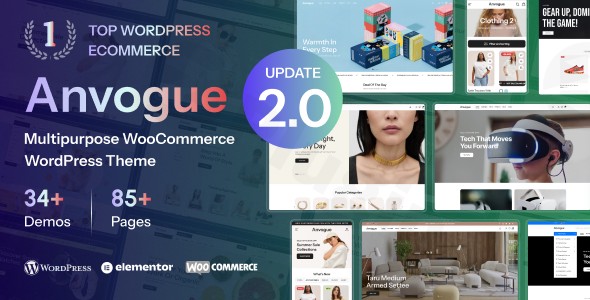
Elevate your online retail business with Anvogue, a modern and stylish WooCommerce WordPress theme meticulously designed to create high-converting online stores. Crafted for versatility and visual appeal, Anvogue is the ultimate solution for anyone looking to launch or revamp an eCommerce website, from fashion boutiques and luxury brands to electronics, jewelry, and furniture stores. Its seamless integration with Elementor, coupled with an extensive suite of eCommerce features, makes it a powerful choice for both seasoned developers and new store owners alike.
Key Features: Design, Layout & Performance
Anvogue sets itself apart with a robust feature set that combines stunning aesthetics with powerful functionality, ensuring your online store not only looks professional but also performs exceptionally well.
Design & Layout Options
Anvogue provides unparalleled design flexibility right out of the box, ensuring your store stands out.
- Extensive Homepage Variations: Choose from 24+ pre-built home pages, expertly designed to fit various niches like fashion, cosmetics, jewelry, electronics, and furniture. This ensures you can find a perfect starting point that aligns with your brand’s aesthetic.
- Comprehensive Internal Page Designs: Beyond homepages, Anvogue includes 85+ internal page variations, providing ready-to-use layouts for product pages, shop archives, contact pages, and more.
- Flexible Layouts: Benefit from both wide and boxed layout options, giving you control over the overall container width of your site.
- Unlimited Header & Footer Styles: Design unique header and footer sections that reflect your brand, including a smart sticky header for enhanced navigation.
- Product Display Options: Showcase your merchandise with 8+ product gallery layouts, 4+ product page layouts, and 4+ product page tab styles, along with 5 different shop item hover effects to engage customers.
Customization Capabilities
Personalizing Anvogue to match your brand identity is intuitive and code-free, thanks to its deep integration with Elementor and a powerful admin panel.
- Drag-and-Drop Customization with Elementor: Built with the acclaimed Elementor page builder, Anvogue empowers you to create stunning pages and customize virtually every element using a simple drag-and-drop interface. Dedicated Elementor widgets for products, banners, and categories further streamline the design process.
- Unlimited Color Options: Easily change your entire color theme with an intuitive color picker, ensuring perfect brand alignment.
- Advanced Typography Control: Anvogue offers comprehensive typography options, integrating Google Web Fonts and Typekit Fonts to give your site an elegant and professional look.
- Powerful Admin Panel: A centralized admin panel provides over 450+ options to manage header styles, page layouts, typography, and more, all without touching a single line of code.
Performance & SEO Features
Anvogue is engineered for speed and search engine optimization, crucial for increasing visibility and conversion rates in the competitive eCommerce landscape.
- Speed Optimization: The theme is speed-optimized and lightweight, ensuring ultra-fast page loads and smooth browsing experiences. It claims to achieve a 90% performance grade in independent tests, which is vital for retaining visitors and improving search rankings.
- Fully Responsive Design: With a mobile-first approach, Anvogue guarantees a flawless and consistent shopping experience across all devices—desktops, tablets, and mobile phones.
- Cross-Browser Compatibility: Your store will look great and function perfectly across all modern web browsers, including Chrome, Firefox, Safari, Opera, and Edge.
- SEO-Friendly Structure: While not explicitly detailing schema, the theme’s clean code, structured headings, and focus on performance lay a strong foundation for excellent search engine optimization.
Advanced eCommerce Tools
Beyond basic shop functionalities, Anvogue integrates a suite of advanced tools specifically designed to boost sales and enhance the user shopping experience.
- Intelligent Product Filters: Help customers quickly find what they’re looking for with intuitive product filters.
- AJAX Search & Quick Buy: Offer lightning-fast product search results and a convenient quick buy option to streamline the purchasing process.
- Mini-Cart Functionality: Provide an easy-to-access mini-cart for customers to review their selections.
- Sales-Boosting Features: Includes sticky add-to-cart, quick view options, wishlists, product variation swatches, size guides, product videos, and 360-degree product views.
- Multi-Vendor Support: Seamlessly integrates with Dokan and WCFM Marketplace, making it an ideal choice for creating multi-vendor marketplaces.
Installation & Demo Import
Setting up your Anvogue-powered online store is a straightforward process, even for beginners. Here’s a step-by-step guide to get you started:
- Download the Theme: First, obtain the Anvogue theme files. If purchased from ThemeForest, you’ll download a
.zipfile containing the theme and potentially a child theme. If using a GPL-licensed version from a reputable source, ensure it’s scanned and safe (e.g., VirusTotal scanned from ZeroPlugin.com). - Install & Activate Anvogue:
- Log in to your WordPress dashboard.
- Navigate to
Appearance > Themes > Add New > Upload Theme. - Click
Choose File, select the Anvogue theme.zipfile (do not unzip it first), and clickInstall Now. - Once installed, click
Activate.
- Install Required Plugins: After activation, Anvogue will likely prompt you to install a set of recommended plugins. These typically include Elementor (for page building) and WooCommerce (for eCommerce functionality), along with any other companion plugins necessary for the theme’s features. Install and activate all of these as prompted.
- One-Click Demo Import: Anvogue boasts a One-Click Demo Import feature, allowing you to replicate any of the 24+ pre-built homepages and 85+ internal pages with ease.
- Look for a menu item like
Anvogue Demo ImportorAppearance > Import Demo Datain your WordPress dashboard. - Select the demo you wish to import.
- Click
Import. - Tip: Demo imports can be resource-intensive. Ensure your hosting environment has sufficient PHP memory limit and execution time to prevent timeouts, especially for larger demos. If you encounter issues, increase your server’s PHP
memory_limitandmax_execution_time.
- Look for a menu item like
- Configure Menus & Widgets: After the demo import, your site will look like the chosen demo. However, you might need to manually assign navigation menus (
Appearance > Menus) and configure widget areas (Appearance > Widgets) to match your preferences, as these sometimes need manual setup post-import.
Customization Guide: Branding & Layout
Anvogue’s strength lies in its profound customization capabilities, allowing you to truly make your store your own.
- WordPress Customizer & Global Styles: While Anvogue leverages Elementor for page-level design, its powerful admin panel (often accessible via
Appearance > Theme Optionsor a dedicated theme panel) provides 450+ options to manage global settings. This includes header and footer styles, overall page layouts, blog settings, and more. - Changing Colors & Typography: Easily brand your site using the theme’s unlimited color options and comprehensive typography controls. Select your brand’s primary and accent colors, and choose from Google Fonts or Typekit to define your site’s unique voice.
- Logo & Favicon: Upload your custom logo and favicon through the theme options or WordPress Customizer to reinforce your brand identity.
- Header & Footer Layouts: Utilize the unlimited header and footer styles to create unique sections that serve your customers effectively, adding custom content, widgets, and navigation elements.
- Building Pages with Elementor: For content pages (like “About Us,” “Contact,” or custom landing pages), head to
Pages > Add Newand clickEdit with Elementor. Here, you can drag and drop Anvogue’s dedicated widgets and Elementor’s extensive library to craft engaging layouts. - Setting Up Your Homepage & Blog Page: After importing a demo, the homepage is usually set. If not, go to
Settings > Readingand select your desired static page for the homepage and a separate page for your blog posts. - Utilizing a Child Theme: Anvogue includes a child theme in its download package. For any custom code, CSS, or template file modifications, it is highly recommended to use the child theme. This ensures that your customizations are preserved when the main Anvogue theme receives updates. You can also add custom CSS/JS directly via the theme options for minor tweaks.
FAQ & Troubleshooting
Here are answers to some common questions about the Anvogue Multipurpose WooCommerce WordPress Theme:
Q: Is Anvogue compatible with Elementor?
A: Yes, Anvogue is fully compatible with Elementor. It’s built specifically with Elementor in mind, allowing for seamless drag-and-drop page building and extensive customization without needing any coding knowledge. It also mentions Elementor Pro compatibility for even more advanced features.
Q: Does Anvogue support WooCommerce for online stores?
A: Absolutely! Anvogue is a dedicated WooCommerce WordPress theme designed for online stores. It offers seamless integration with WooCommerce and includes advanced eCommerce features such as product filters, AJAX search, quick buy options, mini-cart, wishlists, and multi-vendor support with Dokan and WCFM Marketplace.
Q: Can I use a child theme with Anvogue?
A: Yes, using a child theme with Anvogue is highly recommended, and one is typically included in the theme download package. A child theme allows you to safely make code customizations without losing them during theme updates.
Q: How can I update the Anvogue theme without losing my customizations?
A: To update Anvogue safely, always use a child theme for any custom code or CSS. Before updating, it’s good practice to create a full backup of your website. You can then update the parent Anvogue theme via your WordPress dashboard (Appearance > Themes) or by uploading the latest version. If you downloaded it from ZeroPlugin.com, they often provide regular updates.
Q: What should I do if the Anvogue demo import fails or looks different from the demo site?
A: If the demo import fails, first check your server’s PHP configuration (specifically memory_limit, max_execution_time, and upload_max_filesize). Low values can cause import failures. Try re-importing after increasing these values if needed. If it looks different, ensure all required and recommended plugins are installed and activated, as some demo content relies on them. Consult the official Anvogue documentation or reach out to support if issues persist.
Conclusion
Anvogue stands out as a top-tier multipurpose WooCommerce WordPress theme that masterfully blends stunning, minimalist design with powerful eCommerce functionality. Its 24+ pre-built homepages and Elementor integration offer unparalleled design flexibility and ease of use, making it accessible for anyone to create a professional online store without coding. The theme’s commitment to speed optimization (achieving a 90% performance grade) and fully responsive design ensures an optimal shopping experience across all devices, crucial for both user satisfaction and SEO.Whether you’re launching a chic fashion boutique, a high-end jewelry store, an electronics shop, or any other premium eCommerce venture, Anvogue provides a scalable and robust foundation. Its comprehensive suite of advanced eCommerce tools, including AJAX search, multi-vendor support, and various product display options, is tailored to boost conversions and streamline operations. For agencies, freelancers, and store owners seeking a visually striking, high-performing, and easy-to-customize solution for their online store, Anvogue is an excellent choice.
I. Download Limits & Account Benefits
- Free Downloads: Each email address receives 3 downloads per day for free products
- Upgrade Benefits: Purchase any paid product to increase your daily download limit by 3 for each paid product
- No Account Required: You can download immediately by receiving the download link via email
- Account Recommended: Create an account for easier access to your order history and direct update downloads
II. Understanding GPL vs Official Versions
Important: The products available on WPPick are GPL-licensed versions, which differ from official developer versions. Before purchasing, please read our comprehensive guide: Understanding GPL & Official Differences at WPPick
Key Points:
- GPL versions may not include premium support from original developers
- Updates may be delayed compared to official releases
- Some premium features might have limitations
- Always consider your specific needs and support requirements
III. Support & Assistance
We’re here to help through multiple channels:
- Email Support: Direct email assistance for all inquiries
- Live Chat: Real-time support during business hours
- Comprehensive Documentation: Detailed guides and tutorials
IV. Order Tracking
Access your complete purchase history and download links anytime: Order History
V. Account Access
New to WPPick? Login or Create Account to manage your downloads and orders efficiently.
VI. Refund Protection
We stand behind our products with a clear refund policy. Review our terms: Refund Policy
VII. Privacy & Security
Your data security is our priority. Learn how we protect your information: Privacy Policy
VII. Terms of Service
Understanding our service terms ensures a smooth experience: Terms of Use
Quick Tips for Best Experience
- Verify Compatibility: Check plugin/theme compatibility with your WordPress version
- Backup First: Always backup your site before installing new plugins or themes
- Test Environment: Consider testing on a staging site first
- Stay Updated: Regularly check for updates in your account dashboard
- Read Documentation: Review any included documentation for optimal setup
Need Help?
If you have questions about downloads, licensing, or need technical assistance, don’t hesitate to contact our support team. We’re committed to ensuring you have the best possible experience with WPPick products.
Ready to get started? Your download adventure begins with just one click!