

Apkdone WordPress Themes Premium By Exthem.es
/Year
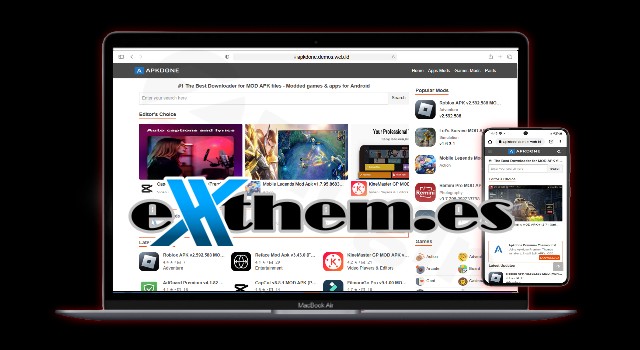
Building a high-performance app repository or a download portal requires more than just a standard blog layout; it requires speed, automation, and a layout that users trust. The Apkdone WordPress theme is a highly specialized solution designed specifically for creating professional APK website themes for WordPress. Developed by Exthem.es, this theme is engineered for developers and niche marketers who want to replicate the success of popular app download portals like apkdone.com with minimal manual effort.In this review and setup guide, we will explore how this theme simplifies content management and why it stands out as a leading choice for Android app and game repositories.
Key Features: Design, Layout & Performance
The Apkdone theme is built with a “function-first” philosophy. Unlike multipurpose themes that are often weighed down by heavy code, Apkdone focuses on a minimalist aesthetic that prioritizes content delivery and user experience.
Specialized Layout & Design
The theme features a clean, responsive, and mobile-friendly design. Since the majority of APK downloads occur on mobile devices, the theme uses a mobile-first approach to ensure that app listings, screenshots, and download buttons are perfectly aligned on any screen size.
- Minimalist Aesthetic: Reduces visual clutter to keep the focus on app titles and download links.
- Grid-Based Listings: Ideal for displaying large volumes of apps and games clearly.
- Ad-Ready Slots: Includes dedicated widget areas specifically designed for Adsense banners to help you monetize your traffic immediately.
Performance and SEO Readiness
Speed is a critical ranking factor for download sites. The Apkdone WordPress theme is optimized for fast loading and fast indexing.
- Clean Code: Exthem.es has removed unnecessary elements to reduce rendering times.
- SEO Structure: The theme uses clean markup and a structured heading hierarchy to help Google and other search engines crawl your app pages efficiently.
- Fast Indexing: The theme’s architecture is built to help new app entries appear in search results as quickly as possible, giving you an edge in the competitive APK niche.
Content Automation
The standout feature is its tight integration with the proprietary Apkdone plugin. This allows for automated content generation, where the theme can extract app data and categorize it automatically, saving hours of manual data entry.
Installation & Setup Guide
Setting up an APK website theme for WordPress shouldn’t be complicated. Following these steps will help you get your download portal live quickly.
- Theme Installation: Log in to your WordPress dashboard, navigate to Appearance > Themes, click Add New, and upload the
apkdone-theme.zipfile provided by Exthem.es. - Plugin Activation: For the theme to function correctly, you must install and activate the bundled Apkdone Plugin. This plugin handles the data extraction and automated posting features.
- License Activation: Enter your license key (Regular, Premium, or Developer) in the theme settings to enable updates and support.
- Importing Content: Use the theme’s built-in automation tool to begin fetching app data. The process is typically marketed as a “3-step setup” that populates your categories, descriptions, and download links automatically.
- Widget Setup: Go to Appearance > Widgets to place your primary navigation menus and your Adsense banners in the designated “Ready Widget Slots.”
Customization Guide: Branding & Layout
While the Apkdone theme is more specialized than a general-purpose theme, it still offers flexibility to match your brand identity.
Visual Personalization
You can access the WordPress Customizer to adjust the primary color schemes. This allows you to change the “Download” buttons and header accents to match your logo.
- Logo & Favicon: Upload your custom branding via the Site Identity tab.
- Menu Management: Set up your “Games,” “Apps,” and “Mod” categories within the standard WordPress Menu system to provide easy navigation.
Managing App Data
The theme treats app entries with a specific structure. You can customize how screenshots and technical app details (version, size, developer) appear on the front end. Because the theme is built for stability, it is recommended to use the built-in styles rather than adding heavy third-party page builders like Elementor, which may slow down the specialized download pages.
FAQ & Troubleshooting
Is the Apkdone theme good for SEO?
Yes. The Apkdone WordPress theme is specifically optimized for SEO. It features a lightweight code structure and optimized heading tags designed to facilitate fast indexing in Google and AI-based search engines.
Does the theme support WooCommerce?
The Apkdone theme is designed as a download repository rather than a traditional e-commerce store. While you can install WooCommerce, the theme is not specifically styled for it. It is best used for free or ad-supported download portals.
Can I use the Apkdone theme on multiple websites?
This depends on your license. The Regular and Premium licenses are typically for a single site, while the Developer or “No Licensed” options allow for usage on multiple sites. Always check your purchase terms at Exthem.es.
How do I update the theme without losing customizations?
To keep your site secure and functional, always use a Child Theme if you plan on making manual code changes. Standard updates provided by Exthem.es can be applied via the dashboard without affecting settings configured through the WordPress Customizer.
Conclusion
The Apkdone WordPress theme by Exthem.es is a powerful, niche-specific tool for anyone looking to build a professional app repository. Its core strength lies in its automation and performance, making it significantly more efficient than using a generic multipurpose theme for an APK site. While it offers less design flexibility than a builder-heavy theme, its speed and specialized features like “Adsense-ready” slots and “fast indexing” make it an ideal choice for niche marketers and app reviewers. If your goal is to launch a fast, automated, and SEO-friendly download portal, the Apkdone theme is a top-tier investment.For more WordPress theme reviews and SEO strategies, visit wppick.com.
I. Download Limits & Account Benefits
- Free Downloads: Each email address receives 3 downloads per day for free products
- Upgrade Benefits: Purchase any paid product to increase your daily download limit by 3 for each paid product
- No Account Required: You can download immediately by receiving the download link via email
- Account Recommended: Create an account for easier access to your order history and direct update downloads
II. Understanding GPL vs Official Versions
Important: The products available on WPPick are GPL-licensed versions, which differ from official developer versions. Before purchasing, please read our comprehensive guide: Understanding GPL & Official Differences at WPPick
Key Points:
- GPL versions may not include premium support from original developers
- Updates may be delayed compared to official releases
- Some premium features might have limitations
- Always consider your specific needs and support requirements
III. Support & Assistance
We’re here to help through multiple channels:
- Email Support: Direct email assistance for all inquiries
- Live Chat: Real-time support during business hours
- Comprehensive Documentation: Detailed guides and tutorials
IV. Order Tracking
Access your complete purchase history and download links anytime: Order History
V. Account Access
New to WPPick? Login or Create Account to manage your downloads and orders efficiently.
VI. Refund Protection
We stand behind our products with a clear refund policy. Review our terms: Refund Policy
VII. Privacy & Security
Your data security is our priority. Learn how we protect your information: Privacy Policy
VII. Terms of Service
Understanding our service terms ensures a smooth experience: Terms of Use
Quick Tips for Best Experience
- Verify Compatibility: Check plugin/theme compatibility with your WordPress version
- Backup First: Always backup your site before installing new plugins or themes
- Test Environment: Consider testing on a staging site first
- Stay Updated: Regularly check for updates in your account dashboard
- Read Documentation: Review any included documentation for optimal setup
Need Help?
If you have questions about downloads, licensing, or need technical assistance, don’t hesitate to contact our support team. We’re committed to ensuring you have the best possible experience with WPPick products.
Ready to get started? Your download adventure begins with just one click!
- Fixed minor issue with themes by rating post.