

Applied – Essential Blog Theme For Modern Content Creators
/Year
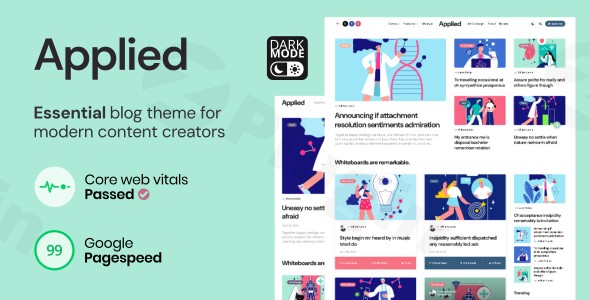
The digital landscape for content creators is more competitive than ever, demanding not just compelling content, but also a website that performs flawlessly, looks stunning, and is easy to manage. The Applied Blog Theme WordPress theme rises to this challenge, meticulously engineered to be the essential platform for contemporary bloggers, writers, journalists, and digital publishers. This review delves into how Applied combines sophisticated design with intuitive functionality, making it the ideal choice for establishing a powerful and engaging online presence.
Elevate Your Content: Design, Layout & Performance with Applied
Applied stands out for its commitment to both aesthetic appeal and functional excellence, ensuring your content takes center stage while providing a seamless experience for your readers.
Streamlined Design and Extensive Layout Options
Applied delivers an uncomplicated, user-friendly interface that prioritizes content visibility and reader engagement. Its clean, modern design creates an elegant backdrop, allowing your stories, articles, and insights to shine. The theme offers extensive layout flexibility, particularly for blog content, with over 30 distinct blog layouts. These are categorized into popular styles like:
- Masonry: Available in 2, 3, and 4-column variations for a dynamic, mosaic-like display.
- Grid: Also offered in 2, 3, and 4-column options for a structured, uniform look.
- List styles: For a classic, linear content presentation.Beyond blog archives, Applied provides 7 one-click install demos, including a new “Reviews Demo” for 2025, allowing you to quickly launch your site with a pre-configured design. You can mix and match theme elements or build from scratch, customizing your blog live in the WordPress Customizer. For overall site structure, it offers 3 header layouts and 9 footer layouts, complemented by 7 sidebar options and dedicated mobile settings. When it comes to individual articles, you’ll find 3 blog post styles and an impressive 20 single post layouts, supporting standard, video, audio, gallery, and image post formats.
Comprehensive Customization Capabilities
Personalizing your website to perfectly align with your brand identity is effortless with Applied. The theme offers extensive theme options and flexible customization capabilities that require no coding knowledge. Key customization features include:
- Fully Customizable Color Schemes: Create a unique visual identity with dedicated settings for both light and dark modes. Applied intelligently detects your device’s preferred mode or allows you to set a permanent one, even including a pre-configured light and dark scheme to jumpstart your design.
- Typography Control: Integrated with Google Fonts, Applied provides a wide range of typography choices, empowering you to perfectly match your brand’s voice and readability standards.
- WordPress Customizer Integration: All customization happens within the intuitive WordPress Customizer, offering a live preview of your changes as you make them.
Performance-Optimized Architecture and SEO Advantages
In today’s fast-paced digital world, website speed and search engine visibility are paramount. Applied excels in both, boasting a performance-optimized architecture designed for exceptional loading speeds.
- Google PageSpeed Optimization & Core Web Vitals Compliance: Applied ensures your website meets the highest performance standards, claiming to pass Core Web Vitals and achieve up to 99 Google PageSpeed scores. This contributes directly to improved search rankings and enhanced user satisfaction.
- Lightweight Code & SEO-Friendly Structure: The theme is built with a lightweight code and an SEO-friendly architecture, ensuring your content receives maximum visibility across search engines. Clean markup, fast loading times, and mobile-responsive design are fundamental, contributing to superior search performance and user engagement metrics.
- Mobile Responsiveness: Applied is fully responsive and mobile-friendly, providing a seamless browsing experience across all devices. Dedicated mobile settings allow you to optimize post elements and layouts specifically for smartphones and tablets.
Advanced Monetization Integration
For content creators looking to maximize their revenue potential, Applied offers advanced monetization integration. It includes dedicated advertising areas strategically placed throughout the theme, providing optimized spaces for display ads, affiliate marketing, and sponsored content without compromising user experience. A new feature for 2025 is an Advanced Reviews & Ratings system, allowing users to rate content with stars, bars, circles, and sashes, offering scale configuration and editable light/dark scheme colors, making it ideal for review-focused blogs.
Getting Started: Installation & Demo Import
Setting up your website with Applied is a straightforward process, designed to get your content online quickly.
- Installation & Activation:
- First, download the Applied theme files from your purchase source (e.g., ThemeForest).
- Log in to your WordPress dashboard.
- Navigate to
Appearance > Themes > Add New > Upload Theme. - Choose the
applied.zipfile (or similar, depending on the theme package) and clickInstall Now. - Once installed, click
Activate. - Applied also includes a dedicated theme plugin (less than 1MB) which may need to be installed upon activation for full functionality. Follow any prompts to install and activate it.
- A child theme is included with Applied. For any advanced customizations or developer work, it’s highly recommended to install and activate the child theme to ensure your modifications are safe during theme updates.
- One-Click Demo Import:
- After activating the theme and any required companion plugins, you’ll typically find an option for “Demo Import” or “Import Sample Data” within the WordPress dashboard, often under
Appearanceor a dedicated theme options panel. - Choose one of the 7 one-click install demos that best suits your vision.
- Click the “Import” button. The theme will then import pages, posts, widgets, menus, and customizer settings, replicating the chosen demo site.
- What to Expect: The import process can take several minutes, especially for larger demos. It’s crucial to have sufficient server memory and execution time configured on your hosting to prevent timeouts. After a successful import, you will find demo content in your posts, pages, and media library. Your menus and widgets will also be populated, mirroring the demo, providing an excellent starting point for your website.
- After activating the theme and any required companion plugins, you’ll typically find an option for “Demo Import” or “Import Sample Data” within the WordPress dashboard, often under
Customization Guide: Branding & Layout
Applied empowers you to personalize every aspect of your website without touching a line of code, ensuring your brand identity shines through.
- Accessing the Customizer:
- From your WordPress dashboard, go to
Appearance > Customize. This will open the WordPress Customizer interface with a live preview of your site on the right.
- From your WordPress dashboard, go to
- Changing Colors and Typography:
- Look for sections like “Colors,” “Typography,” or “General Settings.”
- Here, you can easily adjust your color scheme, including settings for both light and dark modes. Choose primary, secondary, and accent colors to match your brand.
- Under “Typography,” select your desired Google Fonts for headings, body text, and other elements. Adjust font sizes, line heights, and weights for optimal readability.
- Setting Up Your Logo and Site Identity:
- In the “Site Identity” section, you can upload your logo, set your site title and tagline, and add a favicon.
- Configuring Headers and Footers:
- Navigate to the “Header” and “Footer” sections within the Customizer.
- Choose from the 3 header layouts and 9 footer layouts provided.
- Customize elements like navigation menus, social media links, contact information, and copyright text. Applied’s flexibility allows you to fine-tune the layout and content of these crucial site areas.
- Setting Up Your Homepage and Blog Page:
- Under
Homepage Settings(orStatic Front Page), you can choose whether your homepage displays your latest posts or a static page. If opting for a static page, select which page will serve as your homepage and which will display your blog posts. - For blog layouts, explore the “Blog” or “Archive” settings to choose from the 30+ blog layouts and configure options like post meta-data visibility and pagination styles.
- Under
- Managing Menus and Widgets:
- In the “Menus” section, you can create and assign menus to various locations, such as your primary navigation or footer.
- The “Widgets” section allows you to drag and drop widgets into your 7 theme sidebars and 4 footer sidebars, as well as toggle/mobile sidebars, to display advertisements, recent posts, social feeds, and more.The customization experience with Applied is highly intuitive, thanks to the live preview in the WordPress Customizer. This allows you to experiment with various settings and instantly see how they impact your site’s appearance before publishing your changes, ensuring a cohesive and professional look.
FAQ & Troubleshooting
Here are answers to some common questions about the Applied Blog Theme.
Is Applied Blog Theme compatible with Elementor, WPBakery, or Gutenberg?
Applied is optimized for Gutenberg and fully compatible with the Block Editor, supporting all standard WordPress blocks and widgets. This means you can leverage the native WordPress editing experience to create rich and dynamic content. While it works seamlessly with Gutenberg, explicit compatibility with major third-party page builders like Elementor or WPBakery is not documented in the provided information.
Does Applied Blog Theme support WooCommerce for online stores?
The provided information does not explicitly state direct compatibility with WooCommerce. Applied is primarily designed as an “essential blog theme for modern content creators,” focusing on content presentation and monetization through advertising and reviews. If you plan to run an online store, it would be advisable to verify WooCommerce compatibility with the developer, 3FortyMedia.
Does Applied Blog Theme include child theme support?
Yes, a child theme is included with Applied. Using a child theme is a best practice for making custom modifications to your website’s design or functionality, as it ensures your changes are not overwritten when the main Applied theme receives updates.
How can I update Applied Blog Theme without losing my customizations?
To update Applied without losing your customizations, always ensure you are using the included child theme for any custom CSS, functions, or template file overrides. When an update is available, you can safely update the parent Applied theme through your WordPress dashboard. Any modifications made within the child theme will remain intact.
Is Applied Essential Blog Theme fast and SEO optimized?
Yes, Applied is built with performance and SEO as core priorities. It boasts a performance-optimized architecture with Google PageSpeed optimization and Core Web Vitals compliance, aiming for high scores. Its lightweight code, clean markup, and mobile-responsive design contribute to superior search performance and user engagement, making it an SEO optimized blog theme WordPress.
Conclusion
The Applied Essential Blog Theme WordPress theme truly lives up to its name, providing a robust, visually appealing, and highly functional platform for modern content creators. Its strengths lie in its exceptional design flexibility, offering over 30 blog layouts and 20 single post layouts to present your content in myriad ways. The comprehensive customization options via the intuitive WordPress Customizer, including dual light and dark modes, empower users to create a unique brand presence without any coding.Furthermore, Applied’s commitment to performance and SEO readiness—evidenced by its Google PageSpeed and Core Web Vitals optimization, lightweight code, and mobile responsiveness—ensures your content is not only beautiful but also discoverable and fast-loading. With dedicated advertising areas and an advanced review system, it’s also well-suited for creators looking to monetize their content effectively.Ideal for personal bloggers, professional journalists, niche content publishers, and anyone focused on delivering high-quality, engaging content, Applied provides the tools needed to thrive. It’s a confident choice for those who prioritize a seamless user experience, powerful content presentation, and a strong foundation for SEO and revenue generation. If you’re a content creator seeking a reliable, high-performing, and easy-to-manage WordPress theme, Applied is an excellent investment for your digital journey.
I. Download Limits & Account Benefits
- Free Downloads: Each email address receives 3 downloads per day for free products
- Upgrade Benefits: Purchase any paid product to increase your daily download limit by 3 for each paid product
- No Account Required: You can download immediately by receiving the download link via email
- Account Recommended: Create an account for easier access to your order history and direct update downloads
II. Understanding GPL vs Official Versions
Important: The products available on WPPick are GPL-licensed versions, which differ from official developer versions. Before purchasing, please read our comprehensive guide: Understanding GPL & Official Differences at WPPick
Key Points:
- GPL versions may not include premium support from original developers
- Updates may be delayed compared to official releases
- Some premium features might have limitations
- Always consider your specific needs and support requirements
III. Support & Assistance
We’re here to help through multiple channels:
- Email Support: Direct email assistance for all inquiries
- Live Chat: Real-time support during business hours
- Comprehensive Documentation: Detailed guides and tutorials
IV. Order Tracking
Access your complete purchase history and download links anytime: Order History
V. Account Access
New to WPPick? Login or Create Account to manage your downloads and orders efficiently.
VI. Refund Protection
We stand behind our products with a clear refund policy. Review our terms: Refund Policy
VII. Privacy & Security
Your data security is our priority. Learn how we protect your information: Privacy Policy
VII. Terms of Service
Understanding our service terms ensures a smooth experience: Terms of Use
Quick Tips for Best Experience
- Verify Compatibility: Check plugin/theme compatibility with your WordPress version
- Backup First: Always backup your site before installing new plugins or themes
- Test Environment: Consider testing on a staging site first
- Stay Updated: Regularly check for updates in your account dashboard
- Read Documentation: Review any included documentation for optimal setup
Need Help?
If you have questions about downloads, licensing, or need technical assistance, don’t hesitate to contact our support team. We’re committed to ensuring you have the best possible experience with WPPick products.
Ready to get started? Your download adventure begins with just one click!