

Archsan – Architecture & Architect WordPress
/Year
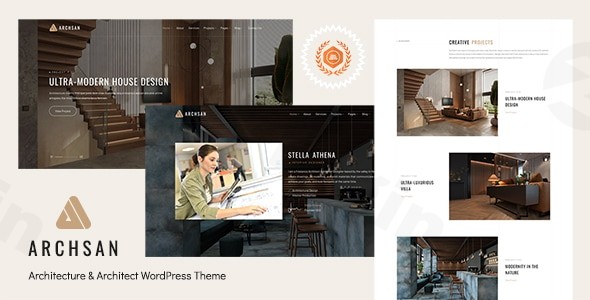
Building a professional digital presence for a design-led business requires a balance of high-end aesthetics and technical precision. The ArchSan WordPress theme is a specialized architecture WordPress theme designed specifically for architecture firms, interior designers, and construction companies who need a clean, minimal, and visually-driven platform to showcase their portfolios.Whether you are an individual architect or a large-scale creative studio, ArchSan provides a modern framework that prioritizes imagery and user experience. By focusing on a “less is more” design philosophy, it ensures that your blueprints, 3D renders, and finished projects remain the focal point of the website.
Key Features: Design, Layout & Performance
ArchSan stands out in a crowded market of multipurpose themes by offering a curated feature set tailored specifically to the building and design industry.
1. Sophisticated Design & Layout Options
ArchSan offers a range of layout variations that cater to different aesthetic preferences:
- Multiple Homepage Variations: The theme includes nine distinct homepage layouts, allowing you to choose the one that best fits your firm’s brand identity.
- Light & Dark Versions: Toggle between a crisp, professional light mode or a sophisticated, high-contrast dark mode to suit your portfolio’s mood.
- Portfolio-Centric Layouts: Specifically engineered to display architectural projects, the portfolio sections use clean grids and generous whitespace to ensure a premium feel.
2. Deep Customization Capabilities
Under the hood, ArchSan utilizes the Redux Theme Option panel, providing an intuitive interface for global site settings:
- Typography: Access to over 600 Google Fonts allows you to fine-tune the editorial feel of your site.
- Color Control: With unlimited color styles, you can perfectly match your website to your corporate branding with just a few clicks.
- Header & Footer Builder: Customize the navigation experience and site credits without needing to touch a single line of code.
3. SEO & Performance Optimization
In today’s competitive landscape, being a high-quality architecture website builder WordPress tool isn’t enough; you also need to rank. ArchSan is built with clean, search-engine-friendly code. It is fully responsive and retina-ready, ensuring that your high-resolution project photos look sharp on everything from a 5K monitor to an iPhone screen.
Installation & Demo Import
Setting up your site with the ArchSan WordPress theme is designed to be a frictionless experience, even for those without technical expertise.
- Install & Activate: Upload the theme files through your WordPress Dashboard (Appearance > Themes > Add New).
- Plugin Installation: Upon activation, the theme will prompt you to install required companion plugins, including Elementor (or WPBakery) and the Redux Framework.
- One-Click Demo Import: Navigate to the theme options to find the One-Click Demo Importer. This tool allows you to import the full demo content—including pages, menus, and sample projects—in just a few minutes.
- Final Polish: Once the import is complete, simply replace the placeholder images and text with your own project data.Note: Ensure your hosting environment has sufficient memory limits (at least 256MB) to handle the demo import process smoothly.
Customization Guide: Branding Your Architecture Site
Once the foundation is laid, personalizing ArchSan is where your firm’s personality comes to life.
Using the Drag-and-Drop Builders
ArchSan is fully compatible with Elementor, which is widely considered the most intuitive page builder on the market. You can edit layouts in real-time, dragging elements like “Project Sliders,” “Team Members,” or “Service Lists” exactly where you want them.
Setting Up the Portfolio
The heart of any architect’s site is the work. Use the built-in portfolio layouts to categorize your projects (e.g., Residential, Commercial, Interior Design). Because ArchSan supports parallax effects and clean animations, your projects will feel dynamic as users scroll through your history.
eCommerce Integration
If your firm sells digital blueprints, furniture, or design consultations, ArchSan’s WooCommerce compatibility makes it easy to set up a professional online shop alongside your portfolio.
FAQ & Troubleshooting
Is ArchSan good for interior designers?
Yes, ArchSan is an ideal interior design WordPress theme. Its minimal aesthetic and focus on large, high-quality imagery make it perfect for showcasing textures, floor plans, and interior décor projects.
Is ArchSan compatible with Elementor?
Yes, ArchSan is highly optimized for the Elementor page builder. It is also compatible with WPBakery, giving you the flexibility to use the drag-and-drop tool you are most comfortable with.
Does ArchSan support WooCommerce?
Yes, the ArchSan WordPress theme is fully compatible with WooCommerce. This allows architecture firms and designers to sell products, digital assets, or services directly from their website.
What WordPress version does ArchSan support?
ArchSan has been tested and confirmed compatible up to WordPress 6.0. It is recommended to keep your theme updated to the latest version provided by the developer to ensure continued compatibility with newer WordPress releases.
How can I update the theme without losing customizations?
To protect your changes, it is best practice to use a Child Theme for any code-level modifications. For visual changes made via the Redux panel or Elementor, these settings are stored in the database and will remain intact during a standard theme update.
Conclusion
The ArchSan WordPress theme is a powerful, niche-specific solution for anyone in the architecture and design industry. By combining a clean, “retina-ready” visual style with the flexibility of the Elementor page builder, it removes the technical barriers to creating a world-class portfolio.Whether you are looking for an SEO-friendly WordPress theme for an architecture portfolio or a robust business site for a construction firm, ArchSan offers the professional polish and ease of use required to stand out. For more WordPress tips and theme insights, visit wppick.com.
I. Download Limits & Account Benefits
- Free Downloads: Each email address receives 3 downloads per day for free products
- Upgrade Benefits: Purchase any paid product to increase your daily download limit by 3 for each paid product
- No Account Required: You can download immediately by receiving the download link via email
- Account Recommended: Create an account for easier access to your order history and direct update downloads
II. Understanding GPL vs Official Versions
Important: The products available on WPPick are GPL-licensed versions, which differ from official developer versions. Before purchasing, please read our comprehensive guide: Understanding GPL & Official Differences at WPPick
Key Points:
- GPL versions may not include premium support from original developers
- Updates may be delayed compared to official releases
- Some premium features might have limitations
- Always consider your specific needs and support requirements
III. Support & Assistance
We’re here to help through multiple channels:
- Email Support: Direct email assistance for all inquiries
- Live Chat: Real-time support during business hours
- Comprehensive Documentation: Detailed guides and tutorials
IV. Order Tracking
Access your complete purchase history and download links anytime: Order History
V. Account Access
New to WPPick? Login or Create Account to manage your downloads and orders efficiently.
VI. Refund Protection
We stand behind our products with a clear refund policy. Review our terms: Refund Policy
VII. Privacy & Security
Your data security is our priority. Learn how we protect your information: Privacy Policy
VII. Terms of Service
Understanding our service terms ensures a smooth experience: Terms of Use
Quick Tips for Best Experience
- Verify Compatibility: Check plugin/theme compatibility with your WordPress version
- Backup First: Always backup your site before installing new plugins or themes
- Test Environment: Consider testing on a staging site first
- Stay Updated: Regularly check for updates in your account dashboard
- Read Documentation: Review any included documentation for optimal setup
Need Help?
If you have questions about downloads, licensing, or need technical assistance, don’t hesitate to contact our support team. We’re committed to ensuring you have the best possible experience with WPPick products.
Ready to get started? Your download adventure begins with just one click!