

Arma – Military Service WordPress Theme
/Year
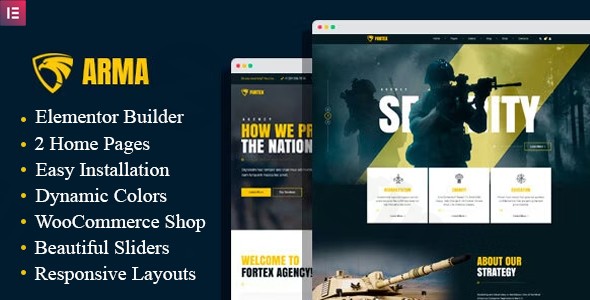
Building a website for a military organization, veteran association, or private security firm requires a specific aesthetic: one that conveys discipline, authority, and trust. The Arma – Military Service WordPress Theme is a specialized solution tailored specifically for this niche. Whether you are launching a recruitment campaign, a military school, or an online store for tactical gear, Arma provides a robust framework that balances professional design with functional versatility.In this review and setup guide, we will explore why this military WordPress theme is a top contender for organizations looking to establish a commanding online presence.
1. Design Philosophy and Visual Appeal
The design of Arma is rooted in the seriousness of the military sector. It utilizes a palette of camouflage-inspired tones—deep greens, earthy browns, and slate grays—to create an immediate sense of reliability. Unlike generic multipurpose themes, Arma is visually aware of its audience. It focuses on a clean, authoritative layout that prioritizes high-impact imagery (perfect for showing training sessions or honors) and clear typography. Its responsive design ensures that the site remains perfectly functional on mobile devices, which is critical for recruitment and community engagement on the go.
2. Key Features: Design, Layout & Performance
Specialized Layout Options
Arma offers a variety of layout configurations to suit different organizational goals:
- Homepage Variations: Choose between fullscreen sliders for a bold first impression or standard boxed layouts for a more traditional look.
- Inner Page Templates: The theme comes pre-configured with essential pages, including About Us, Team (perfect for leadership bios), Services, Blog, and Shop.
- Demo Content: Arma includes at least two distinct demo designs that can be imported to jumpstart your project.
Customization Capabilities
While the theme has a strong niche look, it remains highly flexible:
- Page Builders: It is primarily built on the Unyson Page Builder, offering a drag-and-drop experience. It is also compatible with WPBakery Page Builder and Elementor, giving users the freedom to choose their preferred editing environment.
- Dynamic Colors & Typography: Features a dynamic accent color scheme and integration with Google Fonts, allowing you to match the site to specific branch colors or corporate branding.
- Premium Bundles: The theme includes Slider Revolution, one of the most powerful tools for creating engaging visual storytelling on your homepage.
Performance and SEO Readiness
Arma is built with clean markup and an SEO-friendly structure. While it is not explicitly optimized for the native WordPress Block Editor (Gutenberg), its compatibility with major builders and its “SEO-ready” code ensure that search engines can easily crawl and index your content. This is vital for WordPress themes for security companies that need to rank for local and national search terms.
3. Installation & Demo Import Guide
Setting up the Arma – Military Service WordPress Theme is straightforward, even for those who aren’t professional developers.
- Install & Activate: Upload the theme files through your WordPress Dashboard (Appearance > Themes > Add New).
- Install Required Plugins: Upon activation, Arma will prompt you to install companion plugins, including Unyson, Slider Revolution, and Contact Form 7.
- One-Click Demo Import: Navigate to the theme options (typically under the Unyson or Tools menu) to find the demo content importer. This will bring in the pages, menus, and widgets seen in the official live preview.
- Finalize Menus & Widgets: Once the import is complete, simply assign your menus to the primary header location and configure your sidebar widgets to match your content.Note: Ensure your server has sufficient memory limits (256MB or higher) to prevent timeouts during the demo content import process.
4. Customizing Your Military Website
Personalizing Arma to fit your brand identity is handled through a combination of the WordPress Customizer and the Unyson framework.
- Global Branding: Use the Customizer to upload your logo and set your primary accent colors. For a WordPress theme for veteran associations, you might choose more patriotic or somber tones compared to a high-energy boot camp site.
- Building Pages: With the Unyson drag-and-drop builder, you can create complex layouts using sections, backgrounds, and custom shortcodes.
- E-commerce Setup: If you are running a WooCommerce military store, Arma’s full compatibility makes it easy to list products, manage inventory, and process payments within a design that matches your tactical gear or apparel niche.
5. FAQ & Troubleshooting
Is Arma compatible with Elementor?
Yes, Arma is compatible with both Elementor and Elementor Pro, though it is natively built using the Unyson Page Builder. Users can choose to use Elementor to design custom pages if they prefer its interface over the default options.
Does Arma support WooCommerce for online stores?
Yes, Arma – Military Service WordPress Theme is fully compatible with WooCommerce. It provides styled templates for shop pages, product details, and checkout processes, making it an ideal choice for selling military equipment or veteran-related merchandise.
Does it support child themes?
While the primary documentation focuses on the main theme, it follows standard WordPress development practices. It is always recommended to use a child theme for any custom CSS or PHP modifications to ensure your changes are not lost during theme updates.
How do I update the theme without losing customizations?
To keep your site secure and functional, use the built-in update notifications. If you have made CSS changes via the “Additional CSS” section of the Customizer or used a child theme, your customizations will remain intact during an update.
What should I do if the demo import fails?
If the demo import doesn’t complete, it is usually due to server constraints. Check your PHP max_execution_time and memory_limit. If the issue persists, ensure that all required plugins (especially Unyson) are active before attempting the import again.
6. Conclusion: A Trusted Foundation for Military Projects
The Arma – Military Service WordPress Theme stands out as a specialized, authoritative solution for a very specific market. Its primary strength lies in its niche-specific design—eliminating the need for hours of CSS styling to achieve a “military look.”Ideal for:
- Veteran Organizations: For creating community hubs and memorial sites.
- Security Firms: For establishing a professional, trustworthy B2B presence.
- Training Centers: For boot camps and military schools requiring easy-to-use recruitment forms and schedules.While it relies on the Unyson framework rather than being a “Gutenberg-first” theme, its compatibility with WooCommerce and Slider Revolution makes it a powerhouse for anyone needing a functional, high-impact website in the defense and security sector. If you need a site that commands respect and provides a seamless user experience, Arma is an excellent investment.Looking for more WordPress insights? Visit us at wppick.com for more theme reviews and setup guides.
I. Download Limits & Account Benefits
- Free Downloads: Each email address receives 3 downloads per day for free products
- Upgrade Benefits: Purchase any paid product to increase your daily download limit by 3 for each paid product
- No Account Required: You can download immediately by receiving the download link via email
- Account Recommended: Create an account for easier access to your order history and direct update downloads
II. Understanding GPL vs Official Versions
Important: The products available on WPPick are GPL-licensed versions, which differ from official developer versions. Before purchasing, please read our comprehensive guide: Understanding GPL & Official Differences at WPPick
Key Points:
- GPL versions may not include premium support from original developers
- Updates may be delayed compared to official releases
- Some premium features might have limitations
- Always consider your specific needs and support requirements
III. Support & Assistance
We’re here to help through multiple channels:
- Email Support: Direct email assistance for all inquiries
- Live Chat: Real-time support during business hours
- Comprehensive Documentation: Detailed guides and tutorials
IV. Order Tracking
Access your complete purchase history and download links anytime: Order History
V. Account Access
New to WPPick? Login or Create Account to manage your downloads and orders efficiently.
VI. Refund Protection
We stand behind our products with a clear refund policy. Review our terms: Refund Policy
VII. Privacy & Security
Your data security is our priority. Learn how we protect your information: Privacy Policy
VII. Terms of Service
Understanding our service terms ensures a smooth experience: Terms of Use
Quick Tips for Best Experience
- Verify Compatibility: Check plugin/theme compatibility with your WordPress version
- Backup First: Always backup your site before installing new plugins or themes
- Test Environment: Consider testing on a staging site first
- Stay Updated: Regularly check for updates in your account dashboard
- Read Documentation: Review any included documentation for optimal setup
Need Help?
If you have questions about downloads, licensing, or need technical assistance, don’t hesitate to contact our support team. We’re committed to ensuring you have the best possible experience with WPPick products.
Ready to get started? Your download adventure begins with just one click!
No changelog available.