

Artelligence | Ai & Robotics WordPress Theme
/Year
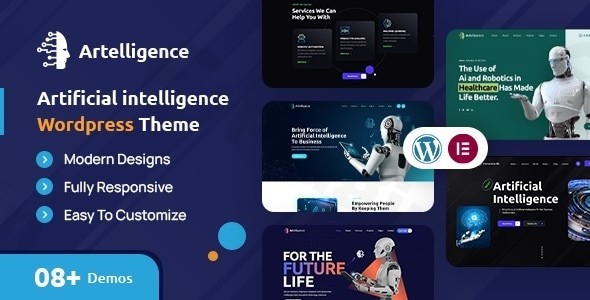
The Artelligence WordPress Theme is a meticulously designed solution for businesses and professionals operating in the Artificial Intelligence (AI) and Robotics industries. It offers a sophisticated, modern, and highly functional online presence, specifically tailored for showcasing expertise and innovations in these cutting-edge fields. Whether you’re a robotics company, an AI startup, or a research institution, Artelligence provides the tools to create a compelling and professional website that captures attention and highlights your technological advancements.
Key Features: Design, Layout & Performance
Artelligence stands out with a robust set of features engineered to support the unique needs of technology and science organizations.
Design & Layout Options
Artelligence is celebrated for its visually-aware design, built with a clean, modern aesthetic. It comes equipped with:
- Multiple Unique Layout Designs: The theme offers various pre-designed homepage layouts and numerous sub-pages, providing diverse starting points for your website. These layouts are crafted to effectively present your services, case studies, and team.
- Essential Pages Included: You’ll find ready-to-use templates for critical sections like Services, About Us, Case Studies, Blog, Projects, Our Team, FAQs, Testimonials, Coming Soon, and Contact Us. This significantly speeds up the website development process.
- Professional Banner Slider: Highlight your key offerings and latest innovations with an engaging banner slider, strategically integrated into the layouts.
- Bootstrap 4 Framework: Built on the responsive Bootstrap 4 framework, Artelligence ensures your site looks pristine and functions flawlessly on any device, from desktops to mobile phones.
Customization Capabilities
Personalizing your Artelligence website to align with your brand is made intuitive and efficient:
- Advanced Customizer Panel: The theme includes an advanced customizer panel and a feature-rich backend, making global adjustments straightforward.
- Flexible Color Schemes: Easily change your website’s colors to match your brand identity or create new visual themes that resonate with your audience.
- Extensive Typography Options: With access to over 600 Google Fonts families, you have vast choices for textual presentation. Customize fonts globally or fine-tune individual elements for perfect readability and brand consistency.
- Flexible Layouts with Variable Content Sections: The theme’s architecture supports easy customization of content sections, giving you control over the visual flow and hierarchy of your pages.
Performance & SEO Features
In today’s competitive digital landscape, a fast and search-engine-friendly website is paramount. Artelligence addresses this with:
- SEO-Optimized with Minimal CSS: The theme is developed with minimal CSS, contributing to fast loading speeds and a clean, search-engine-friendly code structure. This is crucial for increasing visibility and driving organic traffic.
- Fast Loading & Mobile-Friendly: Optimized code and a lightweight design ensure quick page loads and an excellent user experience across all devices. Artelligence is 100% Fluid Responsive, adapting perfectly to desktops, laptops, tablets, and smartphones.
Installation & Demo Import Guide
Setting up your Artelligence AI & Robotics WordPress theme and getting a head start with demo content is a streamlined process, designed for both beginners and experienced users.
- Install & Activate the Theme:
- First, download the Artelligence theme package (usually a
.zipfile) from your purchase source. - Log in to your WordPress dashboard.
- Navigate to
Appearance > Themes. - Click “Add New” and then “Upload Theme”.
- Choose the Artelligence theme
.zipfile and click “Install Now”. - Once installed, click “Activate”.
- First, download the Artelligence theme package (usually a
- Install Required Plugins:
- Upon activation, Artelligence will likely recommend or require certain plugins (e.g., the Artelligence Toolkit plugin for Elementor widgets, and Elementor itself). Follow the on-screen prompts to install and activate these essential companion plugins.
- Import Demo Content:
- Artelligence typically features a One-Click Demo Import function. Look for an option like
Appearance > Import Demo Dataor a dedicated “Demo Importer” section within the theme options or dashboard. - Select the demo layout that best suits your needs and initiate the import. This process will populate your site with the demo pages, posts, sliders, and other content, closely mirroring the live demo site.
- Important Note: Importing demo content can be resource-intensive. Ensure your hosting environment meets standard WordPress requirements to avoid timeouts. If the import fails, try increasing your PHP memory limit and execution time, or consult your host.
- Artelligence typically features a One-Click Demo Import function. Look for an option like
- Post-Import Setup:
- After the demo import, you may need to manually set your homepage (Settings > Reading) and configure your navigation menus (Appearance > Menus) as they appear in the demo. Review imported widgets (Appearance > Widgets) and adjust as necessary.
Customization Guide: Branding & Layout
Artelligence provides robust tools to personalize your website and truly make it your own.
- Using the WordPress Customizer: Most global settings like colors, typography, logo, and basic header/footer elements can be found under
Appearance > Customize. This live customizer allows you to see changes in real-time before publishing. - Changing Colors & Typography: Access global color palettes and font settings within the customizer. You can easily switch out primary and secondary colors, choose from over 600 Google Fonts, and define font sizes for headings and body text.
- Setting Your Logo: Upload your brand logo and favicon through the customizer’s Site Identity section.
- Header and Footer Layouts: While the theme provides flexible pre-designed headers and footers, advanced customization for these areas, especially with dynamic content, can be done using the integrated page builder (Elementor Pro’s Theme Builder offers extensive control here if you have it).
- Homepage and Blog Page Setup: Navigate to
Settings > Readingto designate your static homepage and blog posts page after importing demo content or creating your own. - Menu Management: Organize your site’s navigation under
Appearance > Menus. Create new menus, add pages, custom links, or categories, and assign them to the appropriate menu locations (e.g., primary menu, footer menu). - Page Building with Elementor: Artelligence heavily integrates with Elementor, a powerful drag-and-drop page builder. For individual page layouts, navigate to the page you wish to edit and click “Edit with Elementor.” The Artelligence Toolkit plugin provides a diverse range of specialized widgets to enhance your page building capabilities, making it easy to create complex and engaging layouts without coding.
FAQ & Troubleshooting
Here are answers to common questions about the Artelligence WordPress theme:
Is Artelligence compatible with Elementor for page building?
Yes, Artelligence is specifically highlighted as an Elementor-compatible theme. It integrates a powerful drag-and-drop page builder, which is Elementor, along with an Artelligence Toolkit plugin that provides a diverse range of widgets to enhance page building capabilities.
Does Artelligence support WooCommerce for online stores?
Yes, the Artelligence theme is WooCommerce Ready, meaning it fully supports e-commerce functionalities. You can build and manage an online store for your AI or robotics products directly on your website using WooCommerce.
Does Artelligence offer good performance and is it SEO-friendly?
Absolutely. Artelligence is built with minimal CSS to ensure fast loading speeds and is highly SEO-optimized. Its clean code structure and responsive design contribute to better search engine rankings and an excellent user experience.
Can I use a child theme with Artelligence to protect my customizations?
Yes, a child theme is included with Artelligence. Using a child theme is highly recommended for any advanced modifications, as it allows you to safely customize the theme without affecting the parent theme’s core files, ensuring your changes persist through theme updates.
What should I do if the Artelligence demo import fails or looks different from the demo site?
If the demo import fails, first ensure your server meets the recommended WordPress requirements for PHP memory limit and execution time. If it still looks different, check that all required and recommended plugins were installed and activated. Sometimes, manually setting your homepage and menus (as described in the Installation section) is also necessary after import. Refer to the theme’s official documentation for specific troubleshooting steps.
Conclusion
The Artelligence WordPress Theme is an exceptional choice for any robotics company, AI startup, machine learning researcher, or technology consulting firm looking to establish a robust and visually stunning online presence. Its specialized design and feature set cater directly to the demands of these advanced industries, making it far more effective than generic multipurpose themes.With its sleek, modern aesthetic, robust Elementor compatibility, and extensive customization options, Artelligence empowers you to create a high-converting website with ease. Its focus on SEO optimization and fast loading speeds ensures your innovations get the visibility they deserve. For professionals and businesses in the AI and robotics sectors seeking a unique, performance-driven, and highly flexible platform, Artelligence provides an authoritative and trustworthy foundation for showcasing your cutting-edge solutions.
I. Download Limits & Account Benefits
- Free Downloads: Each email address receives 3 downloads per day for free products
- Upgrade Benefits: Purchase any paid product to increase your daily download limit by 3 for each paid product
- No Account Required: You can download immediately by receiving the download link via email
- Account Recommended: Create an account for easier access to your order history and direct update downloads
II. Understanding GPL vs Official Versions
Important: The products available on WPPick are GPL-licensed versions, which differ from official developer versions. Before purchasing, please read our comprehensive guide: Understanding GPL & Official Differences at WPPick
Key Points:
- GPL versions may not include premium support from original developers
- Updates may be delayed compared to official releases
- Some premium features might have limitations
- Always consider your specific needs and support requirements
III. Support & Assistance
We’re here to help through multiple channels:
- Email Support: Direct email assistance for all inquiries
- Live Chat: Real-time support during business hours
- Comprehensive Documentation: Detailed guides and tutorials
IV. Order Tracking
Access your complete purchase history and download links anytime: Order History
V. Account Access
New to WPPick? Login or Create Account to manage your downloads and orders efficiently.
VI. Refund Protection
We stand behind our products with a clear refund policy. Review our terms: Refund Policy
VII. Privacy & Security
Your data security is our priority. Learn how we protect your information: Privacy Policy
VII. Terms of Service
Understanding our service terms ensures a smooth experience: Terms of Use
Quick Tips for Best Experience
- Verify Compatibility: Check plugin/theme compatibility with your WordPress version
- Backup First: Always backup your site before installing new plugins or themes
- Test Environment: Consider testing on a staging site first
- Stay Updated: Regularly check for updates in your account dashboard
- Read Documentation: Review any included documentation for optimal setup
Need Help?
If you have questions about downloads, licensing, or need technical assistance, don’t hesitate to contact our support team. We’re committed to ensuring you have the best possible experience with WPPick products.
Ready to get started? Your download adventure begins with just one click!