

Atomlab – Startup Landing Page WordPress Theme
/Year
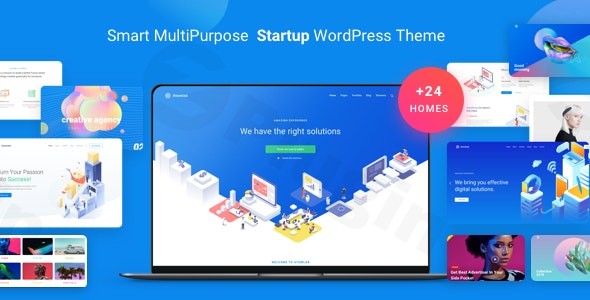
In the competitive world of digital entrepreneurship, making a powerful first impression is non-negotiable. The Atomlab WordPress theme is a high-performance Startup Landing Page WordPress Theme designed specifically for businesses that need to convert visitors into leads through sleek, professional, and modern design. Whether you are launching a new SaaS product, running a creative agency, or building a professional portfolio, Atomlab provides a robust framework that prioritizes user experience (UX) and visual hierarchy.
1. Overview: Design Philosophy and Target Audience
Atomlab is built on a philosophy of “Great UI/UX Design,” ensuring that every element on the page serves a purpose. It moves away from the cluttered look of generic multipurpose themes and focuses on clean lines, purposeful animations, and high-converting layouts. This theme is the ideal choice for:
- Tech Startups: To showcase software features and app screenshots.
- Digital Agencies: To highlight portfolios and service packages.
- Freelancers & Creatives: To build a personal brand with high-impact visuals.
- Store Owners: Looking for a modern, conversion-focused layout for niche products.
2. Key Features: Design, Layout, and Performance
The Atomlab WordPress theme distinguishes itself through its sheer volume of pre-built assets and its optimization for modern search engines.
Dynamic Layout Options
Atomlab is a powerhouse of variety, offering a library of designs that can be imported instantly:
- 24+ Homepage Designs: Tailored for various niches including fintech, creative studios, and product landing pages.
- 61+ Inner Pages: Pre-designed templates for “About Us,” “Services,” and “Contact” pages, ensuring brand consistency across the entire site.
- 14+ Portfolio & 11+ Blog Layouts: Options to showcase your work or industry insights in a grid, masonry, or list format.
Extensive Customization Capabilities
Personalizing your site is intuitive thanks to the Live Customizer and WPBakery Page Builder integration.
- Header & Footer Builder: Choose from 17 preset header styles and 7 footer layouts, or build your own using the custom builder tools.
- Typography & Color: Access over 600 Google Fonts and unlimited color schemes to match your brand identity perfectly.
- Advanced Visuals: Engage users with parallax scroll effects, scroll-triggered animations, and high-quality Font Awesome 5 Pro icons.
Performance and SEO Readiness
Speed is a critical ranking factor for both Google and AI search engines like Perplexity or SGE. Atomlab is engineered with “Blazing Fast Loading Speed” and clean code architecture. It is fully responsive, meaning your site will look and perform flawlessly on smartphones, tablets, and desktops. Furthermore, its SEO-friendly structure helps search engines crawl and index your content more effectively.
3. Installation & Demo Import Guide
Setting up a professional Startup Landing Page WordPress Theme shouldn’t be a technical headache. Follow these steps to get Atomlab running:
- Theme Installation: Upload the Atomlab folder via your WordPress Dashboard (Appearance > Themes > Add New) or via FTP.
- Plugin Activation: Upon activation, the theme will prompt you to install required companion plugins, including WPBakery Page Builder and Slider Revolution.
- One-Click Demo Import: Navigate to the theme options panel and select the “Demo Import” feature. Choose your preferred homepage design.
- Wait for Completion: Ensure your server’s memory limit is sufficient (at least 256M) to avoid timeouts. Once finished, your site will look exactly like the chosen demo, including menus and placeholder widgets.
4. Customization Guide: Personalizing Your Brand
Once the demo is imported, use these strategies to align the site with your business goals:
- Using the Live Customizer: Go to Appearance > Customize to change global settings like site logos, accent colors, and typography in real-time.
- WPBakery Drag-and-Drop: Edit individual pages by clicking “Edit with WPBakery Page Builder.” This allows you to move sections, add new elements like testimonial carousels, and adjust spacing without touching a single line of code.
- Sticky & Mega Menus: Enhance navigation by enabling the sticky header feature and setting up a Mega Menu (4+ styles available) to organize complex site structures.
5. FAQ & Troubleshooting
Is Atomlab good for WooCommerce?
Yes, Atomlab is fully compatible with WooCommerce. It includes dedicated shop layouts, product pages, and sidebar options, making it excellent for startups that want to sell digital or physical products directly from their landing page.
Which page builder does Atomlab use?
Atomlab is bundled with the WPBakery Page Builder (formerly Visual Composer). This allows for deep, section-based customization using a drag-and-drop interface. It also remains compatible with the standard WordPress Block Editor (Gutenberg).
How to customize the header in the Atomlab theme?
You can customize the header through the Theme Options or the Custom Header Builder. Atomlab provides 17 preset styles, including transparent, sticky, and centered layouts. You can also assign different headers to different pages for a unique user experience.
Does the theme support multilingual websites?
Yes, Atomlab is compatible with WPML, allowing you to translate your startup landing page into multiple languages to reach a global audience.
What should I do if the demo import fails?
Most demo import issues are caused by low server resources. Ensure your PHP max_execution_time is set to 300 and memory_limit is at least 256M. If problems persist, check the “System Status” tab in the theme options for specific errors.
6. Conclusion: A High-Converting Choice for Startups
The Atomlab WordPress theme is a top-tier choice for any business that values speed, design aesthetics, and conversion optimization. By bundling premium plugins like Slider Revolution and WPBakery, it offers immense value, potentially saving users hundreds of dollars in additional software costs.While it is specialized for landing pages and single-page experiences, its WooCommerce integration and vast library of inner pages make it flexible enough to grow with your business. If you are looking for an SEO-ready, visually stunning, and highly customizable Startup Landing Page WordPress Theme, Atomlab is a standout contender available today.For more WordPress theme reviews and expert web design tips, visit wppick.com.
I. Download Limits & Account Benefits
- Free Downloads: Each email address receives 3 downloads per day for free products
- Upgrade Benefits: Purchase any paid product to increase your daily download limit by 3 for each paid product
- No Account Required: You can download immediately by receiving the download link via email
- Account Recommended: Create an account for easier access to your order history and direct update downloads
II. Understanding GPL vs Official Versions
Important: The products available on WPPick are GPL-licensed versions, which differ from official developer versions. Before purchasing, please read our comprehensive guide: Understanding GPL & Official Differences at WPPick
Key Points:
- GPL versions may not include premium support from original developers
- Updates may be delayed compared to official releases
- Some premium features might have limitations
- Always consider your specific needs and support requirements
III. Support & Assistance
We’re here to help through multiple channels:
- Email Support: Direct email assistance for all inquiries
- Live Chat: Real-time support during business hours
- Comprehensive Documentation: Detailed guides and tutorials
IV. Order Tracking
Access your complete purchase history and download links anytime: Order History
V. Account Access
New to WPPick? Login or Create Account to manage your downloads and orders efficiently.
VI. Refund Protection
We stand behind our products with a clear refund policy. Review our terms: Refund Policy
VII. Privacy & Security
Your data security is our priority. Learn how we protect your information: Privacy Policy
VII. Terms of Service
Understanding our service terms ensures a smooth experience: Terms of Use
Quick Tips for Best Experience
- Verify Compatibility: Check plugin/theme compatibility with your WordPress version
- Backup First: Always backup your site before installing new plugins or themes
- Test Environment: Consider testing on a staging site first
- Stay Updated: Regularly check for updates in your account dashboard
- Read Documentation: Review any included documentation for optimal setup
Need Help?
If you have questions about downloads, licensing, or need technical assistance, don’t hesitate to contact our support team. We’re committed to ensuring you have the best possible experience with WPPick products.
Ready to get started? Your download adventure begins with just one click!
- Fix compatible with Ultimate Member plugin
- Insight Core plugin 2.8.1
- Revolution Slider plugin - v.6.7.40
- Update option to change shop archive columns
- Move CSS inline to files