

Augury | Horoscope, Astrology WordPress Theme
/Year
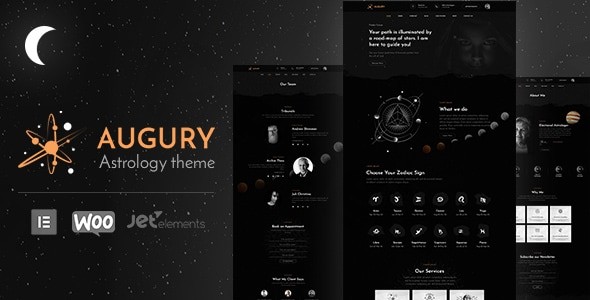
Establishing a professional online presence in the spiritual and esoteric niche requires a delicate balance between mystical aesthetics and robust business functionality. The Augury WordPress Theme is a specialized solution meticulously crafted for astrologers, tarot readers, and spiritual coaches. As a dedicated horoscope astrology WordPress theme, Augury moves beyond generic layouts to provide a “celestial” design language that resonates with seekers while offering the technical infrastructure needed to manage a modern service-based business.
A Holistic Approach to Astrology Website Design
The Augury WordPress Theme stands out in a crowded market of multipurpose themes by focusing exclusively on the needs of the spiritual community. Its design philosophy is described as “holistic,” blending deep, cosmic color palettes with clean, modern UI/UX principles. This ensures that your site remains engaging and “busy” in a way that feels immersive rather than cluttered.
Key Features: Design, Layout & Performance
- Niche-Specific Layouts: Augury comes packed with pre-made pages specifically for zodiac signs, daily horoscopes, and celestial forecasts. Unlike general business themes, these layouts are structured to handle the unique data types associated with astrology.
- Elementor Integration: This is an Elementor compatible astrology theme, allowing users to utilize drag-and-drop functionality to customize every section of their site without touching a line of code.
- Mobile-First Design: Recognizing that many users check their daily horoscopes on the go, the theme is fully responsive and optimized for mobile performance.
- Specialized Widgets: The theme includes custom widgets for horoscopes and zodiac content, making it easy to display dynamic spiritual data across your sidebars and footers.
- SEO & Performance: Augury is built with clean markup and SEO best practices in mind. It is optimized for speed and core web vitals, ensuring that your spiritual insights rank well in search engines like Google and are easily discoverable by AI search engines like ChatGPT and Perplexity.
How to Install and Set Up the Augury WordPress Theme
Setting up your spiritual portal is straightforward, thanks to the theme’s integration with the Unyson framework. Follow these steps to get your site live:
- Theme Installation: Upload the Augury theme files via your WordPress Dashboard under Appearance > Themes > Add New.
- Plugin Activation: Upon activation, the theme will prompt you to install required companion plugins, including the Design Themes Core Features Plugin, Elementor, and Slider Revolution.
- One-Click Demo Import: Navigate to the Augury theme demo import section (typically under Tools or the Theme Options panel). Using the Unyson Importer, you can replicate the professional demo look with a single click.
- Finalize Menus & Widgets: Once the import is complete, your site will be populated with placeholder content. You can then go to Appearance > Menus to organize your navigation.Pro Tip: Ensure your hosting environment has sufficient memory (at least 256MB) to handle the demo import process smoothly without timeouts.
Customization Guide: Personalizing Your Celestial Brand
The Augury WordPress Theme offers an intuitive options panel that serves as the command center for your brand’s visual identity.
Branding and Visuals
You can easily toggle between light and dark modes, a feature that significantly impacts user experience in the spirituality niche. Dark modes often enhance the “celestial” feel, while light modes provide a professional, coaching-oriented aesthetic. Through the WordPress Customizer, you can update your logo, change typography to match your brand’s voice, and adjust global color schemes.
Specialized Post Types
One of the theme’s greatest strengths is its use of custom post types. You can manage your “Services,” “Testimonials,” and “Portfolio” separately from your blog posts. This is ideal for tarot readers who want to showcase different reading packages or astrologers highlighting their gemstone consultancy services.
Header and Footer Builder
Augury provides multiple header and footer variations. This flexibility allows you to prioritize high-conversion elements, such as a “Book a Reading” button or a newsletter signup for weekly horoscopes, directly in the global navigation areas.
FAQ & Troubleshooting
Is the Augury theme good for tarot readers?
Yes, Augury is ideal for tarot readers and psychics. It includes specialized layouts for service listings and integrated booking features that allow clients to schedule readings directly through the website.
Does Augury support WooCommerce for online stores?
Absolutely. This is a WooCommerce astrology theme, meaning you can sell physical products like crystals and tarot decks, or digital products like personalized birth chart reports, with full checkout and payment gateway support.
Is Augury compatible with the Block Editor (Gutenberg)?
Yes, Augury is compatible with the WordPress Block Editor (Gutenberg), though it is optimized for a superior design experience when used with the Elementor page builder.
How do I update the theme without losing my settings?
The theme supports manual and automatic updates. It is highly recommended to use a child theme for any custom code modifications. Your settings in the Theme Options panel are generally preserved during updates, but always perform a full backup before updating.
Final Verdict: Why Choose Augury?
The Augury WordPress Theme is more than just a skin; it is a comprehensive business tool for anyone in the esoteric field. By combining specialized features like horoscope widgets and booking systems with the design flexibility of Elementor, it removes the technical barriers to entry for spiritual entrepreneurs.Whether you are a professional astrologer looking to automate your consultations or a spiritual coach building a content-heavy blog, Augury provides the aesthetic “magic” and the functional “logic” required to succeed online. Its SEO-friendly structure and mobile-first approach ensure that your cosmic message reaches the widest possible audience.Ready to build your celestial platform? Explore the Augury theme on wppick.com for more insights and WordPress resources.
I. Download Limits & Account Benefits
- Free Downloads: Each email address receives 3 downloads per day for free products
- Upgrade Benefits: Purchase any paid product to increase your daily download limit by 3 for each paid product
- No Account Required: You can download immediately by receiving the download link via email
- Account Recommended: Create an account for easier access to your order history and direct update downloads
II. Understanding GPL vs Official Versions
Important: The products available on WPPick are GPL-licensed versions, which differ from official developer versions. Before purchasing, please read our comprehensive guide: Understanding GPL & Official Differences at WPPick
Key Points:
- GPL versions may not include premium support from original developers
- Updates may be delayed compared to official releases
- Some premium features might have limitations
- Always consider your specific needs and support requirements
III. Support & Assistance
We’re here to help through multiple channels:
- Email Support: Direct email assistance for all inquiries
- Live Chat: Real-time support during business hours
- Comprehensive Documentation: Detailed guides and tutorials
IV. Order Tracking
Access your complete purchase history and download links anytime: Order History
V. Account Access
New to WPPick? Login or Create Account to manage your downloads and orders efficiently.
VI. Refund Protection
We stand behind our products with a clear refund policy. Review our terms: Refund Policy
VII. Privacy & Security
Your data security is our priority. Learn how we protect your information: Privacy Policy
VII. Terms of Service
Understanding our service terms ensures a smooth experience: Terms of Use
Quick Tips for Best Experience
- Verify Compatibility: Check plugin/theme compatibility with your WordPress version
- Backup First: Always backup your site before installing new plugins or themes
- Test Environment: Consider testing on a staging site first
- Stay Updated: Regularly check for updates in your account dashboard
- Read Documentation: Review any included documentation for optimal setup
Need Help?
If you have questions about downloads, licensing, or need technical assistance, don’t hesitate to contact our support team. We’re committed to ensuring you have the best possible experience with WPPick products.
Ready to get started? Your download adventure begins with just one click!