

Auto Spa – Car Wash WordPress Theme
/Year
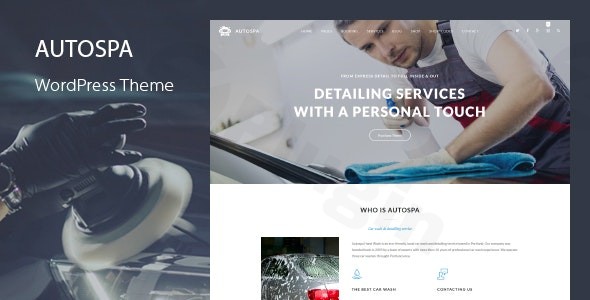
Elevate your automotive service business with Auto Spa, the #1 selling car wash WordPress theme designed to help car wash, auto detailing, and car cleaning services establish a professional online presence. This review and setup guide will walk you through its powerful features, simple installation, and extensive customization options, highlighting why Auto Spa is the ideal choice for businesses looking to streamline appointments and manage services online.
Introduction: Polishing Your Online Presence for Automotive Services
The digital storefront for your car wash, auto detailing, or general car service business is more crucial than ever. The Auto Spa Car Wash WordPress Theme by QuanticaLabs offers a sophisticated yet user-friendly solution, blending aesthetic appeal with robust functionality. It’s crafted for business owners, freelancers, and agencies aiming to create visually stunning and highly efficient websites for automotive care, without needing extensive coding knowledge. Auto Spa’s design philosophy prioritizes a clean, professional look that instills trust, combined with a 100% responsive layout ensuring a flawless experience across all devices.
Key Features: Design, Layout & Performance for Automotive Excellence
Auto Spa goes beyond basic web design, offering specialized features that cater directly to the needs of the automotive service industry.
Design & Layout Options: Sleek & Service-Oriented
The theme provides a flexible foundation for showcasing your services. Its 100% responsive and mobile-friendly layout guarantees your site looks sharp and performs seamlessly on any screen, from desktops to smartphones. With various pre-designed page templates—including multiple styles for “Home,” “About,” “Services,” and “Contact” pages—you can quickly set up your essential web real estate. Diverse blog layouts (e.g., Small Image Right Sidebar, Large Image Left Sidebar) are also included, perfect for sharing car care tips or business news. A sticky menu enhances navigation, keeping your services and booking options readily accessible.Visually, Auto Spa stands out with its pixel-perfect, high-resolution design. It integrates premium icon fonts like the Streamline Premium Icon Font (94 icons) and Unigrid Vehicles Premium Icon Font (25 car type icons), adding industry-specific flair. The bundled Slider Revolution plugin allows you to create dynamic, engaging sliders to spotlight promotions, service packages, or impressive before-and-after galleries.
Customization Capabilities: Brand Your Business with Ease
Tailoring Auto Spa to your brand identity is intuitive thanks to its comprehensive customization options:
- Color Schemes: Access to unlimited color options via the “Theme Styles Panel” means you can effortlessly match your existing branding or create a fresh, appealing palette. You have granular control to change the color of virtually any theme element.
- Typography: The “Theme Fonts Panel” empowers you to customize any theme font, with support for over 800+ Google Fonts. This allows you to fine-tune your site’s readability and aesthetic appeal.
- Extensive Theme Options Panel: Beyond basic styling, a powerful “Theme Options Panel” provides a wealth of configuration settings, giving you significant control over your site’s look and feel without diving into code.
- WPBakery Page Builder: Included and deeply integrated, WPBakery Page Builder for WordPress (formerly Visual Composer) provides a drag-and-drop interface. This allows you to design custom page layouts, arrange content, and style elements with ease, making advanced design accessible even for beginners.
Performance & SEO Features: Fast, Responsive & Search-Ready
In the competitive digital landscape, performance and search engine optimization are paramount. Auto Spa is built with this in mind:
- Responsive and Retina-Ready: The theme ensures your website displays crisply on high-resolution screens and adapts flawlessly to any mobile device, providing an optimal user experience that search engines favor.
- Clean Markup: While specific page speed scores aren’t detailed, Auto Spa’s design claims “improved coding” and a focus on responsiveness, which are foundational for faster loading times and a positive user experience.
- Gutenberg Support: With added support for the WordPress block editor (Gutenberg), you have flexibility in creating content using modern WordPress tools.
Installation & Demo Import: Get Started in Minutes
Setting up your Auto Spa website is designed to be straightforward, even for those new to WordPress.
- Install & Activate the Theme:
- First, log in to your WordPress dashboard.
- Navigate to
Appearance > Themes. - Click “Add New” and then “Upload Theme.”
- Choose the
auto-spa.zipfile you downloaded from ZeroPlugin.com or ThemeForest and click “Install Now.” - Once installed, click “Activate.”
- Install Required Companion Plugins:
- Upon activation, Auto Spa will prompt you to install a set of recommended and required plugins, including the crucial Car Wash Booking System for WordPress, WPBakery Page Builder, and Slider Revolution.
- Follow the on-screen instructions to install and activate all necessary plugins to ensure full theme functionality.
- Use the One-Click Demo Import:
- Auto Spa features a “Theme Demo Data Installer” that allows for a one-click import of the demo content. This is the fastest way to get your site looking exactly like the live preview.
- Typically, you’ll find this option under an “Auto Spa” or “Demo Import” menu item in your WordPress dashboard.
- Click the button to import demo data.
- What to Expect During/After Demo Import:
- The demo import will populate your site with pre-built pages (Home, About Us, Services, Booking, Blog, Gallery, Contact), menus, sample images, and widgets.
- Important: Large demo imports can be resource-intensive. Ensure your hosting environment meets WordPress’s minimum requirements for memory and execution time to prevent timeouts. If the import fails, you might need to increase your PHP memory limit and execution time settings through your host.
- After import, you’ll likely need to navigate to
Appearance > Menusto assign your primary menu andSettings > Readingto set your new homepage.
Customization Guide: Branding Your Auto Spa Website
Personalizing your Auto Spa theme to reflect your business’s unique brand is simple and doesn’t require coding expertise.
- Using the Theme Options Panel: The dedicated “Theme Options Panel” is your central hub for global settings. Here, you can manage layout options, upload your logo, set favicon, configure header and footer layouts, and control many other site-wide elements.
- Changing Colors & Fonts: Head to the “Theme Styles Panel” for comprehensive color control over virtually every element of your site. Use the “Theme Fonts Panel” to select from over 800 Google Fonts to match your brand’s typographic style. These global settings ensure consistency across your site.
- Building Pages with WPBakery Page Builder: For individual page layouts and content, leverage the drag-and-drop power of WPBakery Page Builder. When editing a page, switch to the WPBakery editor (often labeled “Backend Editor” or “Frontend Editor”) to add “30+ Content Elements” such as service blocks, image galleries, testimonials, and contact forms. This intuitive interface makes it easy to create custom sections and refine your content.
- Setting Up Your Homepage and Menus: After demo import, ensure your static homepage is selected under
Settings > Reading. Then, go toAppearance > Menusto arrange your navigation structure and assign it to the appropriate menu locations (e.g., Primary Menu). - Widget Areas: The theme includes a “Widget Area” plugin, allowing you to easily place custom widgets in your sidebars (left or right, as available on various page templates) and footer areas, providing additional content or calls to action.
FAQ & Troubleshooting: Quick Answers for Common Queries
Here are some common questions about the Auto Spa WordPress Theme, designed to provide clear, actionable answers.
Is Auto Spa compatible with Elementor, WPBakery, or Gutenberg?
Auto Spa is deeply integrated with and includes WPBakery Page Builder for drag-and-drop page creation. Additionally, it has added support for the Gutenberg WordPress editor (block editor). While some other themes named “Auto Spa” might support Elementor, the QuanticaLabs version primarily bundles and uses WPBakery.
Does Auto Spa support WooCommerce for online stores?
Yes, Auto Spa is fully integrated with WooCommerce. This means you can easily set up an online store to sell car-related products, accessories, or even pre-paid service packages directly from your website, complete with online payments.
How does the Auto Spa car wash booking system work?
The Auto Spa theme features a proprietary, integrated Car Wash Booking System for WordPress. This system allows customers to select services, choose preferred dates and times, and make payments online. It supports online payments, provides email/SMS notifications, and offers Google Calendar integration for efficient management of appointments. The system handles “Vehicles Module,” “Services Module,” and “Packages Module” to manage your offerings.
What WordPress and PHP versions does Auto Spa require?
The Auto Spa theme is compatible with WordPress 5.0.x and above and is regularly updated to support the latest WordPress releases. For optimal performance and security, it is generally recommended to use PHP 7.4 or higher with modern WordPress themes, although a specific minimum PHP version isn’t explicitly documented.
What should I do if the Auto Spa demo import fails or looks different from the demo site?
If the demo import fails, it’s often due to server limitations (e.g., low PHP memory limit, short execution time). Contact your hosting provider to increase PHP memory limit (e.g., to 256MB or 512MB) and max execution time (e.g., to 300 seconds). If the imported demo looks different, ensure all required and recommended plugins are installed and activated, and that you have assigned your primary menu and selected your homepage in WordPress settings.
Conclusion: Drive Your Business Forward with Auto Spa
The Auto Spa – Premium Car Wash WordPress Theme is an exceptional choice for any business in the automotive service industry. Its blend of professional design, dedicated car wash booking system, and user-friendly customization makes it a standout solution. Ideal for car wash services, auto detailing businesses, car care centers, and mechanics, it offers an out-of-the-box solution that saves time and resources.With its 100% responsive design, WPBakery Page Builder integration, and WooCommerce compatibility, Auto Spa provides the tools necessary to create a high-converting, visually appealing, and SEO-ready website. Whether you’re a small business owner looking for a specialized website, or a freelancer/agency building sites for clients, Auto Spa delivers the expertise, features, and reliability to drive your automotive service business forward online.
I. Download Limits & Account Benefits
- Free Downloads: Each email address receives 3 downloads per day for free products
- Upgrade Benefits: Purchase any paid product to increase your daily download limit by 3 for each paid product
- No Account Required: You can download immediately by receiving the download link via email
- Account Recommended: Create an account for easier access to your order history and direct update downloads
II. Understanding GPL vs Official Versions
Important: The products available on WPPick are GPL-licensed versions, which differ from official developer versions. Before purchasing, please read our comprehensive guide: Understanding GPL & Official Differences at WPPick
Key Points:
- GPL versions may not include premium support from original developers
- Updates may be delayed compared to official releases
- Some premium features might have limitations
- Always consider your specific needs and support requirements
III. Support & Assistance
We’re here to help through multiple channels:
- Email Support: Direct email assistance for all inquiries
- Live Chat: Real-time support during business hours
- Comprehensive Documentation: Detailed guides and tutorials
IV. Order Tracking
Access your complete purchase history and download links anytime: Order History
V. Account Access
New to WPPick? Login or Create Account to manage your downloads and orders efficiently.
VI. Refund Protection
We stand behind our products with a clear refund policy. Review our terms: Refund Policy
VII. Privacy & Security
Your data security is our priority. Learn how we protect your information: Privacy Policy
VII. Terms of Service
Understanding our service terms ensures a smooth experience: Terms of Use
Quick Tips for Best Experience
- Verify Compatibility: Check plugin/theme compatibility with your WordPress version
- Backup First: Always backup your site before installing new plugins or themes
- Test Environment: Consider testing on a staging site first
- Stay Updated: Regularly check for updates in your account dashboard
- Read Documentation: Review any included documentation for optimal setup
Need Help?
If you have questions about downloads, licensing, or need technical assistance, don’t hesitate to contact our support team. We’re committed to ensuring you have the best possible experience with WPPick products.
Ready to get started? Your download adventure begins with just one click!
- Improved coding
- Updated plugin: Theme Font
- Updated plugin: Widget Area
- Updated plugin: Theme Styles
- Updated plugin: Theme Demo Data Installer
- Updated plugin: Car Wash Booking System for WordPress
- Updated plugin: Visual Composer: Page Builder for WordPress
- Updated plugin: Slider Revolution Responsive WordPress Plugin
- Redesigned the entire theme admin panel (refreshed layout)
- Improved coding
- Fixed few minor issues
- Updated plugin: Auto Spa Core
- Updated plugin: Theme Font
- Updated plugin: Widget Area
- Updated plugin: Theme Styles
- Updated plugin: Theme Demo Data Installer
- Updated plugin: Car Wash Booking System for WordPress
- Updated plugin: Visual Composer: Page Builder for WordPress
- Updated plugin: Slider Revolution Responsive WordPress Plugin