
Auto Stars – Car Dealership And Listings Wp Theme
/Year
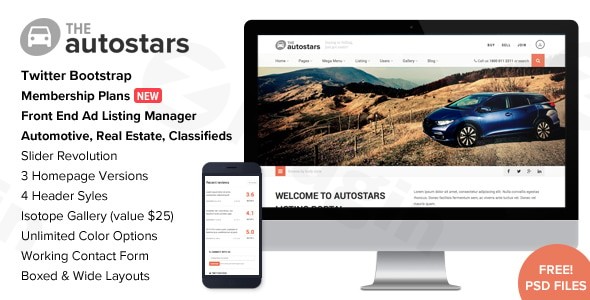
The Auto Stars WordPress theme is a specialized solution meticulously crafted for businesses in the automotive sector, including car dealerships, auto listing portals, and car rental services. Designed with a strong emphasis on showcasing vehicle inventories and streamlining user submissions, Auto Stars provides a robust and visually engaging platform for anyone looking to establish a professional online presence in the automotive market. Its foundation on the Twitter Bootstrap framework ensures a responsive and modern design, making it a powerful choice for entrepreneurs and developers alike who aim to create dynamic and effective car listing websites.
Key Features: Design, Layout & Performance for Automotive Businesses
Auto Stars distinguishes itself with a suite of features tailored to the unique demands of the automotive industry, blending aesthetic flexibility with robust technical capabilities.
Design & Layout Options
The theme offers versatile design choices to present your automotive content effectively:
- Layout Variations: Choose between boxed and wide layouts to best suit your content presentation style. This flexibility allows for a traditional contained design or an expansive, edge-to-edge visual experience.
- Header Styles: With 4 distinct header styles, Auto Stars enables you to customize the top section of your website to align with your brand’s identity and navigation needs.
- Gallery & Listing Templates: The theme includes multiple gallery styles and varied vehicle detail page layouts, ensuring that each vehicle listing can be presented with rich imagery and comprehensive information. These templates are crucial for attracting potential buyers and providing all necessary details at a glance.
- Blog Templates: Beyond listings, Auto Stars provides multiple style options for blog templates, allowing automotive bloggers and reviewers to present articles in an organized and visually appealing manner.
- Bootstrap Framework: Built on the Twitter Bootstrap framework, the theme guarantees a structured and extensible design, simplifying development and ensuring cross-browser compatibility.
Customization Capabilities
Auto Stars offers significant control over your site’s appearance to ensure it perfectly matches your brand:
- Color Schemes: Jumpstart your design with 12 pre-made color schemes. For ultimate branding control, the theme provides unlimited color options, allowing you to fine-tune every element to your exact specifications.
- Typography: Support for Google Fonts provides access to a vast library of high-quality typefaces, ensuring your website’s text is both readable and aesthetically pleasing.
- Prebuilt Templates & Design Assets: While specific one-click starter sites aren’t detailed, the theme includes 25+ full-layered PSD files. These valuable design assets can serve as a strong foundation for custom mockups or as a reference point for your design team.
Performance & SEO Features
Optimizing for speed and search engines is critical for any online automotive business:
- Mobile Responsiveness: Auto Stars is explicitly labeled as “Retina Ready & Fully Responsive,” guaranteeing a flawless viewing experience across all devices, from desktops to smartphones and tablets. This is crucial for user experience and search engine rankings.
- SEO Optimization: The theme is described as “SEO Optimized,” indicating that its underlying code structure is built with search engine best practices in mind, aiming for better visibility in search results. The Bootstrap framework also generally contributes to cleaner, more performant code.
- Bundled Premium Plugin: The inclusion of the Slider Revolution plugin (valued at $26) allows for the creation of dynamic, visually striking sliders to showcase featured vehicles or promotions, enhancing user engagement without needing to purchase an additional license.
Installation & Demo Import: Getting Started with Auto Stars
Setting up your car dealership or auto listing website with Auto Stars is designed to be user-friendly, even for those new to WordPress.
- Theme Installation & Activation:
- Once you’ve purchased Auto Stars, download the theme package from ThemeForest.
- Log in to your WordPress dashboard.
- Navigate to Appearance > Themes > Add New > Upload Theme.
- Select the theme’s
.zipfile and click “Install Now.” - After installation, click “Activate” to make Auto Stars your active theme.
- Install Required Plugins:
- Upon activation, Auto Stars will likely prompt you to install any necessary companion plugins. This typically includes the bundled Slider Revolution plugin and potentially other listing-specific functionalities. Follow the on-screen prompts to install and activate these plugins.
- Demo Content Import:
- The theme aims for ease of use with features like “demo import.” While exact steps are not detailed in the provided content, most themes offer a “One-Click Demo Import” feature, usually found under an “Auto Stars Options” or “Import Demo” menu item within your WordPress dashboard (often under Appearance or a dedicated theme menu).
- Select the demo that best fits your vision and initiate the import process.
- What to Expect: The demo import will typically populate your site with sample pages, posts, menus, widgets, and theme options, closely resembling the theme’s live demo. Be aware that importing large amounts of demo content may require sufficient server memory and execution time to prevent timeouts. If you encounter issues, consult your web host or the theme’s documentation.
Customization Guide: Branding Your Automotive Platform
Personalizing Auto Stars to reflect your brand’s unique identity is straightforward, leveraging WordPress’s native customization tools and the theme’s dedicated options.
- WordPress Customizer:
- Most global styling options, such as colors and typography, can be accessed via the WordPress Customizer (Appearance > Customize). Here, you’ll find “Unlimited Color Options” to precisely match your brand’s palette and the ability to select from Google Fonts for your headings and body text.
- You can also configure your chosen header style (from the 4 available options), manage widget areas (which are typically available in sidebars and footers), and set up your homepage and blog page.
- Managing Vehicle Listings:
- Auto Stars features a “PowerFull User Dashboard” and “Front End Ad Listing Management.” This means both administrators and potentially registered users can manage vehicle listings directly from the front end of the website, offering a seamless and intuitive experience. This dashboard will be your central hub for adding new vehicles, editing existing ones, and managing images and details.
- Logo and Site Identity:
- Within the Customizer, you’ll typically find options to upload your custom logo, favicon, and update your site title and tagline, ensuring your brand is prominently displayed.
- Menu Setup:
- Navigate to Appearance > Menus to create and assign your primary navigation menus. You can link to your vehicle categories, service pages, blog, and user dashboard.While Auto Stars is built on the Twitter Bootstrap framework, providing a structured design, explicit integration with popular drag-and-drop page builders like Elementor or WPBakery is not detailed. However, its modern foundation generally ensures compatibility with the Block Editor (Gutenberg) for content creation. For advanced design control beyond the Customizer, custom CSS is generally easy to apply.
FAQ & Troubleshooting
Here are answers to some common questions about the Auto Stars WordPress theme:
Is Auto Stars theme compatible with Elementor, WPBakery, or Gutenberg?
While specific, explicit compatibility with popular third-party page builders like Elementor or WPBakery is not detailed, Auto Stars is built on the Twitter Bootstrap framework. Modern themes based on Bootstrap are generally compatible with WordPress’s native Block Editor (Gutenberg) for content creation. For Elementor or WPBakery, it suggests it could work through custom elements, but direct, deep integration is not explicitly confirmed.
Does Auto Stars support WooCommerce for online stores?
Compatibility with WooCommerce is not directly mentioned for the Auto Stars theme in the provided information. While many car dealership themes integrate with WooCommerce for e-commerce functionalities (like selling parts or managing rental payments), it would be prudent to verify this directly with the theme developer or documentation if e-commerce features are a core requirement for your site.
Does Auto Stars support child themes?
The provided information does not explicitly detail support for child themes or the availability of hooks and filters. However, it is a standard WordPress best practice to use a child theme for any custom modifications to prevent losing your changes during theme updates. It is highly recommended to create a child theme if you plan to add custom CSS, PHP, or JavaScript.
How can I update the Auto Stars theme without losing my customizations?
To update the Auto Stars theme safely and prevent losing your customizations, it is essential to use a child theme for any modifications. If you have made direct changes to the parent theme files, these will be overwritten during an update. Always back up your website before performing any theme or plugin updates. Updates are typically handled through the WordPress dashboard (Appearance > Themes) once a new version is released by the developer.
What should I do if the demo import fails or looks different from the demo site?
If the demo import fails or doesn’t perfectly match the live demo, first check your server requirements. Large demo imports require adequate PHP memory limit, execution time, and post max size settings. You might need to increase these values in your php.ini file or contact your hosting provider. Also, ensure all required plugins are installed and activated before importing the demo. If problems persist, consult the theme’s official documentation or contact imithemes support for specific guidance.
Conclusion: Is Auto Stars the Right Choice for Your Automotive Business?
The Auto Stars WordPress theme emerges as a compelling solution for anyone looking to build a professional and feature-rich website for car dealerships, auto listings, or related automotive ventures. Its specialized design and functionality cater directly to the needs of the industry, offering robust tools for showcasing vehicle inventory and managing user submissions.With its responsive design, a selection of header and gallery styles, and extensive color and typography options, Auto Stars provides significant design flexibility to craft a visually appealing and branded online presence. The inclusion of the Slider Revolution plugin adds a premium touch for dynamic content presentation, while its “SEO Optimized” foundation aims for better visibility. The “PowerFull User Dashboard” stands out as a key feature, simplifying the management of listings for both site owners and potential users.Auto Stars is an ideal choice for car dealership owners, automotive bloggers, and developers building sites for automotive clients who prioritize a dedicated, feature-rich theme over a generic multipurpose option. While specific integrations with certain page builders or WooCommerce are not explicitly detailed, its strong foundation and specialized features make it a powerful contender for creating a high-converting, visually aware, and SEO-optimized automotive platform. If you value a theme that understands the nuances of the automotive market and provides dedicated tools for vehicle listings and management, Auto Stars is a well-considered investment for your digital garage.
I. Download Limits & Account Benefits
- Free Downloads: Each email address receives 3 downloads per day for free products
- Upgrade Benefits: Purchase any paid product to increase your daily download limit by 3 for each paid product
- No Account Required: You can download immediately by receiving the download link via email
- Account Recommended: Create an account for easier access to your order history and direct update downloads
II. Understanding GPL vs Official Versions
Important: The products available on WPPick are GPL-licensed versions, which differ from official developer versions. Before purchasing, please read our comprehensive guide: Understanding GPL & Official Differences at WPPick
Key Points:
- GPL versions may not include premium support from original developers
- Updates may be delayed compared to official releases
- Some premium features might have limitations
- Always consider your specific needs and support requirements
III. Support & Assistance
We’re here to help through multiple channels:
- Email Support: Direct email assistance for all inquiries
- Live Chat: Real-time support during business hours
- Comprehensive Documentation: Detailed guides and tutorials
IV. Order Tracking
Access your complete purchase history and download links anytime: Order History
V. Account Access
New to WPPick? Login or Create Account to manage your downloads and orders efficiently.
VI. Refund Protection
We stand behind our products with a clear refund policy. Review our terms: Refund Policy
VII. Privacy & Security
Your data security is our priority. Learn how we protect your information: Privacy Policy
VII. Terms of Service
Understanding our service terms ensures a smooth experience: Terms of Use
Quick Tips for Best Experience
- Verify Compatibility: Check plugin/theme compatibility with your WordPress version
- Backup First: Always backup your site before installing new plugins or themes
- Test Environment: Consider testing on a staging site first
- Stay Updated: Regularly check for updates in your account dashboard
- Read Documentation: Review any included documentation for optimal setup
Need Help?
If you have questions about downloads, licensing, or need technical assistance, don’t hesitate to contact our support team. We’re committed to ensuring you have the best possible experience with WPPick products.
Ready to get started? Your download adventure begins with just one click!