

Auto – WordPress Theme For Mechanic, Car Dealers And Repair Shops
/Year
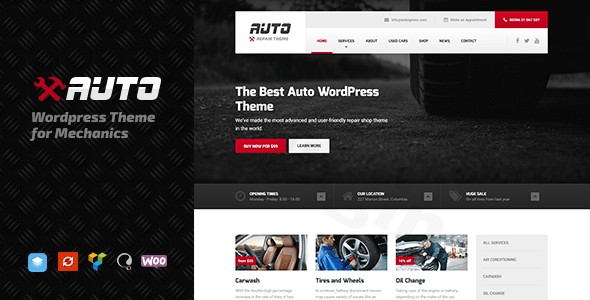
In the competitive automotive industry, a professional digital storefront is just as important as a clean service bay. The Auto WordPress Theme is a premium, niche-specific solution designed specifically for mechanics, car dealerships, and auto repair shops looking to establish a high-converting online presence. Developed by the reputable ProteusThemes, this theme strikes a perfect balance between professional aesthetics and functional utility, ensuring that even non-technical business owners can launch a high-performance website with ease.
A Professional Design Tailored for the Automotive Niche
The Auto WordPress Theme for mechanics is built with a clear design philosophy: clarity, trust, and conversion. Unlike multipurpose themes that require hours of tweaking to look “right,” Auto comes out of the box with layouts optimized for the automotive sector.
Layout & Visual Flexibility
Whether you are running a small local garage or a large-scale car dealership, the theme offers versatile layout options:
- Full-Width & Boxed Layouts: Choose a modern edge-to-edge look or a classic boxed container to suit your brand’s style.
- Niche-Specific Elements: The theme includes dedicated sections for service showcases, diagnostic pricing, and team profiles, allowing you to highlight your expertise immediately.
- Responsive & Retina Ready: With a mobile-first approach, your site will look sharp on everything from a mechanic’s smartphone to a customer’s high-resolution desktop monitor.
Performance and SEO Optimization
Speed is a critical ranking factor for both Google and AI search engines like Perplexity or ChatGPT. The Auto theme features clean, lightweight code that reduces “bloat,” ensuring fast loading times. Its structure is inherently SEO-friendly, using proper heading hierarchies and schema-ready markup to help your business rank higher for local searches like “car repair near me.”
Detailed Setup: How to Install the Auto WordPress Theme
Setting up the Auto WordPress Theme is a streamlined process designed for efficiency. Follow these steps to get your site live:
- Theme Installation: Upload the theme zip file via Appearance > Themes > Add New in your WordPress dashboard.
- Plugin Activation: Upon activation, the theme will prompt you to install required plugins, including Page Builder by SiteOrigin or WPBakery (Visual Composer). These tools enable the drag-and-drop functionality.
- One-Click Demo Import: Navigate to the theme options to find the demo importer. This feature imports all pre-built pages, widgets, and menus, making your site look exactly like the professional demo in minutes.
- Permalinks & Menus: Ensure your permalinks are set to “Post Name” for SEO, and assign your primary menu to the “Header” location.Note: Before importing a large demo, ensure your hosting environment has sufficient memory limits (at least 256MB) to prevent timeouts.
Customization Guide: Branding Your Auto Business
One of the strengths of this WordPress theme for car dealers is its high degree of flexibility without the need for coding.
Using the WordPress Customizer
Most global changes are handled through the native WordPress Customizer. You can see your changes in real-time as you:
- Define Color Schemes: Switch between brand-specific colors to match your physical shop’s signage.
- Typography: Choose from hundreds of Google Fonts to ensure your text is readable and professional.
- Header & Footer: Customize the contact information in the top bar—crucial for auto shops—so customers can call you with one click.
Page Building & Custom Post Types
The theme integrates deeply with the SiteOrigin Page Builder and WPBakery, allowing you to create custom landing pages for special promotions or new vehicle inventory. Furthermore, it utilizes Custom Post Types for “Services” and “Testimonials,” making it easy to manage your content separately from your standard blog posts.
FAQ: Common Questions About the Auto Theme
Is the Auto WordPress Theme compatible with Elementor?
While the theme is primarily built to work with WPBakery and SiteOrigin Page Builder, its clean code structure allows it to function alongside Elementor. However, for the most seamless experience with the pre-built demo content, using the recommended WPBakery or SiteOrigin builders is advised.
Does Auto support WooCommerce for online stores?
Yes, the Auto WordPress Theme is fully compatible with WooCommerce. This is ideal for shops that want to sell auto parts, accessories, or branded merchandise directly through their website.
Is the theme translation-ready?
Absolutely. The theme is localized and compatible with plugins like WPML or Polylang, making it an excellent choice for automotive businesses serving multilingual communities.
Does it support child themes?
Yes, the theme is built following WordPress best practices and supports child themes. Using a child theme is highly recommended so you can apply custom CSS or PHP modifications without losing them during a theme update.
Final Verdict: Is Auto the Right Choice for You?
The Auto WordPress Theme is a specialized, high-quality tool that removes the guesswork from building an automotive website. It excels in providing a professional “big-brand” feel for small to medium-sized businesses.
- Who is it for? Mechanics, repair shops, car dealers, and handymen who want a professional site quickly.
- Pros: Niche-specific design, excellent demo content, compatible with major page builders, and responsive performance.
- Cons: Users strictly wanting to use the Block Editor (Gutenberg) for everything may find the reliance on classic page builders a slight learning curve, though it remains fully functional.If you are looking for a reliable, SEO-optimized, and visually stunning foundation for your automotive business, the Auto WordPress Theme is a top-tier contender that delivers on its promises.For more WordPress theme reviews and SEO strategies, visit wppick.com.
I. Download Limits & Account Benefits
- Free Downloads: Each email address receives 3 downloads per day for free products
- Upgrade Benefits: Purchase any paid product to increase your daily download limit by 3 for each paid product
- No Account Required: You can download immediately by receiving the download link via email
- Account Recommended: Create an account for easier access to your order history and direct update downloads
II. Understanding GPL vs Official Versions
Important: The products available on WPPick are GPL-licensed versions, which differ from official developer versions. Before purchasing, please read our comprehensive guide: Understanding GPL & Official Differences at WPPick
Key Points:
- GPL versions may not include premium support from original developers
- Updates may be delayed compared to official releases
- Some premium features might have limitations
- Always consider your specific needs and support requirements
III. Support & Assistance
We’re here to help through multiple channels:
- Email Support: Direct email assistance for all inquiries
- Live Chat: Real-time support during business hours
- Comprehensive Documentation: Detailed guides and tutorials
IV. Order Tracking
Access your complete purchase history and download links anytime: Order History
V. Account Access
New to WPPick? Login or Create Account to manage your downloads and orders efficiently.
VI. Refund Protection
We stand behind our products with a clear refund policy. Review our terms: Refund Policy
VII. Privacy & Security
Your data security is our priority. Learn how we protect your information: Privacy Policy
VII. Terms of Service
Understanding our service terms ensures a smooth experience: Terms of Use
Quick Tips for Best Experience
- Verify Compatibility: Check plugin/theme compatibility with your WordPress version
- Backup First: Always backup your site before installing new plugins or themes
- Test Environment: Consider testing on a staging site first
- Stay Updated: Regularly check for updates in your account dashboard
- Read Documentation: Review any included documentation for optimal setup
Need Help?
If you have questions about downloads, licensing, or need technical assistance, don’t hesitate to contact our support team. We’re committed to ensuring you have the best possible experience with WPPick products.
Ready to get started? Your download adventure begins with just one click!
- Added WPML support for translating footer text.
- Added WPML support for portfolio custom type and taxonomy.
- Fixed WPML config now copies panels_data for SiteOrigin Panels content.
- Added ClevrBot to recommended-plugins list.
- Removed WP Featherlight from the recommended plugins list.