
Baby Kids – Education Primary School Children
/Year
Introduction: A Vibrant Foundation for Learning Institutions
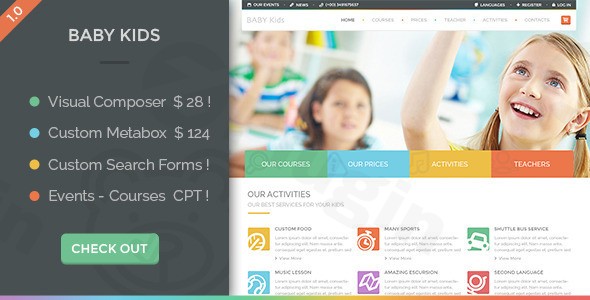
The Baby Kids WordPress theme is a versatile and visually engaging multi-page solution meticulously designed for a broad spectrum of educational institutions and child-focused businesses. From bustling kindergartens and primary schools to established universities and children’s activity centers, Baby Kids offers a cheerful and professional online presence. Its vibrant design philosophy, coupled with a focus on ease of use, makes it an ideal choice for educators, academic centers, toy stores, and summer camps looking to create an inviting and functional website tailored specifically for young learners and their families.
Key Features: Design, Layout & Performance
Baby Kids stands out with a robust set of features that blend aesthetic appeal with technical excellence, ensuring a seamless experience for both administrators and visitors.
Design & Layout Options
The theme boasts a fully responsive and retina-ready design, guaranteeing your website looks impeccable on any device, from smartphones and tablets to high-resolution desktop monitors. It supports flexible multi-page layouts and offers specialized custom sections for managing courses, events, excursions, and dedicated teacher profiles. This structured approach helps organize content logically and present it appealingly, enhancing the user experience. The design philosophy embraces a vibrant, playful, and cheerful aesthetic, utilizing bright colors and engaging visuals to create a welcoming atmosphere.
Customization Capabilities
Personalizing your site with Baby Kids is intuitive and powerful. You get unlimited color options through integrated color pickers, allowing comprehensive brand alignment. The theme provides extensive typography choices with over 300 Google Fonts, ensuring your text is both readable and matches your institution’s style. With multiple layout options, customizable backgrounds, and Fontello icon integration, every aspect of your site can be finely tuned. The advanced theme options panel centralizes control, making it easy to manage colors, fonts, and layouts without touching a single line of code.
Performance & SEO Features
Built with clean HTML5, jQuery, and CSS3 code, Baby Kids is engineered for excellent performance and SEO optimization. This modern codebase ensures fast loading times and a stable user experience. The theme’s optimized architecture and clean markup contribute to superior search engine readiness, helping your educational institution rank higher and reach more prospective students and parents. Its mobile responsiveness further boosts its SEO credentials, as search engines prioritize mobile-friendly websites.
Installation & Demo Import: Get Started Quickly
Setting up your Baby Kids website is designed to be straightforward, even for those with limited technical expertise. The theme includes comprehensive documentation and valuable demo content for a rapid deployment.
- Install & Activate the Theme: Begin by uploading and activating the Baby Kids theme through your WordPress dashboard (
Appearance > Themes > Add New). - Install Required Plugins: Upon activation, Baby Kids will prompt you to install its essential companion plugins. This typically includes the powerful Visual Composer Page Builder (included), Revolution Slider (included), and the Time Table plugin (included). Ensure all recommended plugins are installed and activated for full functionality.
- Import Demo Content: The theme offers a demo content import feature for quick setup. Navigate to the theme’s demo importer (usually found under an
AppearanceorTheme Optionsmenu item). Here, you can import various demo options, including an “original demo” which serves as a simplified starting point. Be aware that some advanced Elementor-based demos might require the Elementor Pro plugin for accurate layout import, which is not bundled with the theme. - Post-Import Adjustments: After the demo import is complete, you’ll find pre-designed pages, posts, menus, and widgets populated with placeholder content. You will need to customize these with your institution’s specific information, images, and branding. Check your menus (
Appearance > Menus) and widget areas (Appearance > Widgets) to ensure they are correctly assigned.
Customization Guide: Branding Your Educational Platform
Baby Kids offers extensive customization options to ensure your website truly reflects your institution’s brand and ethos. The intuitive interface empowers you to personalize every element.
- Utilizing the Advanced Theme Options Panel: The core of your customization journey lies within the theme’s advanced theme options panel (typically found under
Appearance > Theme Optionsor a dedicated menu item). This centralized hub provides granular control over global settings. - Colors and Typography: Use the integrated color pickers to define your brand’s color palette, applying it across the site for backgrounds, accents, and text. Explore the 300+ Google Fonts to set primary and secondary typography that enhances readability and visual appeal.
- Logo and Identity: Easily upload your institution’s logo and favicon through the theme options, instantly establishing your brand identity across the site.
- Header and Footer Layouts: While a dedicated builder isn’t explicitly mentioned, the theme allows for customization of header/footer elements. You can configure custom search components and other elements to fit your layout needs.
- Custom Post Types for Education: Leverage the specialized custom post types for Courses, Events, Excursions, and Teachers to structure your educational content effectively. Each post type comes with dedicated fields, making content entry consistent and straightforward. Dedicated “Teacher pages” allow individual educators to upload their profiles, curriculum, and activities.
- Page Building with Visual Composer (WPBakery Page Builder): The included Visual Composer (now known as WPBakery Page Builder) provides a powerful drag-and-drop interface. This allows you to create and customize complex page layouts visually, moving elements, adding content blocks, and designing unique sections without needing any coding knowledge.
- Custom Metaboxes: The theme includes custom metaboxes for flexible page layouts, offering additional controls and options directly within the page or post editor for specific content types.
FAQ & Troubleshooting
Here are answers to common questions about the Baby Kids WordPress theme:
Is Baby Kids compatible with Elementor / WPBakery / Gutenberg?
Yes, the Baby Kids theme is fully compatible with and includes the WPBakery Page Builder (formerly Visual Composer) for powerful drag-and-drop page creation. While the theme integrates with Elementor, some specific advanced demos may require the Elementor Pro plugin for correct layout import. Information on explicit compatibility with the native WordPress Block Editor (Gutenberg) is not prominently documented, with the theme’s emphasis being on its included page builders.
Does Baby Kids support WooCommerce for online stores?
Absolutely. Baby Kids is fully compatible with WooCommerce, offering complete design integration and specialized widgets available in both dark and light versions. This allows you to effortlessly sell educational services like courses, enrollment packages, books, merchandise, or any other physical products directly from your website.
What premium plugins are included with the Baby Kids theme?
The Baby Kids theme comes bundled with several valuable premium plugins, adding significant functionality and savings. These include the Visual Composer Page Builder (now WPBakery Page Builder, value $28), Revolution Slider (value $18) for dynamic slideshows, and the Time Table plugin (value $18) for efficient schedule management.
How do I import demo content in the Baby Kids theme?
To import demo content, after installing and activating the Baby Kids theme and its required plugins, navigate to the theme’s demo import section within your WordPress dashboard (typically found under Appearance or Theme Options). From there, you can select and import the available demo content, including the “original demo,” to quickly set up your site with pre-designed layouts and placeholder content.
Is Baby Kids theme mobile-responsive?
Yes, the Baby Kids theme is fully responsive and retina-ready. It automatically adapts to any screen size, from smartphones and tablets to desktops, ensuring your website looks perfect and performs optimally across all devices. This also contributes positively to your site’s SEO.
Conclusion
The Baby Kids WordPress theme is an outstanding choice for any educational institution or child-focused business seeking a visually appealing, highly functional, and easy-to-manage website. Its vibrant design, combined with powerful features like the included WPBakery Page Builder, Revolution Slider, and Time Table plugin, provides a comprehensive toolkit for creating an engaging online presence.With extensive customization options for colors, typography (300+ Google Fonts), and layout, alongside specialized custom post types for courses, events, and teachers, Baby Kids empowers you to craft a site that truly reflects your brand. Its robust WooCommerce compatibility also makes it ideal for selling educational materials or services online. Built with clean code for excellent performance and SEO, this theme is an intelligent investment for kindergartens, primary schools, universities, children’s activity centers, and toy stores. Baby Kids simplifies the web development process, making it accessible for beginners while offering the depth and flexibility required by agencies and freelancers working with educational clients.
I. Download Limits & Account Benefits
- Free Downloads: Each email address receives 3 downloads per day for free products
- Upgrade Benefits: Purchase any paid product to increase your daily download limit by 3 for each paid product
- No Account Required: You can download immediately by receiving the download link via email
- Account Recommended: Create an account for easier access to your order history and direct update downloads
II. Understanding GPL vs Official Versions
Important: The products available on WPPick are GPL-licensed versions, which differ from official developer versions. Before purchasing, please read our comprehensive guide: Understanding GPL & Official Differences at WPPick
Key Points:
- GPL versions may not include premium support from original developers
- Updates may be delayed compared to official releases
- Some premium features might have limitations
- Always consider your specific needs and support requirements
III. Support & Assistance
We’re here to help through multiple channels:
- Email Support: Direct email assistance for all inquiries
- Live Chat: Real-time support during business hours
- Comprehensive Documentation: Detailed guides and tutorials
IV. Order Tracking
Access your complete purchase history and download links anytime: Order History
V. Account Access
New to WPPick? Login or Create Account to manage your downloads and orders efficiently.
VI. Refund Protection
We stand behind our products with a clear refund policy. Review our terms: Refund Policy
VII. Privacy & Security
Your data security is our priority. Learn how we protect your information: Privacy Policy
VII. Terms of Service
Understanding our service terms ensures a smooth experience: Terms of Use
Quick Tips for Best Experience
- Verify Compatibility: Check plugin/theme compatibility with your WordPress version
- Backup First: Always backup your site before installing new plugins or themes
- Test Environment: Consider testing on a staging site first
- Stay Updated: Regularly check for updates in your account dashboard
- Read Documentation: Review any included documentation for optimal setup
Need Help?
If you have questions about downloads, licensing, or need technical assistance, don’t hesitate to contact our support team. We’re committed to ensuring you have the best possible experience with WPPick products.
Ready to get started? Your download adventure begins with just one click!
- 18 June 2025