

Bayside – Responsive WordPress Theme
/Year
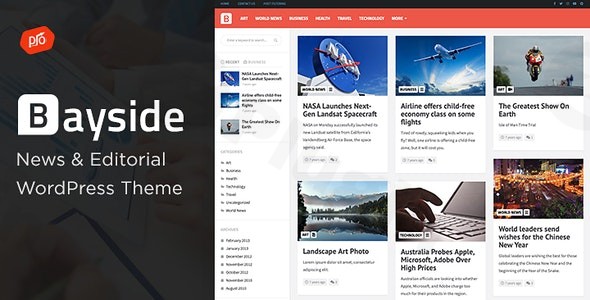
The Bayside WordPress theme is a visually-driven, high-performance solution designed specifically for publishers, editorial teams, and bloggers who need to manage high volumes of content. In an era where user attention spans are short, Bayside leverages a “Pinterest-style” masonry layout to create an engaging, infinite-scrolling experience that keeps readers on your site longer. Whether you are launching a digital news portal or a personal blog, this Bayside – Responsive WordPress Theme provides the perfect balance between aesthetic appeal and functional power.
1. Key Features: Design, Layout & Performance
Bayside is not just another multipurpose theme; it is a specialized tool for content-heavy websites. Its design philosophy centers on clean typography, organized grids, and seamless navigation.
Visual Mastery with Masonry Layouts
The standout feature of Bayside is its Pinterest-style layout. Unlike traditional blog feeds that can feel static, Bayside uses a dynamic masonry grid. This allows posts of different heights to fit together perfectly, maximizing screen real estate and giving your homepage a modern, curated feel.
Comprehensive Customization Capabilities
- Elementor Integration: Bayside is an Elementor compatible theme, allowing you to build complex pages using a drag-and-drop interface without touching a single line of code.
- Boosted Elements Add-on: Included with the theme (a $22 value), this plugin adds premium features like sliders, maps, and advanced image galleries.
- Header & Footer Flexibility: You can customize the header with sticky navigation, social icons, and logo placement. The footer is equally flexible, even allowing for page builder templates to be used for its design.
- Typography & Colors: Through the WordPress Customizer, you have access to extensive Google Fonts and unlimited color schemes to match your brand identity.
Performance & SEO Readiness
As a responsive WordPress theme for content-heavy sites, Bayside is optimized for speed and search engine visibility.
- SEO-friendly Structure: The theme uses clean markup and structured headings to help search engines index your content effectively.
- Retina Ready: Images and icons stay sharp on high-resolution displays like MacBooks and iPhones.
- Mobile-First Design: The layout adapts fluidly across all devices, ensuring a consistent user experience from desktop to smartphone.
2. Installation & Demo Import Guide
Getting your site to look like the professional demo is a straightforward process. Follow these steps to set up the Bayside WordPress theme:
- Install & Activate: Upload the
bayside.zipfile via Appearance > Themes > Add New in your WordPress dashboard. - Plugin Setup: Upon activation, you will be prompted to install required plugins, including Elementor and the Boosted Elements Add-on. It is essential to install these to unlock the theme’s full layout potential.
- One-Click Demo Import: Navigate to the theme’s demo importer (usually found under Appearance > Import Demo Data). Choose your preferred layout and click import.
- Final Touches: Once the import is complete, your site will be populated with placeholder content, menus, and widgets. You can now begin replacing the demo posts with your own unique articles.Note: Ensure your server’s PHP version is 7.4 or higher and your memory limit is set to at least 256MB to prevent timeouts during the demo import process.
3. Customization Guide: Personalizing Your Brand
Personalizing the Bayside WordPress theme is done primarily through the WordPress Customizer (Appearance > Customize). This real-time editor allows you to see changes as you make them.
- Setting the Global Style: Start by navigating to the “Colors” and “Typography” tabs. Setting these globally ensures that every page on your site feels cohesive.
- Configuring Infinite Scroll: To maximize engagement, enable the infinite scroll feature. This allows readers to continue scrolling through your archives without having to click “Next Page,” which is a proven method for increasing “Time on Site.”
- Using Custom Post Formats: Bayside supports multiple post formats (Video, Audio, Gallery, Quote, and Link). Use these to vary your content type; for example, use the “Video” format for your YouTube embeds to display a play icon over the thumbnail in the masonry grid.
4. FAQ & Troubleshooting
Is the Bayside WordPress theme compatible with Elementor?
Yes, Bayside is a fully Elementor compatible theme. It is built to work seamlessly with the Elementor drag-and-drop builder, and it even includes the Boosted Elements Add-on to extend your design capabilities further.
Does Bayside support WooCommerce for online stores?
While Bayside is primarily a WordPress theme for news sites and magazines, it can function with WooCommerce. However, since its core focus is editorial layout, you may need additional CSS or plugins if you require advanced e-commerce features like product filtering.
Does it support child themes?
Yes, the Bayside package includes a child theme. We highly recommend activating the child theme before making any code-level customizations. This ensures your changes are not lost when the parent theme is updated.
How do I update the theme without losing my customizations?
As long as you use the WordPress Customizer for styling and a child theme for code changes, you can safely update Bayside through the Dashboard > Updates section. Always keep a backup of your site before running major updates.
What should I do if the masonry layout looks broken?
If the masonry grid appears unaligned, ensure that all your featured images are of high quality. While masonry handles different heights, extremely small images may cause gaps. You can also “Regenerate Thumbnails” using a plugin to ensure all images are cropped to the theme’s required dimensions.
5. Conclusion: Is Bayside Right for You?
The Bayside WordPress theme is an exceptional choice for content creators who prioritize visual storytelling. Its Pinterest-style layout and infinite scroll make it one of the best WordPress themes for news sites and editorial blogs currently available on ThemeForest. Ideal for:
- Magazine Publishers: Who need a clean, organized way to display hundreds of articles.
- Visual Bloggers: Who want a “Pinterest-style” aesthetic for lifestyle, travel, or photography content.
- Agencies: Looking for a reliable, Elementor-based framework to build fast, SEO-friendly news portals for clients.While it isn’t a “do-everything” multipurpose theme, its specialization in the editorial niche makes it faster and more intuitive than many bloated competitors. If you are looking for a professional, responsive, and easy-to-customize magazine theme, Bayside is a top-tier contender for your next project at wppick.com.
I. Download Limits & Account Benefits
- Free Downloads: Each email address receives 3 downloads per day for free products
- Upgrade Benefits: Purchase any paid product to increase your daily download limit by 3 for each paid product
- No Account Required: You can download immediately by receiving the download link via email
- Account Recommended: Create an account for easier access to your order history and direct update downloads
II. Understanding GPL vs Official Versions
Important: The products available on WPPick are GPL-licensed versions, which differ from official developer versions. Before purchasing, please read our comprehensive guide: Understanding GPL & Official Differences at WPPick
Key Points:
- GPL versions may not include premium support from original developers
- Updates may be delayed compared to official releases
- Some premium features might have limitations
- Always consider your specific needs and support requirements
III. Support & Assistance
We’re here to help through multiple channels:
- Email Support: Direct email assistance for all inquiries
- Live Chat: Real-time support during business hours
- Comprehensive Documentation: Detailed guides and tutorials
IV. Order Tracking
Access your complete purchase history and download links anytime: Order History
V. Account Access
New to WPPick? Login or Create Account to manage your downloads and orders efficiently.
VI. Refund Protection
We stand behind our products with a clear refund policy. Review our terms: Refund Policy
VII. Privacy & Security
Your data security is our priority. Learn how we protect your information: Privacy Policy
VII. Terms of Service
Understanding our service terms ensures a smooth experience: Terms of Use
Quick Tips for Best Experience
- Verify Compatibility: Check plugin/theme compatibility with your WordPress version
- Backup First: Always backup your site before installing new plugins or themes
- Test Environment: Consider testing on a staging site first
- Stay Updated: Regularly check for updates in your account dashboard
- Read Documentation: Review any included documentation for optimal setup
Need Help?
If you have questions about downloads, licensing, or need technical assistance, don’t hesitate to contact our support team. We’re committed to ensuring you have the best possible experience with WPPick products.
Ready to get started? Your download adventure begins with just one click!
- Updates to support WordPress 6.9+
- Updated Premium Plugins