

Beatrix – Modern Magazine WordPress Theme
/Year
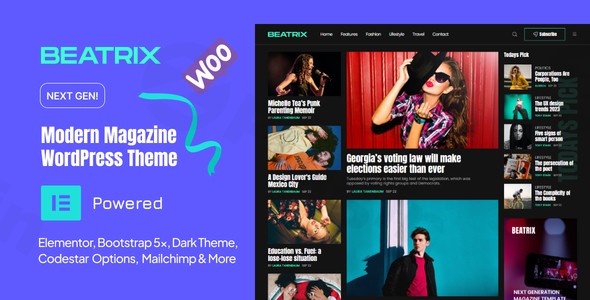
Beatrix is a stylish and contemporary Modern Magazine WordPress Theme meticulously crafted for creative professionals, online publishers, and dedicated bloggers. Whether you’re launching a dynamic lifestyle magazine, a cutting-edge tech blog, a vibrant fashion news hub, or an adventurous travel journal, Beatrix provides a robust and visually appealing foundation for all your content-driven endeavors. Its design philosophy centers on delivering a clean, modern aesthetic with a strong emphasis on readability and user engagement, ensuring your stories captivate and retain your audience.
Key Features: Design, Layout & Performance
The Beatrix theme offers a rich array of features designed to empower content creators with flexibility, stunning visuals, and optimal performance.
Design & Layout Options
Beatrix shines with its diverse layout capabilities, making it an ideal news portal WordPress theme. It offers:
- Fully Responsive Design: Your content will look flawless on any device, from desktops to tablets and smartphones, ensuring an optimal viewing experience for every visitor. The theme is also Retina Ready (HD), guaranteeing crisp, high-resolution graphics on all modern screens.
- Multiple Homepage Blocks & Variations: Craft unique front pages with a powerful and flexible block system. Choose from over 10 homepage variations and 5 premade post layouts to showcase your articles in engaging ways, whether through standard posts, galleries, video, or audio formats.
- Smart Sticky Header: Enhance navigation with a “Smart Sticky Header” that intuitively responds to scroll intent, keeping your main menu accessible without cluttering the screen.
- Adaptable Niches: Beatrix adapts seamlessly across various content categories, making it perfect for fashion, technology, health, travel, politics, sports, and entertainment publications.
Customization Capabilities
Personalizing your website to match your brand identity is straightforward with Beatrix:
- Unlimited Color Options: With a user-friendly customization panel and an Advanced Theme Options Panel, you have limitless possibilities to define your site’s color scheme at the click of a button.
- Optimized & Enhanced Typography: The theme provides superior readability through its optimized typography, offering unlimited fonts and a focus on presenting content effectively without requiring any CSS/HTML knowledge.
- Easy Lightweight Theme Options: The theme options are designed to be intuitive and lightweight, allowing you to quickly and easily create a style that suits your specific needs.
Performance & SEO Features
In today’s competitive online landscape, speed and visibility are paramount. Beatrix addresses these needs head-on:
- Fast-Loading Performance: Engineered to be a super fast and lightweight theme, Beatrix ensures quick page loads, crucial for user satisfaction and lower bounce rates.
- SEO Optimized: With clean code and an SEO-friendly structure, Beatrix helps your content rank higher in search engine results, improving your site’s discoverability. It is truly an SEO optimized WordPress magazine theme.
- Ajax “Load More” Feature: For homepage blocks, this feature improves perceived performance by loading content dynamically as users scroll, enhancing the browsing experience.
- Cross-Browser Compatibility: Beatrix ensures a consistent experience across popular web browsers, including Edge, Chrome, Safari, and Firefox.
Installation & Demo Import
Getting started with Beatrix involves a few straightforward steps to transform your WordPress site into a professional online magazine or blog.
- Theme Installation:
- Log in to your WordPress admin dashboard.
- Navigate to Appearance > Themes.
- Click “Add New” and then “Upload Theme”.
- Choose the Beatrix theme ZIP file you downloaded from ZeroPlugin.com (or Envato Elements) and click “Install Now”.
- Once installed, click “Activate”.
- Required/Recommended Plugins:
- Upon activation, Beatrix may prompt you to install a set of recommended plugins. While the theme strongly integrates with Elementor Page Builder (and includes 30+ Elementor News Blocks), ensure you install any other plugins suggested by the theme for full functionality.
- Demo Content Import:
- Beatrix offers 10+ Homepage Variations and 5 Premade Post Layouts to kickstart your design. While specific one-click demo import instructions are not explicitly detailed in the provided sources, premium themes typically integrate a demo importer tool accessible via Appearance > Import Demo Data or within the Theme Options Panel.
- Look for an option to import demo content within your WordPress dashboard. This process usually brings in sample pages, posts, menus, and widgets, providing a perfect starting point that you can then customize.
- Important Note: Demo imports can sometimes be resource-intensive. If you encounter issues like timeouts or incomplete imports, it’s often due to low server memory or execution limits. Contact your hosting provider if necessary.
- After Import Setup:
- Once the demo is imported, you’ll need to go to Appearance > Menus to set up your navigation, and Appearance > Widgets to arrange your sidebar and footer areas as desired. The demo content will likely populate various pages and posts that you can then edit with your own content.
Customization Guide: Branding & Layout
Beatrix provides robust tools to personalize your website, ensuring it perfectly reflects your brand’s unique identity.
Using the Advanced Theme Options Panel
The core of your customization experience will be the Advanced Theme Options Panel, often accessible under Appearance > Customize or a dedicated “Beatrix Options” menu item in your WordPress dashboard.
- Colors & Branding: Easily change your site’s primary and secondary colors using the unlimited color options. Upload your custom logo and favicon to establish your brand presence.
- Typography: Fine-tune your site’s fonts. Beatrix’s enhanced typography options allow you to select from unlimited fonts to control headings, body text, and other elements, ensuring optimal readability and aesthetic appeal.
- Header & Footer Layouts: Configure your “Smart Sticky Header” behavior and customize the footer area. While a dedicated footer builder isn’t explicitly mentioned, you’ll typically manage footer content through widget areas.
- Homepage and Blog Page Setup: Utilize the Multiple Homepage Blocks and 10+ Homepage Variations to design your front page. You can set a static homepage or display your latest blog posts, configuring the layout and post display options through the theme settings.
Leveraging Elementor for Page Building
Beatrix is supercharged with Elementor Page Builder, offering a powerful drag-and-drop experience.
- 30+ Elementor News Blocks: For creating engaging and dynamic content layouts, Beatrix provides custom Elementor blocks specifically designed for news and magazine content. This allows you to build complex article grids, featured sections, and more without coding.
- Advanced Query Builder: Elementor integration includes an advanced query builder for posts widgets, giving you granular control over which articles are displayed where, based on categories, tags, authors, and other criteria.
FAQ & Troubleshooting
Here are answers to some common questions about the Beatrix theme:
Is Beatrix compatible with Elementor and Gutenberg?
Yes, Beatrix is supercharged with Elementor Page Builder and includes 30+ Elementor News Blocks for extensive page design. While not explicitly detailed, most modern themes are generally compatible with the WordPress Block Editor (Gutenberg) for standard content creation.
Does Beatrix support WooCommerce for online stores?
Yes, the Beatrix theme is fully compatible with WooCommerce, allowing you to seamlessly integrate an online store into your magazine or blog website. This is ideal for selling products, subscriptions, or merchandise alongside your content.
Is Beatrix an SEO-friendly WordPress theme?
Absolutely. Beatrix is described as SEO optimized and features clean code and a fast-loading performance, which are critical factors for improving search engine rankings and overall visibility.
How can I customize the typography in Beatrix?
Beatrix provides enhanced typography options and supports unlimited fonts through its user-friendly customization panel and Advanced Theme Options. You can usually access these settings via Appearance > Customize or a dedicated theme options menu in your WordPress dashboard to adjust fonts, sizes, and weights.
What types of websites is Beatrix best suited for?
Beatrix is best suited for online newspapers, news portals, and modern magazine websites. It’s also perfect for creative blogs, personal blogs, and content-rich sites across various niches like Lifestyle, Fashion, Tech, Politics, Videos, Travel, Style, Beauty, and Health.
Conclusion
The Beatrix – Modern Magazine WordPress Theme stands out as a robust and visually compelling solution for anyone looking to launch or revamp a content-focused website. Its combination of flexible design options, extensive Elementor integration, and strong emphasis on performance and SEO makes it a formidable choice.With its fully responsive design, unlimited customization capabilities, and diverse layout variations, Beatrix offers impressive design flexibility for a wide range of content niches. The super-fast loading times and SEO optimized structure ensure your site performs well both for users and search engines.Beatrix is an excellent choice for bloggers, online publishers, journalists, and small businesses aiming to create a professional, engaging, and modern online magazine or news portal. Its ease of use, coupled with powerful features, makes it a valuable asset for delivering a premium content experience.
I. Download Limits & Account Benefits
- Free Downloads: Each email address receives 3 downloads per day for free products
- Upgrade Benefits: Purchase any paid product to increase your daily download limit by 3 for each paid product
- No Account Required: You can download immediately by receiving the download link via email
- Account Recommended: Create an account for easier access to your order history and direct update downloads
II. Understanding GPL vs Official Versions
Important: The products available on WPPick are GPL-licensed versions, which differ from official developer versions. Before purchasing, please read our comprehensive guide: Understanding GPL & Official Differences at WPPick
Key Points:
- GPL versions may not include premium support from original developers
- Updates may be delayed compared to official releases
- Some premium features might have limitations
- Always consider your specific needs and support requirements
III. Support & Assistance
We’re here to help through multiple channels:
- Email Support: Direct email assistance for all inquiries
- Live Chat: Real-time support during business hours
- Comprehensive Documentation: Detailed guides and tutorials
IV. Order Tracking
Access your complete purchase history and download links anytime: Order History
V. Account Access
New to WPPick? Login or Create Account to manage your downloads and orders efficiently.
VI. Refund Protection
We stand behind our products with a clear refund policy. Review our terms: Refund Policy
VII. Privacy & Security
Your data security is our priority. Learn how we protect your information: Privacy Policy
VII. Terms of Service
Understanding our service terms ensures a smooth experience: Terms of Use
Quick Tips for Best Experience
- Verify Compatibility: Check plugin/theme compatibility with your WordPress version
- Backup First: Always backup your site before installing new plugins or themes
- Test Environment: Consider testing on a staging site first
- Stay Updated: Regularly check for updates in your account dashboard
- Read Documentation: Review any included documentation for optimal setup
Need Help?
If you have questions about downloads, licensing, or need technical assistance, don’t hesitate to contact our support team. We’re committed to ensuring you have the best possible experience with WPPick products.
Ready to get started? Your download adventure begins with just one click!