

Beaver Builder WordPress Theme
/Year
The Beaver Builder Theme stands out as a robust and lightweight WordPress theme, meticulously crafted as a foundational framework for the popular Beaver Builder page builder plugin. Designed by a seasoned web agency with extensive client experience, this theme addresses the practical demands of modern website creation, offering a perfect blend of developer capabilities and user-friendly functionality. If you’re seeking a high-performing, flexible, and reliable base for your WordPress site, particularly when paired with the Beaver Builder ecosystem, this theme presents a compelling solution for businesses, agencies, bloggers, and store owners alike.
Introduction: The Foundation for Your Beaver Builder Website
The Beaver Builder Theme is not just another WordPress theme; it’s a professional-grade framework engineered for stability, performance, and seamless integration with the Beaver Builder page builder plugin. It’s ideal for anyone looking to build a responsive, SEO-optimized website without being bogged down by unnecessary features or code bloat.This theme is particularly suited for:
- Agencies and Freelancers: Who need a consistent, high-performing base for multiple client projects.
- Small Business Owners & Bloggers: Seeking a fast, reliable, and easily customizable platform.
- eCommerce Stores: That require a stable foundation to build sophisticated online shops using WooCommerce.
- Developers: Appreciating its clean code, developer-friendliness, and extensive hooks.Its design philosophy centers on providing a clean, efficient “blank canvas” that empowers users to create virtually any layout and design through the visual drag-and-drop interface of the Beaver Builder plugin.
Key Features: Design, Layout & Performance
The Beaver Builder Theme provides a powerful backbone for your website, focusing on core structural elements while allowing the Beaver Builder plugin to handle detailed content design.
Design & Layout Options
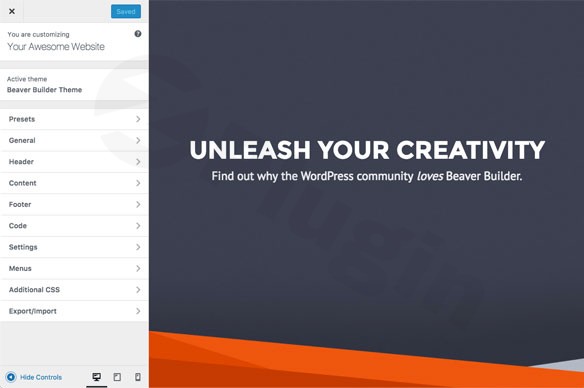
The theme integrates directly with the WordPress Customizer, allowing for live, real-time previews of your changes. It offers:
- Unique Preset-Based Design System: Unlike traditional child themes that can restrict design, the Beaver Builder Theme provides versatile presets. These act as quick starting points, instantly transforming your site’s look with a single click. You can then fully customize these presets using a Beaver Builder child theme for unlimited design flexibility.
- Flexible Site Layouts: Options for overall site layout, including full-width or boxed designs, with control over content width for headers and footers.
- Header & Footer Styles: Includes three distinct header layouts and two different footer layouts, each with various styling options. Top bar layouts are also available in one or two columns.
Customization Capabilities
Empower your brand identity with intuitive customization:
- Live Theme Customization: All theme settings are managed within the WordPress Customizer, offering an instant preview of changes. This makes adjustments to global styles like colors, typography, and spacing incredibly intuitive.
- Comprehensive Color Schemes: Set a basic layout and color scheme using presets, then customize default, accent, and hover colors. These can be overridden globally or at the row, column, or module level when using the Beaver Builder editor.
- Typography Controls: Customize font size, weight, and style for the header logo (if text-based), and general typography throughout the site.
- Developer-Friendly: For advanced users, the theme is child theme compatible, providing a safe way to implement deep customizations without affecting the core theme. It also supports adding custom HTML, CSS, or JavaScript directly through the Customizer’s Code tab, leveraging an array of hooks and filters.
Performance & SEO Features
Built for speed and search engine visibility:
- Built on Bootstrap Framework: Leveraging the robust Bootstrap framework ensures your website adheres to industry-standard best practices, guaranteeing modern design and inherent responsiveness across all devices.
- Optimized for High-Traffic Performance: This battle-tested framework powers over 15,000 websites, supporting high-traffic sites and blogs with proven stability and excellent performance at any scale.
- Professional-Grade Code Standards: The theme is known for its lightweight nature, generating clean, efficient code (static HTML, CSS, and JavaScript). This results in faster page load times and strong performance scores on tools like Google PageSpeed Insights, contributing to better SEO.
- Mobile Responsiveness: Inherently responsive, the theme includes configurable medium and mobile breakpoints, ensuring your site looks great and performs flawlessly on smartphones and tablets.
Installation & Setup
Setting up the Beaver Builder Theme is a straightforward process, designed to get your professional WordPress site up and running efficiently. While the theme itself is a framework, its true power unfolds when integrated with the Beaver Builder plugin.
- Install the Beaver Builder Theme:
- Once you’ve purchased a Beaver Builder plan (which includes the theme), download the theme zip file from your account.
- From your WordPress dashboard, navigate to
Appearance > Themes > Add New > Upload Theme. - Select the downloaded theme zip file and click
Install Now. - After installation, click
Activate.
- Install Required Companion Plugins:
- To unlock the full potential, install and activate the Beaver Builder Plugin. This is where your page content layouts will be designed.
- For advanced layout control, such as custom headers, footers, and dynamic post/archive layouts, consider the Beaver Themer add-on (included in Professional and Unlimited plans).
- Importing Pre-built Content Layouts:
- The Beaver Builder Theme itself is a framework and does not come with one-click demo imports for full websites. Instead, the Beaver Builder plugin provides a library of professional, pre-built templates for landing pages and content pages.
- When creating a new page or post, simply open it with the Beaver Builder editor and choose from the extensive template library to kickstart your design. Third-party add-ons like Ultimate Addons for Beaver Builder further expand these options.
- During template import, ensure your server memory limit is sufficient (at least 128 MB, 256 MB or more preferred) to prevent any timeouts.
Customization Guide: Branding & Layout
The Beaver Builder Theme, in conjunction with its ecosystem, provides a highly intuitive and flexible customization experience.
- Global Styling with the WordPress Customizer:
- Go to
Appearance > Customizein your WordPress dashboard. - Here, you’ll find dedicated tabs for
Presets,Generallayout options (full-width/boxed),Header,Content,Footer,Widgets, andCode. - Colors & Typography: Easily adjust your site’s color scheme, including accent and hover colors. Control general typography and specific settings for the header logo.
- Header & Footer Layouts: Select from the theme’s built-in header and footer layouts and customize their appearance, including backgrounds, spacing, and top bar options.
- Menus: Set up your main navigation, footer menus, and other menu locations under the
Menustab. - All changes are previewed in real-time, allowing for a seamless design process.
- Go to
- Advanced Layout Control with Beaver Builder Plugin & Themer:
- Page Content: Use the Beaver Builder plugin to design custom layouts for individual pages and posts. Its drag-and-drop interface and module library allow for complex and beautiful content structures.
- Site-wide Elements (with Beaver Themer): This powerful add-on allows you to go beyond content areas and design custom headers, footers, archive pages (e.g., blog categories, shop pages), single post templates, and even custom post type layouts using the familiar Beaver Builder interface. This grants complete design control over every aspect of your WordPress website.
- Child Theme & Custom Code: For developers or those requiring highly specific modifications, the theme fully supports child themes. You can also inject custom CSS, JavaScript, or HTML directly into specific locations via the Customizer’s
Codetab, utilizing the theme’s robust array of hooks and filters.
FAQ & Troubleshooting
Here are some common questions about the Beaver Builder Theme to help you get started and overcome potential challenges.
Is Beaver Builder Theme compatible with other page builders?
The Beaver Builder Theme is specifically designed as the foundational framework for the Beaver Builder page builder plugin, offering perfect, conflict-free integration. While it may technically work with other page builders, its features and optimizations are tailored for the Beaver Builder ecosystem, providing the best user experience and performance when used together.
Does Beaver Builder Theme support WooCommerce for online stores?
Yes, the Beaver Builder Theme is compatible with WooCommerce. For basic shop functionality, the theme and plugin integrate well. However, for complete design control over WooCommerce archive pages (like shop, product category) or single product layouts beyond the description tab, the Beaver Themer add-on is highly recommended. Beaver Builder also includes dedicated WooCommerce modules to display product content effectively.
How does Beaver Builder Theme handle custom headers and footers?
The theme provides several built-in header and footer layouts that you can customize via the WordPress Customizer. For truly custom, visually designed headers and footers that go beyond the theme’s default options, the Beaver Themer add-on is essential. Beaver Themer allows you to build these site-wide elements using the Beaver Builder drag-and-drop interface, giving you complete creative freedom.
Is Beaver Builder Theme fast and SEO-friendly?
Absolutely. The Beaver Builder Theme is renowned for its lightweight nature and professional-grade code, built on the robust Bootstrap framework. This results in clean, efficient code that contributes to excellent page load times and strong performance scores. It is inherently mobile-responsive and follows best practices that make it SEO-friendly.
Can I use a child theme with Beaver Builder Theme?
Yes, the Beaver Builder Theme is fully compatible with child themes. This is the recommended approach for making any significant customizations to your theme’s files or functions, as it ensures that your changes won’t be overwritten when the main theme is updated.
Conclusion
The Beaver Builder Theme is a professional and flexible WordPress framework that delivers a stable, high-performance foundation for any website. Its commitment to clean code, live customization via the WordPress Customizer, and deep integration with the Beaver Builder page builder and Beaver Themer add-on makes it an unparalleled choice for a wide range of users.Whether you are a freelancer building multiple client sites, an agency prioritizing efficiency and performance, a small business owner, or a blogger/store owner seeking a reliable and customizable platform, the Beaver Builder Theme offers an intuitive yet powerful solution. By providing a lightweight, SEO-ready, and mobile-responsive base, it empowers you to build professional-grade websites with confidence and control, making it an excellent investment for your WordPress projects.
I. Download Limits & Account Benefits
- Free Downloads: Each email address receives 3 downloads per day for free products
- Upgrade Benefits: Purchase any paid product to increase your daily download limit by 3 for each paid product
- No Account Required: You can download immediately by receiving the download link via email
- Account Recommended: Create an account for easier access to your order history and direct update downloads
II. Understanding GPL vs Official Versions
Important: The products available on WPPick are GPL-licensed versions, which differ from official developer versions. Before purchasing, please read our comprehensive guide: Understanding GPL & Official Differences at WPPick
Key Points:
- GPL versions may not include premium support from original developers
- Updates may be delayed compared to official releases
- Some premium features might have limitations
- Always consider your specific needs and support requirements
III. Support & Assistance
We’re here to help through multiple channels:
- Email Support: Direct email assistance for all inquiries
- Live Chat: Real-time support during business hours
- Comprehensive Documentation: Detailed guides and tutorials
IV. Order Tracking
Access your complete purchase history and download links anytime: Order History
V. Account Access
New to WPPick? Login or Create Account to manage your downloads and orders efficiently.
VI. Refund Protection
We stand behind our products with a clear refund policy. Review our terms: Refund Policy
VII. Privacy & Security
Your data security is our priority. Learn how we protect your information: Privacy Policy
VII. Terms of Service
Understanding our service terms ensures a smooth experience: Terms of Use
Quick Tips for Best Experience
- Verify Compatibility: Check plugin/theme compatibility with your WordPress version
- Backup First: Always backup your site before installing new plugins or themes
- Test Environment: Consider testing on a staging site first
- Stay Updated: Regularly check for updates in your account dashboard
- Read Documentation: Review any included documentation for optimal setup
Need Help?
If you have questions about downloads, licensing, or need technical assistance, don’t hesitate to contact our support team. We’re committed to ensuring you have the best possible experience with WPPick products.
Ready to get started? Your download adventure begins with just one click!
- Fixed Header logo disappearing for centered inline logo layout set to shrink (#463)
- Validate rgba to prevent a malformed rgba value from causing a fatal error (#464)
- Revert Security fix for XSS issue in Bootstrap 4.6.2 because the related security advisory has been withdrawn
- Max Mega Menu: Fixed inline logo being injected into menu (#459)
- Social Icons: Add Bluesky field (#450)
- Security: fixed XSS issue in Bootstrap 4.6.2 (#437)
- Fixed child theme styles being overridden by base stylesheet (#447)
- Ensure theme location is set to prevent PHP warnings (#443)
- Fixed CLS issue when using the Nav centered with inline logo header layout (#387)